1. Giriş
This manual provides detailed instructions for the installation, operation, and maintenance of your NexiGo 3 Channel Dash Cam D621. Please read this manual thoroughly before using the device to ensure proper functionality and safety. Keep this manual for future reference.
2. Kutuda Neler Var?
Paketi açtığınızda tüm parçaların eksiksiz ve iyi durumda olduğunu doğrulayın.
- NexiGo D621 Dash Cam
- 128 GB SD Kart
- Emme Yuvası
- Auxiliary Power Cable (11.5 ft)
- Rear Camera with Extension Cable (21.3 ft)
- Kaldırma Aracı
- Temizlik Bezi
- Kullanıcı Kılavuzu

Image: NexiGo D621 Dash Cam and its components, including the main unit, suction mount, cables, and SD card.
3. Ürün Bittiview
The NexiGo D621 is a 3-channel dash cam designed to record front, interior, and rear views simultaneously. It features a rotatable interior/front camera for flexible recording options.
Temel Özellikler:
- Rotatable Interior/Front Camera: Allows the interior camera to be rotated to face forward, providing dual front-facing recording.
- Yüksek Çözünürlüklü Kayıt: Front camera records in 4K/2K, interior and rear cameras in 1080P.
- Sony STARVIS Sensors: Enhanced low-light performance for clear night vision.
- Dahili Wi-Fi: Supports 5.0 GHz and 2.4 GHz for fast file transfer and app connectivity.
- Entegre GPS: Records real-time trip data including location and speed.
- 24 Saat Park Modu: Monitors your vehicle when parked (requires hard-wire kit, sold separately).
- G-Sensörü: Automatically locks emergency footage upon impact detection.
- Döngü Kaydı: En eski foo dosyasının üzerine yazar.tage SD kart dolduğunda.

Image: Diagram illustrating the three-channel recording capability of the NexiGo D621, showing simultaneous front, interior, and rear views.

Image: Visual representation of the optimized field of view for the front (88°) and interior (132°) cameras of the NexiGo D621.
4. Kurulum
4.1. İlk Kurulum
- Attach Suction Mount: Slide the suction cup mount into the slot on the top of the dash cam until it clicks securely into place.
- SD Kartı Takın: If not already inserted, gently push the provided 128GB Micro SD card into the TF slot on the side of the dash cam until it clicks. The dash cam supports up to 256GB.
- Araç İçi Kamera Montajı: Clean the desired area on your windshield. Attach the suction mount firmly to the windshield, ensuring it does not obstruct your view.
- Gücü bağlayın: Plug the auxiliary power cable into the dash cam and then into your vehicle's 12V auxiliary power outlet.
- Arka Kamerayı Takın: Connect the rear camera to the main unit using the extension cable. Route the cable neatly along the vehicle's interior trim using the pry tool. Mount the rear camera on the rear windshield or above the license plate.
Video: Official NexiGo D621 User Guide demonstrating the physical installation of the dash cam and its components.
4.2. Cihazı Açma ve İlk Ayarlar
- Once connected to power, the dash cam will automatically power on and begin recording.
- Use the physical buttons below the screen to navigate the menu.
- Access "Settings" (gear icon) to configure basic settings like date, time, and time zone.
- Ensure the date and time are correct for accurate timestamping of recordings.
5. Kullanım Talimatları
5.1. Kayıt Modları
- Normal Kayıt: Araç çalıştırıldığında otomatik olarak başlar. Footage is saved in continuous loops.
- Acil Durum Kaydı: Activated by the G-sensor upon detecting an impact. This footage is locked and will not be overwritten.
- Park Modu: When connected to a hard-wire kit (ASIN: B0C5RYDBBD, sold separately), the dash cam can monitor your vehicle for impacts or motion while parked.
5.2. Adjusting Camera Views
The interior camera can be rotated to face forward, effectively providing two front-facing cameras. To do this:
- Physically rotate the interior camera lens until it faces forward.
- Navigate to "Camera Settings" in the menu.
- Toggle "Rear Camera: Flip Horizontally" to ON if needed to correct the image orientation.
- Set "Interior Camera Recording" to "Front" to ensure it records the forward view.
Video: Official NexiGo D621 User Guide demonstrating how to rotate the interior camera and adjust settings for dual front-facing recording.
5.3. Night Vision and Exposure
The D621 features Sony STARVIS sensors and infrared LED lights for enhanced night vision. You can adjust the exposure level for optimal clarity in low-light conditions, especially for capturing license plates.
- Press and hold the OK button to quickly access the front camera's special exposure settings.
- Use the up and down buttons to adjust the exposure level until license plates are clearly visible.
- To automate this, go to "Camera Settings" and select "Set special exposure time" to define a time range (e.g., sunset to sunrise) for automatic exposure adjustments.

Image: Comparison showing a default image versus an image with Manual Highlight Compensation (HLC) enabled, demonstrating improved readability of license plates at night.
6. Wi-Fi Connection and App Usage
The NexiGo D621 features built-in Wi-Fi (2.4 GHz and 5.0 GHz) for seamless connection to the NexiGo app on your iOS or Android device.
- İndir uygulaması: Arama "NexiGo Dash Cam" in your device's app store and install it.
- Dash Cam'de Wi-Fi'yi Etkinleştirin: On the dash cam, navigate to "Settings" > "Wi-Fi Settings" > "Wi-Fi Information" to view the Wi-Fi SSID and password.
- Connect Phone to Dash Cam Wi-Fi: On your smartphone, go to Wi-Fi settings, find the NexiGo dash cam's SSID, and connect using the provided password.
- Uygulamayı kullanın:
- Canlı View: Gerçek zamanlı yemek akışıtagAraç kamerasından telefonunuza.
- Oynatma ve İndirme: Access recorded videos and photos stored on the SD card. You can stream them directly or download them to your phone.
- Ayarlar: Adjust dash cam settings directly from the app, including video resolution, loop recording duration, G-sensor sensitivity, and Wi-Fi password.

Image: Illustration of the NexiGo D621 Dash Cam wirelessly transferring data to a smartphone via Wi-Fi, showing different transfer speeds for 5G and 2.4G Wi-Fi.
Video: Official NexiGo D621 User Guide demonstrating the process of connecting the dash cam to the mobile app and navigating its features.
7. Bakım
- Lensleri Temizleyin: Regularly clean the camera lenses with the provided cleaning cloth to ensure clear recordings.
- SD Kartı Biçimlendir: Format the Micro SD card periodically (e.g., once a month) to prevent data corruption and ensure optimal performance. This can be done via the dash cam's settings menu.
- Donanım Yazılımı Güncellemeleri: Check the NexiGo webPerformansı iyileştirmek ve yeni özellikler eklemek için mevcut tüm ürün yazılımı güncellemeleri için siteyi veya uygulamayı ziyaret edin.
- Sıcaklık: The dash cam is designed to operate in temperatures from -4°F (-20°C) to 158°F (70°C). Avoid prolonged exposure to extreme temperatures outside this range.
Video: Official NexiGo D621 User Guide demonstrating how to format the Micro SD card.
8. Sorun Giderme
- Dash Cam Açılmıyor:
- Ensure the power cable is securely connected to both the dash cam and the vehicle's 12V outlet.
- Check the vehicle's 12V outlet for power.
- Mümkünse farklı bir güç kablosu veya priz deneyin.
- Recording Issues (e.g., blurry footage, missing files)
- Fotoğraf makinesi lenslerini temizleyin.
- SD kartı biçimlendirin.
- Ensure the SD card is properly inserted and not full. Replace the SD card if it's old or damaged.
- Menüden video çözünürlüğü ayarlarını kontrol edin.
- Wi-Fi Bağlantı Sorunları:
- Araç kameranızda ve akıllı telefonunuzda Wi-Fi'nin etkinleştirildiğinden emin olun.
- Verify the correct SSID and password are being used.
- Telefonunuzdaki araç kamerasının Wi-Fi ağını unutun ve yeniden bağlanın.
- Hem araç kameranızı hem de akıllı telefonunuzu yeniden başlatın.
- GPS Data Not Displaying Correctly:
- GPS modülünün düzgün bir şekilde bağlandığından ve net bir görüşe sahip olduğundan emin olun view gökyüzünün.
- Check time zone settings in the dash cam menu.
- For full GPS data, download the DVPlayer app from nexigo.com/dashcam Ve view footage. bilgisayarda.
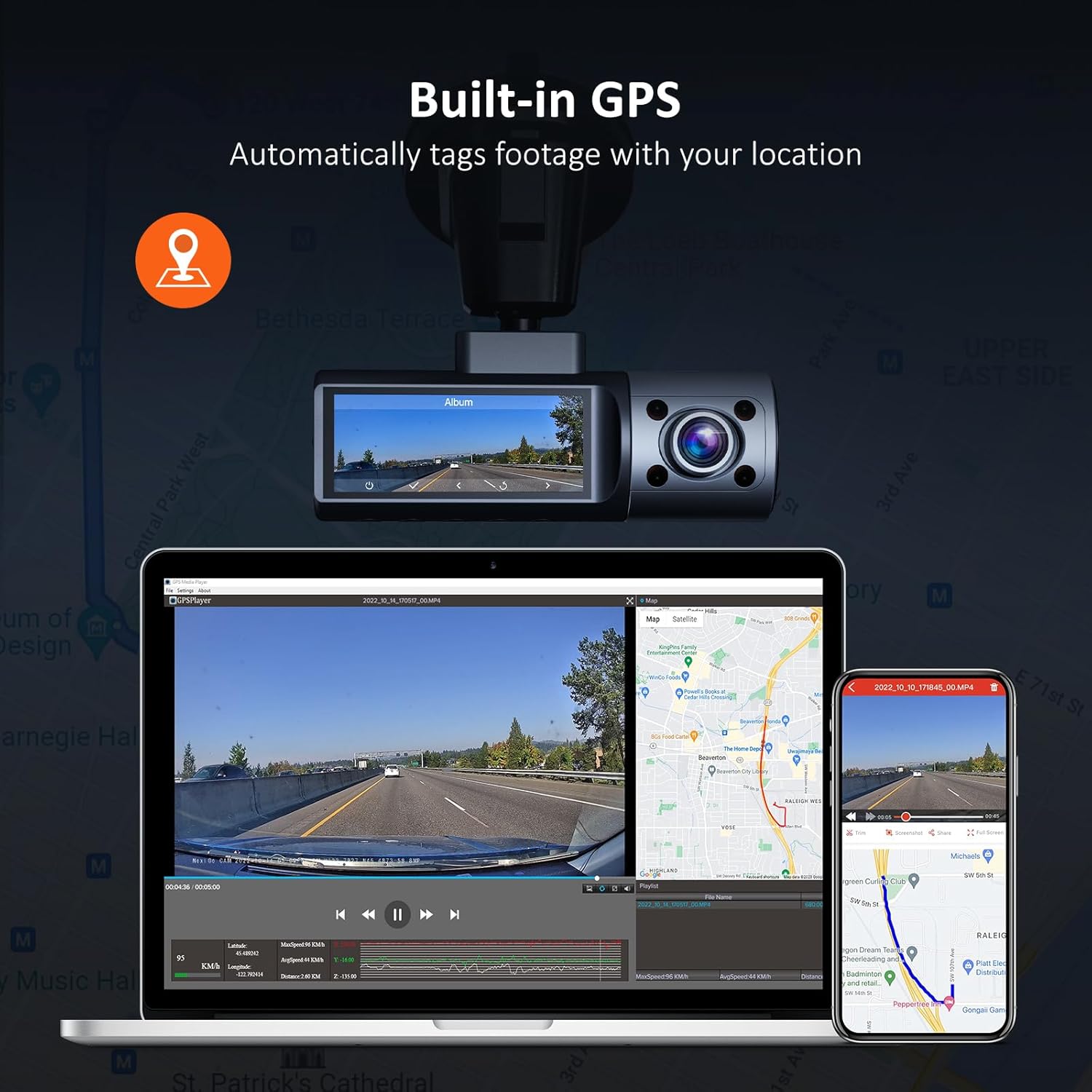
Image: Illustration of the NexiGo D621 Dash Cam's built-in GPS, showing how it tags footage with location data, viewable on a map via the app or desktop software.
9. Özellikler
| Örnek | D621 |
| Video Çözünürlüğü | Front: 4K/2K (1440P), Interior: 1080P, Rear: 1080P |
| Alanı View (Görüş açısı) | Front: 88°, Interior: 132°, Rear: 132° |
| Sensörler | Sony STARVIS IMX335 & IMX307 |
| Bağlantı | Wi-Fi (2.4 GHz & 5.0 GHz), GPS |
| Depolamak | Supports up to 256GB Micro SD Card (128GB included) |
| Çalışma Sıcaklığı | -4°F ila 158°F (-20°C ila 70°C) |
| Güç Kaynağı | Süper Kapasitör |
| Boyutlar | 5 x 4 x 2 inç |
| Ağırlık | 1.79 pound |
10. Garanti ve Destek
NexiGo products come with a standard manufacturer's warranty. For specific warranty details, product registration, or technical support, please visit the official NexiGo websitesine gidin veya müşteri hizmetleriyle iletişime geçin.
- Resmi Webalan: www.nexigo.com
- Destek E-postası: Ürün ambalajına veya resmi talimatlara bakın. webiletişim bilgileri için site.
Ek koruma için satın almayı düşünün.asing an extended protection plan. Options may include 2-Year or 3-Year Protection Plans, or a Complete Protect plan for broader coverage.


