1. Giriş
This manual provides essential information for setting up, operating, maintaining, and troubleshooting your VAIO Pro PF (Model: VJPF11C11N) notebook PC. Please read this manual thoroughly before using your device to ensure proper and safe operation.
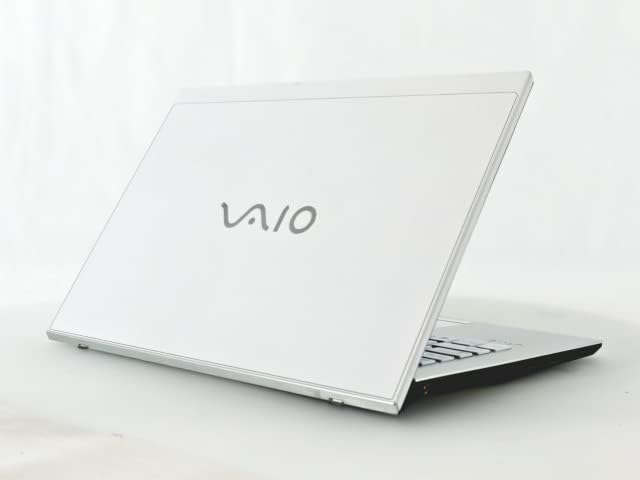
Figure 1: VAIO Pro PF Notebook PC
The VAIO Pro PF is a lightweight and compact mobile notebook designed for productivity. It features an 11.6-inch Full HD display, an Intel 8th Generation Core i5-8250U processor, 8GB of RAM, and a 256GB SSD, running on Windows 11 Pro. The device also includes a backlit keyboard for comfortable typing in various lighting conditions.
2. Kurulum
2.1 Paketin açılması
Tüm bileşenleri ambalajından dikkatlice çıkarın. Aşağıdaki öğelerin mevcut olduğundan emin olun:
- VAIO Pro PF Notebook PC
- AC Adaptörü ve Güç Kablosu
- Belgeler (bu kılavuz, garanti bilgileri)
2.2 Güce Bağlama
Before initial use, connect the AC adapter to the laptop's power input port and then plug the power cord into a wall outlet. Allow the battery to charge fully.
2.3 İlk Açılış ve Windows Kurulumu
Press the power button to turn on the laptop. Follow the on-screen instructions to complete the initial Windows 11 Pro setup, including language selection, network connection, and user account creation.
3. Operating Your VAIO Pro PF
3.1 Klavye ve Dokunmatik Yüzey
The VAIO Pro PF features a full-sized keyboard with a backlight for improved visibility. The touchpad located below the keyboard supports multi-touch gestures for navigation.

Şekil 2: Klavye ve Dokunmatik Yüzey Yerleşimi
3.2 Harici Cihazların Bağlanması
Dizüstü bilgisayarınızda harici aygıtları bağlamak için çeşitli bağlantı noktaları bulunur:
- USB 3.0 Bağlantı Noktaları (x3): Harici sabit diskler, fareler veya klavyeler gibi USB aygıtlarını bağlamak için kullanılır.
- HDMI Bağlantı Noktası: For connecting to external displays or projectors with HDMI input.
- D-SUB15 (VGA) Port: For connecting to older external displays or projectors with VGA input.
- Kablolu LAN Bağlantı Noktası: For connecting to a wired network using an Ethernet cable.
- Kulaklık girişi: Kulaklık veya harici hoparlör bağlamak için.
3.3 Kablosuz Bağlantı
The VAIO Pro PF supports both Wi-Fi and Bluetooth connectivity:
- Wi-Fi (802.11n): To connect to a wireless network, go to Windows Settings > Network & Internet > Wi-Fi, turn Wi-Fi on, and select your desired network.
- Bluetooth: To connect Bluetooth devices, go to Windows Settings > Bluetooth & devices, turn Bluetooth on, and pair your device.
3.4 Web Kamera
Entegre web camera can be used for video calls and conferences. Access it through applications like Camera, Microsoft Teams, or Zoom.
4. Bakım
4.1 Dizüstü Bilgisayarı Temizleme
To clean the exterior of your laptop, use a soft, lint-free cloth slightly dampened with water or a mild, non-abrasive cleaning solution. Avoid spraying liquids directly onto the device. For the screen, use a specialized screen cleaner.
4.2 Yazılım Güncellemeleri
Sisteminizin en son güvenlik yamalarına ve performans iyileştirmelerine sahip olduğundan emin olmak için Windows güncellemelerini düzenli olarak kontrol edin ve yükleyin. Windows Ayarları > Windows Güncellemesi'ne gidin.
4.3 Pil Bakımı
Pil ömrünü uzatmak için aşırı sıcaklıklardan kaçının ve pili sık sık tamamen boşaltın. Uzun süreli saklama için pili yaklaşık %50-70 oranında şarj edin.
5. Sorun Giderme
This section addresses common issues you might encounter with your VAIO Pro PF.
| Sorun | Çözüm |
|---|---|
| Dizüstü bilgisayar açılmıyor. | AC adaptörünün güvenli bir şekilde bağlandığından ve elektrik prizinin çalışır durumda olduğundan emin olun. Güç düğmesini 10-15 saniye basılı tutmayı deneyin. |
| Wi-Fi bağlantı sorunları. | Check if Wi-Fi is enabled in Windows Settings. Restart your router and the laptop. Ensure you are within range of the Wi-Fi network. |
| Klavye arka ışığı çalışmıyor. | Check if the backlight function key (often Fn + F key) is enabled. Adjust brightness settings if available. |
| External display not detected. | Ensure the cable is securely connected to both the laptop and the display. Use Windows display settings to detect or extend displays. Try a different cable or port if available. |
6. Özellikler
| Özellik | Detay |
|---|---|
| Model Adı | VAIO Pro PF (VJPF11C11N) |
| Marka | VAIO (Manufacturer: SONY) |
| Ekran Boyutu | 11.6 inç |
| Çözünürlük | 1920x1080 pixels (Full HD) |
| İşlemci | Intel Core i5-8250U (8th Gen, 4 Cores, 8 Threads, 1.6 GHz base, up to 3.4 GHz) |
| Veri deposu | 8 GB DDR4 SDRAM |
| Depolamak | 256 GB SSD (Katı Hal Sürücüsü) |
| İşletim Sistemi | Windows 11 Pro (64 bit) |
| Grafikler | Tümleşik Intel Graphics |
| Kablosuz Bağlantı | Wi-Fi (802.11n), Bluetooth |
| Limanlar | 3x USB 3.0, 1x HDMI, 1x D-SUB15 (VGA), 1x Wired LAN, 1x Headphone Jack |
| Web Kamera | Entegre |
| Klavye | Arkadan aydınlatmalı klavye |
| Ağırlık | Approx. 0.87 kg (870 g) |
| İlk Mevcut Tarih | 10 Mayıs 2023 |
7. Garanti ve Destek
For information regarding your product's warranty, please refer to the warranty card included with your purchase or visit the official VAIO support website. For technical assistance, driver downloads, or further inquiries, please contact VAIO customer support through their official channels.