Firecore F95T-PRO-WT 3x360 Green Laser Level with 60-inch Tripod User Manual
Model: F95T-PRO-WT | Brand: Firecore
giriiş
This manual provides detailed instructions for the safe and effective operation of your Firecore F95T-PRO-WT 3x360 Green Laser Level. This precision tool is designed for various leveling and alignment tasks in construction, renovation, and DIY projects. Please read this manual thoroughly before use and retain it for future reference.
Güvenlik Bilgileri
UYARI: LAZER RADYASYONU
Do not stare directly into the laser beam. Direct exposure to the laser beam can cause eye injury. Always wear appropriate laser safety glasses when operating the device. Ensure the laser is not aimed at people or reflective surfaces.
- Lazer ışınının doğrudan gözlerinize temas etmesinden kaçının.
- Lazer seviyeleme cihazını sökmeyin. Onarımlar yalnızca yetkili servis personeli tarafından yapılmalıdır.
- Cihazı çocukların erişemeyeceği yerde saklayınız.
- Yalnızca belirtilen pilleri ve şarj aksesuarlarını kullanın.
- Operate the device in a stable environment to prevent accidental movement.
Paket İçeriği
Aşağıda listelenen tüm öğelerin paketinizde bulunduğunu doğrulayın:
- 1x Firecore F95T-XG Laser Level with Integrated Magnetic Bracket
- 1x 60-Inch Tripod
- 2x 4000mAh Rechargeable Li-ion Batteries
- 1x Uzaktan Kumanda
- 1 adet Type-C güç kablosu
- 1x Güç Adaptörü
- 1 adet Lazer Hedef Plakası
- 1x Kullanım Kılavuzu (bu belge)
- 1x Taşıma Çantası
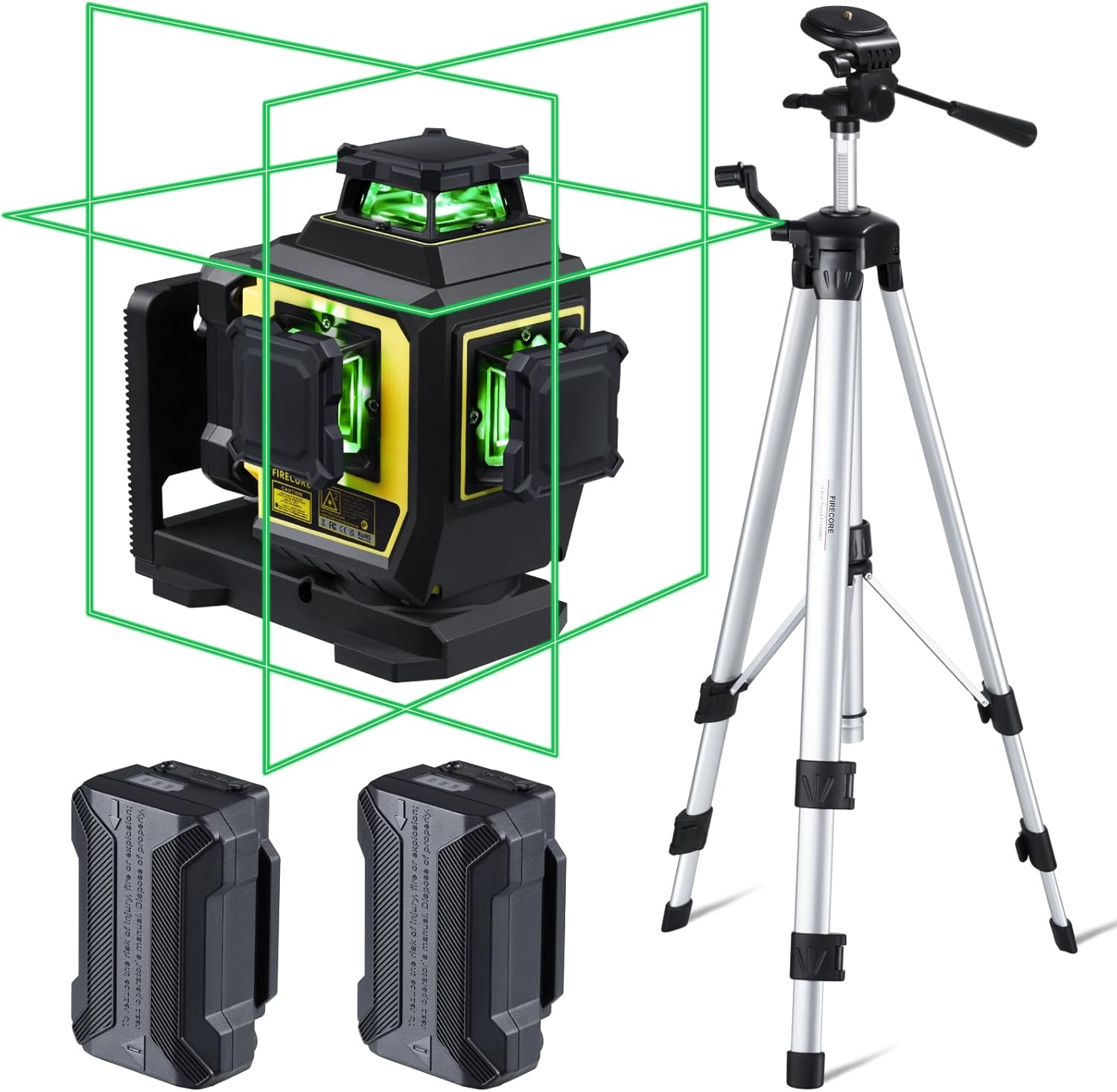
Figure 1: Complete package contents of the Firecore F95T-PRO-WT Laser Level system.
Ürün Özellikleri
- Parlak Yeşil Lazer: Up to 4X brighter than standard red beams, offering a working range of up to 98 ft with ±1/13" accuracy at 33 ft.
- 3 x 360° Line Laser: Projects one 360° horizontal and two 360° vertical planes for comprehensive room layout.
- Otomatik Tesviye Modu: Automatically levels within ±4°. The laser blinks as an alarm when out of range.
- Manuel Mod: Allows the laser tool to be placed at any angle when the pendulum is locked.
- Dış Mekan Darbe Modu: Extends the working range up to 197 ft with a Firecore Line Laser Receiver (sold separately).
- Çift Şarj Edilebilir Piller: Two 4000mAh Li-ion batteries provide up to 16 hours of continuous runtime.
- Uzaktan kumanda: Adjust laser lines, brightness, and modes without direct interaction with the unit.
- Sağlam Tasarım: IP54 dust/water resistance with over-molded construction.
- Çok Yönlü Montaj: Integrated magnetic bracket, 360° rotating base with micro-adjustment, and 1/4-20 & 5/8-11 threads for tripod mounting.
- 60-Inch Tripod: Lightweight aluminum construction, adjustable from 26 to 60 inches, with a quick-release plate and built-in bullseye level.
Kurmak
- Pil Montajı:
Insert one of the provided 4000mAh Li-ion batteries into the battery compartment of the laser level. Ensure it clicks securely into place. The device can also be powered by the second battery or charged via the Type-C port.
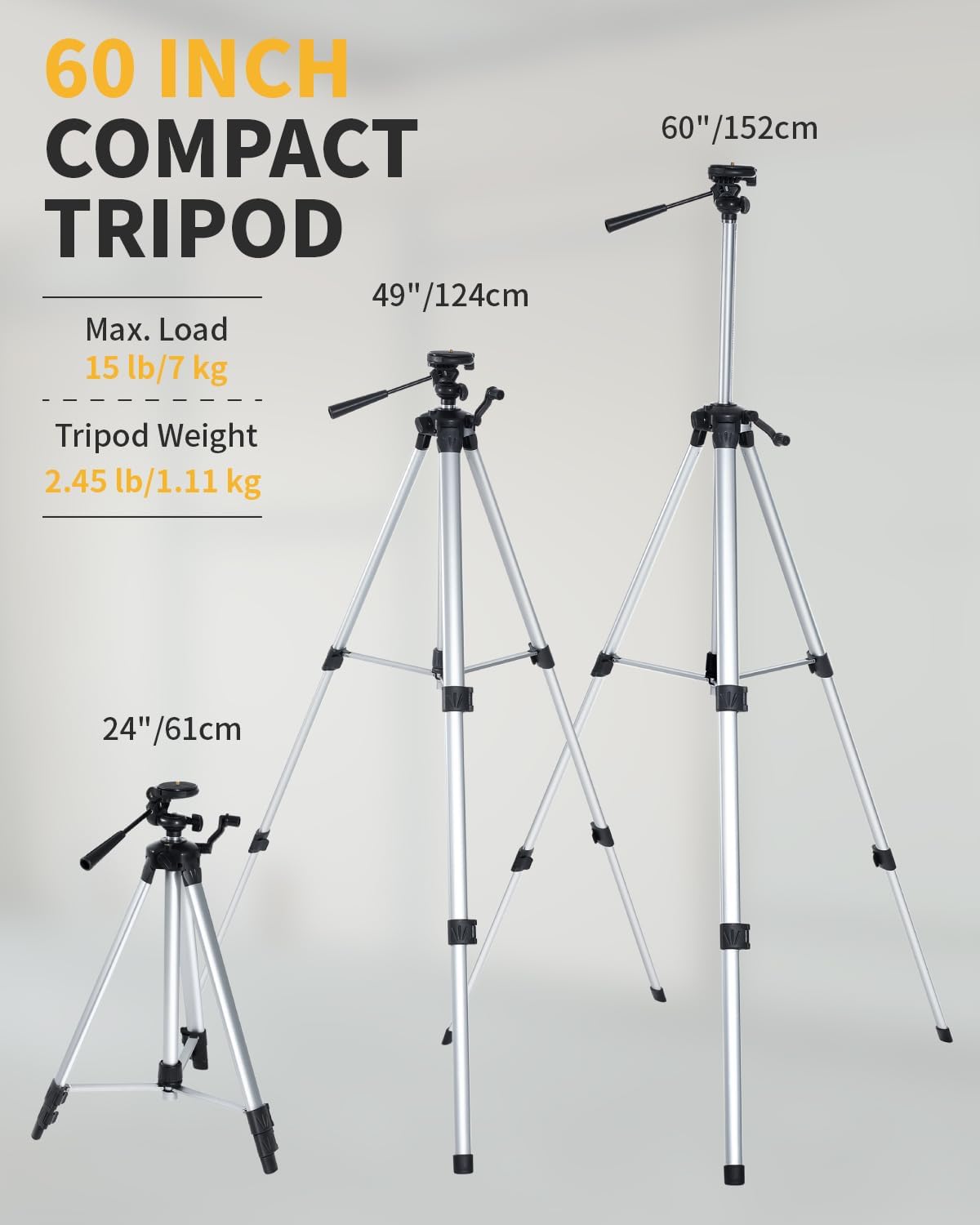
Figure 2: Battery installation and Type-C charging port.
- Mounting the Laser Level:
The laser level offers multiple mounting options:
- On the Tripod: Attach the laser level to the 60-inch tripod using the 1/4-20 or 5/8-11 mounting threads. Extend the tripod legs and adjust the height as needed. Use the built-in bullseye level on the tripod to ensure a stable and level base.
- Manyetik Braket: Utilize the integrated magnetic bracket to attach the laser level to metal surfaces, such as steel studs.
- Döner Taban: The 360° rotating base allows for fine adjustment of horizontal lines.

Figure 3: Laser level mounted on the tripod.
Çalışma Modları
The Firecore F95T-PRO-WT laser level features several operating modes to suit different applications.
1. Kendiliğinden Dengeleme Modu
This mode is ideal for applications requiring precise horizontal and vertical alignment. The device automatically levels itself within a range of ±4°.
- Kilitleme düğmesini açık konuma getirerek sarkaçı kilitten çıkarın.
- Lazer seviyeleme cihazını sağlam bir yüzeye veya üç ayaklı sehpaya yerleştirin.
- The laser will automatically self-level. If the device is outside its ±4° self-leveling range, the laser lines will blink as an alarm. Adjust the device's position until the lines become steady.

Figure 4: Self-Leveling Mode in operation.
2. Manuel Mod (Kilitli Mod)
Manuel mod, lazer çizgilerini istediğiniz açıda yansıtmanıza olanak tanır; bu özellik, korkuluk veya dekoratif desen montajı gibi işler için kullanışlıdır.
- Lock the pendulum by sliding the lock switch to the locked position.
- Press and hold the Manual button for 3 seconds to activate manual mode.
- The laser lines will be projected at the angle the device is positioned, without self-leveling.

Figure 5: Manual Mode for angled projections.
3. Pulse Mode (Outdoor Mode)
Pulse mode extends the working range of the laser level, especially useful for outdoor applications or in bright conditions when paired with a compatible Firecore Line Laser Receiver.
- Activate the pulse mode by pressing the Receiver Button on the laser level or the remote control.
- The laser lines will emit a pulsed signal, allowing detection by a Firecore Line Laser Receiver up to 197 ft away.

Figure 6: Pulse Mode for extended range with a receiver.
4. Switching Line Modes and Brightness
The laser level can project various combinations of horizontal and vertical lines, and the brightness can be adjusted.
- Use the H/V buttons on the device or the remote control to cycle through different line combinations (e.g., one horizontal, two vertical, all three 360° planes).
- The remote control also allows adjustment of laser brightness.

Figure 7: Using the remote control to switch line modes.
Pil Bilgileri
The Firecore F95T-PRO-WT laser level is powered by two 4000mAh Li-ion batteries, providing extended operation.
- Şarj: Connect the Type-C power cord to the laser level and the power adapter. Plug the adapter into a standard electrical outlet. The battery indicator will show charging status.
- Çalışma zamanı: A fully charged battery provides up to 16 hours of continuous runtime.
- Pil Değişimi: The two included batteries allow for easy hot-swapping to minimize downtime.

Figure 8: Charging the laser level and spare batteries.
Tripod Usage
The included 60-inch tripod provides a stable and adjustable platform for the laser level.
- Yükseklik Ayarı: The tripod can be adjusted from 26 inches (61 cm) to 60 inches (152 cm) to suit various working heights.
- Hızlı Çıkarma Plakası: Use the quick-release plate for fast attachment and detachment of the laser level.
- Seviyelendirme: Ensure the tripod is on a level plane using its built-in bullseye level before mounting the laser level.
- Kararlılık: Always ensure the tripod legs are fully extended and locked for maximum stability.
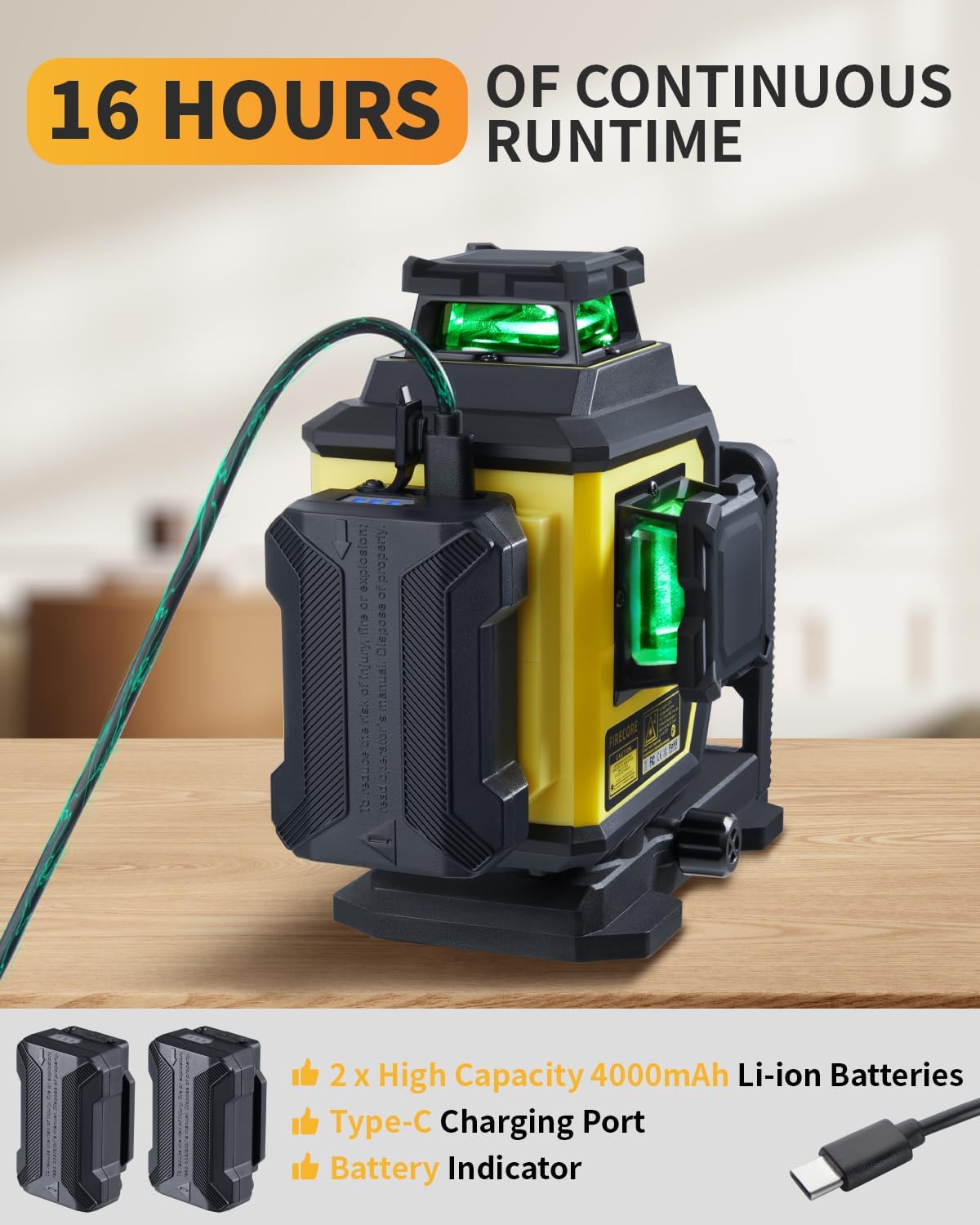
Figure 9: Tripod height adjustments and features.
Bakım
- Temizlik: Cihazı yumuşak bir bezle silin.amp bez. Sert kimyasallar veya aşındırıcı temizleyiciler kullanmayın.
- Depolamak: Store the laser level and accessories in the provided carry pouch in a dry, cool place when not in use.
- Pil Bakım: Pillerin ömrünü uzatmak için, kullanılmadıkları zaman bile düzenli olarak şarj edin.
- Denetleme: Cihazı herhangi bir hasar veya aşınma belirtisi açısından periyodik olarak inceleyin.
Figure 10: Store the laser level and accessories in the provided carry pouch.
Sorun giderme
| Sorun | Olası Neden | Çözüm |
|---|---|---|
| Laser lines are blinking. | Cihaz otomatik dengeleme aralığının (±4°) dışında. | Adjust the device's position until it is within the self-leveling range. Ensure the pendulum is unlocked. |
| Lazer çizgileri görünmez veya siliktir. | Low battery; Bright ambient light; Brightness setting is low. | Charge the battery; Use pulse mode with a receiver in bright conditions; Adjust brightness using the remote control. |
| Cihaz açılmıyor. | Pil doğru takılmamış veya bitmiş. | Ensure the battery is properly inserted and charged. Try using the second battery. |
| Uzaktan kumanda çalışmıyor. | Remote battery depleted; Obstruction between remote and device. | Uzaktan kumandanın pilini değiştirin; görüş hattının açık olduğundan emin olun. |
Özellikler
| Özellik | Detay |
|---|---|
| Marka | Ateş çekirdeği |
| Model Numarası | F95T-PRO-WT (F95T-XG Laser Level) |
| Lazer Renk | Yeşil Işın |
| Kesinlik | 33 ft mesafede ±1/13" (10 m mesafede ±2 mm) |
| Kendinden Tesviye Aralığı | ±4° |
| Çalışma Aralığı | Up to 98 ft (197 ft with receiver in Pulse Mode) |
| Lazer Uçakları | Bir adet 360° yatay, iki adet 360° dikey |
| Çalışma Modları | Self-Leveling Mode / Manual Mode / Pulse Mode |
| Güç Kaynağı | Battery Powered (2x 4000mAh Li-ion batteries included) |
| Pil Çalışma Süresi | Up to 16 hours (continuous with all beams on) |
| Şarj Portu | Tip-C |
| IP Derecelendirmesi | IP54 (Dust/Water Resistant) |
| Montaj Dişleri | 1/4-20 & 5/8-11 |
| Tripod Yüksekliği | 26 inç (61 cm) ila 60 inç (152 cm) |
| Malzeme | Thermoplastic Elastomers, Acrylonitrile Butadiene Styrene, Aluminum |
| Ürün Ağırlığı | 7.05 pound (yaklaşık 3.2 kg) |
Garanti ve Destek
Firecore provides a 24 aylık satış sonrası servis Ve ömür boyu teknik destek for the F95T-PRO-WT laser level.
For any concerns, questions, or technical assistance, please contact Firecore customer support through the official channels or refer to the contact information provided with your purchase documentation.
Daha fazla bilgi için şu adresi ziyaret edin: Firecore Store on Amazon.


