giriiş
This manual provides detailed instructions for the setup, operation, and maintenance of your ATTACK SHARK Wireless Bluetooth/USB Wired Gaming Mechanical Keyboard. This compact 100-key keyboard features RGB backlighting, hot-swappable switches, and multiple connectivity options for versatile use across various devices.

Image: The ATTACK SHARK Wireless Mechanical Keyboard, showcasing its 100-key layout, RGB backlighting, orange coiled USB-C cable, and a cloud-shaped wrist rest.
Paket İçeriği
Paketinizde tüm öğelerin mevcut olduğundan emin olun:
- ATTACK SHARK Wireless Mechanical Keyboard
- Cloud Keyboard Wrist Rest
- USB-C to USB-A Data Cable (Coiled)
- Tuş Başlığı ve Anahtar Çektirme
- 2.4GHz USB Alıcı
- Additional Switches (Red Switch type)
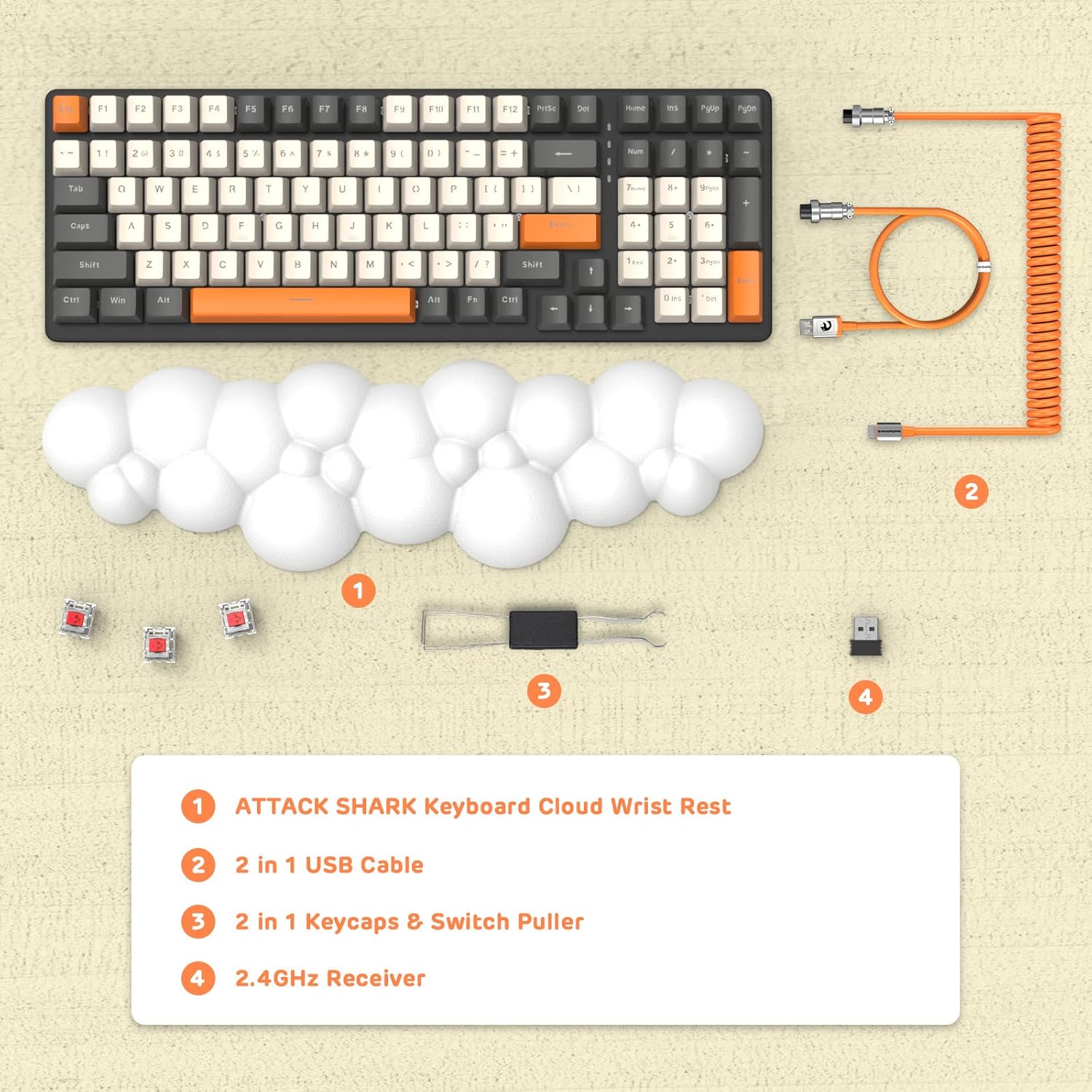
Resim: Bir üstten görünüm view displaying the keyboard, cloud wrist rest, coiled USB cable, keycap and switch puller, and 2.4GHz USB receiver, along with spare switches.
Kurmak
The keyboard supports three connection modes: Bluetooth 5.0, 2.4GHz Wireless, and USB-C Wired.
1. Kablolu Bağlantı (USB-C)
- Connect the USB-C end of the provided coiled cable to the keyboard's USB-C port.
- Kablonun USB-A ucunu bilgisayarınızdaki uygun bir USB portuna takın.
- The keyboard will automatically switch to wired mode (indicated by FN+5).

Image: A visual representation of the keyboard connecting to various devices (laptop, tablet, desktop, smartphone) via wired USB, 2.4GHz wireless, and Bluetooth.
2. 2.4 GHz Kablosuz Bağlantı
- 2.4GHz USB alıcısını bulun.
- USB alıcısını bilgisayarınızdaki uygun bir USB bağlantı noktasına takın.
- Basmak FN + 4 on the keyboard to activate 2.4GHz wireless mode. The indicator light will show the connection status.
3. Bluetooth Bağlantısı
Klavyeye en fazla üç Bluetooth cihazı kaydedilebiliyor.
- Basılı tutun FN + 1, FN + 2, veya FN + 3 for 3-5 seconds to enter Bluetooth pairing mode for the desired channel. The indicator light will flash rapidly.
- On your device (e.g., laptop, tablet, smartphone), navigate to Bluetooth settings and search for available devices.
- Select "ATTACK SHARK Keyboard" (or similar name) from the list to pair.
- Eşleştirildikten sonra gösterge ışığının yanıp sönmesi duracak ve sabit kalacaktır.
- Eşleştirilmiş Bluetooth cihazları arasında geçiş yapmak için sadece tuşuna basın FN + 1, FN + 2, veya FN + 3.
Kullanım Talimatları
RGB Arka Aydınlatma Kontrolü
The keyboard features customizable RGB backlighting with multiple modes.
- Arka Işık Modunu Değiştirin: Basmak FN + İNS Farklı RGB aydınlatma efektleri arasında geçiş yapmak için.
- Parlaklığı Ayarla: Basmak FN + ↑ (Yukarı Ok) parlaklığı artırmak için, FN + ↓ (Aşağı Ok) parlaklığı azaltır.
- Hızı Ayarla: Basmak FN + ← (Left Arrow) to decrease effect speed, + → (Sağ Ok) Etki hızını artırmak için.

Image: The keyboard displaying various RGB lighting patterns, with key combinations for switching modes and adjusting brightness/speed.
Sıcak Değiştirilebilir Anahtarlar
The keyboard's PCB supports 3-pin mechanical switches, allowing for easy replacement without soldering. This feature enables customization of typing feel and extends the keyboard's lifespan.
- İstenilen tuş başlığını dikkatlice çıkarmak için verilen tuş başlığı çıkarıcısını kullanın.
- Use the switch puller to gently grasp and remove the switch from the PCB.
- Align the pins of the new 3-pin switch with the holes on the PCB and press firmly until it clicks into place.
- Tuş başlığını değiştirin.

Resim: Ayrıntılı view of the keyboard's PCB with a switch removed, demonstrating the hot-swappable feature. Spare red switches are also shown.
Pil ve Şarj
The keyboard is equipped with a 4000mAh lithium battery.
- Pil Ömrü: Up to 200 hours of use with the backlight turned off.
- Şarj: Connect the keyboard via the USB-C cable to a power source. The charging indicator light will show the charging status.
- Düşük Hacimtage Gösterge: The keyboard features a low voltage indicator to alert you when charging is required.

Image: The keyboard shown from the side, emphasizing its 4000mAh lithium battery capacity.
Bakım
To ensure the longevity and optimal performance of your keyboard:
- Temizlik: Use a soft, dry cloth to wipe the keyboard surface. For deeper cleaning, remove keycaps using the provided puller and use compressed air to clear debris from between switches.
- Bilek Desteği: The PU material of the wrist rest is durable and washable. Clean with a damp bez ve gerekirse yumuşak sabun.
- Depolamak: Klavyeyi serin, kuru ve doğrudan güneş ışığından ve aşırı sıcaklıklardan uzak bir yerde saklayın.
- Sıvılardan Kaçının: Do not expose the keyboard to liquids. In case of spills, immediately disconnect power and allow it to dry completely before use.
Sorun giderme
| Sorun | Olası Neden | Çözüm |
|---|---|---|
| Klavye kablosuz modunda yanıt vermiyor. | Low battery, incorrect mode selected, receiver not connected, or Bluetooth not paired. | Charge the keyboard. Ensure correct mode (FN+4 for 2.4G, FN+1/2/3 for Bluetooth) is selected. Verify 2.4G receiver is securely plugged in. Re-pair Bluetooth if necessary. |
| Keys are "sticking" or registering multiple inputs. | Debris under keycap/switch, faulty switch. | Remove keycap and switch, clean thoroughly with compressed air. If issue persists, replace the switch using the hot-swappable feature. |
| RGB arka aydınlatma çalışmıyor veya loş. | Backlight turned off, brightness set too low, or low battery. | Press FN+INS to cycle modes. Adjust brightness with FN+↑ / FN+↓. Charge the keyboard. |
| Keyboard not recognized by device. | Driver issue, incorrect connection mode, or device compatibility. | Ensure correct connection mode is active. Try a different USB port or device. For wired mode, ensure the cable is fully inserted. Check device's operating system for necessary drivers (usually plug-and-play). |
Özellikler
- Modeli: 3b5c1fdb-29da-409c-b4b7-12e9e72fb741
- Bağlantı: Bluetooth 5.0, 2.4GHz Wireless (RF), USB-C Wired
- Düzen: Compact 100 Keys (98% layout)
- Anahtarlar: Hot-Swappable 3-pin Mechanical (Red Switch variant)
- Arka aydınlatma: RGB Backlit (9 modes)
- Pil: 4000mAh Lityum Pil
- Uyumlu Cihazlar: Laptop, PC, Tablet (Mac/Win Supported)
- Malzeme: Polyurethane (PU) for wrist rest
- Boyutlar: 16.97 x 6.42 x 2.52 inç (Paket)
- Ürün Ağırlığı: 2.94 pound
- Özel Özellikler: Ergonomic design, Custom Coiled Aviator Keyboard Cable, Keycap and Switch Puller included.
Garanti ve Destek
For warranty information and technical support, please refer to the documentation provided with your purchase or visit the official ATTACK SHARK webSite. Satın alma belgenizi herhangi bir garanti talebi için saklayın.
Üretici: SALDIRI KÖPEKBALIĞI
İlk Mevcut Tarih: 8 Mayıs 2023


