1. Giriş
This manual provides comprehensive instructions for the Vrabocry LM091 RGBCCT 4 Zone Touch RF Remote Control. This remote is designed to control RGBCCT LED strips and bulbs, offering intuitive control over color, brightness, and color temperature. Please read this manual thoroughly before use to ensure proper operation and to maximize the product's lifespan.
2. Ürün Bittiview
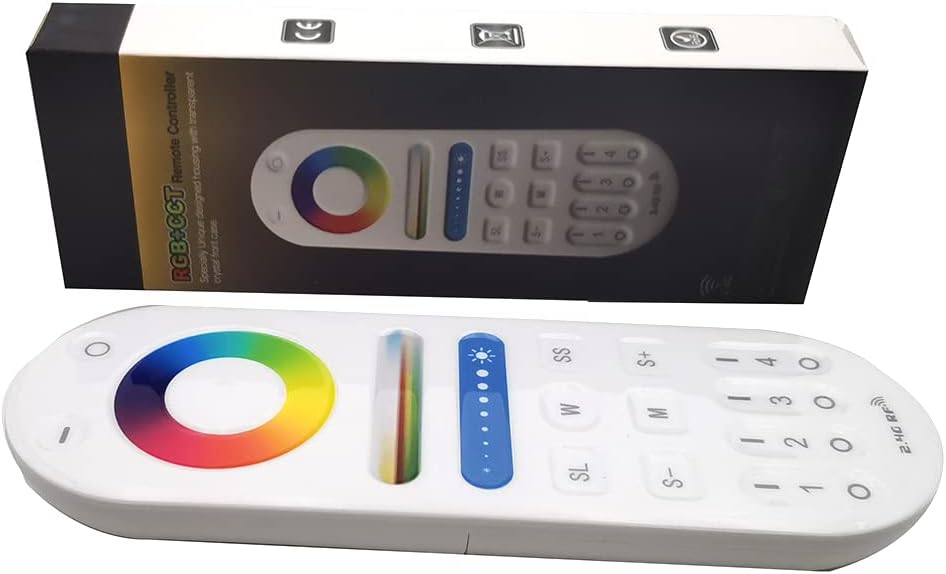
Image 1: The Vrabocry LM091 RGBCCT remote control shown alongside its product packaging.
2.1 Temel Özellikler
- RGBCCT Control: Capable of controlling RGBCCT 6-pin (V+, R, G, B, WW, CW) LED strips and bulbs.
- 4 Bölgeli Kontrol: Manage up to four distinct lighting zones independently or simultaneously.
- Touch Color Ring: Intuitive color selection via a sensitive touch color ring.
- Brightness and Color Temperature Adjustment: Fine-tune lighting intensity and white light temperature (warm white to cool white).
- 2.4GHz RF Transmission: Reliable wireless control with a range of up to 98 feet (30 meters).
- Uyumluluk: Works with various Mi-Boxer/Mi-Light RGBCCT series controllers such as WL5, LS2, FUT045, FUT039, and others.
- Ergonomik Tasarım: Tutması ve kullanması rahat.
2.2 Uzaktan Kumanda Düzeni

Resim 2: Ön view of the LM091 remote control, showing the touch color ring, brightness slider, and various control buttons.
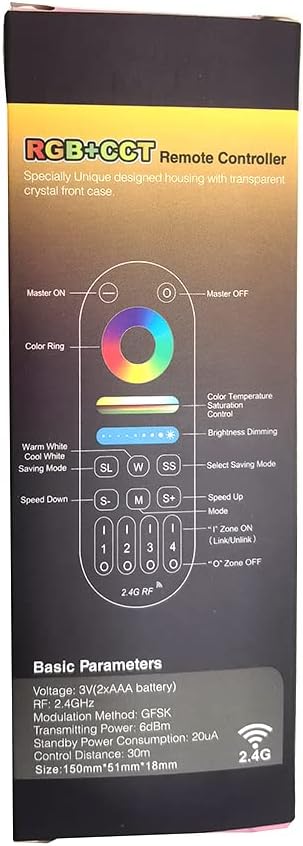
Image 3: A detailed diagram illustrating the functions of each button on the LM091 remote control, as depicted on its packaging.
3. Kurulum
3.1 Pil Kurulumu
- Uzaktan kumandanın arkasındaki pil bölmesi kapağını bulun.
- Kapağı kaydırarak açın.
- İki adet AAA pili, doğru kutuplara (+ ve -) dikkat ederek takın.
- Pil bölmesi kapağını yerine takın.

Image 4: The back of the LM091 remote control with the battery compartment open, showing where to insert AAA batteries.
3.2 Uzaktan Kumandayı Eşleştirme
To control your LED lights, the remote control must be paired with a compatible RGBCCT controller (e.g., Mi-Boxer/Mi-Light series). The pairing process typically involves the following steps:
- Ensure your LED controller is powered off.
- Power on the LED controller. Within 3 seconds of powering on, press the desired zone number button (1, 2, 3, or 4) on the LM091 remote control three times.
- The connected LED lights should flash three times to indicate successful pairing.
- If pairing fails, power off the controller and repeat the process.
eşleştirmeyi kaldır: To unpair, power on the LED controller. Within 3 seconds, press the desired zone number button five times. The lights should flash six times to confirm unpairing.
4. Kullanım Talimatları
The LM091 remote control allows for precise adjustment of your RGBCCT LED lighting. Refer to Image 3 for button identification.
- Ana AÇIK/KAPALI: Press the 'Master ON' button (top right) to turn all paired lights on. Press the 'Master OFF' button (top left) to turn all paired lights off.
- Bölge Seçimi: Press buttons '1', '2', '3', or '4' to select a specific lighting zone. Once a zone is selected, all subsequent commands will apply only to that zone. To control all zones simultaneously, press the 'Master ON' button.
- Renk Halkası: Touch the color ring to select any static color.
- Renk Sıcaklığı Kontrolü: Use the 'W' (Warm White) and 'SS' (Cool White) buttons to adjust the color temperature of the white light. This function requires a CCT (Dual White) 3-wire LED strip (V+, WW, CW) or an RGBCCT strip.
- Parlaklık Azaltma: Use the brightness slider to increase or decrease the light intensity. The 'S+' and 'S-' buttons can also be used for fine-tuning brightness.
- Mode Selection (M): Press the 'M' button to cycle through various dynamic lighting modes.
- Speed Adjustment (S+/S-): When a dynamic mode is active, use the 'S+' and 'S-' buttons to increase or decrease the speed of the mode.
- Saving Mode (SL): The 'SL' button may be used to save or recall custom lighting settings, depending on the connected controller's capabilities.
5. Bakım
- Temizlik: Uzaktan kumandayı yumuşak, kuru bir bezle silin. Aşındırıcı temizleyiciler veya çözücüler kullanmayın.
- Pil Değişimi: Replace batteries when the remote's response becomes sluggish or inconsistent. Always use new AAA batteries and dispose of old batteries responsibly.
- Depolamak: Kumandayı kuru bir yerde, doğrudan güneş ışığından ve aşırı sıcaklıklardan uzakta saklayın.
6. Sorun Giderme
| Sorun | Olası Neden | Çözüm |
|---|---|---|
| Uzaktan yanıt vermiyor | Low or dead batteries. Remote is out of range. Not paired correctly. | Replace batteries. Move closer to the LED controller. Re-pair the remote control with the LED controller (refer to Section 3.2). |
| Lights not changing color/brightness | Incorrect zone selected. Controller not compatible with RGBCCT. | Ensure the correct zone is selected or press 'Master ON'. Verify that your LED controller and strip are RGBCCT compatible. |
| Color temperature adjustment not working | LED strip is not CCT or RGBCCT. | This function requires a CCT (Dual White) 3-wire LED strip (V+, WW, CW) or an RGBCCT strip. Ensure your strip supports this feature. |
7. Özellikler
- Modeli: LM091
- Cilttage: 3V (2 x AAA Batteries)
- İletim Frekansı: 2.4 GHz
- Modülasyon Yöntemi: GFSK
- İletim Gücü: 6dBm
- Bekleme Güç Tüketimi: 20uA
- Kontrol Mesafesi: 98 feet'e (30 metre) kadar
- Çalışma Sıcaklığı: -20°C ila 60°C (-4°F ila 140°F)
- Desteklenen Maksimum Cihaz Sayısı: 1 (per remote, but one controller can be controlled by four remotes)
- Düğme Sayısı: 4 (zone buttons) + other control buttons
- Denetleyici Tipi: Remote control, Touch
8. Garanti ve Destek
For warranty information and technical support, please refer to the documentation provided with your purchase or contact Vrabocry customer service through the retailer where the product was purchased. Keep your proof of purchase for any warranty claims.