giriiş
This manual provides detailed instructions for the installation, operation, and maintenance of your Strong SRT 7040 Digital Satellite HD Receiver. Please read this manual carefully before using the device to ensure proper functionality and to prevent damage.

Image: The Strong SRT 7040 DTT Tuner and its retail packaging.
The Strong SRT 7040 is a Full HD digital satellite receiver designed for Free-To-Air (FTA) channels. It features a USB port for multimedia playback and software updates, and supports Dolby Audio for enhanced sound quality.
1. Kurulum
1.1 Paketin açılması
Tüm bileşenleri ambalajından dikkatlice çıkarın. Aşağıdaki öğelerin mevcut olduğundan emin olun:
- Strong SRT 7040 DTT Tuner
- Uzaktan Kumanda (2 AAA pil ile)
- Güç Adaptörü
- Kullanıcı Kılavuzu
1.2 Cihazın Bağlanması
Follow these steps to connect your SRT 7040 receiver:
- Uydu Girişi: Connect your satellite dish cable to the SATIN AL Alıcının arkasındaki bağlantı noktası.
- Video Çıkışı (HDMI): HDMI kablosunu şuradan bağlayın: HDMI port on the receiver to an HDMI input on your television.
- Video Output (SCART): Alternatif olarak, eski televizyonlar için SCART kablosunu bağlayın. TV SKART Alıcının üzerindeki bağlantı noktasını televizyonunuzdaki SCART girişine bağlayın.
- Audio Output (Digital): For digital audio, connect a coaxial cable from the COAXIAL S/PDIF port to your digital audio ampcankurtaran.
- Audio Output (Analog): For analog audio, connect RCA cables from the AUDIO R/L ports to your audio Hi-Fi ampcankurtaran.
- USB aleti: If desired, connect a USB storage device to the USB port for multimedia playback or software updates.
- Güç: Güç adaptörünü prize takın. 12V === 1.5A Önce alıcıya giriş yapın, ardından adaptörü duvardaki prize takın.

Image: Rear panel connections of the Strong SRT 7040 DTT Tuner, showing SAT IN, HDMI, TV SCART, COAXIAL S/PDIF, AUDIO R/L, USB, and Power input.
1.3 First-Time Installation and Channel Scan
Upon first power-on, the receiver will guide you through an initial setup wizard. Follow the on-screen prompts to select your language, country, and perform an automatic channel scan. This process will detect and store all available satellite channels.
2. Kullanım Talimatları
2.1 Uzaktan Kumandaview
The included remote control allows you to access all functions of the SRT 7040. Insert the two AAA batteries into the remote control, ensuring correct polarity.

Image: The remote control for the Strong SRT 7040 DTT Tuner, showing buttons for power, numbers, volume, channel, menu, and special functions.
2.2 Temel Fonksiyonlar
- Güç: Basın GÜÇ button to turn the receiver on or off (standby mode).
- Kanal Seçimi: Kullanın ÇİN+ / Ç- buttons to change channels sequentially, or use the numeric keypad to enter a channel number directly.
- Ses Kontrolü: Kullanın HACİM+ / cilt Ses seviyesini ayarlamak için düğmeler.
- Sesini kapatmak: Basın SESSİZ Sesi geçici olarak susturmak için kullanılan düğme.
2.3 Menü Navigasyonu
Basın MENÜ Ana menüye erişmek için düğmeye basın. Ok tuşlarını kullanın (UP, AŞAĞI, SOL, SAĞ) to navigate through options and OK Seçimleri onaylamak için. Basın EXIT Önceki ekrana veya canlı yayına geri dönmek için.
2.4 Özel Özellikler
- Zamanlayıcılar: The receiver supports programming timers for recording or switching to specific channels at scheduled times. Access this feature via the menu.
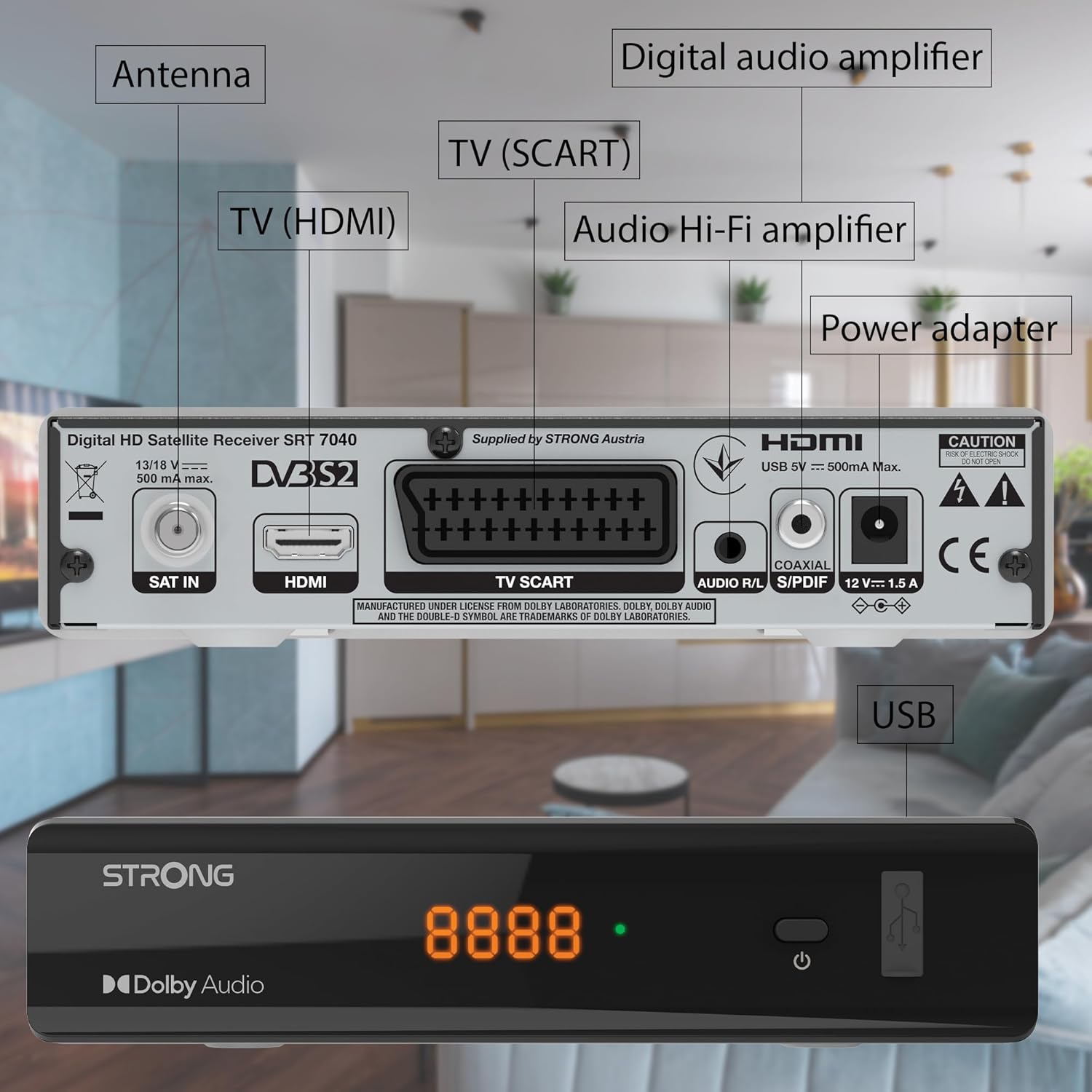
Image: The Strong SRT 7040 DTT Tuner displaying a timer icon, indicating its scheduling capabilities.
- Favori Listeler: Create customized lists of your preferred channels for quick access.
- Altyazılar: Enable or disable subtitles for compatible broadcasts using the ALT Uzaktan kumandadaki düğmeye basın.
- Elektronik Program Rehberi (EPG): Basın EPG düğmeye bas view program information for upcoming broadcasts.
- Dolby Ses: The receiver supports Dolby Audio for a high-quality sound experience.

Image: The Strong SRT 7040 DTT Tuner with the Dolby Audio logo, illustrating its sound processing capability.
3. Bakım
3.1 Temizlik
To clean the receiver, disconnect it from the power supply. Use a soft, dry cloth to wipe the exterior. Do not use liquid cleaners, aerosols, or abrasive materials, as these can damage the finish or internal components.
3.2 Yazılım Güncellemeleri
Üreticinin periyodik olarak kontrol edin website for available software updates. Updates can improve performance, add new features, or resolve issues. Software updates are typically performed via the USB port following specific instructions provided with the update file.
3.3 Güvenlik Bilgileri
- Alıcıyı açmayın.asing. İçerisinde kullanıcı tarafından bakımı yapılabilecek parça bulunmamaktadır. Tüm bakımlar için yetkili personele başvurun.
- Alıcıyı doğrudan güneş ışığından, ısı kaynaklarından ve nemden uzak tutun.
- Cihazın aşırı ısınmasını önlemek için çevresinde yeterli havalandırma olduğundan emin olun.
- Yalnızca sağlanan güç adaptörünü kullanın.
4. Sorun Giderme
If you encounter problems with your SRT 7040, consult the following table before contacting support.
| Sorun | Olası Neden | Çözüm |
|---|---|---|
| Güç yok | Güç adaptörü bağlı değil; Elektrik prizi arızalı. | Check power adapter connection; Try a different power outlet |
| Sinyal yok / Siyah ekran | Satellite cable loose or disconnected; Incorrect input selected on TV; Satellite dish alignment issue | Check SAT IN cable connection; Ensure TV is on correct HDMI/SCART input; Perform a channel scan; Consult a professional for dish alignment if necessary |
| Uzaktan kumanda çalışmıyor | Batteries depleted or incorrectly inserted; Obstruction between remote and receiver | Replace batteries; Ensure correct polarity; Remove any obstructions; Point remote directly at receiver |
| Kötü görüntü kalitesi | Weak satellite signal; Incorrect display settings | Check satellite signal strength in menu; Adjust TV display settings; Ensure Full HD content is being broadcast |
5. Özellikler
The following are the technical specifications for the Strong SRT 7040 Digital Satellite HD Receiver:
- Modeli: SRT 7040 (SAT FTA Full HD)
- Marka: Güçlü
- Boyutlar: 3.39 x 6.46 x 1.38 inç (8.6 x 16.4 x 3.5 cm)
- Ürün Ağırlığı: 9.2 ons (260 Gram)
- Renk: Siyah
- Bağlantı Teknolojisi: USB
- Cilttage: 100 - 240V
- Sıklık: 50 - 60 Hz
- Güç Tüketimi: 18 kWh (operational, typical)
- Çalışma Sıcaklık Aralığı: 0ºC ila 40ºC
- Bağıl Nem: %10 - %95
- Piller: 2 adet AAA pil (uzaktan kumanda için dahildir)
- Şartname Karşılandı: DVB-S2
- Dahil: Wally Receiver
6. Garanti ve Destek
For warranty information and technical support, please refer to the warranty card included in your product packaging or visit the official Strong webSite. Satın alma fişinizi, garanti talepleriniz için satın alma belgeniz olarak saklayın.
For further assistance, you may contact Strong customer service through the contact details provided on their official webalan.


