1. Giriş
This manual provides comprehensive instructions for the Maxcom Fit FW55 Aurum Pro Smartwatch. It covers essential information regarding product setup, operation, maintenance, and troubleshooting to ensure optimal performance and user experience. Please read this manual carefully before using your device.
2. Paket İçeriği
Lütfen aşağıda listelenen tüm öğelerin ürün paketinizde mevcut olduğundan emin olun:
- Maxcom Fit FW55 Aurum Pro Smartwatch
- Şarj kablosu
- Kullanım Kılavuzu (bu belge)
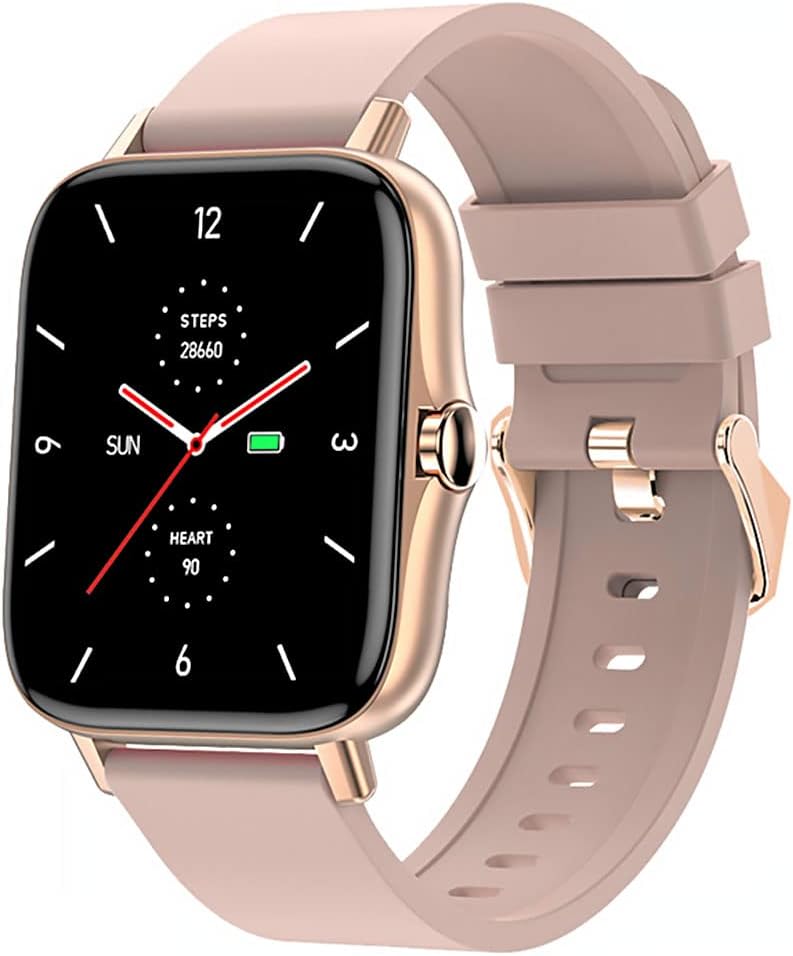
Image 1: Maxcom Fit FW55 Aurum Pro Smartwatch with a pink silicone band. The watch face displays steps, heart rate, and time.
3. Kurulum
3.1. Akıllı Saati Şarj Etme
Before initial use, fully charge your Maxcom Fit FW55 Aurum Pro Smartwatch. Connect the provided charging cable to the charging port on the back of the smartwatch and plug the other end into a standard USB power adapter (not included) or a computer's USB port. The watch display will indicate charging status.
- Ensure the charging pins are clean and properly aligned with the watch's charging contacts.
- Tam şarj genellikle yaklaşık 2 saat sürer.
3.2. Akıllı Telefonunuzla Eşleştirme
To unlock the full functionality of your smartwatch, you need to pair it with your smartphone via Bluetooth.
- Uygulamayı indirin: Arama the official Maxcom Fit application in your smartphone's app store (iOS App Store or Google Play Store) and install it.
- Bluetooth'u etkinleştir: Akıllı telefonunuzda Bluetooth'un etkinleştirildiğinden emin olun.
- Uygulamayı açın: Launch the Maxcom Fit application on your smartphone.
- Cihaz Ekle: Follow the in-app instructions to add a new device. Select "FW55 Aurum Pro" from the list of available devices.
- Eşleştirmeyi Onayla: A pairing request may appear on both your smartphone and the smartwatch. Confirm the pairing on both devices.
Once successfully paired, the smartwatch will synchronize data with your phone, and you can customize settings through the app.
4. Akıllı Saatin Çalıştırılması
4.1. Güç Açma/Kapatma
- Güç Açık: Press and hold the side button for a few seconds until the Maxcom logo appears.
- Kapat: From the watch face, swipe down to access quick settings, or navigate to the 'Settings' menu. Select 'Power Off' and confirm. Alternatively, press and hold the side button and select 'Power Off'.
4.2. Temel Gezinme
- Dokunmatik Ekran: The FW55 Aurum Pro features a 1.7-inch touch screen for intuitive interaction.
- Yukarı/Aşağı Kaydırma: Scroll through notifications, menus, or quick settings.
- Sola/Sağa Kaydır: Access different widgets or main functions (e.g., heart rate, activity data).
- Musluk: Bir öğeyi seçin veya bir eylemi onaylayın.
- Yan Düğme: Press to return to the watch face or wake the screen. A long press may access power options.
4.3. Temel Özellikler
The Maxcom Fit FW55 Aurum Pro Smartwatch offers a range of features to support your daily activities and health monitoring:
- Etkinlik Takibi: Monitors steps taken, distance covered, and calories burned.
- Nabız İzleme: Gerçek zamanlı kalp atış hızı verisi sağlar.
- Uyku İzleme: Uyku düzenini ve kalitesini takip eder.
- Bildirimler: Eşleştirilmiş akıllı telefonunuzdan gelen aramalar, mesajlar ve uygulama bildirimleri için uyarılar alır.
- KÜRESEL KONUMLAMA SİSTEMİ: Integrated GPS for accurate outdoor activity tracking.
- Özelleştirilebilir Saat Yüzleri: Personalize your watch face through the companion app.

Image 2: Maxcom Fit FW55 Aurum Pro Smartwatch featuring a gold metal mesh band. The watch face displays digital time, steps, and heart rate.
5. Bakım
Proper care and maintenance will extend the lifespan of your smartwatch.
- Temizlik: Regularly wipe the watch screen and body with a soft, dry, lint-free cloth. For stubborn dirt, slightly dampBezi suyla yıkayın. Sert kimyasallar veya aşındırıcı malzemeler kullanmaktan kaçının.
- Kayış Bakımı: Clean the watch strap according to its material. Silicone straps can be washed with mild soap and water. Metal straps may require specific cleaning agents.
- Aşırı Koşullardan Kaçının: Do not expose the smartwatch to extreme temperatures, direct sunlight for prolonged periods, or corrosive liquids.
- Suya Dayanıklılık: While the watch may have some water resistance, it is not suitable for diving or high-pressure water activities. Refer to the product specifications for detailed water resistance ratings.
6. Sorun Giderme
If you encounter issues with your Maxcom Fit FW55 Aurum Pro Smartwatch, try the following solutions:
- Saat açılmıyor: Saatinizin tam şarjlı olduğundan emin olun. Saatinizi en az 30 dakika şarj cihazına takın.
- Akıllı telefonla eşleştirilemiyor:
- Telefonunuzda ve saatinizde Bluetooth'un etkin olduğundan emin olun.
- Saatin telefonunuzun Bluetooth menzili içinde olduğundan emin olun.
- Hem telefonunuzu hem de akıllı saatinizi yeniden başlatın.
- Cihazın uygulama üzerinden eşleştirmesini kaldırıp tekrar eşleştirmeyi deneyin.
- Yanlış veriler (adım sayısı, kalp atış hızı):
- Saatin bileğinize tam oturduğundan, bilek kemiğinizin yaklaşık bir parmak yukarısında olduğundan emin olun.
- Saatin arkasındaki sensörü temizleyin.
- Yardımcı uygulamayı en son sürüme güncelleyin.
- Alınmayan bildirimler:
- Check notification settings in the Maxcom Fit app.
- Telefonunuzun bildirim izinlerinin uygulamaya verildiğinden emin olun.
- Verify that the watch is successfully paired and connected to your phone.
If problems persist, consult the Maxcom support website veya müşteri hizmetleriyle iletişime geçin.
7. Özellikler
Below are the technical specifications for the Maxcom Fit FW55 Aurum Pro Smartwatch:
| Özellik | Detay |
|---|---|
| Marka | Maxcom |
| Model Numarası | FW55 Aurum Pro |
| Ekran Boyutu | 1.7 inç |
| Bağlantı Teknolojisi | Bluetooth |
| Kablosuz İletişim Standardı | Bluetooth |
| Uyumlu Cihazlar | Akıllı telefon |
| Küresel Konumlama Sistemi | Entegre GPS |
| Şekil | Kare |
| Hedef Kitle | Adult Unisex |
| Dahil Bileşenler | Şarj cihazı |

Resim 3: Ön view of the Maxcom Fit FW55 Aurum Pro Smartwatch with a pink silicone band, highlighting the square display.
8. Garanti ve Destek
For warranty information and customer support, please refer to the documentation included with your purchase or visit the official Maxcom webSite. Satın alma belgenizi garanti talepleriniz için saklayın.
For technical assistance or further inquiries, please contact Maxcom customer service through their official channels.


