1. Giriş
Satın aldığınız için teşekkür ederizasing the SOAR XL ShockBox BTH6 Wireless Bluetooth Speaker. This speaker is designed to provide high-quality audio with versatile connectivity options, including Bluetooth 5.0, AM/FM radio, USB, and Aux inputs. Its portable and shockproof design, combined with dynamic multicolor LED lights, makes it suitable for various environments. Please read this manual carefully to ensure proper use and maintenance of your device.
2. Ürün Bittiview
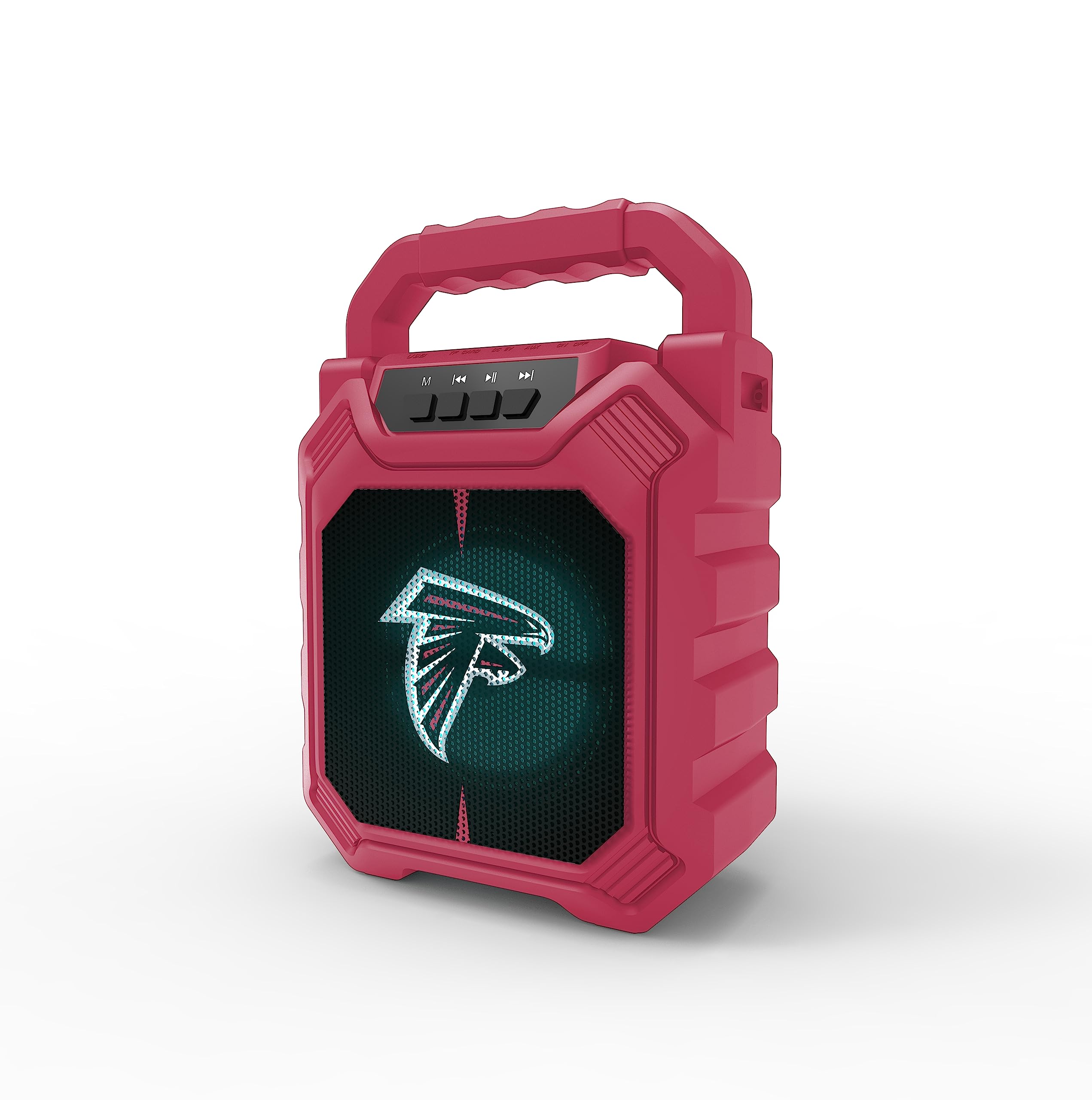
Resim 1: Ön view of the SOAR XL ShockBox BTH6 Wireless Bluetooth Speaker, featuring the Atlanta Falcons logo.
Temel Özellikler:
- Bluetooth 5.0 Bağlantısı: For seamless wireless audio streaming.
- Çoklu Ses Girişleri: Supports AM/FM radio, USB, and Aux connections.
- Taşınabilir Tasarım: Features a convenient top handle and shockproof construction.
- Uzun Pil Ömrü: Provides over 5 hours of playback on a single charge.
- Dinamik LED Işıklar: Multicolor LED lights pulse with the music.
- Gerçek Kablosuz Stereo (TWS): Daha iyi stereo ses için iki hoparlörü birbirine bağlayın.
3. Kontroller ve Bağlantı Noktaları

Image 2: Top panel of the speaker, illustrating the control buttons and various input ports.
Düğme Fonksiyonları:
- Güç Düğmesi: Press and hold to turn the speaker ON/OFF. Short press to switch modes (Bluetooth, FM, USB, Aux).
- 'M' (Mode) Button: Short press to cycle through input modes (Bluetooth, FM Radio, USB, Aux).
- Önceki Parça / Ses Kısma: Short press for previous track (in Bluetooth/USB mode). Press and hold to decrease volume.
- Oynat/Duraklat Düğmesi: Short press to play or pause audio. In FM mode, short press to auto-scan and save stations.
- Sonraki Parça / Sesi Yükselt: Short press for next track (in Bluetooth/USB mode). Press and hold to increase volume.
Giriş Bağlantı Noktaları:
- Mikro USB Şarj Bağlantı Noktası: Hoparlörü şarj etmek için.
- USB Bağlantı Noktası: USB flash bellekten ses çalmak için.
- Aux-in Port (3.5mm): Harici ses cihazlarını yardımcı kablo aracılığıyla bağlamak için.
- MicroSD Kart Yuvası: MicroSD karttan ses dosyaları oynatmak için.
4. Kurulum ve Çalıştırma
4.1 Hoparlörü Şarj Etme
- Connect the provided micro-USB cable to the charging port on the speaker.
- Kablonun diğer ucunu bir USB güç adaptörüne (dahil değildir) veya bir bilgisayarın USB portuna bağlayın.
- Şarj gösterge ışığı yanacaktır. Tamamen şarj olduğunda ışık renk değiştirebilir veya sönebilir.
- A full charge provides over 5 hours of playback time.
4.2 Açma/Kapatma
- To turn ON, press and hold the Power button until you hear an audible prompt.
- To turn OFF, press and hold the Power button again until the speaker powers down.
4.3 Bluetooth Eşleştirme
- Hoparlörü açın. Otomatik olarak Bluetooth eşleştirme moduna geçecektir; bu durum yanıp sönen bir LED ışık ve sesli bir uyarı ile belirtilir.
- Cihazınızda (akıllı telefon, tablet vb.) Bluetooth'u etkinleştirin ve kullanılabilir cihazları arayın.
- Select "SOAR BTH6" from the list of devices.
- Eşleştirme işlemi tamamlandığında, hoparlör sesli bir onay verecek ve LED ışığı yanıp sönmeyi durduracaktır.
- Hoparlör açıldığında, cihaz menzil dahilindeyse ve Bluetooth etkinse, son eşleştirilen cihaza otomatik olarak yeniden bağlanacaktır.
4.4 FM Radyo Çalışması
- Turn on the speaker and press the 'M' (Mode) button until you enter FM Radio mode.
- Mevcut FM istasyonlarını otomatik olarak taramak ve kaydetmek için, Oynat/Duraklat düğmesine kısa süre basın. Hoparlör istasyonları otomatik olarak tarayacak ve kaydedecektir.
- Kaydedilmiş istasyonlar arasında gezinmek için Önceki Parça ve Sonraki Parça düğmelerini kullanın.
4.5 USB and Aux Input
- USB Girişi: USB flash sürücüyü USB bağlantı noktasına takın. Hoparlör otomatik olarak USB moduna geçecek ve ses çalmaya başlayacaktır. files.
- Yardımcı Giriş: Connect an external audio device (e.g., MP3 player) to the Aux-in port using a 3.5mm audio cable. Press the 'M' button to switch to Aux mode.
4.6 LED Aydınlatma Modu

Image 3: The speaker displaying its dynamic LED lights in a vibrant setting.
The speaker features dynamic multicolor LED lights that pulse to the rhythm of the music. These lights activate automatically when the speaker is in use. There are no user-adjustable modes for the LED lights; they are designed to enhance the audio experience visually.
4.7 Gerçek Kablosuz Stereo (TWS) Eşleştirme

Image 4: Two SOAR XL ShockBox BTH6 speakers paired together for True Wireless Stereo (TWS) sound.
Daha geniş bir ses yelpazesi elde etmek içintage, you can pair two SOAR XL ShockBox BTH6 speakers together using the TWS function:
- Ensure both speakers are turned OFF.
- Turn ON both speakers. They will enter Bluetooth pairing mode.
- On one of the speakers (this will be your primary speaker), double-press the 'M' (Mode) button. The speakers will attempt to connect to each other.
- Once successfully paired, you will hear an audible confirmation. The LED lights on both speakers will synchronize.
- Şimdi cihazınızı 4.3. bölümde anlatıldığı gibi Bluetooth aracılığıyla birincil hoparlöre bağlayın. Ses her iki hoparlörden de stereo olarak çalınacaktır.
5. Bakım
- Temizlik: Hoparlörün dış yüzeyini temizlemek için yumuşak ve kuru bir bez kullanın. Aşındırıcı temizleyiciler veya çözücüler kullanmayın.
- Depolamak: Hoparlörü serin, kuru ve doğrudan güneş ışığından ve aşırı sıcaklıklardan uzak bir yerde saklayın.
- Pil Bakım: Pil ömrünü uzatmak için, sık kullanılmasa bile hoparlörü düzenli olarak şarj edin. Pilin uzun süre tamamen boşalmasından kaçının.
- Suya Dayanıklılık: While designed to be durable, avoid submerging the speaker in water.
6. Sorun Giderme
| Sorun | Olası Çözüm |
|---|---|
| Hoparlör açılmıyor. | Ensure the battery is charged. Connect the speaker to a power source using the micro-USB cable. |
| Bluetooth üzerinden eşleştirme yapılamıyor. | Make sure the speaker is in Bluetooth mode and within range (approx. 10 meters). Turn off and on your device's Bluetooth. Forget "SOAR BTH6" from your device's Bluetooth list and try pairing again. |
| Ses yok veya ses seviyesi düşük. | Hem hoparlörün hem de bağlı cihazınızın ses seviyelerini kontrol edin. Doğru giriş modunun seçili olduğundan emin olun. |
| FM radyo alımı zayıf. | Adjust the speaker's position. Ensure you are in an area with good signal strength. |
| TWS eşleştirmesi başarısız. | Ensure both speakers are fully charged and not connected to any other Bluetooth devices. Follow the TWS pairing steps carefully. |
7. Özellikler
| Özellik | Detay |
|---|---|
| Model Numarası | BTH6 (Variant: NFL-BTH6-DLPH) |
| Bluetooth Sürümü | 5.0 |
| Ses girişleri | Bluetooth, AM/FM Radio, USB, Aux-in, MicroSD |
| Oyun Zamanı | Over 5 hours (per charge) |
| Şarj Portu | Mikro-USB |
| Üretici | Prime Brands Grup A.Ş. |
| İlk Mevcut Tarih | 6 Eylül 2023 |
8. Resmi Ürün Videosu
Video 1: Ürünün resmi video gösterimiasing the features and dynamic LED lights of the SOAR BTH6 Wireless Bluetooth Speaker.
9. Garanti ve Destek
For warranty information and customer support, please refer to the documentation included with your product or contact the manufacturer, Prime Brands Group Inc., directly. Details regarding specific warranty periods and support procedures are typically provided at the point of purchase or on the manufacturer's official webalan.