1. Giriş
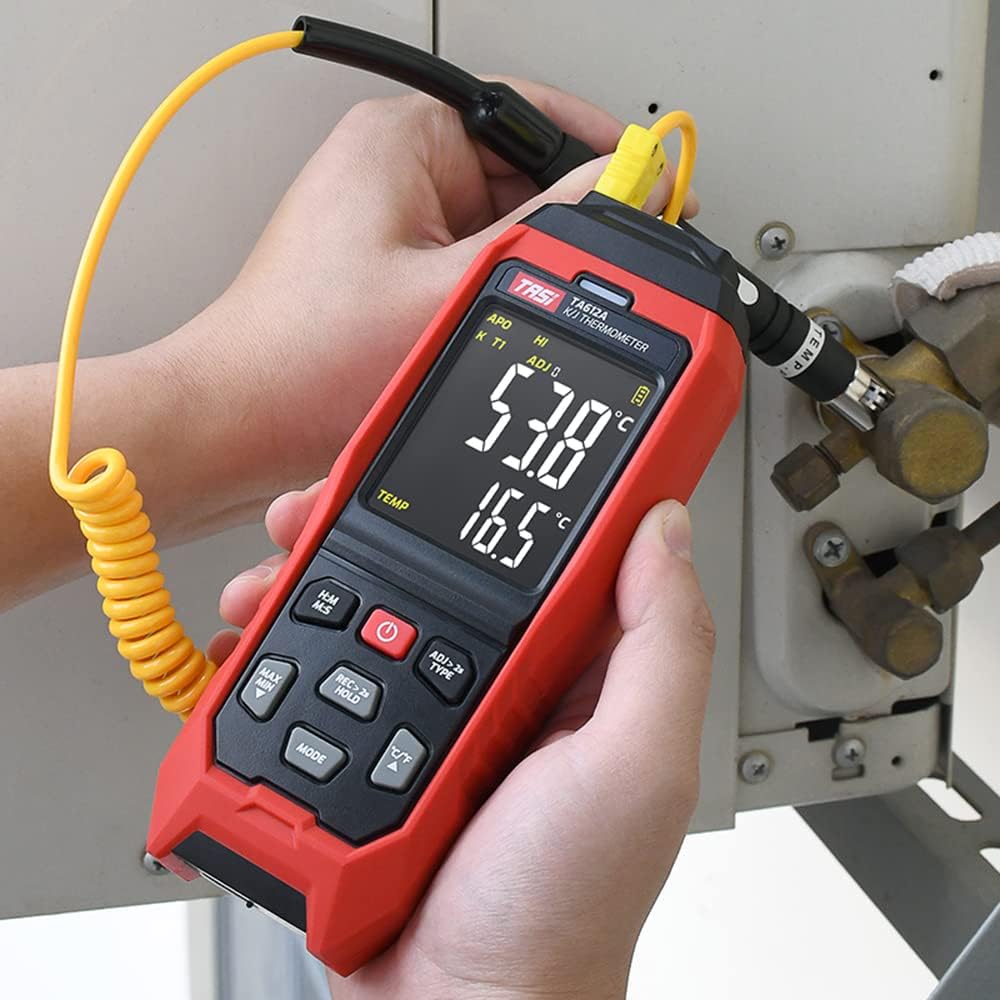
The TASI TA612C is a portable digital thermometer designed for precise temperature measurement using K/J type thermocouples. This model supports four channels, allowing simultaneous measurement of multiple points. It features a VA digital color display, data hold function, MAX/MIN value tracking, extensive data storage capabilities, an alarm buzzer, and automatic shutdown for convenient and efficient operation. The TA612C also includes a USB interface for data upload and real-time measurement.
2. Paket İçeriği
Lütfen paketi açtıktan sonra tüm ürünlerin eksiksiz ve hasarsız olduğundan emin olmak için içeriğini kontrol edin.
- 1 x TASI TA612C Thermometer
- 4 x K-type Thermocouple Probes
- 1 x USB Kablosu
- 1 x Saklama Çantası
- 1 x Kullanım Kılavuzu (İngilizce)

3. Ürün Özellikleri
- 4-Channel Measurement: Simultaneously monitor temperatures from up to four different locations using K/J type thermocouples.
- Geniş Sıcaklık Aralığı: -200℃ ile 1372℃ (-328℉ ile 2501℉) arasındaki sıcaklıkları ölçer.
- VA Digital Color Display: Provides clear and easy-to-read temperature values and operational status.
- Veri Tutma Fonksiyonu: Ekrandaki mevcut sıcaklık değerini dondurur.
- Maksimum/Minimum Değer Takibi: Records and displays the maximum and minimum temperatures measured during a session.
- Geniş Veri Depolama: Stores up to 5000 groups of temperature data.
- USB Data Logger: Allows data upload to a computer and real-time measurement monitoring via USB connection.
- Adjustable Probe Error Compensation (ADJ): Compensates for probe inaccuracies within a range of -9℃ to 9℃.
- Yüksek/Düşük Sıcaklık Alarmı: Configurable alarm limits (default 1300℃/-200℃) with dual sound and light alerts.
- Otomatik Kapanma: Belirli bir süre işlem yapılmadığında otomatik olarak kapanarak pil ömründen tasarruf sağlar.

4. Kurulum
4.1 Güç Kaynağı
The TA612C thermometer can be powered by three AA/LR06 batteries (not included) or via a 5V 1A USB power source. Ensure batteries are inserted with correct polarity. For continuous operation or data transfer, connect the device using the provided USB cable.
4.2 Termokupl Problarının Bağlanması
The device supports K/J type thermocouples. Four K-type probes are included in the package. Connect the thermocouple probes to the corresponding input jacks (T1, T2, T3, T4) at the top of the device. Ensure a secure connection for accurate readings.
5. Kullanım Talimatları
5.1 Güç Açma/Kapatma
- Basın Güç düğmesi (
 ) cihazı açmak için.
 - Basılı tutun Güç düğmesi for approximately 2 seconds to turn the device off.
5.2 Ekran Üstüview
The VA color display provides comprehensive information. Refer to the diagram below for key indicators:

5.3 Temel Ölçüm
Once powered on and probes are connected, the device will automatically begin displaying temperature readings for each active channel. The sampling rate is approximately 1 time per second.
5.4 Veri Tutma
Basın REC > 2s HOLD button briefly to activate/deactivate the data hold function. The 'HOLD' indicator will appear on the display when active.
5.5 MAX/MIN Value
Basın MAKS MIN button to cycle through current, maximum (MAX), and minimum (MIN) temperature readings. The corresponding indicator will show on the display.
5.6 Birim Değiştirme (°C/°F)
Basın °C/°F Santigrat ve Fahrenheit sıcaklık birimleri arasında geçiş yapmak için kullanılan düğme.
5.7 Veri Depolama
The TA612C can store up to 5000 groups of temperature data. To manually record data, press and hold the REC > 2s HOLD button for more than 2 seconds. The 'REC' indicator will flash, and the data group number will increment. The device stores the temperature values of the thermocouple channels, not ambient temperature.

5.8 Alarm Ayarları
The device has default high/low alarm limits of 1300℃ and -200℃. Consult the full user manual for detailed instructions on how to adjust these alarm thresholds. When an alarm condition is met, the device will provide both sound and light alerts.
5.9 Probe Error Compensation (ADJ)
The TA612C allows for probe error compensation (ADJ) within a range of -9℃ to 9℃. This feature helps to fine-tune the accuracy of readings for specific probes. Refer to the detailed user manual for steps on how to access and adjust this setting.
6. Veri Yönetimi (USB)
The TA612C model features a USB interface for data connectivity. Connect the thermometer to a computer using the provided USB cable. This allows for:
- Veri Yükleme: Transfer stored temperature data from the device to your computer for analysis and record-keeping.
- Gerçek Zamanlı Ölçüm: Monitor live temperature readings on your computer screen, which can be useful for long-term logging or detailed observation.
Software for data management is typically available from the manufacturer's website, as indicated in the included user manual.
7. Bakım
7.1 Temizlik
Cihazı temizlemek için yumuşak, damp cloth. Do not use abrasive cleaners, solvents, or immerse the device in water. Ensure the device is powered off and disconnected from any power source before cleaning.
7.2 Depolama
When not in use, store the thermometer and its probes in the provided storage bag in a cool, dry place, away from direct sunlight and extreme temperatures. Remove batteries if the device will not be used for an extended period to prevent leakage.
7.3 Pil Değişimi
When the battery indicator shows low power, replace the three AA/LR06 batteries. Ensure the device is powered off before opening the battery compartment and observe correct polarity when inserting new batteries.
8. Sorun Giderme
- Cihaz açılmıyor: Check battery installation and ensure batteries are not depleted. If using USB power, verify the cable and power source.
- Yanlış okumalar: Ensure thermocouple probes are correctly and securely connected. Check for any visible damage to the probes. Consider using the ADJ compensation feature if a known offset exists.
- Ekran boş veya titriyor: Replace batteries or connect to USB power. If the issue persists, contact customer support.
- Veri aktarımı sorunları: Ensure the USB cable is properly connected to both the device and the computer. Verify that the correct software/drivers are installed on your computer.
- Alarm not working: Check alarm settings to ensure limits are correctly configured and the alarm function is enabled.
For issues not covered here, please refer to the comprehensive user manual or contact KKnoon customer support.
9. Teknik Özellikler
| Parametre | Şartname |
|---|---|
| Örnek | TA612C |
| Kanal | 4 Kanal |
| Veri Depolama | 5000 Gruplar |
| Data Upload & Real-time Measurement | Supported (USB) |
| Malzeme | ABS (Acrylonitrile Butadiene Styrene), PC (Polycarbonate) |
| K/J Type Measurement Range | -200~1372°C / -328~2501°C |
| Kesinlik | ±0.2% + 0.7℃ |
| High/Low Alarm Limit (Default) | 1300℃ / -200℃ |
| ADJ Compensation Range | -9℃ ~ 9℃ |
| Sampling Oranı | Approx. 1 time/s |
| Güç Kaynağı | 3 x AA/LR06 Batteries (not included) or USB 5V 1A |
| Ürün Boyutu | 177 x 70 x 35 mm (6.97 x 2.76 x 1.38 inç) |
| Ürün Ağırlığı | 565 gr (1.25 lb) |
| Görüntü Türü | Digital VA Color Display |
| Bağlantı Teknolojisi | USB |
10. Güvenlik Bilgileri
Please read and understand all safety instructions before using this device. Failure to follow these instructions may result in electric shock, fire, or personal injury.
- Cihaz hasarlı görünüyorsa veya düzgün çalışmıyorsa çalıştırmayın.
- Cihazı onarmaya veya değiştirmeye çalışmayın. Tüm servis işlemlerini yetkili personele yaptırın.
- Ensure the correct type of thermocouple probes (K or J) are used and properly connected.
- Cihazı aşırı sıcaklıklara, neme veya doğrudan güneş ışığına maruz bırakmaktan kaçının.
- Cihazınızı güçlü elektromanyetik alanlardan uzak tutun.
- Remove batteries if the device is not used for a long period to prevent battery leakage.
- Pilleri ve cihazı yerel yönetmeliklere uygun şekilde imha edin.
11. Garanti ve Destek
For warranty information, technical support, or service inquiries, please refer to the contact details provided in the original product packaging or visit the official KKnoon webSite. Satın alma fişinizi, garanti talepleriniz için satın alma belgeniz olarak saklayın.