1. Önemli Güvenlik Talimatları
Please read all instructions carefully before using the GEARSTONE GT-JT2 Under Desk Elliptical Stepper. Retain this manual for future reference.
- Herhangi bir egzersiz programına başlamadan önce doktorunuza danışın.
- This equipment is intended for home or office use only.
- Adım atma aletinin düz ve sağlam bir yüzeye yerleştirildiğinden emin olun.
- Kullanım sırasında çocukları ve evcil hayvanları ekipmandan uzak tutun.
- 110 kg (242 lbs) maksimum kullanıcı ağırlığını aşmayın.
- Wear appropriate footwear during exercise.
- Ağrı, baş dönmesi veya nefes darlığı hissederseniz egzersizi hemen bırakın.
- The LCD display requires batteries (not included). Ensure correct battery installation.
2. Ürün Bittiview
The GEARSTONE GT-JT2 is a compact under-desk elliptical stepper designed for low-impact exercise. It features 'wing-style' steps for a smooth motion and an LCD display to track your workout progress. Its low-profile design allows for convenient use in various settings, including under a desk.
Temel Özellikler:
- Kompakt Tasarım: Ideal for use at home or in the office.
- Low-Impact Exercise: Engages lower body muscles with minimal joint strain.
- Dijital LCD Ekran: Tracks time, distance, speed, step count, and calories burned.
- Dayanıklı Yapı: Made from iron, ABS, and rubber for stability and longevity.
- Large Foot Pedals: Provides a secure and comfortable platform for various foot sizes.
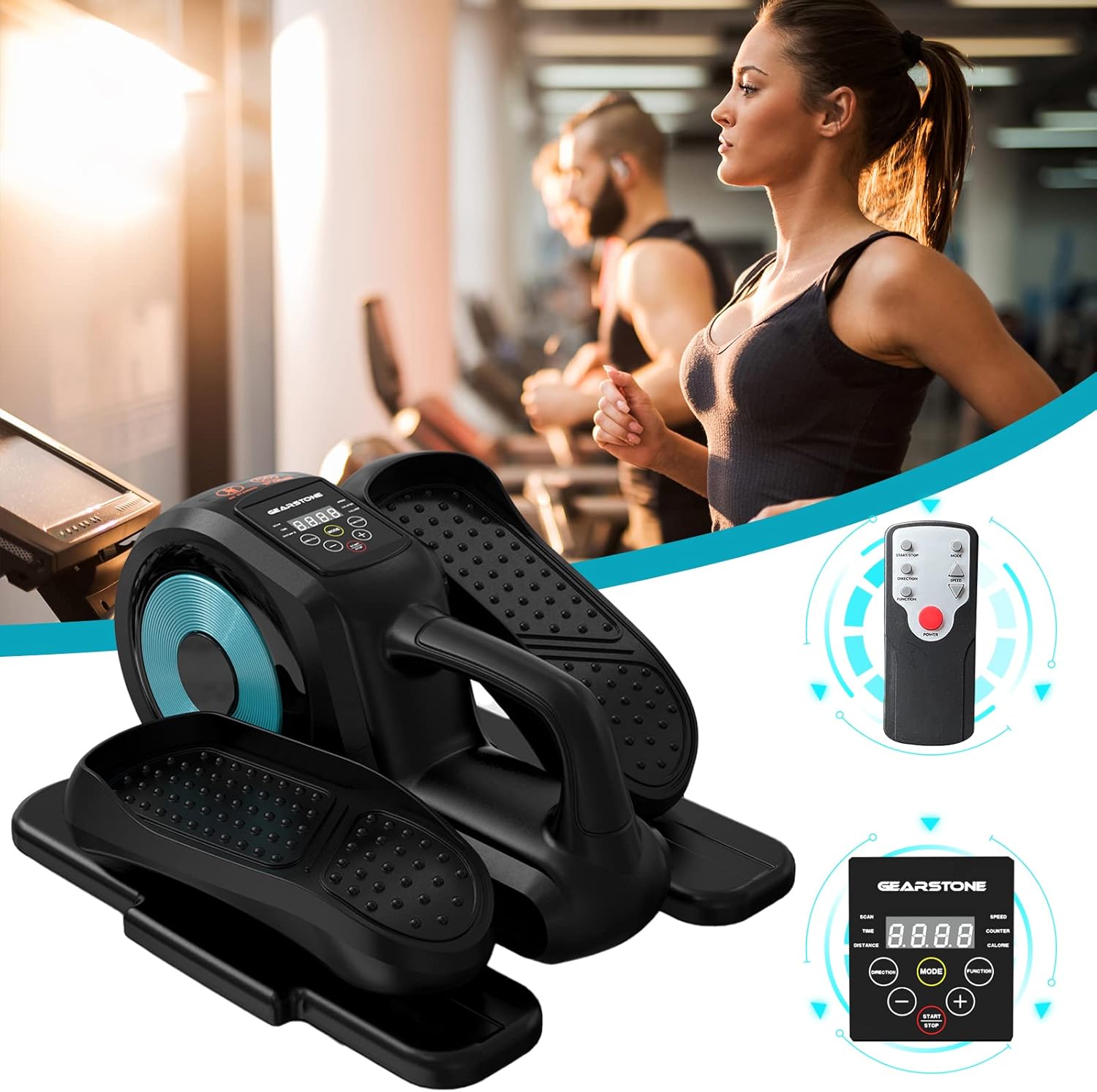
Image: The GEARSTONE GT-JT2 Under Desk Elliptical Stepper, shown with its remote control, ready for use in a home or office environment.
3. Paket İçeriği
Lütfen paketi kontrol ederek tüm ürünlerin mevcut ve hasarsız olduğundan emin olun:
- GEARSTONE GT-JT2 Under Desk Elliptical Stepper Unit
- Uzaktan Kumanda (modelinizle birlikte verilmişse)
- Kullanım Kılavuzu (bu belge)
Not: Batteries for the LCD display are not included and must be provided separately.
4. Kurulum ve Montaj
The GEARSTONE GT-JT2 Stepper comes largely pre-assembled. Minimal setup is required.
- Paketi aç: Carefully remove the stepper from its packaging.
- Atama: Place the stepper on a flat, stable surface. Ensure there is enough clear space around the unit for safe operation.
- Battery Installation (for LCD Display):
- Locate the battery compartment on the back or underside of the LCD display unit.
- Bölme kapağını açın.
- Insert the required batteries (typically AA or AAA, refer to the compartment label) ensuring correct polarity (+/-).
- Pil bölmesi kapağını sıkıca kapatın.
5. Kullanım Talimatları
Using your GEARSTONE GT-JT2 Stepper is straightforward. Follow these steps for an effective workout:
- Konumlandırma: Sit comfortably in a chair with the stepper placed directly in front of you on the floor. Ensure your knees are at a comfortable angle and your feet can reach the pedals easily.
- Ayak Yerleşimi: Place your feet firmly on the large, non-slip pedals. Ensure your entire foot is supported.
- Start Exercising: Begin pedaling in a smooth, continuous motion. The 'wing-style' steps are designed to provide a natural elliptical movement.
- Adjust Resistance (if applicable): This model typically offers fixed resistance. Focus on maintaining a consistent pace.
- İlerlemeyi İzle: Observe the LCD display to track your workout data (see Section 6 for details).
- Uzaktan Kumanda (varsa): If your model includes a remote, you can use it to control the display functions (e.g., changing modes, starting/stopping the timer) without bending down.
- Ending Workout: Gradually slow down your pedaling until you come to a complete stop. Remove your feet from the pedals.

Image: A user demonstrating the GEARSTONE GT-JT2 Under Desk Elliptical Stepper in use, positioned beneath a desk for convenient exercise during work.
6. LCD Ekran Fonksiyonları
The integrated LCD display provides real-time feedback on your workout. It is powered by user-provided batteries.

Resim: Ayrıntılı view of the GEARSTONE GT-JT2's LCD display, illustrating the various metrics it tracks, such as time, distance, speed, step count, and calories.
Görüntüleme Modları:
- TARAMA: Automatically cycles through all data metrics every few seconds.
- ZAMAN: Mevcut antrenman seansınızın süresini gösterir.
- MESAFE: Antrenmanınız sırasında kat ettiğiniz tahmini mesafeyi gösterir.
- HIZ: Indicates your current pedaling speed.
- TEZGAH: Displays the total number of steps or rotations.
- KALORİ: Antrenmanınız sırasında yaktığınız kaloriyi tahmin eder.
Düğme Fonksiyonları:
- TARİFİ: Press to cycle through the different display modes (TIME, DISTANCE, SPEED, COUNTER, CALORIE, SCAN).
- BAŞLA DUR: Initiates or pauses the tracking of your workout data.
- , Used for adjusting settings or values if applicable (e.g., setting target goals, though this model typically has simpler functionality).
The display will automatically turn off after a period of inactivity to conserve battery life. It will resume tracking when movement is detected or a button is pressed.
7. Bakım ve Özen
Düzenli bakım, step motorunuzun uzun ömürlü olmasını ve en iyi performansı göstermesini sağlar.
- Temizlik: Üniteyi reklamla silinamp Her kullanımdan sonra ter ve tozu temizlemek için bir bez kullanın. Aşındırıcı temizleyiciler veya çözücüler kullanmayın.
- Depolamak: Store the stepper in a cool, dry place away from direct sunlight and extreme temperatures. Its compact size allows for easy storage under a bed or in a closet.
- Denetleme: Periodically check all bolts and moving parts to ensure they are secure and functioning correctly. Tighten any loose components.
- Pil Değişimi: Replace the LCD display batteries when the screen becomes dim or stops functioning.
8. Sorun Giderme
If you encounter any issues with your GEARSTONE GT-JT2 Stepper, refer to the following common problems and solutions:
| Sorun | Olası Neden | Çözüm |
|---|---|---|
| LCD ekran boş veya loş. | Piller bitmiş veya yanlış takılmış. | Pilleri yenileriyle değiştirin, kutupların doğru olmasına dikkat edin. |
| No data displayed during exercise. | Sensor not detecting movement; display in 'STOP' mode. | Ensure the stepper is in motion. Press the START/STOP button if applicable. Check battery status. |
| Stepper makes unusual noises. | Loose components; lack of lubrication. | Check and tighten all bolts and screws. Apply a small amount of silicone-based lubricant to moving joints if necessary. |
| Pedals feel stiff or uneven. | İç mekanizma sorunu; kalıntı. | Inspect for any obstructions. If the problem persists, contact customer support. |
9. Özellikler
| Özellik | Detay |
|---|---|
| Örnek | GT-JT2 |
| Marka | DİŞLİ TAŞI |
| Boyutlar (U x G x Y) | Yaklaşık 446 x 392 x 247 mm (17.5 x 15.4 x 9.7 inç) |
| Ürün Ağırlığı | Yaklaşık 8 kg (17.6 lbs) |
| Maksimum Kullanıcı Ağırlığı | 110 kg (242 lbs) |
| Malzeme | Iron, ABS, Rubber |
| Görüntülemek | LCD (Time, Distance, Speed, Counter, Calorie) |
| Güç Kaynağı (Ekran) | Batteries (Self-provided, not included) |
| Renk | Siyah ve Mavi |
10. Garanti ve Destek
For warranty information or technical support, please refer to the documentation provided at the time of purchase or contact GEARSTONE customer service through the retailer where the product was purchased.
Please have your model number (GT-JT2) and purchase details ready when contacting support.


