Poly Edge E220 IP Desk Phone User Manual
Your guide to setting up and using your Poly Edge E220 IP Desk Phone.
1. Giriş
The Poly Edge E220 is a versatile IP desk phone designed for modern office environments, offering advanced communication features. It supports up to 16 lines with 4-line keys and includes integrated Bluetooth for seamless mobile phone and headset pairing. This manual provides detailed instructions for setup, operation, and maintenance of your device.
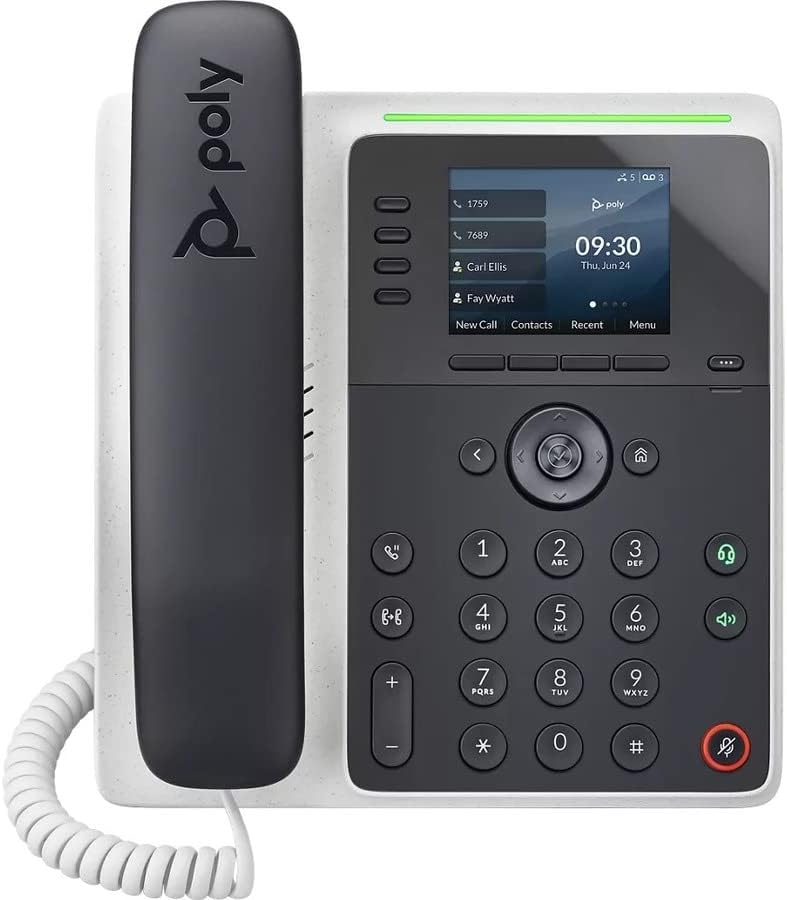
Resim: Ön view of the Poly Edge E220 IP Desk Phone, showcasinEkranı, tuş takımı ve ahizesiyle birlikte.
2. Kutuda Neler Var?
Lütfen paketinizde aşağıdaki bileşenlerin tamamının bulunduğunu doğrulayın:
- Poly Edge E220 IP Desk Phone Unit
- El cihazı
- El Telsizi Bobini Kablosu
- Cat5E Ethernet Cable
- Integrated Wall Mount (pre-attached or separate)
- Taban Standı
Note: A power supply is NOT included with this renewed product and must be acquired separately if Power over Ethernet (PoE) is not available.
3. Ürün Özellikleri
- 4-Line Keys: Supports up to 16 lines for flexible call management.
- Entegre Bluetooth: Allows for seamless pairing with mobile phones and Bluetooth headsets.
- Yüksek Çözünürlüklü Ekran: Provides clear visibility for call information and menu navigation.
- HD Ses: Delivers superior audio quality for clearer conversations.
- Çok Hatlı Çalışma: Manage multiple active calls simultaneously.
- Konferans Görüşmesi Yeteneği: Supports 3-way conferencing.
4. Kurulum ve Kurulum
4.1 Telefonun Montajı
- Attach the Base Stand: Align the tabs on the base stand with the slots on the back of the phone unit. Slide the stand into place until it clicks securely.
- Connect the Handset: Plug one end of the coil cord into the handset and the other end into the handset port on the side of the phone unit.
4.2 Kabloların Bağlanması
Locate the ports on the back and side of the phone unit.

Resim: Yan view of the Poly Edge E220 IP Desk Phone, highlighting the various connection ports and the adjustable stand.
- Ağ bağlantısı: Connect one end of the Cat5E Ethernet cable to the LAN port on the phone and the other end to your network switch or router. If your network provides Power over Ethernet (PoE), the phone will power on automatically.
- Power Connection (if no PoE): If PoE is not available, connect an appropriate power adapter (not included) to the power port on the phone and then to a power outlet.
- Optional Headset Connection: If using a wired headset, connect it to the dedicated headset port.
4.3 İlk Güç Açma
Once connected, the phone will power on and begin its boot sequence. This may take a few moments. The display will show the Poly logo, followed by network configuration and registration status. If prompted, enter your network credentials or contact your IT administrator for setup assistance.
5. Kullanım Talimatları
5.1 Arama Yapma ve Alma
- Telefon çağrısı yapmak: Pick up the handset, press the Speaker button, or press a line key. Dial the number and press the Dial soft key or wait for the call to connect.
- Bir Aramayı Cevaplamak için: Pick up the handset, press the Speaker button, or press the flashing line key.
- Aramayı Bitirmek İçin: Replace the handset, or press the End Call soft key.

Image: A man engaged in a phone call using the Poly Edge E220 IP Desk Phone in a professional office environment.
5.2 Bluetooth Kullanımı
The Poly Edge E220 allows you to pair your mobile phone or Bluetooth headset for enhanced flexibility.
- Bluetooth'u etkinleştir: Navigate to the phone's menu, select Settings, then Bluetooth, and ensure Bluetooth is enabled.
- Bir Cihazı Eşleştirme: Put your Bluetooth device (mobile phone or headset) into pairing mode. On the phone, select 'Add New Device' or 'Scan for Devices'. Select your device from the list and follow the on-screen prompts to complete pairing.
- Bağlanıyor: Once paired, your device should automatically connect when in range. You can manually connect/disconnect from the Bluetooth menu.

Image: A woman working at a desk, utilizing the Poly Edge E220 IP Desk Phone alongside her laptop, demonstrating its integration into a modern workspace.
5.3 Gelişmiş Özellik
- Tutmak: During a call, press the Hold soft key to place the call on hold. Press it again to resume.
- transferi: During a call, press the Transfer soft key, dial the new number, and then press Transfer again to complete.
- Konferans: During an active call, press the Conference soft key, dial the number of the third party, and then press Conference again to join all parties.
- Sesli mesaj: Press the Voicemail button to access your voicemail messages.
6. Bakım
To ensure the longevity and optimal performance of your Poly Edge E220 IP Desk Phone, follow these maintenance guidelines:
- Temizlik: Telefonun yüzeyini ve ekranını temizlemek için yumuşak, kuru, tüy bırakmayan bir bez kullanın. İnatçı lekeler için hafifçe kurulayın.ampBezi suyla yıkayın. Sert kimyasallar, aşındırıcı temizleyiciler veya aerosol spreyler kullanmaktan kaçının.
- Çevre: Telefonu kuru bir ortamda, doğrudan güneş ışığından, aşırı sıcaktan ve nemden uzak tutun.
- Kablo yönetimi: Bağlantı noktalarına veya kablolara zarar gelmemesi için tüm kabloların düzgün bir şekilde düzenlendiğinden ve gerilim altında olmadığından emin olun.
- Yazılım Güncellemeleri: Periodically check with your IT administrator for available software updates to ensure your phone has the latest features and security enhancements.
7. Sorun Giderme
If you encounter issues with your Poly Edge E220, refer to the table below for common problems and solutions.
| Sorun | Olası Neden | Çözüm |
|---|---|---|
| Telefon açılmıyor | No power supply or PoE connection | Ensure Ethernet cable is connected to a PoE-enabled port, or connect a compatible power adapter. |
| Çevir sesi yok | Network issue or phone not registered | Check network cable connection. Verify network status on the phone display. Contact IT support if registration fails. |
| Arayan kişiyi duyamıyorum / Arayan kişi beni duyamıyor | Volume too low, faulty handset/headset, or network audio issue | Adjust volume. Test with speakerphone. Check handset/headset connection. Restart phone. |
| Bluetooth cihazı eşleşmiyor | Cihaz eşleştirme modunda değil veya menzil dışında | Ensure Bluetooth device is in pairing mode and within range. Restart both devices. |
If the problem persists after attempting these solutions, please contact your IT department or the product support team for further assistance.
8. Özellikler
Key technical specifications for the Poly Edge E220 IP Desk Phone:
| Özellik | Detay |
|---|---|
| Ürün Boyutları | 12.1 x 10.3 x 3.4 inç |
| Ürün Ağırlığı | 2.55 pound |
| Telefon Türü | Kablolu IP Telefon |
| Güç Kaynağı | Corded Electric (Power Supply NOT Included) / Power over Ethernet (PoE) |
| Çevirici Türü | Tek Tuş Takımı |
| Yanıtlama Sistemi Türü | Digital (requires service provider support) |
| Konferans Görüşmesi Yeteneği | 3 yollu |
| Çoklu Hat İşlemi | Yes, supports up to 16 lines with 4-line keys |
| Bluetooth | Integrated for mobile phone and headset pairing |
9. Garanti ve Destek
As a renewed product, the Poly Edge E220 IP Desk Phone typically comes with a limited warranty provided by the refurbisher or seller. Please refer to your purchase documentation for specific warranty terms and conditions. For technical support, troubleshooting beyond this manual, or warranty claims, please contact the seller or your IT administrator.


