1. Giriş
The FOXWELL NT624 Elite is a professional diagnostic scan tool designed for comprehensive vehicle system analysis and maintenance services. This device provides full OBD2 functions, all-system diagnostics, and various special reset functions for a wide range of vehicle makes.
2. Temel Özellikler
- Tüm Sistem Tanılamaları: Reads and clears fault codes, views live data, and retrieves ECU information for all available vehicle systems (Engine, ABS, SRS, Transmission, etc.).
- Tam OBD2 Fonksiyonları: Supports all 10 OBD2 test modes, including reading/clearing codes, live data, freeze frame, I/M readiness, O2 monitor test, on-board monitor test, component test, vehicle information, and module present.
- 8 Hot Maintenance Services: Includes Oil Light Reset, SAS (Steering Angle Sensor) Calibration, EPB (Electronic Parking Brake) Service, Throttle Body Relearn, ABS Bleeding, Injector Coding, BRT (Battery Replacement) Service, and DPF (Diesel Particulate Filter) Regeneration.
- Geniş Araç Kapsamı: Compatible with over 90 vehicle makes.
- Otomatik VIN Taraması: Araç bilgilerini otomatik olarak belirleyerek hızlı teşhis sağlar.
- Canlı Veri Gösterimi: Shows live sensor data in text and graph formats for easy analysis.
- Ömür Boyu Ücretsiz Güncellemeler: Ensures the tool stays current with the latest vehicle models and diagnostic functions.
3. Paket İçeriği
The FOXWELL NT624 Elite package typically includes the following items:
- FOXWELL NT624 Elite Main Unit
- Teşhis Kablosu (OBDII konektörü)
- USB Cable for updates
- Kullanıcı Kılavuzu
- Koruyucu Taşıma Çantası
- SD Card (pre-installed in the device)
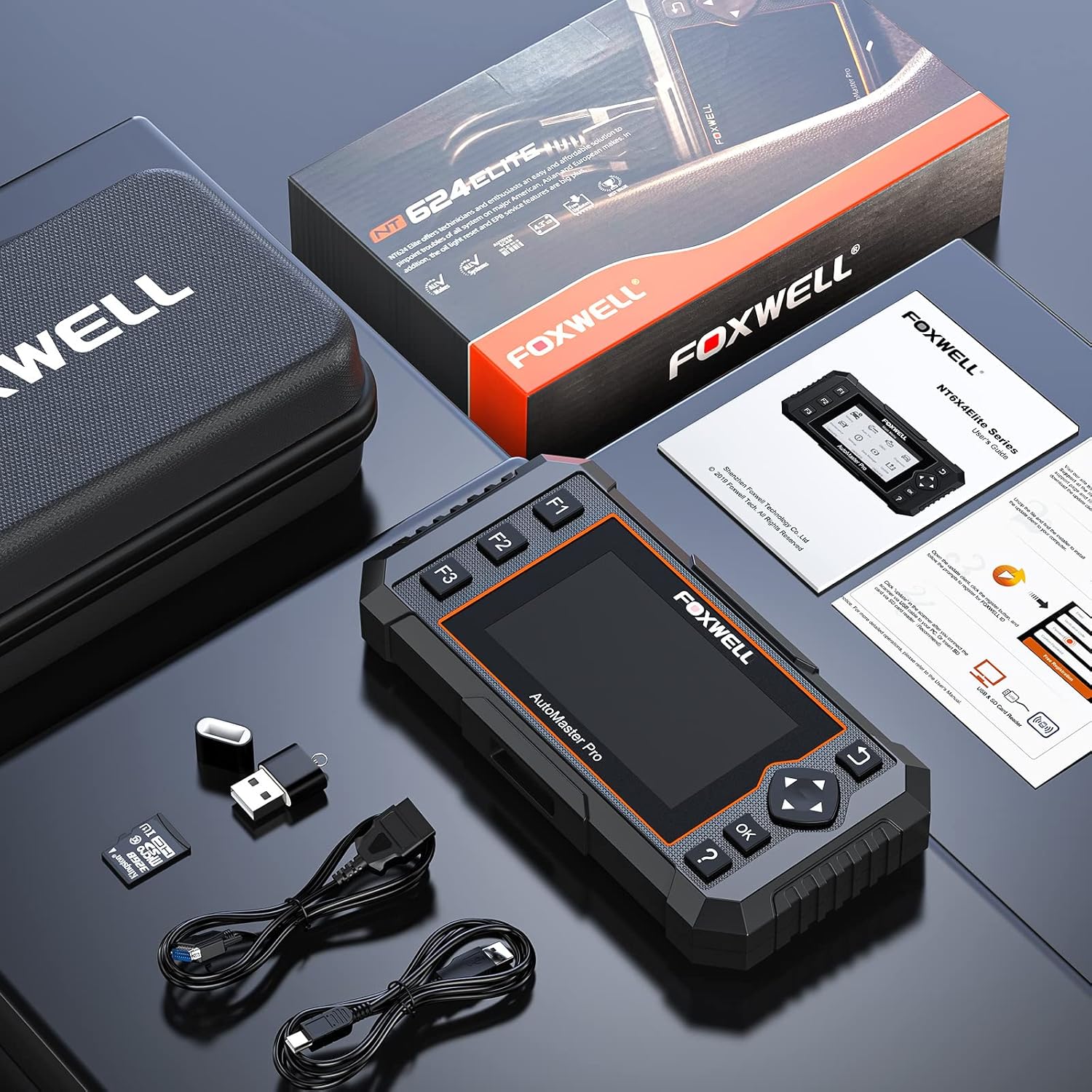
Image: Contents of the FOXWELL NT624 Elite package, showing the diagnostic tool, OBDII cable, USB cable, SD card, and carrying case.
4. Kurulum ve İlk Kullanım
- Güç Açık: Connect the diagnostic cable to the vehicle's OBDII port, usually located under the dashboard on the driver's side. The device will power on automatically.
- Language and Unit Settings: Upon first use, navigate to "Settings" from the main menu to select your preferred language and measurement units (e.g., Metric or Imperial).
- Yazılım Güncellemesi: It is recommended to update the software to the latest version before first use. Connect the device to a computer via the USB cable and visit the official FOXWELL website for update instructions and software.

Image: The FOXWELL NT624 Elite diagnostic tool connected to a vehicle's OBDII port, ready for operation.
5. Kullanım Talimatları
5.1. Ana Menüde Gezinme
Use the directional buttons (up, down, left, right) to navigate through the menu options on the 4.3-inch screen. Press the "OK" button to confirm a selection and "Back" to return to the previous screen.

Image: The main menu of the FOXWELL NT624 Elite, showing options like History, Auto VIN, OBDII, Diagnostic, Maintenance, Settings, Data Manager, and Update.
5.2. Tüm Sistem Tanılamaları
- From the Main Menu, select "Diagnostic".
- Choose the vehicle make, model, and year. The Auto VIN function can often detect this automatically.
- Select "Auto Scan" to scan all available systems or choose a specific system (e.g., Engine, ABS, SRS).
- The tool will display fault codes (DTCs), live data streams, and other system information.
- To clear codes, select the "Clear Codes" option after addressing the underlying issue.

Image: The FOXWELL NT624 Elite displaying diagnostic results for various automotive systems, including ABS, SRS, Engine, and ESP.
5.3. OBD2 Fonksiyonları
- From the Main Menu, select "OBDII".
- Choose the desired OBD2 function:
- Kodları Okuyun: Mevcut, bekleyen ve kalıcı arıza teşhis kodlarını görüntüler.
- Kodları Sil: Araç bilgisayarındaki arıza teşhis kodlarını siler.
- Canlı veri: Shows real-time data from vehicle sensors.
- Çerçeveyi Dondur: Displays a snapshot of operating conditions when an emission-related fault occurred.
- I/M Hazırlık: Checks if the various emission-related systems are operating correctly and are ready for inspection and maintenance testing.
- O2 Monitör Testi: Oksijen sensörü izleme test sonuçlarını alır.
- Araç İçi Monitör Testi: Retrieves results for emission-related powertrain components and systems that are continuously monitored.
- Bileşen Testi: Araçtaki EVAP sisteminin sızıntı testinin başlatılmasına olanak tanır.
- Araç bilgisi: Retrieves VIN, Cal ID, CVN, etc.
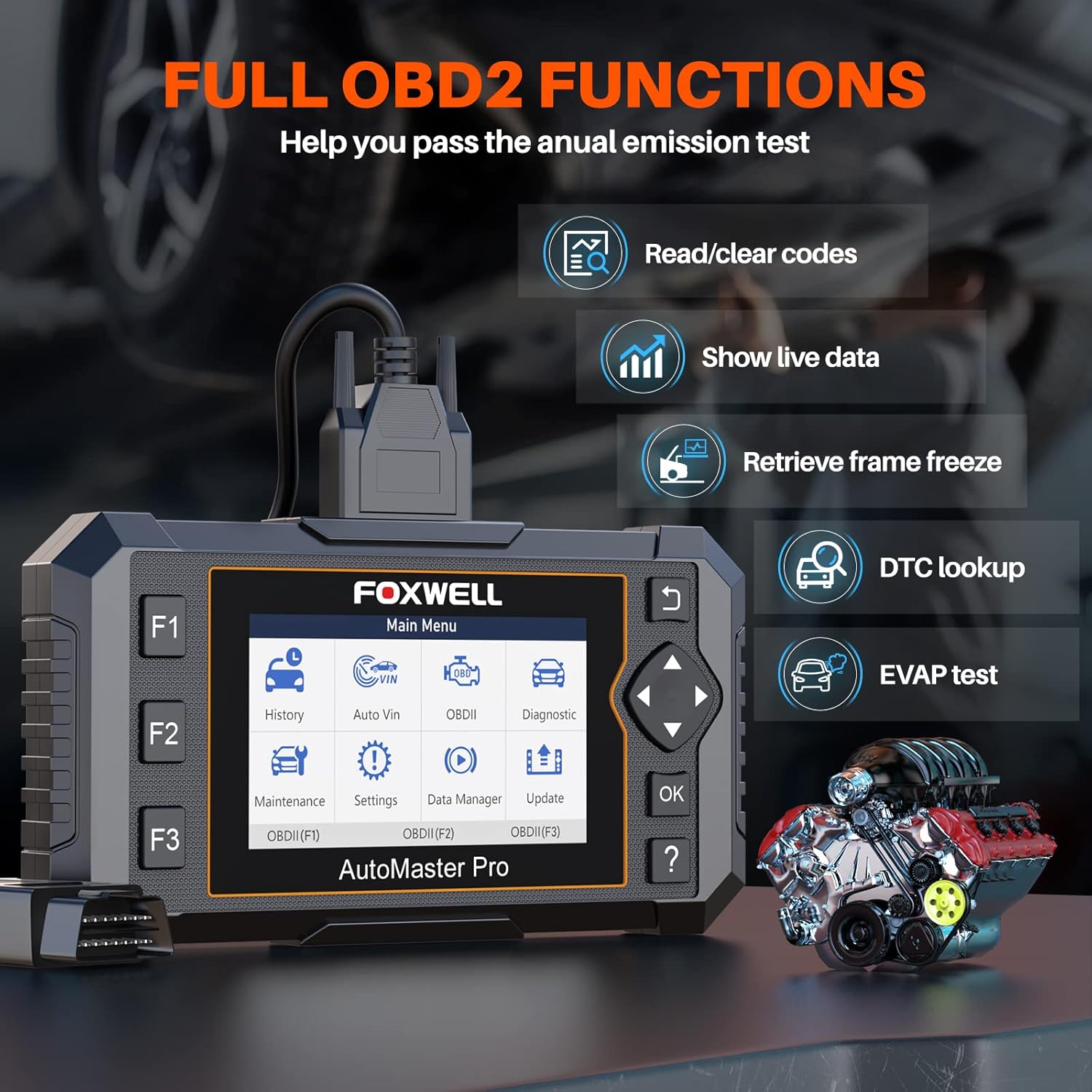
Image: The FOXWELL NT624 Elite screen showing various full OBD2 functions, including Read/Clear codes, Show live data, Retrieve frame freeze, DTC lookup, and EVAP test.
5.4. Bakım Hizmetleri
From the Main Menu, select "Maintenance" to access special reset functions. Follow the on-screen prompts for each service.
- Yağ Lambası Sıfırlama: Yağ değişiminden sonra yağ servis uyarı ışığını sıfırlar.
- SAS Kalibrasyonu: Direksiyon Açısı Sensörünü kalibre eder.
- EPB Hizmeti: Deactivates and reactivates the Electronic Parking Brake system for brake pad replacement.
- Gaz Kelebeği Yeniden Öğrenme: Temizleme veya değiştirme işleminden sonra gaz kelebeği gövdesinin konumunu yeniden öğrenir.
- ABS Kanaması: ABS fren sisteminin havasını alma işlemlerini gerçekleştirir.
- Enjektör Kodlaması: ECU'ya yeni enjektör numaraları kodları gönderir.
- BRT Service: Performs battery replacement registration.
- DPF Yenilenmesi: Initiates Diesel Particulate Filter regeneration.

Image: The FOXWELL NT624 Elite screen highlighting the 8 hot maintenance services available, including Oil Light Reset, ABS Bleeding, Throttle, Injector, SAS, BRT, EPB, and DPF.
6. Veri Yönetimi ve Analizi
The NT624 Elite allows you to view and analyze live data streams, which can be displayed in both text and graphical formats. This helps in understanding vehicle performance and diagnosing intermittent issues.

Image: The FOXWELL NT624 Elite displaying live data in a graphical format on its screen, illustrating sensor readings over time for detailed analysis.
The device also stores diagnostic history, which can be reviewed later. Connect the tool to a computer to print diagnostic reports or manage saved data.
7. Bakım ve Güncellemeler
7.1. Yazılım Güncellemeleri
The FOXWELL NT624 Elite offers lifetime free software updates. To update the device:
- FOXWELL'in resmi sitesini ziyaret edin. webalan (www.foxwelltech.com).
- Download and install the update client software on your computer.
- Register your device and create an account.
- Connect the NT624 Elite to your computer using the provided USB cable.
- Follow the on-screen instructions in the update client to download and install the latest software versions.
7.2. Cihaz Bakımı
- Cihazınızı temiz tutun, toz ve nemden uzak tutun.
- Cihazı kullanmadığınız zamanlarda koruyucu taşıma çantasında saklayın.
- Cihazı düşürmekten veya aşırı sıcaklıklara maruz bırakmaktan kaçının.
8. Sorun Giderme
| Sorun | Olası Neden | Çözüm |
|---|---|---|
| Cihaz açılmıyor. | Loose OBDII connection; vehicle's ignition is off; vehicle battery low. | Ensure the OBDII cable is securely connected. Turn the vehicle's ignition to the ON position. Check vehicle battery voltage. |
| Araçla iletişim hatası. | Incorrect vehicle protocol selected; faulty OBDII port; software issue. | Verify vehicle compatibility. Check the OBDII port for damage. Update the device software. Try on another compatible vehicle. |
| Ekran donuyor veya cihaz yanıt vermiyor. | Yazılım hatası; düşük güç. | Restart the device by disconnecting and reconnecting. Ensure stable power supply from the vehicle. Perform a software update. |
| Update fails. | Unstable internet connection; incorrect update client usage; firewall issues. | Ensure a stable internet connection. Follow the update instructions carefully. Temporarily disable firewall/antivirus if necessary. |
9. Özellikler
- Modeli: NT624 Elit
- Görüntülemek: 4.3 inç Renkli Ekran
- İşletim Sistemi: Windows XP (for update client compatibility, device runs proprietary OS)
- Bağlantı: OBDII, USB
- Boyutlar: 8.8 x 3 x 13.1 inç (yaklaşık)
- Ağırlık: 2.07 pound (yaklaşık)
- Güç: 8-18V vehicle power via OBDII
- Çalışma Sıcaklığı: 0 ila 60°C (32 ila 140°F)
- Depolama Sıcaklığı: -20 ila 70°C (-4 ila 158°F)
10. Destek ve Garanti
For technical support, product inquiries, or warranty information, please contact FOXWELL customer service through their official webLütfen web sitemizi veya ürün ambalajınızda belirtilen iletişim bilgilerini kullanın.
The FOXWELL NT624 Elite comes with a standard manufacturer's warranty. Please refer to the warranty card included in your package for specific terms and conditions.
Video: Bir fazlaview of the FOXWELL NT624 Elite diagnostic tool's features and functions. This video demonstrates the user interface and capabilities of the device.


