1. Giriş
This manual provides detailed instructions for the setup, operation, and maintenance of your VYSER F2 Projector. Please read this manual thoroughly before using the projector to ensure proper functionality and to maximize your viewing experience. The VYSER F2 Projector is a versatile device designed for various entertainment and presentation needs, offering high-definition projection with multiple connectivity options.
2. Kutuda Neler Var?
Upon unboxing your VYSER F2 Projector, please verify that all the following items are included:
- VYSER F2 Projector
- Uzaktan kumanda
- Kullanım Kılavuzu (bu belge)
- HDMI Kablosu
- Güç kablosu
3. Ürün Bittiview
Familiarize yourself with the components and ports of your VYSER F2 Projector.

Figure 3.1: VYSER F2 Projector with key features highlighted.
3.1 Ön View
- Odak Merceği: Yansıtılan görüntünün netliğini ayarlar.
- IR Alıcı: Uzaktan kumandadan sinyalleri alır.
3.2 Side and Rear Views (Bağlantı Noktaları ve Kontroller)
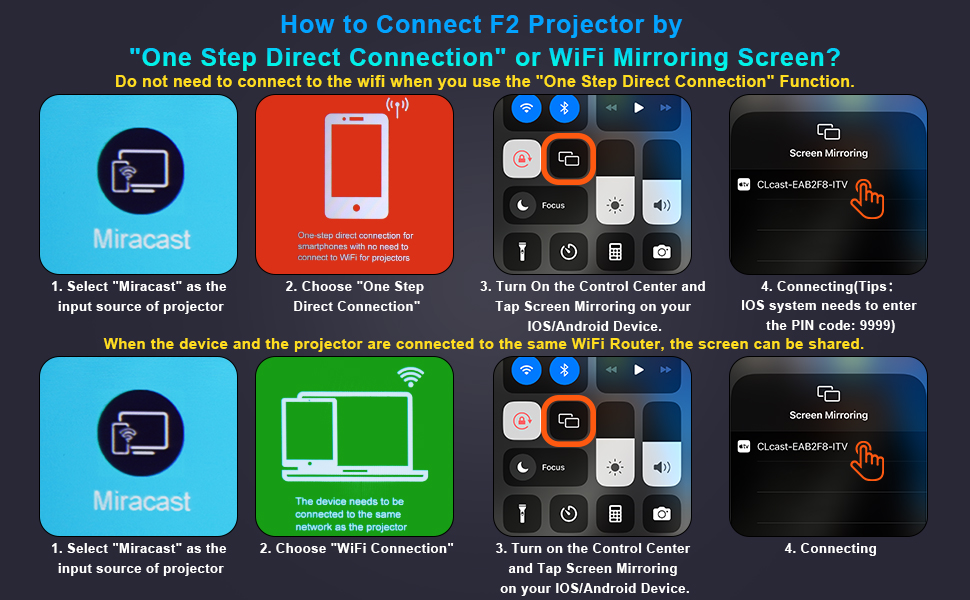
Figure 3.2: Multiple connection options on the VYSER F2 Projector.
- HDMI Bağlantı Noktaları (x2): Connect to devices like laptops, TV sticks, gaming consoles (e.g., PS5/Xbox).
- USB Bağlantı Noktaları (x2): Medya oynatımı için USB sürücülerini bağlayın.
- AV Bağlantı Noktası: AV kablosu kullanarak eski cihazlara bağlanın.
- 3.5mm Ses Çıkışı: Harici hoparlör veya kulaklık bağlayın.
- Güç Girişi: Güç kablosunu bağlayın.
- Cooling Windows: Isı dağıtımı için uygun havalandırmayı sağlayın.
- Yerleşik Kontroller: Buttons for power, menu, input source, and navigation.
3.3 360 Degree View Projektörün
Video 3.1: A comprehensive 360-degree view of the VYSER F2 Projector, showcasing its design and various ports from all angles.
4. Kurulum
Follow these steps to set up your VYSER F2 Projector for the first time.
4.1 Yerleştirme
Place the projector on a stable, flat surface. Ensure there is adequate ventilation around the projector to prevent overheating. The projection distance can range from 5-15 feet, allowing for an adjustable screen size of 50-300 inches.
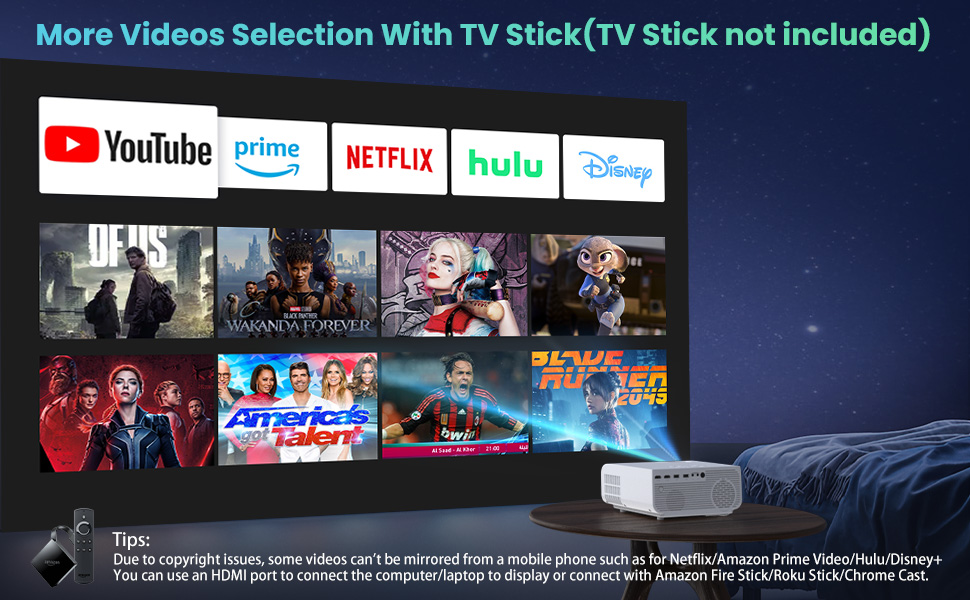
Figure 4.1: Adjustable display size from 50 to 300 inches.
The projector can be placed on a table, mounted on a tripod, or ceiling-mounted. Use the adjustable foot at the bottom of the projector to fine-tune the projection angle if needed.
4.2 Güç Bağlantısı
- Güç kablosunu projektör üzerindeki Güç Girişi bağlantı noktasına bağlayın.
- Güç kablosunun diğer ucunu elektrik prizine takın.
- Press the Power button on the projector or remote control to turn it on.
4.3 Odak ve Trapez Düzeltme
- Odak Ayarı: Rotate the focus lens ring on the front of the projector until the image appears clear and sharp.
- Keystone Düzeltmesi: Use the keystone correction dial (usually on top or side) to adjust the image shape if it appears trapezoidal. The projector supports ±15° keystone correction.
5. Kullanım Talimatları
Learn how to connect your devices and utilize the various features of your projector.
5.1 Cihazları Bağlama
The VYSER F2 Projector offers multiple ways to connect your devices:
- HDMI: For high-definition video and audio from laptops, gaming consoles, TV boxes, etc.
- USB BAĞLANTI: Medya oynatmak için filedoğrudan bir USB flash sürücüden.
- AV: AV çıkışı olan eski cihazları bağlamak için.
5.2 Wireless Connectivity (Screen Mirroring)
The projector supports 5G/2.4G WiFi for seamless screen mirroring from your smartphone or tablet.
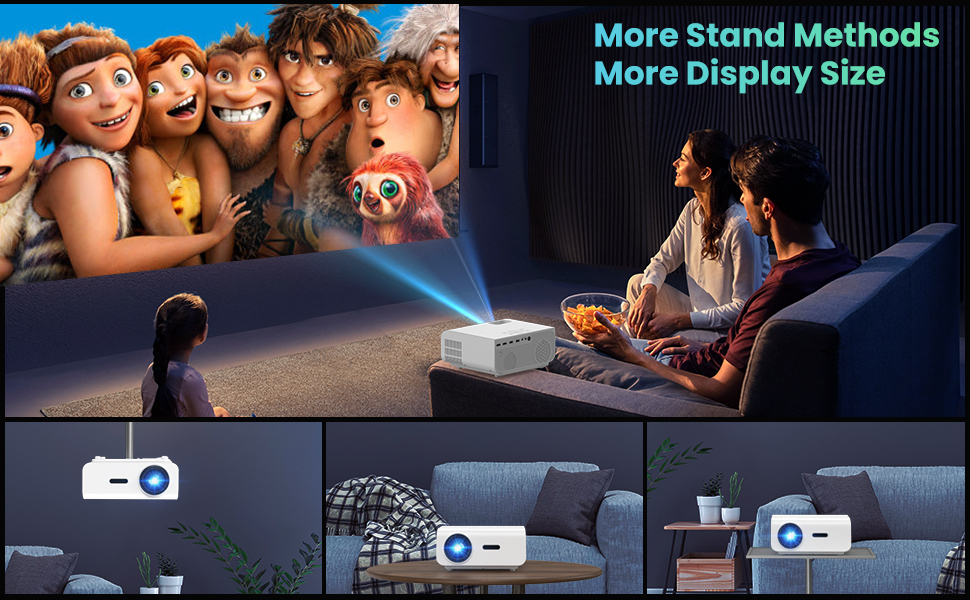
Figure 5.1: 5G/2.4G WiFi Screen Mirroring for various devices.
One-Step Direct Connection: This feature allows direct connection to your phone without needing a WiFi network. Ideal for outdoor use or when a router is unavailable.
Video 5.1: Demonstration of the F2 Projector's One-Step Direct Connection with WiFi and Bluetooth, showing quick setup for phone mirroring.
For detailed steps on screen mirroring, refer to the on-screen instructions by selecting "Miracast" from the input source menu.
Note: Due to copyright restrictions, some streaming services (e.g., Netflix, Amazon Prime Video, Hulu, Disney+) may block screen mirroring. For these services, it is recommended to use an HDMI connection with a compatible device like a Fire TV Stick, Roku Stick, or laptop.
5.3 Bluetooth Bağlantısı
The projector features Bluetooth 5.1 for connecting to external Bluetooth speakers or headphones, enhancing your audio experience.

Figure 5.2: Bluetooth connection for external audio devices.
To connect: Navigate to the Bluetooth settings on the projector, enable Bluetooth, and select your desired audio device from the list of available devices. (Note: The projector connects to Bluetooth speakers, not directly to smartphones/tablets via Bluetooth for audio input).
5.4 Menü Navigasyonu
Use the remote control or the on-board buttons to navigate the projector's menu. Options typically include input source selection, picture settings (brightness, contrast, color), sound settings, and system settings.
6. Bakım
Doğru bakım, projektörünüzün uzun ömürlü olmasını ve en iyi performansı göstermesini sağlar.
- Lens Temizliği: Projeksiyon merceğini temizlemek için optik lensler için özel olarak tasarlanmış, yumuşak ve tüy bırakmayan bir bez kullanın. Aşındırıcı malzemelerden veya sert kimyasallardan kaçının.
- Toz Giderimi: Regularly clean the cooling vents to prevent dust buildup, which can affect performance and lifespan. Use a soft brush or compressed air.
- Depolamak: Projeksiyon cihazını uzun süre kullanılmadığı zamanlarda serin ve kuru bir yerde, tercihen orijinal ambalajında veya koruyucu bir kılıf içinde saklayın.
- Gücü Düzgün Bir Şekilde Kapatın: Always turn off the projector using the power button and allow it to cool down before unplugging or moving it.
7. Sorun Giderme
Projeksiyon cihazınızla ilgili sorunlarla karşılaşırsanız, aşağıdaki yaygın sorun giderme adımlarına bakın:
| Sorun | Olası Neden / Çözüm |
|---|---|
| Görüntü yok veya "Sinyal Yok" mesajı |
|
| Bulanık görüntü |
|
| Trapezoidal image |
|
| Ses yok veya düşük ses |
|
| Screen mirroring issues (e.g., Netflix not working) |
|
| Projector overheating or shutting down |
|
8. Özellikler
Key technical specifications for the VYSER F2 Projector:
| Özellik | Detay |
|---|---|
| Marka | VYSER |
| Örnek | F2 Projektör |
| Yerel Çözünürlük | 1920 x 1080 (Orijinal 1080P) |
| Parlaklık | 12000 Lux (350 ANSI Lümen) |
| Kontrast Oranı | 10000:1 (implied from image comparison) |
| Projeksiyon Boyutu | 50-300 inç |
| Projeksiyon Mesafesi | 5-15 feet |
| Bağlantı Teknolojisi | Wireless (5G/2.4G WiFi), Bluetooth 5.1, HDMI (x2), USB (x2), AV, 3.5mm Audio Out |
| Anahtar Ebatı Düzeltme | ±15° Manuel |
| Ürün Ağırlığı | 4.11 pound |
| Renk | White-White |
9. Garanti ve Destek
VYSER is committed to providing excellent customer service and technical support for your projector.
- Ömür Boyu Müşteri Hizmetleri: Enjoy lifetime customer service and technical support for your VYSER F2 Projector.
- For any inquiries, technical assistance, or warranty claims, please contact VYSER customer support through the platform where you purchased the product or refer to the official VYSER webiletişim bilgileri için site.


