1. Giriş
This manual provides instructions for the proper setup, operation, and maintenance of your myFirst Fone R1s smartwatch phone. Please read this manual thoroughly before using the device to ensure safe and optimal performance. The myFirst Fone R1s is designed as a communication and tracking device for children, offering features such as voice/video calls, GPS tracking, and heart rate monitoring.

Image: The myFirst Fone R1s smartwatch on a child's wrist, highlighting key features such as IPX8 waterproofing, heart rate monitoring, animated wallpapers, MP3 player, video/voice calls, customizable ringtones, SOS button, and pedometer.
2. Kutuda Neler Var?
Before proceeding with setup, please verify that all components are present in the packaging:
- myFirst Fone R1s Smartwatch Phone
- Şarj Kablosu (USB)
- Kullanıcı Kılavuzu
- SIM Card (if included with purchase)
- Stickers (for customization)
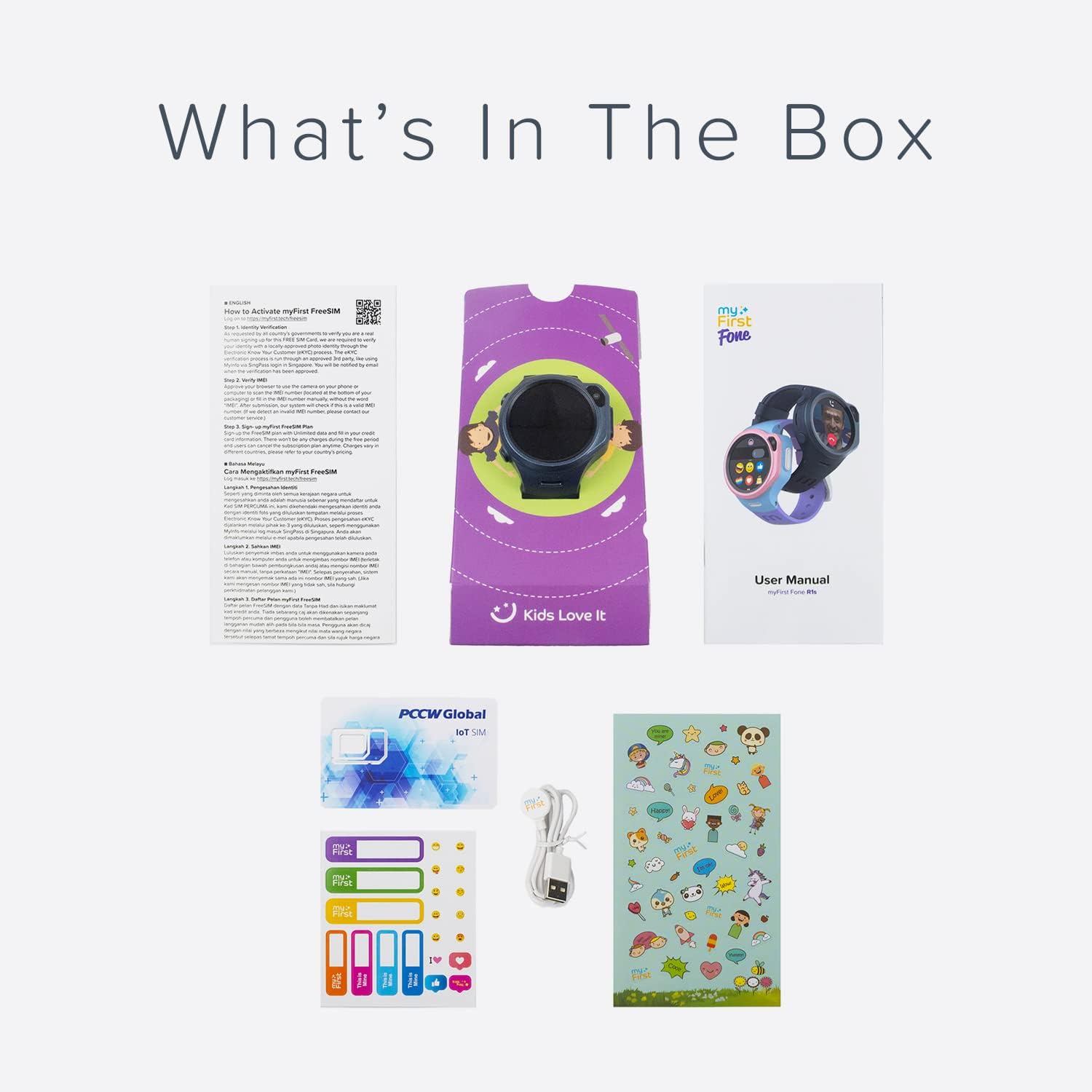
Resim: Bir overview of the myFirst Fone R1s product packaging contents, showing the smartwatch, user manual, SIM card, charging cable, and stickers.
3. Kurulum Kılavuzu
3.1 Cihazı Şarj Etme
Before initial use, fully charge the myFirst Fone R1s. Connect the provided USB charging cable to the charging port on the smartwatch and a compatible USB power adapter. The charging indicator on the screen will show the charging status.
3.2 SIM Kart Kurulumu
The myFirst Fone R1s requires a Nano-SIM card for cellular connectivity, including calls, messaging, and GPS tracking. Ensure the device is powered off before inserting or removing the SIM card.
- Akıllı saatin yan tarafında bulunan SIM kart yuvasını bulun.
- SIM kart yuvası kapağını dikkatlice açın.
- Insert the Nano-SIM card into the tray with the gold contacts facing up and the notched corner aligned correctly.
- Gently push the SIM card tray until it clicks into place.
- Suya dayanıklılığı korumak için SIM kart yuvası kapağını sıkıca kapatın.

Image: The myFirst Fone R1s smartwatch showing the SIM card slot and a SIM card being inserted.
3.3 Uygulama Kurulumu ve Eşleştirme
To manage the smartwatch and access its full features, parents must download and install the companion myFirst Fone application on their smartphone. The app is compatible with both iOS and Android devices.
- Arama "myFirst Fone" in the Apple App Store or Google Play Store.
- Uygulamayı indirin ve yükleyin.
- Follow the on-screen instructions within the app to create an account and pair it with the myFirst Fone R1s smartwatch. This typically involves scanning a QR code displayed on the smartwatch.

Image: The myFirst Fone R1s smartwatch alongside a smartphone displaying the parental control application, illustrating the connection between the device and its management app.
4. Kullanım Talimatları
4.1 Güç Açma/Kapatma
- Güç Açık: Ekran aydınlanana kadar Güç düğmesini basılı tutun.
- Kapat: Press and hold the Power button, then select 'Power Off' on the screen.
4.2 Gezinme
The myFirst Fone R1s features a touchscreen display for navigation. Swipe left/right or up/down to access different menus and applications. Tap to select an option.
4.3 Voice and Video Calls
Once paired and with an active SIM card, the smartwatch can make and receive voice and video calls from approved contacts. Contacts are managed through the parental control app.
- To initiate a call, navigate to the 'Contacts' menu and select the desired contact.
- During an incoming call, tap the green icon to answer or the red icon to decline.

Image: The myFirst Fone R1s smartwatch displaying a video call in progress on a child's wrist.
4.4 GPS Tracking and Safe Zones
The smartwatch utilizes GPS, Wi-Fi, and GSM for real-time location tracking. Parents can view the child's location history and set up 'Safe Zones' through the companion app. Notifications are sent when the device enters or exits a defined safe zone.
4.5 Kalp Atış Hızı İzleme
The myFirst Fone R1s includes a heart rate monitor. Parents can set high heart rate alerts remotely via the app. If the smartwatch detects a heart rate exceeding the set limit (e.g., during physical activity), it will alert the user to slow down.
4.6 MP3 Müzik Çalar
The device is equipped with an MP3 player. Music and audiobooks can be stored on the smartwatch and played through the built-in speaker or wirelessly via Bluetooth headphones.
4.7 Customizable Watch Face and Wallpaper
Users can personalize the watch face with a selection of animated wallpapers or by uploading custom photos via the app.
4.8 Acil Durum Düğmesi
In an emergency, the user can press and hold the dedicated SOS button. This action will send an alert with the current location to pre-set emergency contacts and initiate calls to them.
4.9 Adımsayar
The integrated pedometer tracks daily steps, encouraging physical activity.
5. Bakım ve Özen
5.1 Temizlik
Wipe the smartwatch regularly with a soft, dry, lint-free cloth. Avoid using harsh chemicals or abrasive materials, as these can damage the screen and casing.
5.2 Suya Dayanıklılık
The myFirst Fone R1s is rated IPX8 water resistant. This means it can withstand immersion in water under certain conditions. However, it is not recommended for swimming or showering, and exposure to high-pressure water or hot water should be avoided. Ensure the SIM card slot cover is securely closed to maintain water resistance.
5.3 Pil Bakımı
To prolong battery life, avoid exposing the device to extreme temperatures. Charge the device using only the provided charging cable.
6. Sorun Giderme
If you encounter issues with your myFirst Fone R1s, refer to the following common problems and solutions:
- Cihaz açılmıyor: Cihazın tamamen şarj olduğundan emin olun. Sorun devam ederse, farklı bir şarj kablosu veya güç adaptörü deneyin.
- No network signal/SIM card not detected:
- Verify the SIM card is correctly inserted and activated with a cellular plan.
- Ensure the SIM card is compatible with the device's network bands (4G).
- Akıllı saati yeniden başlatın.
- Check for network coverage in your area.
- GPS tracking inaccurate: Cihazın açık olduğundan emin olun view of the sky. GPS accuracy can be affected by buildings, dense foliage, or indoor environments.
- Uygulamayla eşleştirme yapılamıyor: Ensure Bluetooth is enabled on your smartphone and the smartwatch is in pairing mode. Reinstall the app if necessary.
- Kısa pil ömrü: Reduce screen brightness, close unused applications, and limit frequent GPS updates if possible.
Bu adımlarla çözülemeyen kalıcı sorunlar için lütfen müşteri desteğiyle iletişime geçin.
7. Özellikler
| Marka | benim ilk |
| Model Adı | myFirst Fone R1'ler |
| Model Numarası | KW1305 |
| Ekran Görüntü Boyutu | 1.3 Inches (2" / 4 cm visible screen diagonal) |
| Uyumlu Cihazlar | Akıllı telefonlar |
| Özel Özellikler | Heart Rate Monitor, GPS Tracking, Video/Voice Call, MP3 Player, SOS Button, Pedometer |
| Suya Dayanıklılık | IPX8 |
| Pil Türü | Lityum-İyon (şarj edilebilir) |
| Malzeme Türü | Silicone Plastic |
| Ürün Boyutları | 4.8x1.8x4.8 cm |
| Ürün Ağırlığı | 133 Gram |
| Üretici | OAXIS ASIA PTE LTD |
| UPC | 850031616455 |
8. Garanti ve Destek
8.1 Garanti Bilgileri
Warranty terms and conditions for the myFirst Fone R1s are typically provided with your purchase documentation. Please refer to the warranty card or contact your retailer for specific details regarding coverage and duration.
8.2 Müşteri Desteği
For technical assistance, product inquiries, or warranty claims, please contact myFirst customer support. Contact information can usually be found on the manufacturer's official websitede veya ürün ambalajının içinde.
Manufacturer: OAXIS ASIA PTE LTD


