1. Giriş
This manual provides detailed instructions for the amazon basics Wired Gaming Mouse, Model ABIM03. This mouse is designed to enhance your gaming and computing experience with its adjustable DPI, customizable RGB lighting, and programmable buttons. Please read this manual thoroughly before use to ensure proper operation and longevity of your device.
2. Ürün Özellikleri
- Ayarlanabilir DPI: Up to 6400 DPI for precise cursor control and quick movements.
- Özelleştirilebilir RGB Aydınlatma: Personalize your mouse with various RGB lighting modes and driver customization options for PC.
- Programlanabilir Düğmeler: Equipped with multiple programmable buttons for assigning custom functions or macros.
- Gaming-Grade Sensor: Ensures accurate tracking and rapid response for gaming.
- Dayanıklı Tasarım: Features extra durable switches and enhanced build quality for extended use.
- Honeycomb Grip: Ergonomic honeycomb design provides a comfortable and secure grip.

Image: The amazon basics Wired Gaming Mouse highlighting its adjustable DPI settings, ranging from 1200 to 7200 (though product states up to 6400).
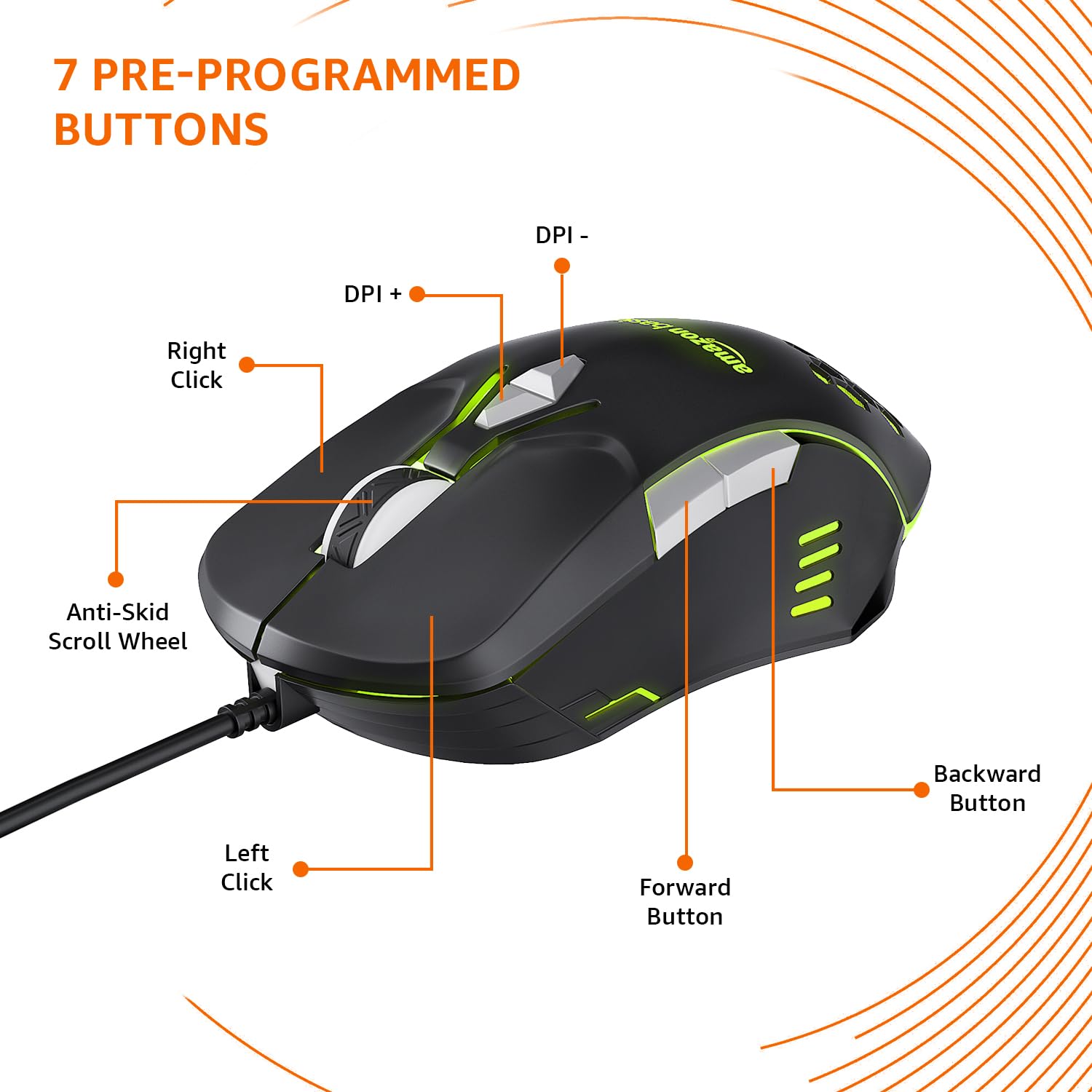
Image: The amazon basics Wired Gaming Mouse showing its 7 pre-programmed buttons, including Left Click, Right Click, Anti-Skid Scroll Wheel, DPI+, DPI-, Forward Button, and Backward Button.

Resim: Yukarıdan aşağıya view of the amazon basics Wired Gaming Mouse, emphasizing its honeycomb-designed surface for improved grip and airflow.

Image: The amazon basics Wired Gaming Mouse illuminated with red RGB lighting, showcasing its light and comfortable design.
3. Kurulum Talimatları
- Fareyi Paketinden Çıkarın: Carefully remove the gaming mouse from its packaging.
- Bilgisayara bağlanın: Farenin USB bağlantısını bilgisayarınızdaki boş bir USB portuna takın.
- Sürücü Kurulumu: Your operating system (Windows, Linux) should automatically detect and install the necessary drivers. If prompted, follow the on-screen instructions. For advanced customization of RGB and programmable keys, refer to the manufacturer's website for specific driver software.
- Atama: En iyi performansı elde etmek için fareyi düz, temiz bir yüzeye veya fare altlığına yerleştirin.
4. Kullanım Talimatları
4.1 Temel İşlevsellik
- Sol tık: Birincil eylem, seçilim.
- Sağ tık: İkincil işlem, bağlam menüleri.
- Kaydırma tekerleği: Scroll up/down pages. Pressing the scroll wheel often acts as a middle click.
- İleri/Geri Düğmeleri: Genellikle navigasyon için kullanılır web tarayıcılar veya file kaşifler.
4.2 DPI (İnç Başına Nokta) Ayarı
The mouse features dedicated DPI adjustment buttons (DPI+ and DPI-) to change cursor sensitivity on the fly. Press these buttons to cycle through different DPI levels up to 6400. A higher DPI setting results in faster cursor movement across the screen with less physical mouse movement.
4.3 Customizing RGB Lighting
The mouse includes customizable RGB lighting. Specific lighting modes can often be cycled through using a dedicated button (if present) or through the optional driver software. Refer to the driver software for advanced customization options, including color selection, effects, and brightness.
4.4 Programming Buttons
The mouse is equipped with programmable buttons. To assign custom functions, macros, or key combinations to these buttons, you will need to install and use the specific driver software provided by the manufacturer. This software typically allows you to create profileFarklı uygulamalar veya oyunlar için.
Video: A short product highlight video demonstrating the key features of the amazon basics Wired Gaming Mouse, including adjustable DPI, RGB lighting, programmable buttons, and durable design.
5. Bakım
- Temizlik: Farenin dış yüzeyini temizlemek için yumuşak, kuru bir bez kullanın. İnatçı kirler için, biraz daha yumuşak bir bez yeterli olacaktır.amp Fareye sıvı girmemesini sağlamak için bez kullanılabilir.
- Sensör Temizleme: Ara sıra pamuklu bir çubuk kullanarak hafifçe temizleyin.ampened with isopropyl alcohol to gently clean the optical sensor on the underside of the mouse. Ensure the mouse is disconnected before cleaning.
- Sıvılardan Kaçının: Do not immerse the mouse in water or any cleaning solutions.
- Depolamak: Fareyi serin, kuru ve doğrudan güneş ışığından ve aşırı sıcaklıklardan uzak bir yerde saklayın.
6. Sorun Giderme
| Sorun | Çözüm |
|---|---|
| Fare yanıt vermiyor. |
|
| İmleç hareketi düzensiz veya kesik kesik. |
|
| Programlanabilir düğmeler çalışmıyor. |
|
| RGB aydınlatma çalışmıyor veya takılı kalmış durumda. |
|
7. Özellikler
| Özellik | Detay |
|---|---|
| Marka | amazon temelleri |
| Model Numarası | ABIM03 |
| Bağlantı Teknolojisi | Kablolu (USB) |
| Hareket Algılama Teknolojisi | Optik |
| DPI Aralığı | 6400 DPI'a kadar |
| Programlanabilir Tuşlar | 4 (in addition to standard left/right click and scroll) |
| Aydınlatma | RGB |
| Renk | Siyah |
| Ürün Ağırlığı | 145 gr |
| Ürün Boyutları (UxGxY) | 15.8x10.4x5.4 cm |
| Donanım Platformu | PC |
| İşletim Sistemi Uyumluluğu | Linux, Windows 7 and above |
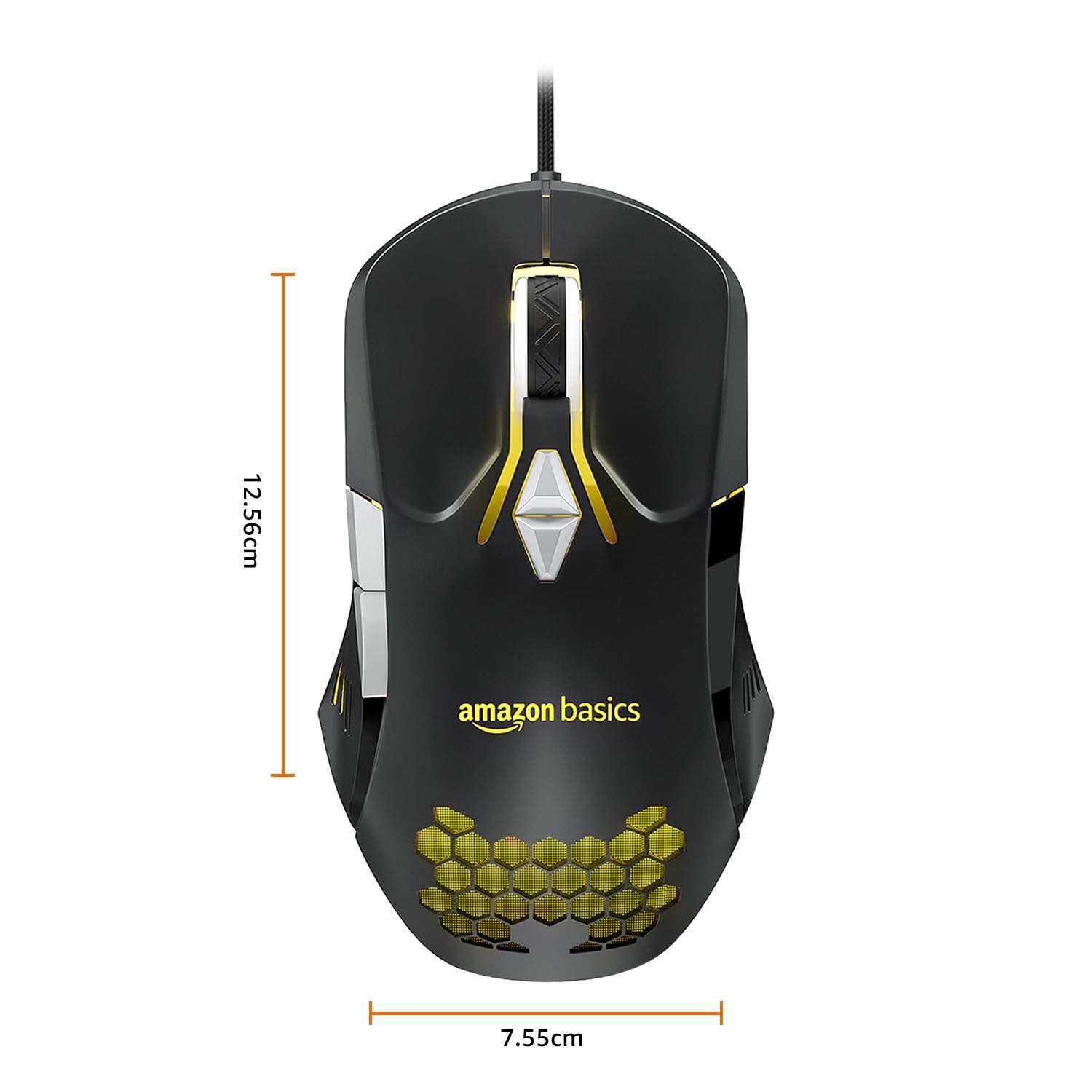
Image: The amazon basics Wired Gaming Mouse with its length (12.56cm) and width (7.55cm) dimensions indicated.
8. Garanti Bilgileri
This amazon basics Wired Gaming Mouse comes with a 1 Yıl Garanti from the date of purchase. This warranty covers manufacturing defects and issues arising from normal use. It does not cover damage caused by misuse, accidents, unauthorized modifications, or normal wear and tear. Please retain your proof of purchase for warranty claims.
9. Destek
For further assistance, technical support, or warranty claims, please visit the official amazon basics support page or contact customer service through your purchase platform. Ensure you have your product model number (ABIM03) and proof of purchase ready when contacting support.
Çevrimiçi Kaynaklar:
- Ürün Sayfası: amazon.in/dp/B0BTD2YN6Y
- amazon basics Store: amazon basics Store


