1. Giriş
Thank you for choosing the DELTACO Gaming PM80 Wireless Optical Gaming Mouse. This manual provides essential information for setting up, operating, and maintaining your new gaming mouse. Please read these instructions carefully before use to ensure optimal performance and longevity of your device.
2. Paket İçeriği
- DELTACO Gaming PM80 Wireless Optical Gaming Mouse
- USB Kablosuz Alıcı
- USB Şarj Kablosu
- Kullanıcı Kılavuzu
3. Ürün Bittiview
The DELTACO Gaming PM80 is a high-performance wireless optical gaming mouse designed for precision and comfort. It features 7 programmable buttons, adjustable DPI up to 4800, and customizable illumination. The mouse is rechargeable, ensuring uninterrupted gaming sessions.
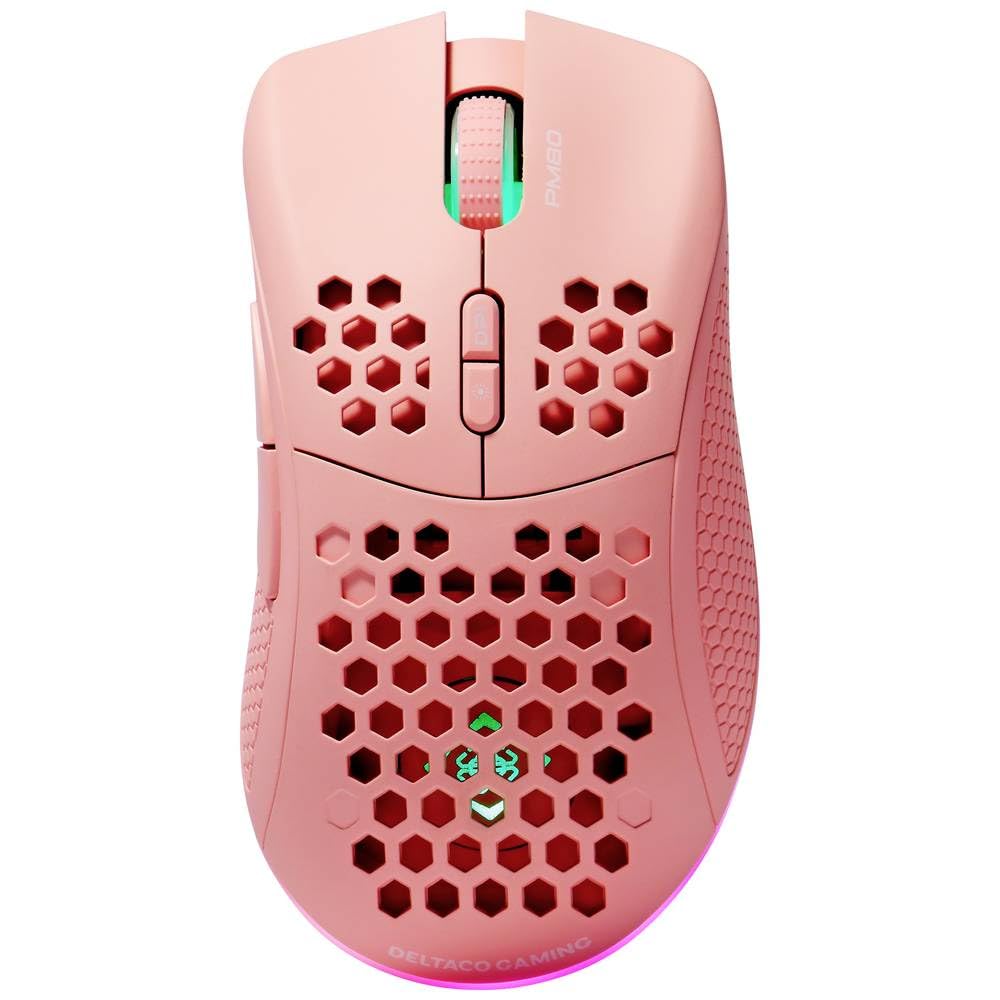
Image: DELTACO Gaming PM80 Wireless Optical Gaming Mouse. This image displays the mouse from a top-down perspective, highlighting its ergonomic design, the central scroll wheel, and the arrangement of its seven buttons.
Düğme Fonksiyonları:
- Sol Tıklama Düğmesi: Standart birincil tıklama işlevi.
- Sağ Tıklama Butonu: Standart ikincil tıklama fonksiyonu.
- Kaydırma tekerleği: Yukarı/aşağı kaydırır ve orta tıklama düğmesi görevi görür.
- DPI Döngü Düğmesi: Changes the mouse's sensitivity (DPI).
- İleri Düğmesi: İleriye doğru gezinir web tarayıcılar veya file kaşifler.
- Geri Düğmesi: Geriye doğru gezinir web tarayıcılar veya file kaşifler.
- Illumination Mode Button: Cycles through different lighting effects or turns illumination on/off.
4. Kurulum
4.1. Fareyi Şarj Etme
- Connect the small end of the USB charging cable to the charging port on the front of the mouse.
- Connect the larger end of the USB charging cable to an available USB port on your computer or a USB wall adapter.
- The mouse's illumination will indicate charging status (e.g., breathing effect, specific color). A full charge typically takes 2-3 hours.
- Once fully charged, the illumination may change or turn off. Disconnect the charging cable.
4.2. USB Kablosuz Alıcının Bağlanması
- Locate the USB wireless receiver, usually stored in a compartment on the underside of the mouse.
- Alıcıyı saklama yuvasından çıkarın.
- USB kablosuz alıcıyı bilgisayarınızdaki kullanılabilir bir USB bağlantı noktasına takın.
- Bilgisayarınız gerekli sürücüleri otomatik olarak algılayıp yükleyecektir. Bu işlem birkaç dakika sürebilir.
4.3. Açma/Kapama
- Farenin alt tarafındaki güç anahtarını bulun.
- Slide the switch to the 'ON' position to power on the mouse. The illumination will light up.
- To conserve battery life, slide the switch to the 'OFF' position when the mouse is not in use for extended periods.
5. Kullanım Talimatları
5.1. Temel Kullanım
Once connected and powered on, the mouse is ready for use. Move the mouse on a flat surface to control the cursor on your screen. Use the left and right click buttons for primary and secondary actions, and the scroll wheel for navigation.
5.2. DPI Ayarlaması
The DPI (Dots Per Inch) setting determines the sensitivity of your mouse. The DELTACO Gaming PM80 offers multiple DPI levels up to 4800 DPI. To adjust the DPI:
- Basın DPI Döngü Düğmesi (typically located behind the scroll wheel).
- Each press will cycle through the available DPI settings. The mouse's illumination may change color or flash to indicate the current DPI level.
- Select the DPI setting that best suits your preference for gaming or general use.
5.3. Aydınlatma Kontrolü
The DELTACO Gaming PM80 features customizable illumination. To change the lighting effects:
- Basın Illumination Mode Button (refer to Product Overview (konum için).
- Each press will cycle through different lighting modes, such as static colors, breathing effects, or off.
6. Bakım
6.1. Temizlik
- Temizlemeden önce farenin kapalı olduğundan emin olun.
- Fare yüzeyini silmek için yumuşak, kuru ve tüy bırakmayan bir bez kullanın.
- İnatçı kirler için hafifçeampBezi su veya aşındırıcı olmayan yumuşak bir temizleyici ile silin. Aşırı nemden kaçının.
- Fare yüzeyine zarar verebileceğinden, sert kimyasallar, çözücüler veya aşındırıcı malzemeler kullanmayın.
- Dokunmatik yüzeyin ve düğme aralıklarının etrafını temizlemek için pamuklu çubuk veya basınçlı hava kullanın.
6.2. Depolama
When not in use for extended periods, store the mouse in a cool, dry place away from direct sunlight and extreme temperatures. Ensure the power switch is in the 'OFF' position to preserve battery life.
7. Sorun Giderme
- Fare yanıt vermiyor:
- Farenin açık olduğundan emin olun.
- Check if the USB wireless receiver is securely plugged into a working USB port.
- Verify the mouse battery is charged. Connect the charging cable and try again.
- Alıcıyı farklı bir USB portuna takmayı deneyin.
- Bilgisayarınızı yeniden başlatın.
- Bağlantıda gecikme veya kesinti:
- Ensure the mouse is within close proximity to the USB receiver (ideally within 10 meters).
- Alıcıyı diğer kablosuz cihazların veya parazit kaynaklarının (örneğin, Wi-Fi yönlendiriciler, kablosuz telefonlar) yakınına yerleştirmekten kaçının.
- Farenin tam şarjlı olduğundan emin olun.
- İmleç hareketi düzensiz veya hassas değil:
- Farenin alt tarafındaki optik sensörü yumuşak ve kuru bir bezle temizleyin.
- Fareyi uygun bir yüzeyde (örneğin, fare altlığı) kullandığınızdan emin olun. Çok yansıtıcı veya şeffaf yüzeylerden kaçının.
- İmleç çok hızlıysa DPI ayarını daha düşük bir hassasiyete ayarlayın.
- Aydınlatma çalışmıyor:
- Farenin açık olduğundan emin olun.
- Press the Illumination Mode Button to cycle through modes, ensuring it's not set to 'off'.
- Check battery level; low battery might disable illumination.
8. Özellikler
| Özellik | Detay |
|---|---|
| Marka | DELTAKO OYUN |
| Model Numarası | GAM-120-P |
| Bağlantı | Kablosuz (USB Alıcı) |
| Sensör Tipi | Optik |
| DPI | 4800 DPI'a kadar (Ayarlanabilir) |
| Düğme Sayısı | 7 |
| El Yönelimi | Sağ |
| Aydınlatma | Evet |
| Şarj edilebilir | Evet |
| Piller Gerekli | Hayır (Dahili Şarj Edilebilir) |
9. Garanti ve Destek
For warranty information and technical support, please refer to the warranty card included with your product or visit the official DELTACO Gaming webSite. Satın alma belgenizi herhangi bir garanti talebi için saklayın.


