giriiş
This user manual provides comprehensive instructions for the setup, operation, maintenance, and troubleshooting of your UNITED LED24HS82A11 24-inch HD Ready Smart Android TV. Please read this manual thoroughly before using your television to ensure proper and safe operation.
The UNITED LED24HS82A11 is a versatile 24-inch HD Ready Smart TV powered by Android 11, offering a wide range of entertainment options. It features pre-installed applications, built-in Chromecast and Airplay for seamless content streaming, and full internet connectivity via Wi-Fi and Ethernet. It also supports DVB/T2/S2/C, MPEG-4, and HEVC Main 10 for various broadcasting standards.
Güvenlik Bilgileri
Yangın, elektrik çarpması veya yaralanmayı önlemek için her zaman aşağıdaki güvenlik önlemlerine uyun:
- TV'yi yağmura veya neme maruz bırakmayın.
- Havalandırma açıklıklarını kapatmayın.
- Güç kablosunun sıkışmadığından veya üzerine basılmadığından emin olun.
- Yıldırımlı havalarda veya uzun süre kullanılmayacaksa televizyonun fişini çekin.
- Tüm bakımları yetkili servis personeline yaptırın.
Kurmak
1. Ambalajdan Çıkarma ve Stand Kurulumu
Carefully remove the TV and all accessories from the packaging. Place the TV face down on a soft, clean surface to prevent screen damage.
Attach the two stand feet to the bottom of the TV using the provided screws. Ensure they are securely fastened.

Şekil 1: Yan view of the UNITED LED24HS82A11 TV, illustrating its slim profile and potential port locations.
2. Bağlantı Kabloları
- Güç: Güç kablosunu televizyonun güç girişine ve ardından duvar prizine bağlayın.
- Anten/Kablo: Connect your antenna or cable TV coaxial cable to the "RF In" port.
- HDMI Cihazları: Blu-ray oynatıcılar, oyun konsolları veya set üstü kutular gibi harici cihazları HDMI bağlantı noktalarına bağlayın.
- Ethernet (İsteğe bağlı): For a wired internet connection, connect an Ethernet cable from your router to the TV's LAN port.
3. İlk Kurulum Sihirbazı
Once powered on, the TV will guide you through the initial setup process. Follow the on-screen prompts to:
- Tercih ettiğiniz dili seçin.
- Ethernet kullanmıyorsanız, Wi-Fi ağınıza bağlanın.
- Sign in with your Google account (optional, but recommended for full Smart TV features).
- Mevcut TV kanallarını tarayın (Anten/Kablo).
İşletim
Uzaktan Kumandaview
Familiarize yourself with the buttons on the remote control for easy navigation and control of your TV's functions.
Temel TV İşlevleri
- Güç Açma/Kapatma: Uzaktan kumanda veya televizyon üzerindeki güç düğmesine basın.
- Ses Kontrolü: Sesi Açma/Kapatma tuşlarını kullanın.
- Kanal Seçimi: Kanal Yukarı/Aşağı tuşlarını veya sayısal tuş takımını kullanın.
- Giriş kaynağı: Press the "Source" or "Input" button to switch between HDMI, TV, and other inputs.
Smart TV Features (Android 11)
Your TV runs on Android 11, providing access to a vast ecosystem of apps and services.

Figure 2: The UNITED LED24HS82A11 TV showcasing its Android TV home screen, featuring popular streaming applications like YouTube, Prime Video, and Netflix.
- Ana Ekran: Navigate the home screen to access pre-installed apps (Netflix, YouTube, Prime Video), recommended content, and settings.
- Google Play Mağazası: Google Play Store'dan ek uygulamalar, oyunlar ve içerikler indirin.
- Chromecast Yerleşik: Cast content directly from your compatible smartphone, tablet, or computer to the TV. Look for the Cast icon in supported apps.
- Hava oyunu: For Apple devices, use Airplay to stream videos, photos, and music from your iPhone, iPad, or Mac to the TV.
- İnternet bağlanabilirliği:
- Wifi: Kablosuz ağınıza bağlanmak için Ayarlar > Ağ ve İnternet bölümüne gidin.
- Ethernet: If an Ethernet cable is connected, the TV will automatically use the wired connection.
Bakım
TV'yi temizleme
- Televizyonu temizlemeden önce mutlaka fişini çekin.
- Ekranı nazikçe silmek için yumuşak, tüy bırakmayan bir bez kullanın. İnatçı lekeler için,ampBezi suyla veya elektronik cihazlar için özel olarak tasarlanmış bir ekran temizleyiciyle hafifçe silin.
- Televizyonu silin.asinYumuşak, kuru bir bezle silin. Aşındırıcı temizleyiciler veya çözücüler kullanmaktan kaçının.
Yazılım Güncellemeleri
Your TV may receive software updates to improve performance and add new features. You can check for updates via Settings > Device Preferences > About > System update.
Sorun giderme
Televizyonunuzda sorunlarla karşılaşırsanız, aşağıdaki yaygın sorunlara ve çözümlere bakın:
| Sorun | Olası Neden / Çözüm |
|---|---|
| Güç Yok | Güç kablosunun televizyona ve prize sıkıca takılı olduğundan emin olun. Farklı bir priz deneyin. |
| Görüntü Yok / Ses Yok | Ensure the correct input source is selected (e.g., HDMI 1, TV). Check cable connections. For TV channels, perform a channel scan. |
| Wi-Fi'ye bağlanılamıyor | Wi-Fi şifrenizi doğrulayın. Yönlendiricinizi ve televizyonunuzu yeniden başlatın. Televizyonun Wi-Fi sinyalinin kapsama alanında olduğundan emin olun. |
| Uzaktan Kumanda Çalışmıyor | Pilleri kontrol edin ve değiştirin. Uzaktan kumanda ile televizyonun IR sensörü arasında herhangi bir engel olmadığından emin olun. |
| Uygulamalar Yüklenmiyor / Performans Yavaş | Check your internet connection speed. Clear app cache (Settings > Apps > [App Name] > Clear cache). Restart the TV. |
Özellikler
Below are the technical specifications for the UNITED LED24HS82A11 TV:
| Özellik | Şartname |
|---|---|
| Marka | Birleşik |
| Model Numarası | LED24HS82A11 |
| Ekran Boyutu | 24 inç |
| Ekran Teknolojisi | NEDEN OLMUŞ |
| Çözünürlük | 768p (1366 x 768 piksel) |
| Yenileme Hızı | 60 Hz |
| İşletim Sistemi | Android 11 |
| Bağlantı | Wi-Fi, Ethernet, HDMI, RF, USB |
| Özel Özellikler | Flat Screen, Chromecast Built-in, Airplay, Pre-installed Apps (Netflix, YouTube, Prime Video) |
| En Boy Oranı | 16:9 |
| Ürün Boyutları (U x G x Y) | 12D x 60.5G x 43.2Y santimetre |
| Dahil Bileşenler | 1 mini AV adapter cable, 1 remote control with 2 AAA 1.5V batteries |
| Enerji Verimliliği Sınıfı | F |
| Güç Tüketimi (SDR) | 21.0 B |
| Güç Tüketimi (HDR) | 21.0 B |
| Güç Tüketimi (Bekleme) | 0.3 B |

Figure 3: The energy efficiency label for the UNITED LED24HS82A11 TV, indicating an 'F' energy class rating and 21 kWh per 1000 hours of operation.
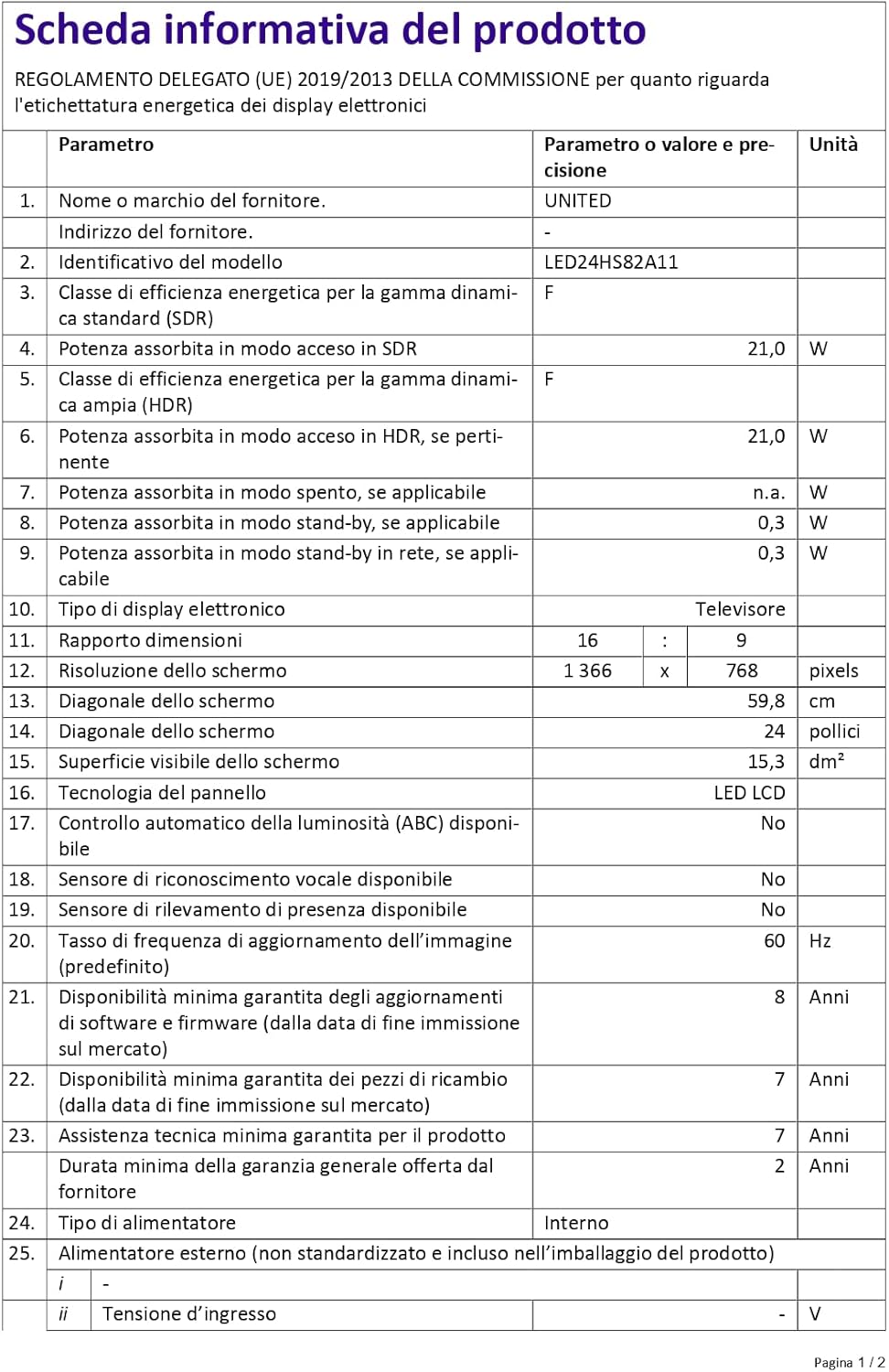
Figure 4: A detailed product information sheet for the UNITED LED24HS82A11 TV, providing comprehensive technical specifications and compliance details.
For more detailed information, please refer to the official EPREL database: https://eprel.ec.europa.eu/qr/1087921
Garanti ve Destek
Your UNITED LED24HS82A11 TV comes with the following support and warranty provisions:
- Minimum General Warranty: 2 Yıl
- Teknik Destek İmkanı: 7 Yıl
- Yazılım Güncellemeleri Şu Tarihe Kadar Garantilidir: 8 Years from market placement date
- Yedek Parça Bulunabilirliği: 7 Years from market placement date
For technical support or warranty claims, please contact your retailer or the manufacturer's authorized service center. Keep your proof of purchase for warranty validation.