1. Giriş
This manual provides essential information for the safe and efficient operation of your KLIM K9000 Portable Air Conditioner. Please read it thoroughly before use and retain it for future reference. The KLIM K9000 is a versatile 3-in-1 unit offering cooling, dehumidification, and fan functions.
2. Güvenlik Talimatları
To reduce the risk of fire, electrical shock, or injury, always follow these basic precautions:
- Cihazı kullanmadan önce tüm talimatları okuyun.
- Güç kaynağının ses seviyesiyle eşleştiğinden emin oluntagDerecelendirme etiketinde belirtilmiştir.
- Üniteyi hasarlı bir kablo veya fişle çalıştırmayın.
- Cihazı ısı kaynaklarından ve doğrudan güneş ışığından uzak tutun.
- Hava giriş ve çıkışlarını kapatmayın.
- Temizlemeden veya bakımını yapmadan önce daima ünitenin fişini çekin.
- Bu cihaz, fiziksel, duyusal veya zihinsel yetenekleri kısıtlı olan veya deneyim ve bilgi eksikliği bulunan kişiler (çocuklar dahil) tarafından, güvenliklerinden sorumlu bir kişi tarafından cihazın kullanımıyla ilgili olarak gözetim veya talimat sağlanmadığı sürece kullanılmak üzere tasarlanmamıştır.
- Cihazı ıslak ortamlarda veya su yakınında kullanmayınız.
- Yalnızca üretici tarafından önerilen aksesuarları kullanın.
3. Paket İçeriği
Paketin içinde tüm öğelerin mevcut olduğundan emin olun:
- KLIM K9000 Air Conditioner Unit
- Uzaktan kumanda
- Egzoz Hortumu
- Egzoz Portu
- Egzoz Hortumu Bağlantısı
- Drenaj Hortumu
- Window Seal Fixing Plate
- Window Cover Extension
- 2 AAA Alkaline Batteries (for remote control, if included)
4. Ürün Bittiview
The KLIM K9000 is a compact and efficient portable air conditioner designed to provide comfort in various environments. It integrates three primary functions: cooling, dehumidification, and fan operation.

Şekil 4.1: KLIM K9000 Portable Air Conditioner unit with remote control, illustrating air circulation.
Its 3-in-1 functionality allows it to cool rooms, circulate air as a fan, and reduce humidity levels, making it suitable for various climate control needs.

Şekil 4.2: The KLIM K9000 offers 3-in-1 comfort: cooling, dehumidifying, and fan functions, with a 9000 BTU cooling capacity.
5. Kurulum ve Kurulum
Proper installation is crucial for optimal performance. Follow these steps for quick setup:
- Konumlandırma: Place the unit on a flat, stable surface, ensuring at least 30 cm (12 inches) of space around it for proper airflow.
- Egzoz hortumunu takın: Connect the exhaust hose to the unit's exhaust port. Extend the hose and connect the window seal fixing plate or window cover extension.
- Pencere Kurulumu: Secure the window seal fixing plate or extension in a compatible window opening (sliding windows). For tilt windows, a separate seal kit is required and sold separately. Ensure the hot air is expelled outdoors.
- Güç Bağlantısı: Güç kablosunu topraklı bir elektrik prizine takın.
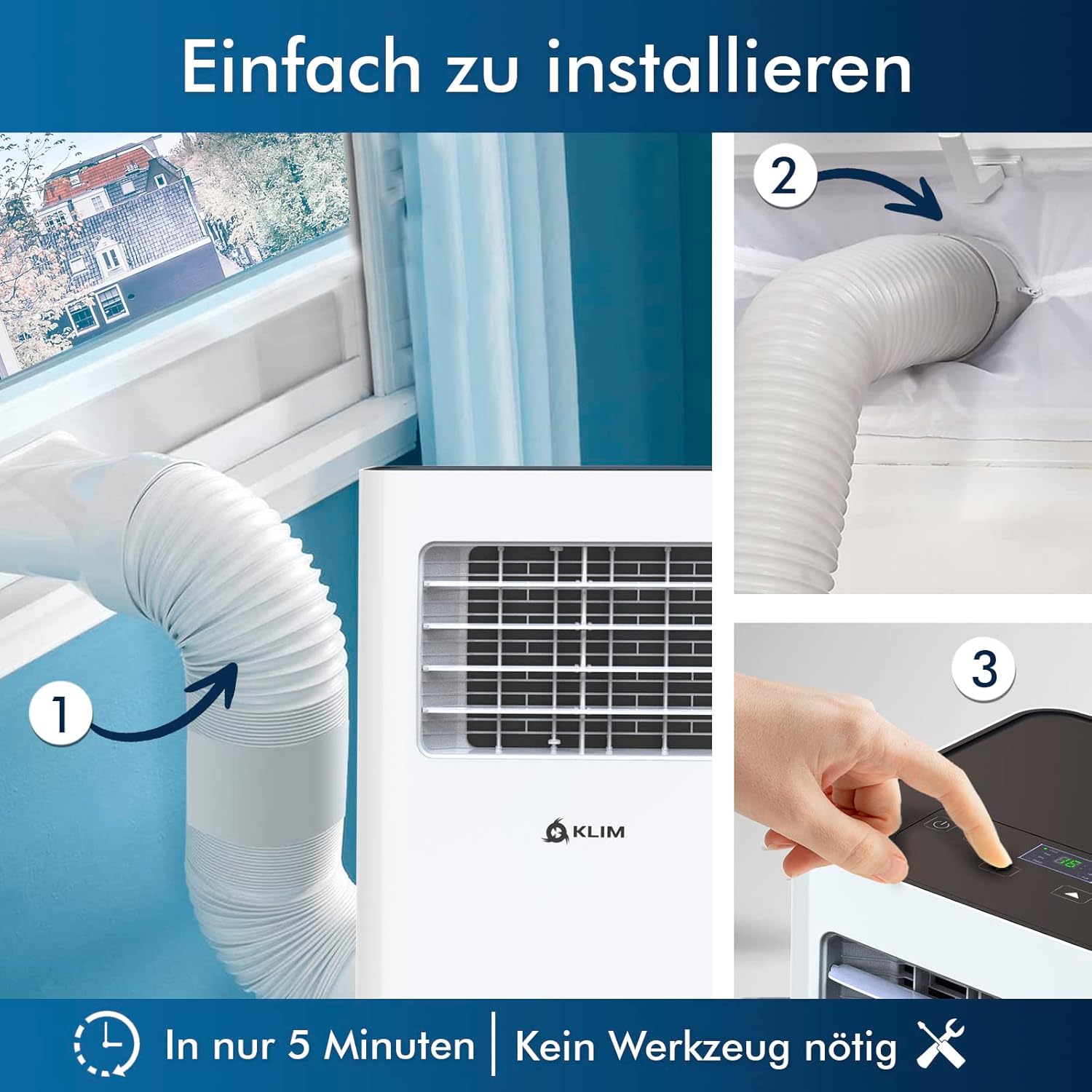
Şekil 5.1: Visual guide for quick installation, typically completed in 5 minutes without special tools.

Şekil 5.2: Illustration of window kit compatibility, showing options for sliding windows and mentioning a separate seal for tilt windows.
6. Kullanım Talimatları
The KLIM K9000 can be operated via the control panel on the unit or the included remote control.
6.1. Kontrol Paneli ve Uzaktan Kumanda
The remote control allows convenient operation from a distance. Ensure AAA batteries are correctly inserted. The control panel on the unit provides direct access to all functions.
6.2. Çalışma Modları
- Soğutma Modu: Activates the compressor to cool the room. Set your desired temperature (down to 16°C). This mode is effective for rooms up to 20 m² (80 m³).
- Fan Modu: Circulates air without cooling. Adjustable fan speeds are available.
- Nem Alma Modu: Removes excess moisture from the air. In this mode, the unit collects water, which will need to be drained.
- Uyku modu: Designed for quiet operation during rest. The unit operates at a reduced noise level (approx. 65 dB) and may adjust temperature settings automatically for comfort.

Şekil 6.1: The sleep mode provides a cool and quiet environment for restful sleep, operating at approximately 65 dB.
To switch between modes, press the "Mode" button on the control panel or remote control.
7. Bakım
Regular maintenance ensures the longevity and efficiency of your KLIM K9000.
7.1. Hava Filtresinin Temizlenmesi
The air filter should be cleaned every two weeks or more frequently depending on usage. A dirty filter can reduce cooling efficiency and airflow.
- Klimanın fişini prizden çekin.
- Hava filtresini bulun ve çıkarın (genellikle ünitenin arkasında veya yan tarafında bulunur).
- Filtreyi ılık sabunlu suyla yıkayın. İyice durulayın ve tekrar takmadan önce tamamen kurumasını bekleyin.
- Kuru filtreyi yeniden takın ve cihazı tekrar prize takın.
7.2. Su Drenajı
The unit features an auto-evaporation system in cooling mode, reducing the need for frequent drainage. However, in high humidity or dehumidifier mode, water will accumulate and needs to be drained.
- Sürekli Drenaj: For continuous dehumidification, attach the drainage hose to the drain outlet and direct it to a suitable container or floor drain.
- Manuel Drenaj: When the internal water tank is full, the unit may stop operating and display an indicator. To drain manually, unplug the unit, place a shallow pan or tray under the drain plug, and remove the plug. Be aware that the internal water container can be cumbersome to empty, and it may require two people to safely tilt the unit for complete drainage if using the bottom drain.
8. Sorun Giderme
Yaygın sorunlar ve çözümleri için bu bölüme bakın.
| Sorun | Olası Neden | Çözüm |
|---|---|---|
| Ünite açılmıyor. | Elektrik yok, sigorta atmış, su deposu dolu. | Elektrik kablosunu kontrol edin, sigortayı sıfırlayın, su deposunu boşaltın. |
| Yetersiz soğutma. | Dirty air filter, blocked air intake/outlet, open windows/doors, room too large, exhaust hose not properly installed. | Clean filter, clear obstructions, close windows/doors, ensure proper exhaust hose installation. |
| Birim gürültülü. | Normal operation sound (compressor/fan), unit not on a level surface. | The unit operates at approximately 65 dB, which is normal. Ensure it is on a flat surface. |
| Su sızıntısı. | Drain plug not securely closed, drainage hose improperly connected. | Check drain plug, ensure drainage hose is securely attached and not kinked. |
Bu çözümleri denedikten sonra sorun devam ederse lütfen müşteri desteğiyle iletişime geçin.
9. Özellikler
| Marka | Klim |
| Model Numarası | K9000WH |
| Soğutma Kapasitesi | 9000 BTU |
| Önerilen Oda Boyutu | 20 m²'ye (80 m³) kadar |
| Fonksiyonlar | Soğutma, Nem Alma, Fan |
| Enerji Verimliliği Sınıfı | A |
| Yıllık Elektrik Tüketimi | 960 Watt |
| Gürültü Seviyesi | 65 Desibel |
| Soğutucu | R-290 (Natural Refrigerant) |
| Boyutlar (U x G x Y) | 29.5x32.5x70.4 cm |
| Ağırlık | 25.58 kilo |
| Malzeme | ABS |
| Güç Kaynağı | Elektrik kablosu |

Şekil 9.1: The KLIM K9000's high energy efficiency (Class A) contributes to cost savings and environmental protection.
10. Garanti ve Destek
The KLIM K9000 Portable Air Conditioner comes with a 5 yıllık garantiKalitesi ve performansı konusunda gönül rahatlığı sağlar.
For technical assistance, warranty claims, or any questions not covered in this manual, please contact KLIM customer support through their official website or the retailer where the product was purchased. Please have your model number (K9000WH) and purchase date ready.


