1. Giriş
Thank you for choosing the Perlegear Full Motion TV Wall Mount, Model PGLF4. This manual provides essential information for the safe and correct installation, operation, and maintenance of your TV wall mount. Please read these instructions thoroughly before beginning installation and keep them for future reference.
2. Güvenlik Bilgileri
WARNING: Failure to read and follow these instructions may result in personal injury, property damage, or voiding your warranty. If you do not understand these instructions or have doubts about the safety of the installation, please contact customer support or a qualified installer.
- This product is designed for installation on 12"/16" wood studs, solid concrete, or concrete block walls. Yalnızca alçıpan üzerine montaj yapmayın.
- Ensure the wall structure can safely support the combined weight of the mount and your TV. The maximum weight capacity for this mount is 132 lbs (60 kg).
- Verify your TV's VESA pattern and weight are within the specified limits before installation.
- Use only the mounting hardware provided. If any parts are missing or defective, contact Perlegear customer service.
- Ahşap kirişlerin yerini doğru bir şekilde tespit etmek için her zaman kiriş bulucu kullanın.
- Do not overtighten screws, as this may cause damage and reduce the mount's stability.
- Montaj sırasında çocukları uzak tutunuz.
3. Paket İçeriği
Please check to ensure all components are included and undamaged:
- Mafsallı Kollu Duvar Plakası Montajı
- TV Askı Aparatları (2 adet)
- Mounting Hardware Kit (various screws, washers, spacers for TV and wall)
- Su Terazisi
- Sondaj Şablonu
- Cable Ties (Velcro straps)
- Kullanım Kılavuzu
4. Ürün Özellikleri
- Ağır Hizmet Tipi İnşaat: Made from robust alloy steel, designed to securely hold TVs up to 132 lbs.
- Geniş TV Uyumluluğu: Supports most 37-85 inch flat or curved TVs.
- VESA Uyumluluğu: Compatible with VESA patterns from 200x100mm to 600x400mm.
- Tam Hareket Ayarlamaları:
- Tool-Free Tilt: Adjust your TV 15° forward and 5° backward to reduce glare and optimize viewIng.
- Döner: Swivel your TV up to 45° left or right for flexible viewaçıları.
- Uzatma ve Geri Çekme: Extends up to 16.9 inches (43 cm) from the wall for immersive viewing and retracts to a slim 2.72 inches (6.9 cm) for a clean profile.
- Gelişmiş Stabilite: Features durable articulating arms, anti-drop end caps, and security locks to keep your TV safely in place.
- Montaj Sonrası Tesviye: Allows for a ±3° leveling adjustment after mounting to ensure a perfectly level screen.
5. Uyumluluk
Before installation, ensure your TV meets the following criteria:
- Televizyon Boyutu: Fits most 37-85 inch TVs.
- Televizyonun Ağırlığı: Your TV must weigh no more than 132 lbs (60 kg).
- VESA Modeli: The mounting holes on the back of your TV must match one of the following VESA patterns: 200x100mm, 200x200mm, 300x200mm, 300x300mm, 400x200mm, 400x300mm, 400x400mm, 500x400mm, 600x400mm.
- Duvar Tipi: Suitable for 12"/16" wood stud walls, solid concrete walls, or concrete block walls. Yalnızca alçıpan üzerine montaj yapmayın.

This image illustrates the wide compatibility of the mount, supporting TVs from 37 to 85 inches and various VESA patterns.

This diagram shows the supported wall types for installation: concrete, block walls, and 12-inch or 16-inch wood studs. It explicitly warns against mounting on drywall only.
6. Kurulum ve Kurulum
Follow these general steps for installation. Refer to the detailed instructions provided in your package for specific diagrams and hardware usage.
6.1 Kurulum Öncesi Kontrol Listesi
- Ensure you have all necessary tools (e.g., drill, stud finder, screwdriver, pencil).
- Confirm your TV and wall meet the compatibility requirements.
- Have a helper available, especially for lifting the TV.
6.2 Kurulum Adımları
- Attach TV Brackets to Your TV: Secure the vertical TV brackets to the back of your television using the appropriate screws, washers, and spacers from the hardware kit. Ensure they are centered and securely fastened.
- Mount the Wall Plate Assembly:
- Use a stud finder to locate the center of your wood studs or mark the desired position on concrete/block walls.
- Position the drilling template on the wall at your desired height and mark the pilot hole locations.
- Drill pilot holes according to the instructions for your wall type.
- Attach the wall plate assembly to the wall using the provided lag bolts and washers. Ensure it is level and securely tightened.
- Hang Your TV: Carefully lift your TV (with attached brackets) and hook the brackets onto the wall plate assembly. Engage the security locks to prevent accidental dislodgement.

This image shows the use of the handy drilling template to mark precise locations for mounting screws on the wall, simplifying the installation process.

This image displays the Perlegear TV wall mount securely installed on a wall, highlighting its maximum weight capacity of 132 lbs.
This video provides a full review and demonstration of the Perlegear TV mount, including aspects of its installation and functionality.
7. Kullanım Talimatları
Once installed, your Perlegear PGLF4 mount allows for various adjustments to achieve optimal viewIng.
- Eğim Ayarı: The mount features tool-free tilt. Locate the tilt adjustment levers on the TV brackets. Loosen them to adjust the TV's vertical angle (15° forward, 5° backward), then tighten to secure.
- Döndürme Ayarı: Gently push or pull the TV to swivel it left or right (up to 45° in each direction) along the articulating arms.
- Uzatma ve Geri Çekme: Extend the TV out from the wall by pulling it forward (up to 16.9 inches) or push it back towards the wall to retract (to 2.72 inches).
- Montaj Sonrası Tesviye: If your TV appears slightly unlevel after installation, use the ±3° leveling adjustment feature to fine-tune its horizontal position. Refer to your detailed manual for specific instructions on how to access and use this feature.

This image demonstrates the mount's ability to tilt the TV +5° to -15° and swivel ±45°, providing the best view from any seat.

This image shows a hand utilizing the tool-free tilt mechanism, allowing for easy adjustment of the TV's vertical angle without additional tools.
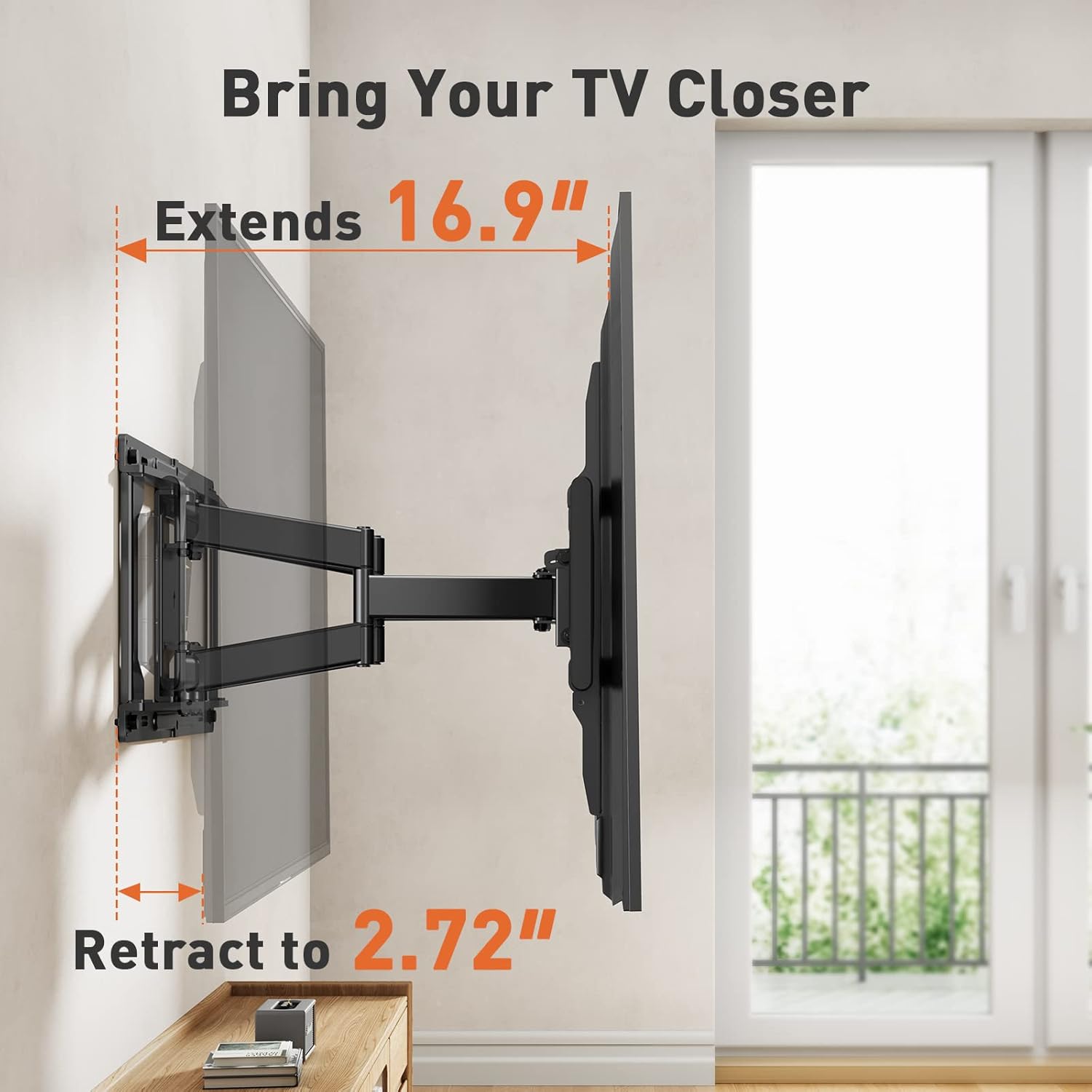
This image illustrates the mount's extension capability, allowing the TV to be pulled out 16.9 inches from the wall and retracted to a compact 2.72 inches.
8. Bakım
Düzenli bakım, TV duvar askılığınızın uzun ömürlü ve güvenli çalışmasını sağlar.
- Temizlik: Wipe the mount with a soft, dry cloth to remove dust. Do not use abrasive cleaners or solvents.
- Bağlantıları Kontrol Edin: Tüm vidaları ve cıvataları periyodik olarak kontrol ederek sıkı olduklarından emin olun. Gerekirse tekrar sıkın, ancak aşırı sıkmayın.
- Hasarı Kontrol Edin: Regularly inspect the mount for any signs of wear, damage, or corrosion. If any issues are found, discontinue use and contact customer support.
9. Sorun Giderme
If you encounter any issues during or after installation, refer to the following common solutions:
- Televizyon Düz Değil: Use the post-installation leveling adjustment feature (±3°) to correct the TV's horizontal alignment.
- Difficulty Moving/Adjusting TV: Ensure all adjustment levers and bolts are sufficiently loosened before attempting to move the TV. If the mount feels stiff, check for any obstructions or overtightened components.
- Dağın Dengesiz Olduğu Hissediliyor: Recheck all wall and TV connections. Ensure lag bolts are securely fastened into studs or appropriate anchors in concrete. Verify the TV's weight does not exceed the mount's capacity.
- Kayıp parçalar: If any parts are missing from your package, contact Perlegear customer support immediately.
10. Özellikler
| Şartname | Detay |
|---|---|
| Marka | perlegear |
| Model Numarası | PGLF4 |
| TV Boyutu Uyumluluğu | 37-85 inç |
| Maksimum Ağırlık Kapasitesi | 132 lbs (60 kg) |
| VESA Uyumluluğu | 200x100mm ila 600x400mm |
| Eğim Açısı | +15° / -5° |
| Dönme Açısı | ±45° |
| Duvar uzantısı | 2.72 inç (6.9 cm) ila 16.9 inç (43 cm) |
| Kurulum Sonrası Tesviye | ±3° |
| Duvar Tipi Uyumluluğu | 12"/16" Wood Studs, Solid Concrete, Concrete Block |
| Malzeme | Alaşımlı Çelik |
| Renk | Siyah |
11. Garanti ve Destek
Perlegear provides a limited warranty for this product. For detailed warranty information, please refer to the warranty card included in your package or visit the official Perlegear webalan.
Should you have any issues or questions, please do not hesitate to contact us:
- ABD/Kanada: 1-800-456-5231 (Mon-Fri, 8am-8pm CST)
- UK/DE: 44-808-196-4165 (Mon-Fri, 2pm-10pm UTC)
- E-posta: destek@perlegear.com
- Webalan: www.perlegear.com


