Ürün Bittiview
The CONBOLA Bladeless Desk Fan (Model TF001) is a versatile and portable cooling device designed for various indoor and outdoor settings. It features a 10000mAh rechargeable battery, offering extended cordless operation. The fan includes adjustable speed settings, an oscillation function, a timer, and an LED light. Its bladeless design enhances safety, making it suitable for households with children and pets.

Şekil 1: The CONBOLA Bladeless Desk Fan, showcasing its sleek design, internal battery, and USB-C charging cable.
Kurmak
1. Kutunun Açılması ve İnceleme:
Carefully remove all components from the packaging. Verify that all parts are present and undamaged. The package should contain the fan unit, a base, and a USB to C-type charging cable. Note that a power adapter is not included.
2. Attaching the Base:
Align the fan unit with the provided circular base. Gently push the fan into the base until it snaps securely into place. The base provides stability for the fan, especially during oscillation.
3. İlk Şarj:
Before first use, fully charge the fan. Connect the provided USB to C-type cable to the USB-C port located at the base of the fan. Connect the other end of the cable to a compatible USB power source (e.g., computer USB port, USB wall adapter - not included). A full charge takes approximately 5 hours. The fan's HD LED display will indicate the battery level.

Şekil 2: The fan's dimensions (16.22 inches tall, 6.5 inches diameter at base) and its 10000mAh battery capacity, highlighting its portability and long-lasting power.
Kullanım Talimatları
The CONBOLA Bladeless Desk Fan features a user-friendly 4-button control system located on the top of the unit, along with a manual knob for vertical airflow adjustment.

Şekil 3: Close-up of the fan's control panel, showing the buttons for speed, oscillation, timer, and LED light.
Güç Açma/Kapama ve Hız Ayarı:
Basın Güç Düğmesi (usually indicated by a power symbol) to turn the fan on. Each subsequent press will cycle through the 3 available speed settings (1, 2, 3). Pressing it a fourth time will turn the fan off. The current speed setting is displayed on the HD LED screen.
Salınım Fonksiyonu:
Basın Salınım Düğmesi (often a circular arrow symbol) to activate the 90° oscillating feature. This allows the fan to distribute cool air across a wider area. Press the button again to stop oscillation.
Zamanlayıcı Ayarı:
Kullanın Zamanlayıcı Düğmesi (clock symbol) to set an auto-off timer. Available settings are 1, 2, or 4 hours. The fan will automatically turn off after the selected duration.
LED Işık Kontrolü:
Basın LED Işık Düğmesi (light bulb symbol) to turn the integrated LED light on or off. This feature can provide ambient lighting.
Manual Airflow Adjustment:
A manual knob located on the side of the fan allows for up-down adjustment of the airflow direction. This provides precise control over where the cool air is directed.
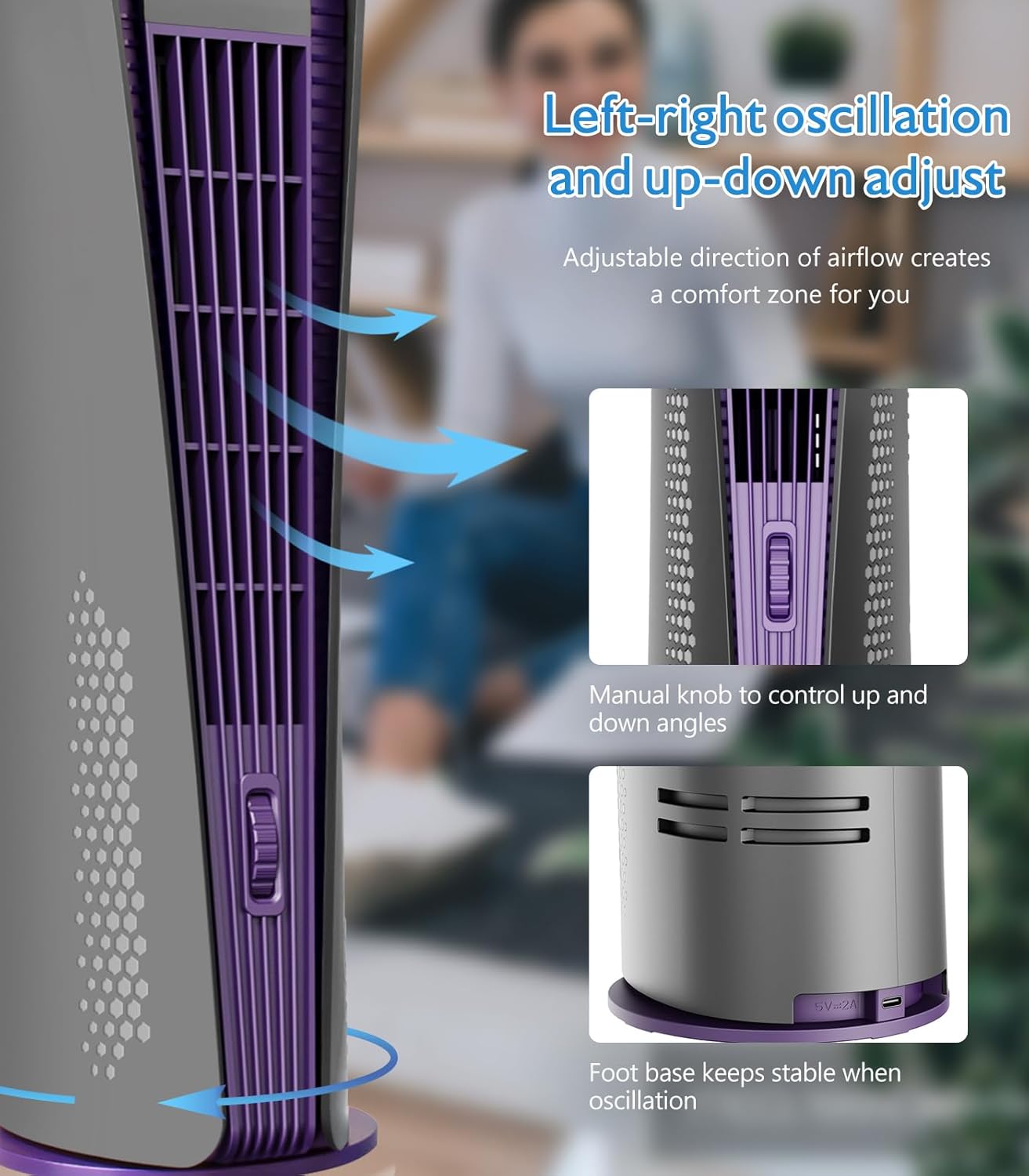
Şekil 4: Illustration of the fan's left-right oscillation and the manual knob for adjusting the up-down airflow direction.
Bakım
Regular maintenance ensures optimal performance and longevity of your CONBOLA Bladeless Desk Fan.
Fanın Temizlenmesi:
Due to its bladeless design, cleaning is simplified. Use a soft, dry cloth to wipe down the exterior surfaces of the fan. For dust accumulation within the air vents, a soft brush or compressed air can be used. Ensure the fan is turned off and unplugged (if charging) before cleaning.
Pil Bakım:
To prolong battery life, avoid completely draining the battery frequently. Recharge the fan when the battery indicator shows low power. If storing the fan for an extended period, charge it to approximately 50% and recharge every few months to prevent deep discharge.
Güvenlik Özelliği:
The bladeless design with a narrow fence ensures safety, preventing children and pets from accidental contact with moving parts.

Şekil 5: The bladeless design of the fan, emphasizing its safety for use around children and pets.
Sorun giderme
| Sorun | Olası Neden | Çözüm |
|---|---|---|
| Fan çalışmıyor. | Pil bitmiş. | Charge the fan using the provided USB-C cable. Ensure the charging port is secure. |
| Kısa pil ömrü. | High speed setting or continuous use. | Battery life varies with speed (8-24 hours). Use lower speed settings for longer operation. Ensure the battery is fully charged before use. |
| Airflow is not strong enough. | Fan speed is too low or fan is too far away. | Increase the fan speed to level 3. Position the fan closer to your personal space. Adjust the manual knob for optimal airflow direction. |
| Vantilatör alışılmadık bir ses çıkarıyor. | Obstruction in air intake/outlet or internal issue. | Ensure no foreign objects are blocking the air vents. If the noise persists, contact customer support. |
Özellikler
- Marka: KOMBOL
- Model Adı: TF001
- Renk: Gri
- Elektrikli Fan Tasarımı: Masa Vantilatörü
- Güç Kaynağı: Pil ile çalışır
- Stil: Modern
- Ürün Ölçüleri: 6.69"D x 5.9"G x 16.53"Y
- Özellik: Manual Airflow Adjustment, Oscillating, LED Light, Timer
- Gürültü Seviyesi: 52 dB
- Netage: 5 watt
- Cilttage: 5 Volt
- Anahtar Türü: Basmalı Düğme
- Dahil Bileşenler: Cord (USB to C-type cable)
- İç/Dış Mekan Kullanımı: İç mekan, dış mekan
- Şartname Karşılandı: FCC
- Kontrol Yöntemi: Dokunmak
- Işık Türü: NEDEN OLMUŞ
- Bağlantı Tipi: USB Tip C
- Bıçak Malzemesi: Plastik
- Tekrar kullanılabilirlik: Şarj edilebilir
- Yeterlik: Enerji verimliliği
- Kablosuz mu?: Evet
- Güç Seviyesi Sayısı: 3
- Üretici: KOMBOL
- UPC: 764742717311
- Ürün Ağırlığı: 3.39 pound
- Piller: 1 Lityum İyon pil gereklidir (dahil)
- İlk Mevcut Tarih: 1 Mayıs 2023
Garanti ve Destek
Specific warranty details for the CONBOLA Bladeless Desk Fan (Model TF001) are typically provided with the product packaging or available on the manufacturer's official website. Please refer to these resources for comprehensive warranty information, including coverage duration and terms.
For technical support, troubleshooting assistance, or any inquiries regarding your CONBOLA product, please contact CONBOLA customer service. Contact information can usually be found on the product packaging, the official CONBOLA websitenizden veya satın alma noktanızdan.
Official product videos from the seller were not available for embedding in this manual.

