1. Giriş
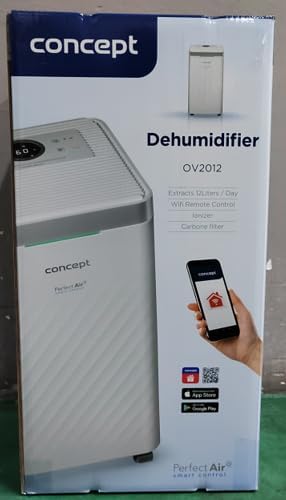
The Concept OV2012 is a versatile appliance designed to improve indoor air quality by combining dehumidification with air purification. This device effectively reduces excess humidity, which can contribute to mold growth and discomfort, while simultaneously filtering airborne pollutants. It features a triple filtration system, intuitive touch controls, and smart app connectivity for convenient operation.

Şekil 1: Ön view of the Concept OV2012 Dehumidifier.
2. Güvenlik Bilgileri
Cihazı kullanmadan önce lütfen tüm güvenlik talimatlarını dikkatlice okuyun. Bu talimatlara uyulmaması elektrik çarpmasına, yangına veya ciddi yaralanmalara neden olabilir.
- Güç kaynağı hacmini sağlayıntage cihazın üzerindeki derecelendirme etiketiyle eşleşiyor.
- Üniteyi hasarlı bir güç kablosu veya fişiyle çalıştırmayın.
- Cihazı sudan ve diğer sıvılardan uzak tutun. Suya batırmayın.
- Hava giriş ve çıkışlarını engellemeyin. Uygun hava akışı için ünitenin etrafında yeterli boşluk olduğundan emin olun.
- Temizlik, bakım öncesinde veya uzun süre kullanılmadığında cihazın fişini çekin.
- Bu cihaz, gözetim veya talimat verilmedikçe, fiziksel, duyusal veya zihinsel yetenekleri kısıtlı olan veya deneyim ve bilgi eksikliği bulunan kişiler (çocuklar dahil) tarafından kullanılmak üzere tasarlanmamıştır.
- Cihazı yanıcı gaz veya buharların bulunduğu alanlarda kullanmayın.
3. Ürün Bileşenleri
Familiarize yourself with the main parts of your Concept OV2012 dehumidifier.
- Kontrol Paneli: Touch-sensitive interface for setting modes and functions.
- Hava çıkışı: Where processed air is released.
- Hava Girişi/Filtre Kapağı: Located at the rear, provides access to the air filters.
- Su Tankı: Yoğuşmuş suyu toplar.
- Sürekli Drenaj Çıkışı: Port for attaching a hose for continuous water drainage.
- 360° Rolling Wheels: Ünitenin kolay hareket ettirilmesi için.

Şekil 2: Arka view of the dehumidifier, showing air intake and water tank.
4. Kontrol Paneli ve Ekran
The OV2012 features an intuitive touch control panel with a digital display and LED indicators.
Şekil 3: Ayrıntılı view of the touch control panel.
- Güç Düğmesi: Üniteyi açar veya kapatır.
- Mod Seçimi: Cycles through operating modes (Automatic, Continuous, Laundry Drying, Fan).
- Humidity Slider/Buttons: İstenilen nem seviyesini ayarlar.
- Zamanlayıcı Düğmesi: Sets the delayed on/off time (up to 24 hours).
- Fan Hızı: Adjusts fan speed (usually two levels).
- İyonlaştırıcı Düğmesi: İyonlaştırıcı fonksiyonunu etkinleştirir veya devre dışı bırakır.
- LED Nem Göstergesi: Changes color based on current room humidity:
- Kırmızı: High humidity (RH > 70%)
- Yeşil: Satisfactory humidity (70% ≥ RH ≥ 50%)
- Mavi: Low humidity (RH < 50%)
5. İlk Kurulum
- Paketin açılması: Nem alma cihazınızı ambalajından dikkatlice çıkarın. Gelecekteki depolama veya taşıma için ambalajı saklayın.
- Atama: Place the unit on a firm, level surface. Ensure there is at least 20 cm of clear space around all sides for optimal airflow. The 360° rolling wheels allow for easy positioning.
- Güç Bağlantısı: Güç kablosunu topraklı bir elektrik prizine takın.
- Su Tankı: Su deposunun üniteye doğru şekilde takıldığından emin olun.
6. Çalışma Modları
The OV2012 offers four distinct operating modes to suit various needs:
- Otomatik Mod: The dehumidifier automatically maintains the humidity level you select. The unit will cycle on and off to achieve and sustain the target humidity.
- Sürekli Çalışma: Ideal for long-term drying of very wet areas. In this mode, the unit runs continuously regardless of the ambient humidity. It is recommended to use the continuous drainage hose in this mode.
- Çamaşır Kurutma Modu: Accelerates the drying of laundry and helps prevent moisture buildup in the room, reducing the risk of mold.
- Fan Mode (Air Purification without Dehumidification): In this mode, the compressor is off, and only the fan and filtration system operate to purify the air without removing moisture.
Using the Concept Home Mobile Application
The OV2012 can be controlled remotely via the Concept Home mobile application, available for iOS and Android devices. This app allows you to:
- Üniteyi açın veya kapatın.
- Select desired operating modes.
- Check the current air status in the room.
- Create a precise operating schedule for the dehumidifier.

Figure 4: The Concept Home mobile application for remote control.
7. Su Drenajı
Su Deposu Drenajı
When the 2.2-liter water tank is full, the unit will automatically shut off, and an indicator light will illuminate. Carefully remove the water tank, empty it, and reinsert it securely to resume operation.
Sürekli Drenaj
For continuous operation without needing to empty the water tank, attach the included hose to the continuous drainage outlet. Direct the hose to a suitable drain, ensuring it is sloped downwards for proper water flow. This allows the unit to operate uninterrupted.
8. Bakım ve Temizlik
Düzenli bakım, nem alma cihazınızın optimum performans göstermesini ve uzun ömürlü olmasını sağlar.
Filtre sistemi
The OV2012 features a triple filter system:
- Toz Filtresi: Captures coarse impurities like dust particles, hair, fur, and pollen. This filter should be cleaned regularly.
- Aktif karbon filtresi: Absorbs toxic, suffocating, and foul-smelling gases and vapors, such as formaldehyde, benzene, and cigarette smoke. This filter requires periodic replacement (Optional accessory: Carbon filter - 42394390).
- iyonlaştırıcı: Refreshes and purifies the air by increasing negatively charged ions, neutralizing odors and absorbing positively charged particles, viruses, and bacteria.
To clean the dust filter, remove the rear filter cover, gently remove the filter, and clean it with a vacuum cleaner or rinse it with water. Ensure it is completely dry before reinserting. Replace the activated carbon filter as recommended by the manufacturer or when you notice a decrease in odor removal effectiveness.

Figure 5: Illustration of the triple filtration system.
Su Tankının Temizlenmesi
Periodically clean the water tank with mild detergent and warm water to prevent mold and bacterial growth. Rinse thoroughly and dry before reinserting.
Dış Temizlik
Ünitenin dışını yumuşak bir bezle silin.amp bezle silin. Aşındırıcı temizleyiciler veya çözücüler kullanmayın.
9. Sorun Giderme Kılavuzu
Nem gidericinizle ilgili sorunlarla karşılaşırsanız, aşağıdaki yaygın sorunlara ve çözümlere bakın:
| Sorun | Olası Neden | Çözüm |
|---|---|---|
| Ünite açılmıyor | Elektrik yok; Su deposu dolu veya yanlış takılmış. | Check power cord connection; Empty and reinsert water tank correctly. |
| Nem alma yok | Room temperature too low; Air filters clogged; Humidity setting too high. | Ensure room temperature is above 5°C; Clean or replace filters; Lower the desired humidity setting. |
| Ünite gürültülü | Ünite düz bir yüzeyde değil; Hava filtresi tıkalı. | Place unit on a flat, stable surface; Clean or replace air filters. |
| Water tank full indicator remains on after emptying | Water tank not fully inserted; Sensor malfunction. | Push the water tank firmly into place; If problem persists, contact customer support. |
Bu çözümleri denedikten sonra sorun devam ederse lütfen müşteri desteğiyle iletişime geçin.
10. Teknik Özellikler
| Özellik | Şartname |
|---|---|
| Model Numarası | OV2012 |
| Dehumidification Performance (max) | 12 liters/day (at 30°C, 80% RH) |
| Su Tankı Hacmi | 2.2 litre |
| Güç Tüketimi | 210 W (Note: Product description also mentions 245W, refer to product label for exact value) |
| Gürültü Seviyesi | ≤ 45 dB |
| Boyutlar (G x D x Y) | 250 x 250 x 460 mm (25 x 25 x 46 cm) |
| Ürün Ağırlığı | 10.82 kilo |
| Kablo Uzunluğu | 1.8 metre |
| Çalışma Modları | 4 (Automatic, Continuous, Laundry Drying, Fan) |
| Filtre sistemi | Dust filter, Activated Carbon filter, Ionizer |
| Kontrol | Touch control, Mobile App (Concept Home) |
| Özel Özellikler | Automatic Shut-off, Timer, 360° wheels, LED Humidity Indicator |

Şekil 6: Ürün boyutları.
11. Garanti ve Müşteri Desteği
For warranty information, please refer to the warranty card included with your product or contact your local Concept distributor. For technical support, spare parts, or service inquiries, please contact Concept customer service. Contact details may be found on the product packaging or the official Concept webalan.
Example contact information from product packaging (may vary by region):
- CZ: Zavolejte nám +420 465 471 400, www.my-concept.cz
- SK: Zavolajte nám +421 326 583 465, www.my-concept.sk
- Türkçe: Zadzwoń do nas +48 71 339 04 44, www.my-concept.pl


