1. Ürün Bittiview
The Phanteks Eclipse G500A DRGB is a high-performance mid-tower chassis designed to accommodate modern PC components with excellent airflow and integrated D-RGB lighting. It features an Ultra-fine Performance Mesh on both the front and top panels, ensuring optimal cooling and dust filtration.

Figure 1: Phanteks Eclipse G500A DRGB Mid Tower Case, Matte White.
Temel Özellikler:
- Yüksek Hava Akışı Tasarımı: Ultra-fine Performance Mesh on front and top panels for superior cooling and dust filtration.
- Entegre D-RGB Aydınlatma: Built-in D-RGB lighting on the front and side, controllable via manual buttons or motherboard synchronization.
- Önceden yüklenmiş Fanlar: Includes three high-performance M25-140 D-RGB fans.
- Kapsamlı Soğutma Desteği: Supports up to 420mm radiators in the front and 360mm in the top.
- Geniş İç Mekan: Accommodates full-length GPUs and offers vertical GPU mounting options (with optional bracket).
- Esnek Depolama: Multiple HDD and SSD locations, including dedicated SSD brackets and stackable HDD bays.
- Modern Ön Giriş/Çıkış: Features 10Gbps USB-C, 2x USB 3.0, Microphone/Headphone Combo, Power button, and D-RGB controls.
2. Kurulum ve Kurulum
This section provides general guidelines for installing components into your Phanteks Eclipse G500A DRGB chassis. Always refer to your component manuals for specific installation instructions.
2.1 Şasinin Hazırlanması
Before installing components, ensure the chassis is placed on a stable, flat surface. Remove the side panels by gently pulling them open (they are hinged) to access the interior.
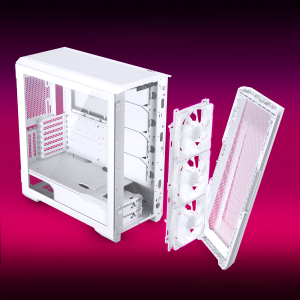
Figure 2: The removable front panel allows for easy installation of fans and radiators.
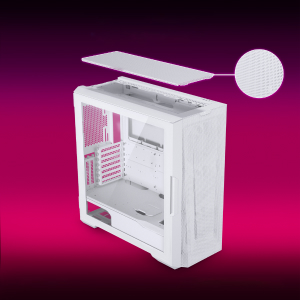
Figure 3: The removable top mesh panel facilitates fan and radiator installation.
2.2 Anakart Kurulumu
The G500A supports ATX, micro-ATX, mini-ITX, and E-ATX motherboards (up to 280mm wide). Install the necessary standoffs for your motherboard form factor, then secure the motherboard with screws.
2.3 Güç Kaynağı Ünitesi (PSU) Kurulumu
Install the PSU at the bottom rear of the chassis. The G500A supports PSUs up to 250mm in length (195mm if all 4 bottom HDD positions are used).
2.4 Depolama Aygıtı Kurulumu
The case offers extensive storage options:
- 2.5" SSD'ler: Up to 9 dedicated 2.5" drive bays are included.
- 3.5" HDD'ler: Two stackable 3.5" HDD bays are included, expandable up to a total of 10 HDD bays.

Figure 4: Multiple storage options for 2.5" and 3.5" drives.
2.5 Grafik Kartı (GPU) Kurulumu
The G500A supports graphics cards up to 435mm in length. For vertical GPU mounting, an optional bracket (PH-VGPUKT4.0_03) or riser cable is required.
2.6 Soğutma Sistemi Kurulumu
The chassis supports various fan and radiator configurations:
- Taraftar Desteği:
- Front: 3x 120mm or 3x 140mm (3x 140mm pre-installed)
- Üst kısım: 3 adet 120 mm veya 3 adet 140 mm
- Arka: 1x 120mm veya 1x 140mm
- Liquid Cooling Radiator Support:
- Front: Up to 360mm (120mm radiator) or 420mm (140mm radiator)
- Top: Up to 360mm (120mm radiator) or 280mm (140mm radiator)
- Arka: 120mm
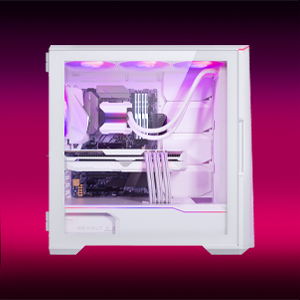
Figure 5: High-end cooling compatibility with various fan and radiator sizes.
2.7 Kablo Yönetimi
The G500A provides ample space and Velcro ties for efficient cable management, ensuring a clean interior and optimal airflow. Cover doors help to conceal cables on the backside of the motherboard tray.
2.8 Kurulum Videoları
Video 1: Detailed PC Build Guide in the Phanteks Eclipse G500A (13:33).
Video 2: Another comprehensive PC assembly guide featuring the Phanteks Eclipse G500A (14:01).
3. Kullanım Talimatları
3.1 Ön Giriş/Çıkış Paneli
Ön giriş/çıkış paneli, önemli bağlantı noktalarına ve kontrollere kolay erişim sağlar:
- Güç Düğmesi: Sisteminizi açmak/kapatmak için.
- USB 3.0 Bağlantı Noktaları (x2): USB 3.0 cihazlarını bağlamak için.
- USB-C Gen2 Port (x1): For high-speed USB-C connectivity.
- Mikrofon/Kulaklık Birleşik Girişi: Ses girişi ve çıkışı için.
- D-RGB Mode Button: Cycles through pre-programmed D-RGB lighting effects.
- D-RGB Color Button: Changes the color of the D-RGB lighting.

Figure 6: Front I/O panel with USB-C, USB 3.0, audio, and D-RGB controls.
3.2 D-RGB Lighting Control
The integrated D-RGB lighting can be controlled in two ways:
- Manuel kontrol: Use the D-RGB Mode and Color buttons on the front I/O panel to cycle through effects and colors without software.
- Anakart Senkronizasyonu: Connect the D-RGB controller to a compatible motherboard's D-RGB header to enable software control and synchronization with other D-RGB components.

Figure 7: Integrated D-RGB lighting with included M25-140 D-RGB fans.
4. Bakım
Düzenli bakım, PC bileşenlerinizin optimum performans ve uzun ömürlü olmasını sağlamaya yardımcı olur.
- Toz Filtreleme: The Ultra-fine Performance Mesh on the front and top panels acts as a dust filter. Periodically remove these panels and clean the mesh to maintain optimal airflow.
- İç Temizlik: Use compressed air to remove dust from inside the chassis, especially from fans, heatsinks, and other components. Ensure the system is powered off and unplugged before cleaning.
- Dış Temizlik: Dış yüzeyleri yumuşak, damp Bez. Aşındırıcı temizleyicilerden veya çözücülerden kaçının.
5. Sorun Giderme
Bu bölümde, bilgisayar kasanızla ilgili karşılaşabileceğiniz yaygın sorunlar ele alınmaktadır.
5.1 Güç Sorunları
- Sistem açılmıyor:
- Ensure all power cables (24-pin ATX, 8-pin CPU, GPU power) are securely connected to the motherboard and components.
- PSU anahtarının 'AÇIK' konumunda olduğundan emin olun.
- Ön panel güç anahtarı kablosunun anakartın F_PANEL başlığına doğru şekilde bağlı olduğundan emin olun.
5.2 D-RGB Lighting Issues
- D-RGB not lighting up or incorrect colors:
- Ensure the D-RGB cables from the fans and LED strips are correctly connected to the integrated D-RGB controller.
- If using motherboard synchronization, ensure the D-RGB controller is connected to the motherboard's D-RGB header and that the motherboard's lighting software is configured correctly.
- Verify the D-RGB controller is receiving power (e.g., via SATA power connector).
- Try cycling through modes and colors using the front I/O buttons to rule out software issues.
5.3 Fan Gürültüsü veya Arızası
- Aşırı fan gürültüsü:
- Fan kanatlarında toz birikmesi olup olmadığını kontrol edin ve gerekirse temizleyin.
- Ensure fans are securely mounted and not vibrating against the chassis.
- Verify fan speeds are controlled appropriately by the motherboard or fan controller.
- Fan dönmüyor:
- Check fan power connections to the motherboard or fan hub.
- Ensure fan headers are enabled in the BIOS/UEFI settings.
6. Özellikler
Detailed technical specifications for the Phanteks Eclipse G500A DRGB Mid Tower Case.
| Özellik | Şartname |
|---|---|
| Model Adı | Eclipse G500A DRGB, White |
| Ürün Model Numarası | PH-EC500GA_DMW01A |
| Form Faktörü | Orta kule |
| Boyutlar (UxGxY) | 19.69 x 9.45 x 20.28 inç (500 x 240 x 515 mm) |
| Ürün Ağırlığı | 23.2 pound |
| Malzeme | Çelik Şasi, Temperli Cam |
| Anakart Desteği | ATX, micro-ATX, mini-ITX, E-ATX (280 mm genişliğe kadar) |
| Genişleme Yuvaları | 7 |
| Dikey GPU Desteği | Yes (with optional bracket PH-VGPUKT4.0_03 or riser cable) |
| Dahili 3.5" Sürücü Yuvaları | 10 (2x included, expandable) |
| Dahili 2.5" Sürücü Yuvaları | 9 (9 adet dahil) |
| Ön G/Ç | 2x USB 3.0, USB-C Gen2, Microphone/Headphone Combo, Power Button, D-RGB Mode, D-RGB Color |
| Önceden yüklenmiş Fanlar | 3x M25-140 D-RGB (Front) |
| Maksimum GPU Uzunluğu | 435 mm / 17.2 inç |
| Maksimum CPU Soğutucu Yüksekliği | 185 mm |
| Maksimum PSU Uzunluğu | 195mm (if all 4 bottom HDD positions used) / 250mm (if 2 bottom HDD used) |
| Soğutma Yöntemi | Fan, Su |
7. Garanti ve Destek
Phanteks products are manufactured with high-quality standards. For warranty information and technical support, please refer to the official Phanteks websitesine gidin veya müşteri hizmetleriyle iletişime geçin.
İletişim Bilgileri:
- Webalan: www.phanteks.com
- Phanteks Taiwan Inc.: 11F., No. 150, Jian 1. Cadde, Zhonghe Bölgesi Yeni Taipei Şehri 235
- Importer EU (Axpertec Int B.V.): Sydneystraat 33, 3047 BP Rotterdam, The Netherlands
- Importer US (Axpertec Inc.): 20465 E Walnut Dr. N, City of Industry, California 91789, United States

Figure 8: Phanteks company and importer details, along with compliance markings (CE, UKCA, RoHS).


