1. Giriş
The MOES Fingerbot Plus is a smart button pusher designed to automate traditional buttons and switches in your home. It offers enhanced control through a touch interface and can be integrated with smart home ecosystems via the Smart Life App and a Tuya Bluetooth Hub for remote and voice control.

Image 1.1: MOES Fingerbot Plus with its accompanying smartphone application interface.
2. Temel Özellikler
- Smart Control for Traditional Appliances: Compatible with various buttons and switches (excluding touch screen buttons).
- Upgraded Touch Control: Features built-in touch buttons for direct control of the robot arm.
- Enhanced with Tuya Bluetooth Hub: Enables remote control, voice control (Alexa, Google Assistant), and timing functions.
- Kolay Kurulum: Attaches to surfaces next to switches or buttons using an adhesive sticker.
- Enerji Tasarrufu: Powered by a replaceable CR2 battery (included).

Image 2.1: The Fingerbot Plus is designed to work with various types of physical buttons and switches.
3. Paket İçeriği
Lütfen kutuyu açtığınızda tüm ürünlerin mevcut olduğundan emin olun:
- MOES Fingerbot Plus Akıllı Düğme Basıcı
- CR2 Pil (önceden takılı veya ayrı)
- Yapışkanlı Etiket
- Kullanım Kılavuzu (bu belge)
Note: Additional accessories like the Fingerbot Toolpack for specific switch types or the Tuya Bluetooth Hub are sold separately.
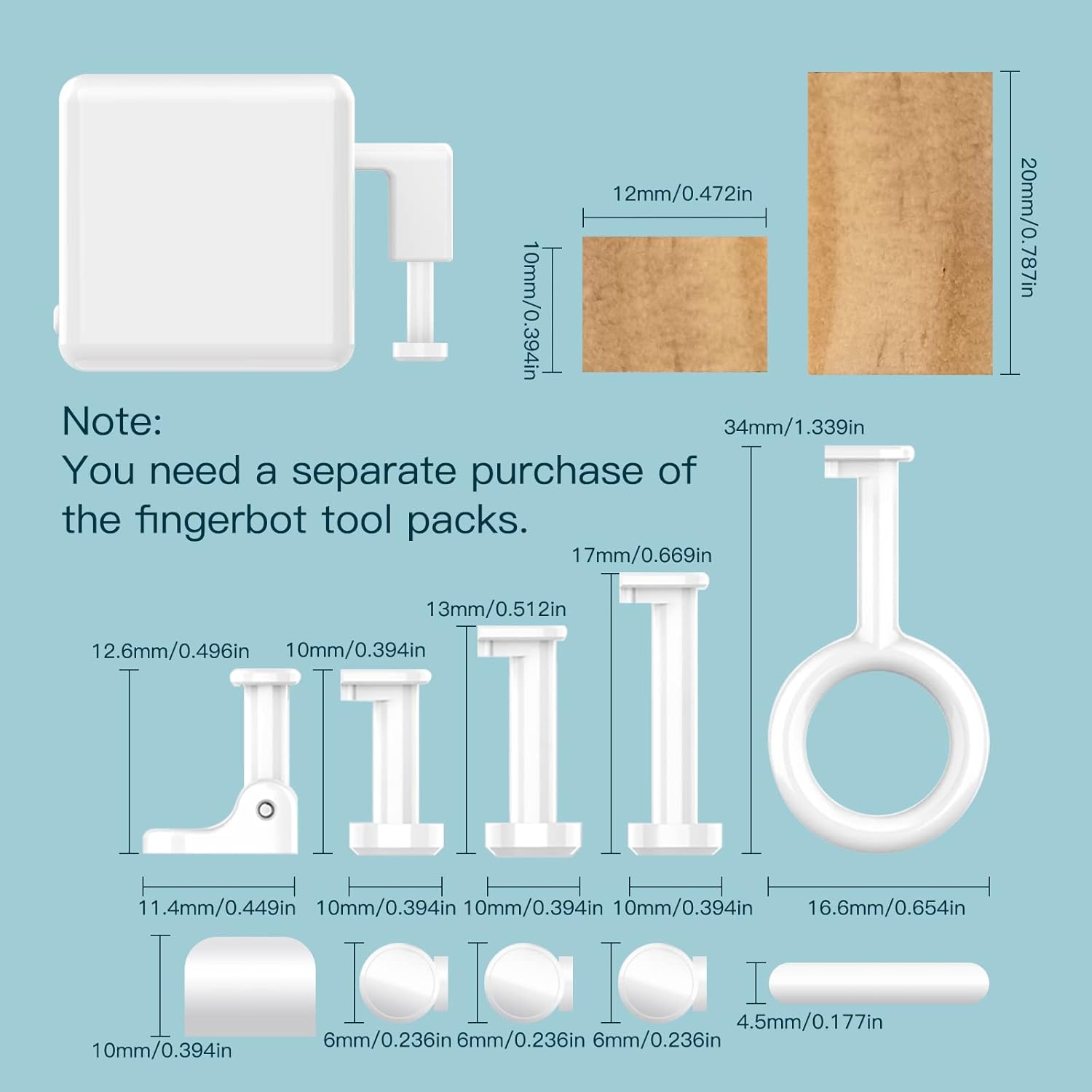
Image 3.1: The Fingerbot Toolpack, containing various adapters for different button and switch configurations, is available for separate purchase.
4. Kurulum
4.1. Pil Kurulumu
- Gently open the cover plate of the Fingerbot Plus.
- If present, remove the plastic insulating paper from the CR2 battery to activate power.
- Ensure the battery is correctly seated with the positive (+) and negative (-) terminals aligned.
- Close the cover plate securely.

Image 4.1: Remove the plastic strip to activate the battery.
4.2. Uygulama İndirme ve Eşleştirme
- İndir Akıllı Hayat or MOES Uygulaması Akıllı telefonunuzun uygulama mağazasından (iOS veya Android).
- Hesabınıza kaydolun veya giriş yapın.
- Long press the button inside the Fingerbot Plus until the indicator light flashes quickly to enter pairing mode.
- In the app, tap the "+" icon or "Add Device" and follow the on-screen instructions to discover and add the Fingerbot Plus.

Image 4.2: Press and hold the internal button to enter pairing mode.
4.3. Fiziksel Kurulum
- Clean the surface around the target button or switch.
- Peel off the protective film from the adhesive sticker on the back of the Fingerbot Plus.
- Carefully align the Fingerbot Plus so its arm can press the desired button or flip the switch.
- Press firmly for a few seconds to ensure secure attachment.
- Test the movement via the app to confirm proper alignment and function.

Resim 4.3: Örn.amples of Fingerbot Plus installation on different devices.
5. Kullanım Talimatları
5.1. Uygulama Kontrolü
Once paired, you can control the Fingerbot Plus through the Smart Life/MOES App:
- Tıklama Modu: For simple on/off buttons.
- Anahtar Modu: For rocker switches, where each action toggles the state.
- Program Modu: For advanced sequences or specific button presses.
Ayarlayabilirsiniz Down Movement (how far the arm extends) and Sustain Time (how long the arm holds the press) to suit your specific device.

Image 5.1: Adjusting the 'Sustain Time' in the app for precise control, such as for a coffee machine.
5.2. Manual Control (Touch Button)
The Fingerbot Plus features a built-in touch button on its top surface. A simple touch will activate the robot arm, allowing for direct manual control without needing the app.

Image 5.2: The Fingerbot Plus offers both app control and direct touch control.
5.3. Zamanlayıcı İşlevleri
To set schedules for automatic on/off operations, a Tuya Bluetooth Hub is required. Within the Smart Life/MOES App, navigate to the timer settings for your Fingerbot Plus and configure desired schedules.

Image 5.3: Setting up a timer schedule for automated control, requiring a Bluetooth hub.
5.4. Remote Control with Tuya Bluetooth Hub
For control when you are away from home, a Tuya Bluetooth Hub (sold separately) is necessary. The hub connects the Fingerbot Plus to your Wi-Fi network, enabling remote access via the app and integration with voice assistants.

Image 5.4: A Bluetooth hub extends control beyond local Bluetooth range, enabling remote access.
5.5. Sesle Kontrol (Alexa, Google Home)
With the Tuya Bluetooth Hub connected, the Fingerbot Plus can be linked to Amazon Alexa and Google Assistant for voice commands. Follow the instructions in the Smart Life/MOES App to integrate with your preferred voice assistant.

Image 5.5: The Bluetooth hub enables voice control and other advanced features.
Video 5.1: This video demonstrates the basic usage and functionality of the MOES Fingerbot.
Video 5.2: Bu video genel bir bakış sunmaktadır.view of the Fingerbot's functions and installation process.
6. Bakım
6.1. Pil Değişimi
The Fingerbot Plus uses a replaceable CR2 battery. When the battery is low, the device's performance may be affected. To replace:
- Kapak plakasını açın.
- Eski CR2 pili çıkarın.
- Kutupların doğru olduğundan emin olarak yeni bir CR2 pil takın.
- Kapak plakasını kapatın.

Image 6.1: Proper battery insertion for the Fingerbot Plus.
6.2. Temizlik
Wipe the device with a soft, dry cloth. Avoid using harsh chemicals or abrasive cleaners, as these can damage the device.
7. Sorun Giderme
| Sorun | Olası Neden | Çözüm |
|---|---|---|
| Fingerbot is unresponsive. | Low battery; not paired; out of Bluetooth range. | Replace battery; re-pair with app; move closer to phone or Bluetooth hub. |
| Cannot connect to Smart Life/MOES App. | Incorrect pairing mode; Bluetooth off on phone; app issue. | Ensure Fingerbot is flashing quickly; enable phone Bluetooth; restart app. |
| Uzaktan kumanda çalışmıyor. | No Tuya Bluetooth Hub; hub offline; poor Wi-Fi signal. | Ensure a Tuya Bluetooth Hub is installed and online; check hub's Wi-Fi connection. |
| Ses kontrolü çalışmıyor. | Not linked to Alexa/Google Home; hub offline; incorrect voice command. | Link device in Smart Life/MOES App to voice assistant; ensure hub is online; use correct commands. |
| Fingerbot does not press button correctly. | Incorrect physical alignment; movement distance/sustain time not set. | Re-align Fingerbot; adjust 'Down Movement' and 'Sustain Time' in the app. Consider using a Fingerbot Toolpack accessory. |
8. Özellikler
- Ürün Ölçüleri: 1.3 x 1.3 x 1.3 inç
- Ürün Ağırlığı: 1.76 ons
- Ürün Model Numarası: e3a49421-8b53-43a2-8aa0-18d222406ec2
- Piller: 1 CR2 pil gereklidir (dahil)
- Çalışma Modu: Manuel ve Otomatik
- Aktüatör Tipi: Dokunmak
- Bağlantı: Bluetooth (requires Tuya Bluetooth Hub for remote/voice control)
- Malzeme: Metal (for contact)
9. Garanti ve Destek
For warranty information and technical support, please refer to the official MOES webSite üzerinden satın alabilir veya doğrudan müşteri hizmetleriyle iletişime geçebilirsiniz. Garanti talepleriniz için satın alma fişinizi saklayın.
10. Güvenlik Bilgileri
- Cihazı sökmeye veya değiştirmeye çalışmayın.
- Cihazı sudan, nemden ve aşırı sıcaklıklardan uzak tutun.
- Use only the specified CR2 battery.
- Ensure the device is securely attached to prevent it from falling and causing damage.
- Bu cihaz yalnızca iç mekanda kullanıma yöneliktir.


