1. Giriş
The Maxcom MM724 is a simple mobile phone designed for ease of use, featuring straightforward software and practical functions. It is particularly suitable for users who prefer a device without complicated menus. Key features include an emergency SOS button, a built-in flashlight, and Bluetooth connectivity for hearing aid compatibility.
2. Paket İçeriği
Lütfen aşağıdaki öğelerin kutucuğunu işaretleyin:
- 1 Maxcom MM724 Mobile Phone
- 1 Desktop Charger
- 1 Matching Cords (for charger)
- 1 Kullanıcı Kılavuzu (bu belge)
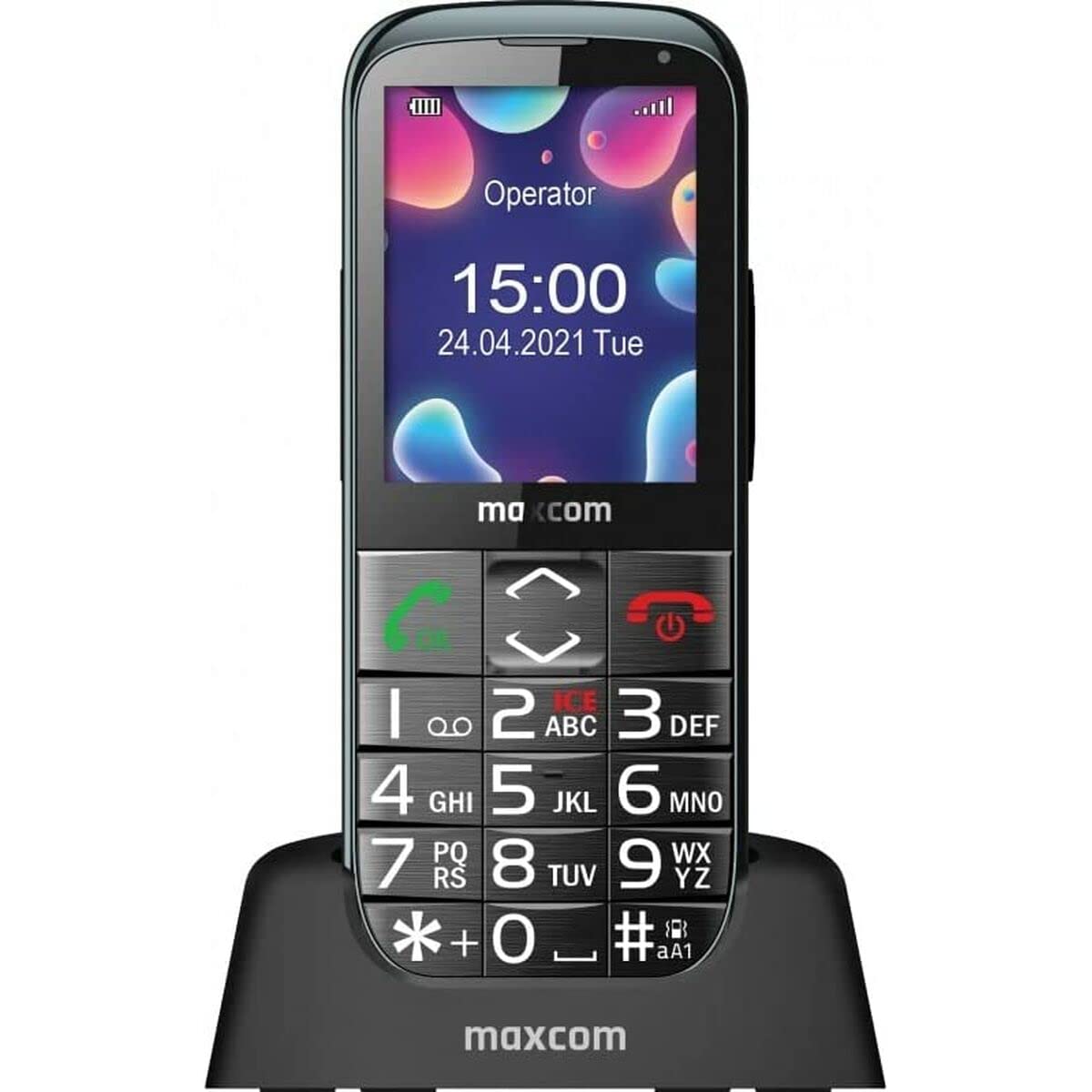
Image: The Maxcom MM724 simple mobile phone, typically black, with a clear display and large buttons.
3. Kurulum
3.1. SIM Kartı ve Bataryayı Takma
- Telefonun arka kapağını dikkatlice çıkarın.
- SIM kartınızı/kartlarınızı altın renkli kontaklar aşağı bakacak şekilde belirtilen yuvaya/yuvalara yerleştirin.
- Pili takarken kontakların doğru şekilde hizalandığından emin olun.
- Arka kapağı yerine tam oturana kadar takın.
3.2. Cihazın Şarj Edilmesi
The Maxcom MM724 uses a convenient desktop charger. To charge your phone:
- Connect the charger cord to a power outlet.
- Place the phone upright into the desktop charging cradle.
- Ensure the charging indicator on the phone or cradle illuminates, indicating that charging has begun.
- For optimal battery life, keep the phone in the cradle when not in use to ensure it is always charged.
4. Kullanım Talimatları
4.1. Açma/Kapama
- Açmak İçin: Ekran ışığı yanana kadar Güç/Çağrı Sonlandırma düğmesini (genellikle kırmızı) basılı tutun.
- Kapatmak İçin: Press and hold the Power/End Call button until the power-off options appear, then confirm.
4.2. Arama Yapma ve Alma
- Telefon çağrısı yapmak: Dial the number using the keypad and press the Call button (usually green).
- Bir Çağrı Almak İçin: Press the Call button when the phone rings. The phone is designed to ring very loudly to ensure calls are not missed.
- Aramayı Bitirmek İçin: Güç/Çağrı Sonlandırma düğmesine basın.
4.3. Mesaj Gönderme ve Alma
Navigate to the 'Messages' menu to compose new SMS messages or read incoming ones. Use the keypad to type your message.
4.4. Using the SOS Button
The SOS button is located on the back of the phone and is designed for emergencies.
- Kurmak: Access the phone's settings to pre-define a list of emergency contacts.
- Etkinleştirme: In an emergency, press and hold the SOS button. The phone will automatically call the pre-defined contacts in sequence until one answers.
4.5. El Fenerini Aktifleştirme
The phone features a dedicated button for the flashlight, making it easy to activate when needed. Refer to your phone's specific button layout for its location.
4.6. Bluetooth and Hearing Aid Compatibility
The Maxcom MM724 supports Bluetooth connectivity, allowing it to pair with compatible devices, including certain hearing aids. This enables hands-free calling.
- Eşleştirme: Go to the Bluetooth settings on your phone and enable Bluetooth. Put your hearing aid into pairing mode (consult your hearing aid's manual). Select your hearing aid from the list of available devices on the phone to pair.
- Not: Compatibility with hearing aids depends on the hearing aid's features. Consult your audiologist for specific compatibility information. The phone also features a ring line and additional gain for improved audio performance with or without hearing aids.
5. Bakım
- Temizlik: Telefonun ekranını ve gövdesini temizlemek için yumuşak, kuru bir bez kullanın. Sıvı temizleyicilerden veya aşındırıcı malzemelerden kaçının.
- Pil Bakım: Keep the battery charged regularly. Avoid extreme temperatures, which can affect battery performance and lifespan.
- Depolamak: Uzun süre kullanmayacağınız zaman telefonunuzu serin ve kuru bir yerde saklayın.
6. Sorun Giderme
- Phone does not power on: Pilinin doğru takıldığından ve şarj edildiğinden emin olun. Telefonu şarj cihazına bağlayın ve tekrar deneyin.
- Ağ sinyali yok: Check if the SIM card is properly inserted. Move to an area with better network coverage. Contact your service provider if the issue persists.
- Arama yapılamıyor/alınamıyor: Verify that you have sufficient credit or an active plan. Check network signal strength.
- Bluetooth eşleştirme sorunları: Ensure both devices are in pairing mode and within range. Try restarting both the phone and the Bluetooth device.
7. Özellikler
| Marka | Maxcom |
| Model Adı | MM724 |
| İşletim Sistemi | Android |
| Ekran Boyutu | 3 inç |
| Bağlantı Teknolojisi | Bluetooth |
| Hücresel Teknoloji | 4G |
| Kablosuz Ağ Teknolojisi | GSM |
| Renk | Siyah |
| Ürün Ağırlığı | 85 Gram |
| Kablosuz Taşıyıcı | Kilidi Açıldı |
8. Garanti ve Destek
Warranty information for the Maxcom MM724 mobile phone is typically provided with your purchase documentation or can be found on the official Maxcom website. For technical support or service inquiries, please refer to the contact information provided by your retailer or the manufacturer.


