1. Giriş
The OLIGHT Perun 2 Mini is a versatile, rechargeable headlamp designed for various activities requiring hands-free illumination. It features dual white and red LED light sources, multiple lighting modes, and a compact, durable design. This manual provides essential information for safe and effective use of your Perun 2 Mini.
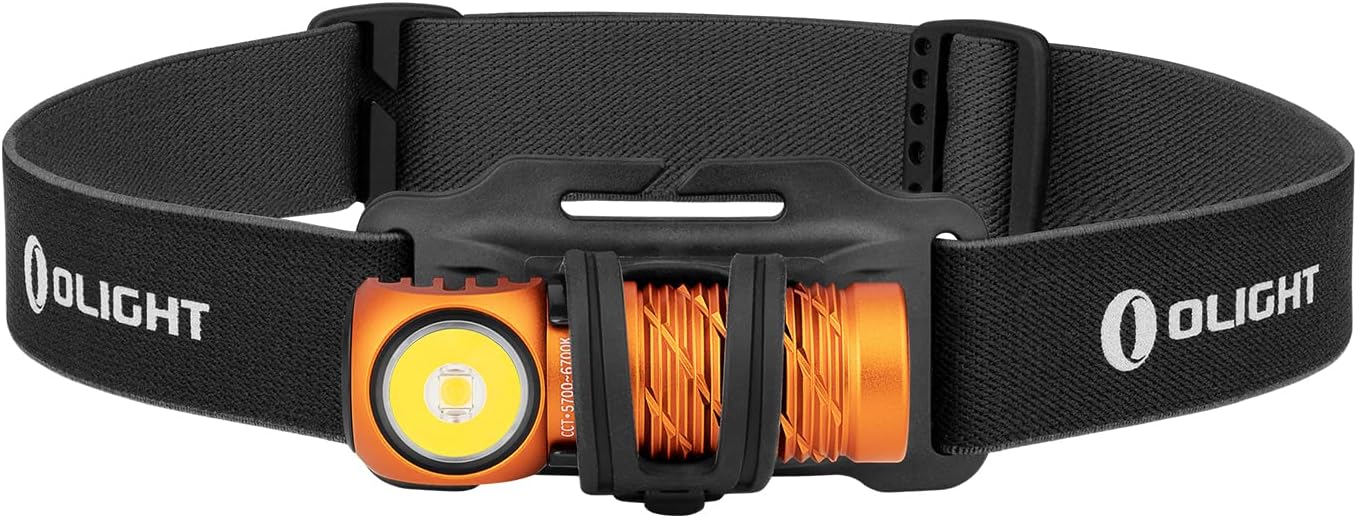
Resim 1: OLIGHT Perun 2 Mini Kafaamp mounted on its adjustable headband.
2. Güvenlik Bilgileri
- Göz Güvenliği: Işığı doğrudan gözlerinize tutmayın. Güçlü ışın geçici görme bozukluğuna veya kalıcı göz hasarına neden olabilir.
- Çocuklar: Çocukların erişemeyeceği yerlerde saklayın. Bu ürün oyuncak değildir.
- Sıcaklık: kafaamp may become warm during prolonged use, especially on higher modes. Avoid direct contact with hot surfaces.
- Pil: Use only the specified rechargeable battery. Do not attempt to disassemble or modify the battery.
- Suya Dayanıklılık: While IPX8 rated, ensure the charging port is clean and dry before charging to prevent damage.
3. Paket İçeriği
Paketinizde tüm öğelerin mevcut olduğundan emin olun:
- OLIGHT Perun 2 Mini Başlıkamp
- Şarj Edilebilir Pil (önceden takılmış)
- Headband with Silicone Mount
- MCC1A Manyetik Şarj Kablosu
- Cep Klipsi
- Kullanıcı Kılavuzu

Image 2: Contents of the Perun 2 Mini package.
4. Ürün Bittiview
The Perun 2 Mini features a compact body with a powerful LED, a magnetic tail cap for charging and attachment, and a side switch for operation. It can be used as a headlamp with the included headband or as a handheld flashlight.
Resim 3: Ön view of the Perun 2 Mini, highlighting the LED and body design.
5. Kurulum
5.1 İlk Şarj
İlk kullanımdan önce başlığı tamamen şarj edin.amp. Connect the magnetic charging cable (MCC1A) to the magnetic tail cap of the headlamp and a USB power source. The indicator on the charging cable will show red during charging and turn green when fully charged.

Image 4: The Perun 2 Mini connected to its magnetic charging cable.
5.2 Kafa Bandına Takma
Başlığı yerleştirinamp into the silicone mount on the headband. Ensure it is securely seated. The headband is adjustable for a comfortable fit.
6. Kullanım Talimatları
6.1 Güç Açma/Kapatma ve Mod Değiştirme
- Açma/Kapatma: Yan taraftaki düğmeye bir kez tıklayarak ışığı açıp kapatabilirsiniz.
- Parlaklığı Değiştir: When the light is on, press and hold the side switch to cycle through Low, Medium, and High modes. Release the switch at your desired brightness.
- Ayışığı Modu: When the light is off, press and hold the side switch for approximately one second to activate Moonlight mode.
- Turbo mod: Turbo modunu etkinleştirmek için yan düğmeye çift tıklayın. Önceki moda dönmek için tekrar çift tıklayın.
- Kırmızı Işık Modu: Triple click the side switch to activate Red light mode.
- Acil Durum Modu: From Red light mode, double click the side switch to activate SOS mode.
6.2 Açı Ayarı
kafaamp can be rotated up to 180 degrees within its silicone mount, allowing you to direct the beam precisely where needed. This wide range of adjustment enhances visibility and helps avoid hazards.

Image 5: The Perun 2 Mini demonstrating its 180-degree adjustable angle.
6.3 Kullanım Senaryoları
The Perun 2 Mini is suitable for a wide range of activities, including camping, running, hiking, night fishing, auto repair, and as an emergency light during power outagee.

Resim 6: Örn.amples of the Perun 2 Mini in use for different activities.
7. Pil Yönetimi
7.1 Şarj Etme
The Perun 2 Mini utilizes a magnetic charging system for convenience. A full charge takes approximately 70 minutes, providing extended runtime.
7.2 Pil Seviyesi Göstergesi
kafaamp features a three-color battery indicator to show the remaining power at a glance:
- Yeşil: Pil seviyesi > %60
- Turuncu: Pil seviyesi %60 ~ %10
- Kırmızı: Pil seviyesi %10 ~ %5
- Kırmızı Yanıp Sönme: Pil seviyesi < %5

Image 7: The Perun 2 Mini's battery level indicator.
8. Bakım
- Temizlik: Clean the lens with a soft, clean cloth. For stubborn dirt, use a small amount of rubbing alcohol.
- Şarj Portu: Keep the magnetic charging port clean and free of debris to ensure proper charging.
- Depolamak: Başlığı saklayınamp in a cool, dry place. If storing for an extended period, charge the battery every few months to maintain its health.
9. Sorun Giderme
- Işık yanmıyor: Ensure the battery is charged. Check for any physical damage.
- Işık loş: Pil seviyesi düşük olabilir. Başlığı şarj edin.amp.
- Şarj sorunları: Ensure the magnetic charging cable is properly connected and the charging port is clean. Try a different USB power source.
- Inconsistent mode switching: Ensure the side switch is clean and free of obstructions.
10. Özellikler
| Özellik | Detay |
|---|---|
| Marka | HAFİF |
| Örnek | Perun 2 Mini |
| Renk | Orange (Cool white) |
| Malzeme | Alüminyum |
| Işık Kaynağı Türü | NEDEN OLMUŞ |
| Güç Kaynağı | Şarj edilebilir pil |
| Maksimum Parlaklık | 1100 Lümen |
| Maksimum Işın Mesafesi | 150 Metre |
| Ürün Boyutu | 2.06x2.2x6.43 cm |
| Ürün Ağırlığı | 140 gr (pil dahil) |
| Su Geçirmezlik Derecesi | IPX8 |
| Darbe Direnci | 1.5 Metre |
| Özel Özellikler | SOS Mode, Angle Adjustable Strap |
11. Garanti ve Destek
OLIGHT products are covered by a manufacturer's warranty. For detailed warranty information, product support, or service inquiries, please refer to the official OLIGHT webWeb sitesini ziyaret edin veya yerel bayinizle iletişime geçin. Garanti talepleri için satın alma fişinizi saklayın.


