1. Giriş
Thank you for choosing the Gembird USB-C Gigabit Network Adapter with 3-Port USB 3.1 Hub. This device is designed to expand the connectivity of your USB-C enabled laptop, tablet, or computer, providing both high-speed Gigabit Ethernet and additional USB 3.1 ports. This manual provides essential information for setting up, operating, and maintaining your device.
2. Ürün Özellikleri
- USB-C Bağlantısı: Connects to your host device via a reversible USB-C port.
- Gigabit Ethernet Bağlantı Noktası: Provides a stable and fast wired network connection up to 1000 Mbps.
- 3-Port USB 3.1 Hub: Adds three USB 3.1 ports for connecting peripherals such as external hard drives, flash drives, keyboards, and mice.
- Yüksek Hızlı Veri Aktarımı: USB 3.1 ports support data transfer rates up to 5 Gbps.
- Tak ve Çalıştır: No driver installation required for most modern operating systems.
3. Paket İçeriği
Please ensure the following items are included in your package:
- Gembird USB-C Gigabit Network Adapter with 3-Port USB 3.1 Hub (Model A-CMU3-LAN-01)
4. Ürün Bittiview
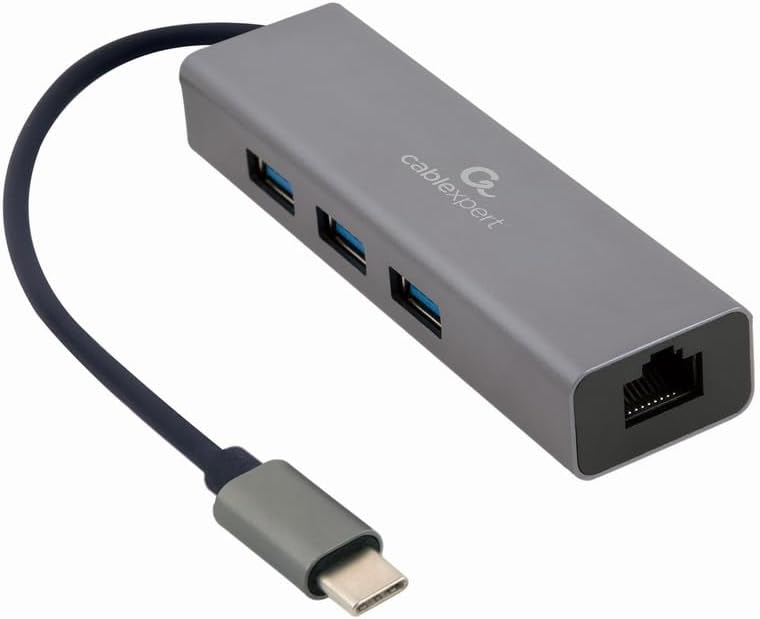
Şekil 1: Ön view of the Gembird USB-C Gigabit Network Adapter, showing the USB-C cable, three USB 3.1 ports, and the RJ45 Gigabit Ethernet port.

Şekil 2: Retail packaging for the Gembird USB-C Gigabit Network Adapter, highlighting key features like USB Type-C, USB 3.1 x 3, RJ45, Gigabit, 1000 Mbps, and Plug & Play.
5. Kurulum
Follow these steps to set up your Gembird USB-C Gigabit Network Adapter:
- Ana Bilgisayara Bağlan: Plug the USB-C connector of the adapter into an available USB-C port on your laptop, tablet, or computer.
- Ağa bağlan: Insert an Ethernet cable (RJ45) from your router or modem into the Gigabit Ethernet port on the adapter.
- USB çevre birimlerini bağlayın: Plug your USB devices (e.g., flash drives, external hard drives, mouse, keyboard) into the three available USB 3.1 ports on the adapter.
- Sürücü Kurulumu: The adapter is typically plug-and-play. Your operating system (Windows, macOS, Linux, Chrome OS) should automatically detect and install the necessary drivers. If prompted, allow the system to install drivers.
6. Kullanım Talimatları
Once connected, the adapter functions automatically:
- Ağ Erişimi: Your host device should now have a wired network connection. You can verify this in your operating system's network settings.
- USB Device Access: Connected USB peripherals will be recognized by your host device and function as if directly connected.
7. Sorun Giderme
Sorunlarla karşılaşırsanız aşağıdaki yaygın sorunlara ve çözümlere bakın:
- Ağ Bağlantısı Yok:
- Ensure the Ethernet cable is securely connected to both the adapter and your router/modem.
- Check your router/modem for proper operation.
- Ana cihazınızdaki ağ ayarlarını doğrulayın.
- Try connecting the adapter to a different USB-C port on your host device.
- USB Aygıtları Tanınmıyor:
- Ensure USB devices are properly plugged into the adapter's USB 3.1 ports.
- Try connecting the USB device directly to your host computer to confirm it is functional.
- Some high-power USB devices may require an external power source if your host device's USB-C port does not provide sufficient power (this adapter does not have a dedicated power input).
- Yavaş Ağ Hızı:
- Ethernet kablonuzun Gigabit hızlarını desteklediğinden emin olun (Cat5e veya üzeri).
- İnternet servis sağlayıcınızın hızını ve yönlendiricinizin özelliklerini doğrulayın.
- Ensure your host device's USB-C port supports USB 3.0/3.1 speeds.
8. Özellikler
| Model Numarası | A-CMU3-LAN-01 |
| Donanım Arayüzü | USB-C (Host), USB 3.1 (Hub), RJ45 (Ethernet) |
| Toplam USB Bağlantı Noktaları | 3 (USB 3.1) |
| Ethernet Bağlantı Noktaları | 1 (Gigabit RJ45) |
| Data Transfer Rate (USB) | 5 Gbps'ye kadar (USB 3.1) |
| Data Transfer Rate (Ethernet) | 10/100/1000 Mb/sn |
| Ürün Boyutları | 10 x 2 x 2.7 inç |
| Ürün Ağırlığı | 2.46 ons |
9. Bakım
Adaptörünüzün uzun ömürlü ve en iyi performansı göstermesi için:
- Temizlik: Cihazın dış yüzeyini temizlemek için yumuşak, kuru bir bez kullanın. Sıvı temizleyicilerden veya çözücülerden kaçının.
- Depolamak: Kullanılmadığı zaman adaptörü serin, kuru ve doğrudan güneş ışığından ve aşırı sıcaklıklardan uzak bir yerde saklayın.
- İşleme: Avoid dropping or subjecting the device to strong impacts. Do not attempt to disassemble the adapter.
10. Garanti ve Destek
This Gembird product comes with a Fabrika hatalarına karşı iki yıl garantiLütfen garanti talepleriniz için satın alma belgenizi saklayın.
For technical support or warranty inquiries, please contact your retailer or visit the official Gembird webiletişim bilgileri için site.


