1. Giriş
This manual provides comprehensive instructions for the installation, operation, and maintenance of your ASRock Intel Arc A380 Challenger ITX 6GB OC Graphics Card. Please read this manual thoroughly before using the product to ensure proper functionality and to prevent damage. Keep this manual for future reference.
2. Güvenlik Bilgileri
Always observe the following safety precautions when handling and installing your graphics card:
- Kurulumdan önce bilgisayar sisteminizin kapalı olduğundan ve prizden çıkarılmış olduğundan emin olun.
- Bileşenlere dokunmadan önce, topraklanmış bir metal nesneye (örneğin, bilgisayar kasasına) dokunarak vücudunuzdaki statik elektriği boşaltın.
- Avoid touching the gold-plated connector pins on the graphics card.
- Install the graphics card in a well-ventilated area to prevent overheating.
- Ekran kartını neme veya aşırı sıcaklıklara maruz bırakmayın.
3. Paket İçeriği
Ürün paketinizde tüm öğelerin mevcut olduğunu doğrulayın:
- ASRock Intel Arc A380 Challenger ITX 6GB OC Graphics Card
- Hızlı Kurulum Kılavuzu
4. Ürün Bittiview
The ASRock Intel Arc A380 Challenger ITX 6GB OC Graphics Card is designed for compact systems, offering capable graphics performance in a single-slot ITX form factor. It features Intel's Arc A380 GPU with 6GB of GDDR6 memory and a 2250 MHz clock speed. Key features include a striped axial fan, 0dB silent cooling, and support for modern display technologies.

Figure 4.1: ASRock Intel Arc A380 Challenger ITX 6GB OC Graphics Card
4.1. Boyutlar
This graphics card features a compact design suitable for ITX systems.
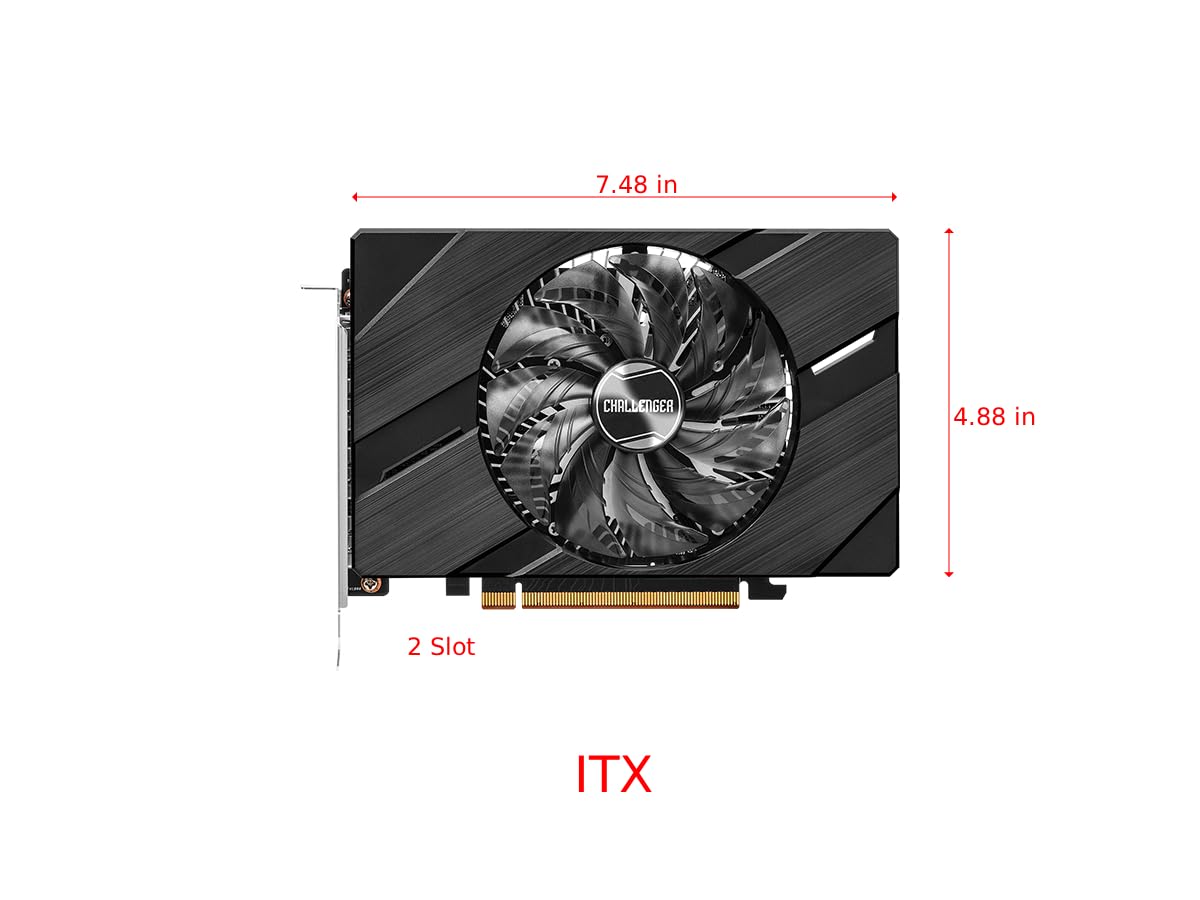
Figure 4.2: Graphics Card Dimensions (Approx. 7.48 in x 4.88 in, 2-slot)
4.2. Display Outputs
The card provides multiple display outputs for versatile connectivity.
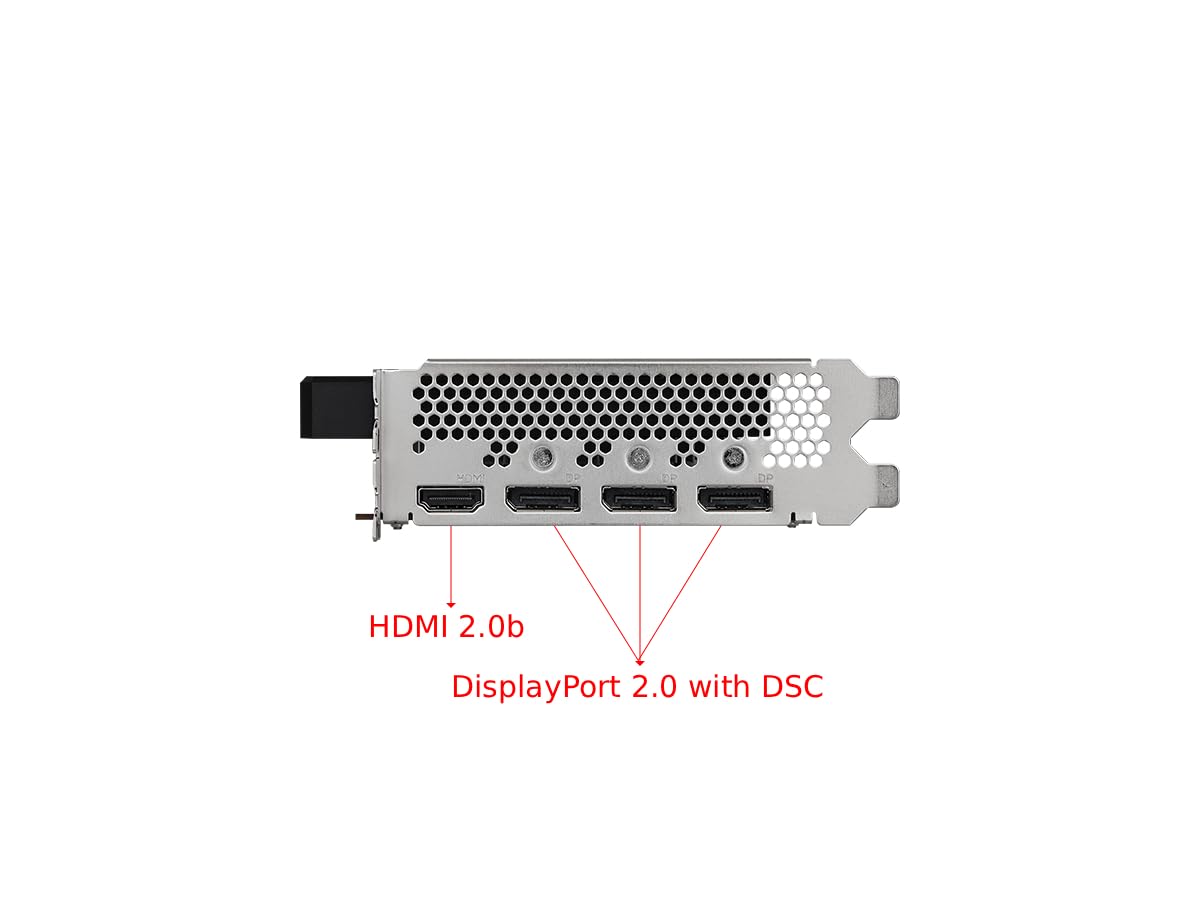
Figure 4.3: Display Outputs (1x HDMI 2.0b, 3x DisplayPort 2.0 with DSC)
4.3. Soğutma Sistemi
The ASRock custom Striped Axial Fan design enhances airflow for optimal cooling. The 0dB Silent Cooling technology ensures the fans stop spinning under light workloads for quiet operation.

Figure 4.4: Striped Axial Fan for enhanced airflow

Figure 4.5: 0dB Silent Cooling: Fans stop under light workloads
4.4. Resmi Ürün Videosu
Video 4.1: Bittiview of Intel ARC Graphics Cards by ASRock USA. This video provides a general introduction to the Intel ARC graphics card series.
5. Kurulum
5.1. Fiziksel Kurulum
- Sisteminizi hazırlayın: Bilgisayarınızı kapatın ve tüm kabloları çıkarın. Bilgisayar kasasını açın.
- Bir PCIe yuvası bulun: Anakartınızda kullanılabilir bir PCI Express 4.0 x16 yuvası bulun.
- Yuva kapağını çıkarın: Bilgisayar kasanızdaki ilgili yuva kapağını çıkarın.
- Ekran kartını takın: Ekran kartını PCIe yuvasıyla dikkatlice hizalayın ve yerine oturana kadar sıkıca bastırın. PCIe yuvasındaki kilitleme klipsinin yerine oturduğundan emin olun.
- Kartı güvence altına alın: Fasten the graphics card to the computer case with a screw.
- Gücü bağlayın: Connect the single 8-pin PCIe power connector from your power supply to the graphics card. Ensure your power supply meets the recommended 500W minimum.
- Dava kapandı: Bilgisayarınızın kasasını kapatın ve tüm kabloları yeniden bağlayın.
5.2. Sürücü Kurulumu
After physical installation, you must install the latest drivers for your graphics card:
- Bilgisayarınızı açın.
- ASRock'un resmi sitesini ziyaret edin. website or Intel's support webalan.
- Navigate to the support section and locate the drivers for the Intel Arc A380 series.
- Download the latest graphics drivers for your operating system.
- Kurulum dosyasını çalıştırın ve ekrandaki yönergeleri izleyin. Sistem yeniden başlatılması gerekebilir.
6. Çalıştırma
Once drivers are installed, your ASRock Intel Arc A380 Challenger ITX graphics card is ready for use. Connect your display(s) to the available DisplayPort 2.0 or HDMI 2.0b ports. You can configure display settings, resolution, and refresh rates through your operating system's display settings or the Intel Arc Control software.
7. Bakım
Düzenli bakım, grafik kartınızın uzun ömürlü olmasını ve optimum performans göstermesini sağlar:
- Toz Giderimi: Periodically clean dust from the fan and heatsink using compressed air. Ensure the system is powered off and unplugged before cleaning.
- Sürücü Güncellemeleri: Keep your graphics drivers updated to the latest version. New drivers often include performance improvements, bug fixes, and compatibility enhancements.
- Sıcaklık İzleme: Use monitoring software to keep an eye on the GPU temperature, especially during heavy workloads. While the 0dB cooling feature is efficient, ensuring good case airflow is crucial.
8. Sorun Giderme
Ekran kartınızla ilgili sorun yaşıyorsanız, aşağıdaki sorun giderme adımlarını göz önünde bulundurun:
- Görüntü Çıkışı Yok:
- Grafik kartının PCIe yuvasına tam olarak oturduğundan emin olun.
- Verify that the 8-pin power connector is securely attached.
- Check that your monitor cable is correctly connected to the graphics card and the monitor.
- Farklı bir ekran çıkış portunu veya kablosunu deneyin.
- Driver Issues/Instability:
- Perform a clean installation of the latest graphics drivers. Uninstall previous drivers completely before installing new ones.
- Ensure your motherboard BIOS/UEFI is updated to the latest version, as this can improve compatibility.
- Verify that Resizable BAR (ReBAR) is enabled in your system's BIOS/UEFI for optimal performance with Intel Arc GPUs.
- Aşırı Isınma:
- Bilgisayar kasanızın içinde yeterli hava akışının olduğundan emin olun.
- Clean any dust buildup from the graphics card's fan and heatsink.
- Check that the fan is spinning correctly under load.
9. Özellikler
| Özellik | Şartname |
|---|---|
| Grafik Eş İşlemcisi | Intel Arc A380 |
| Video Belleği | 6 GB GDDR6 |
| Bellek Hızı | 15.5 Gbps |
| Motor saati | 2250 MHz |
| Maksimum Ekran Çözünürlüğü | 7680x4320 Piksel (8K) |
| Video Çıkış Arayüzü | 3x DisplayPort 2.0, 1x HDMI 2.0b |
| Ürün Model Numarası | 90-GA3KZZ-00UANF |
| Ürün Ağırlığı | 1.32 pound |
| Ürün Boyutları | 1.1 x 9.7 x 0.04 inç |
| Önerilen PSU | 500W |
10. Garanti ve Destek
ASRock provides a manufacturer's warranty for this product. Please refer to the warranty card included in your package or visit the official ASRock website for detailed warranty terms and conditions. For technical support, driver downloads, and FAQs, please visit the ASRock support page at www.asrock.com/support.asp.
Optional protection plans are available for purchase, offering extended coverage beyond the standard manufacturer's warranty. These plans typically cover 3-year or 4-year durations, or monthly subscription options.