1. Giriş
This manual provides detailed instructions for the installation, operation, and maintenance of the Alphacool Eisblock Aurora Acryl GPX-N water block for NVIDIA RTX 3090 TI FTW3 Ultra graphics cards. This product is designed to provide efficient liquid cooling for your graphics card's critical components, including the GPU, VRAM, and VRMs, and features integrated digital RGB lighting.
2. Güvenlik Bilgileri
Please read all safety instructions carefully before installation and operation. Failure to follow these instructions may result in product damage, system damage, or personal injury.
- Ensure your computer system is powered off and disconnected from the main power supply before beginning installation.
- Hasar görmemesi için parçaları dikkatlice taşıyın.
- Use appropriate tools and follow anti-static precautions.
- Perform a leak test before powering on your system after installation.
- Çocukların erişemeyeceği yerde saklayınız.
3. Paket İçeriği
Verify that all components are present before proceeding with the installation:
- Alphacool Eisblock Aurora Acryl GPX-N Water Block
- Arka plaka
- Montaj Vidaları ve Pullar
- Termal Pedler
- Termal Macun
- Digital RGB Adapter Cable
- Kurulum Kılavuzu (bu belge)
4. Kurulum ve Kurulum
This section details the steps required to install the water block onto your NVIDIA RTX 3090 TI FTW3 Ultra graphics card.
4.1. Hazırlık
- Carefully remove your graphics card from your computer system.
- Remove the stock cooler and backplate from the graphics card. Refer to your graphics card manufacturer's instructions for this step.
- Clean the GPU die and all VRAM/VRM components thoroughly to remove any old thermal paste or residue using isopropyl alcohol and a lint-free cloth.
4.2. Applying Thermal Pads and Paste
- Cut the provided thermal pads according to the dimensions specified in the included diagram (if applicable) or the water block's instructions for your specific GPU model.
- Apply the thermal pads to the VRAM and VRM components on the graphics card PCB. Ensure full coverage and good contact.
- Apply a small amount of thermal paste to the center of the GPU die. A pea-sized amount is typically sufficient.
4.3. Su Bloğunun Montajı
- Carefully align the water block with the mounting holes on the graphics card PCB. Ensure the GPU die makes contact with the copper cold plate and all thermal pads are properly seated.
- Gently lower the water block onto the graphics card.
- Secure the water block using the provided mounting screws and washers. Tighten screws in a diagonal pattern to ensure even pressure, but do not overtighten.

Şekil 1: Üst view of the Alphacool Eisblock Aurora Acryl GPX-N Water Block, showing the clear acrylic top and internal cooling channels.
4.4. Arka Plakanın Takılması
- Align the backplate with the corresponding mounting holes on the rear of the graphics card PCB.
- Secure the backplate using the designated screws.
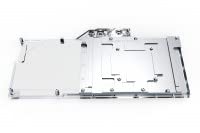
Figure 2: The Alphacool Eisblock Aurora Acryl GPX-N Backplate, designed to cover the rear of the graphics card PCB.

Figure 3: The Alphacool Eisblock Aurora Acryl GPX-N Water Block with the backplate installed, showing the complete assembly.
4.5. Connecting Digital RGB Lighting
- Connect the digital RGB cable from the water block to the appropriate 3-pin 5V addressable RGB header on your motherboard or a compatible RGB controller.
- Ensure the connector is oriented correctly to avoid damage.
4.6. Integrating into the Cooling Loop
- Install appropriate fittings (not included) into the G1/4" ports on the water block.
- Connect the water block into your existing or new custom liquid cooling loop using compatible tubing.
- Ensure all connections are secure and fittings are tightened to prevent leaks.
4.7. Leak Testing
- Before powering on your computer, fill your liquid cooling loop with coolant.
- Use a dedicated leak testing tool or run the pump independently (without powering the rest of the system) for at least 24 hours.
- Visually inspect all connections and components for any signs of leaks. Address any leaks immediately before proceeding.
5. Kullanım Talimatları
Once the water block is successfully installed and leak-tested, you can power on your system. The water block will passively cool your GPU as long as the liquid cooling loop is operational.
- Monitor your GPU temperatures using appropriate software to ensure optimal cooling performance.
- Manage the digital RGB lighting effects through your motherboard's software or a connected RGB controller.
6. Bakım
Regular maintenance is crucial for the longevity and performance of your liquid cooling system.
- Soğutma Suyu Değişimi: It is recommended to replace the coolant in your loop every 6-12 months, depending on the coolant type and usage.
- Sistem Temizliği: Periodically inspect the water block and other loop components for any signs of buildup or discoloration. If necessary, drain the loop and clean components with distilled water or a specialized cleaning solution.
- Görsel Muayene: Regularly check tubing and fittings for wear, cracks, or loose connections.
7. Sorun Giderme
Bu bölümde karşılaşabileceğiniz yaygın sorunlar ele alınmaktadır.
7.1. High GPU Temperatures
- Check Pump Operation: Ensure your pump is running and circulating coolant.
- Hava Kabarcıkları: Bleed any air bubbles from the loop. Tilt your system gently to help move air to the reservoir.
- Thermal Paste/Pads: Verify that thermal paste was applied correctly and thermal pads are making good contact. Re-seat the water block if necessary.
- Radiator Performance: Ensure your radiator fans are spinning and the radiator fins are clean and unobstructed.
7.2. Sızıntılar
- Identify Source: Immediately power off your system and locate the source of the leak.
- Bağlantı Elemanlarını Sıkın: Ensure all fittings are securely tightened. Do not overtighten.
- Boruları inceleyin: Check tubing for cuts, cracks, or improper seating. Replace damaged tubing.
7.3. RGB Aydınlatma Çalışmıyor
- Bağlantıyı kontrol et: Ensure the 3-pin 5V ARGB cable is correctly connected to the motherboard or controller.
- Yazılım Yapılandırması: Verify that your motherboard's RGB software or external controller is properly configured and enabled.
- Güç: Confirm the ARGB header on your motherboard is receiving power.
8. Özellikler
| Ürün Adı | Alphacool Eisblock Aurora Acryl GPX-N RTX 3090 TI FTW3 Ultra |
| Model Numarası | 1022801 |
| Uyumlu Cihazlar | NVIDIA RTX 3090 TI FTW3 Ultra Graphics Cards (Desktop) |
| Soğutma Yöntemi | Sıvı |
| Malzeme | Nickel-plated Copper (cold plate), Acrylic (top) |
| Power Connector Type (RGB) | 3-Pin (5V Addressable RGB) |
| Ürün Boyutları | Approximately 19.69 x 19.69 x 11.02 inches (as packaged) |
9. Garanti ve Destek
Alphacool products are manufactured to high-quality standards. For warranty information and technical support, please refer to the official Alphacool webSiteyi ziyaret edin veya perakendecinizle iletişime geçin. Satın alma belgenizi garanti talepleriniz için saklayın.
Daha fazla yardım için şu adresi ziyaret edin: Alphacool Store on Amazon.


