giriiş
This manual provides essential instructions for the safe and effective use of your Brookstone Sonic Electric Toothbrush. Please read this manual thoroughly before first use and retain it for future reference.
Paket İçeriği
- 1 x Brookstone Sonic Electric Toothbrush Handle
- 2 x Soft Bristle Replacement Brush Heads
- 1 x Tongue Scraper Attachment
- 1 x USB Charging Cable (integrated into the toothbrush base)

Image: The Brookstone Sonic Electric Toothbrush handle, two standard brush heads, and a tongue scraper attachment.
Kurmak
1. İlk Şarj
Before first use, fully charge the toothbrush. The toothbrush features a USB charging port integrated into its base.
- Locate the USB connector at the bottom of the toothbrush handle.
- Plug the USB connector into a compatible USB power source (e.g., computer USB port, USB wall adapter).
- The charging indicator light will illuminate. A full charge typically takes 12 hours and provides up to 30 days of use.

Image: Illustration of the USB charging port located at the base of the toothbrush handle, alongside the tongue scraper and replacement heads.
2. Attaching Brush Heads
Align the brush head or tongue scraper with the metal shaft on the toothbrush handle and push it down firmly until it clicks into place. Ensure it is securely attached before use.
Kullanım Talimatları
1. Güç Açma/Kapatma ve Mod Seçimi
The toothbrush features a single power button to control operation and switch between modes.
- Press the power button once to turn the toothbrush on. It will start in the last used mode.
- Press the power button repeatedly to cycle through the available cleaning modes:
- Temiz Mod: For daily standard brushing.
- Lehçe Modu: For surface cleaning and tooth polishing.
- Hassasiyet Modu: Gentle vibration for sensitive teeth and gums.
- To turn the toothbrush off, press and hold the power button for 2 seconds, or cycle through all modes until it turns off.
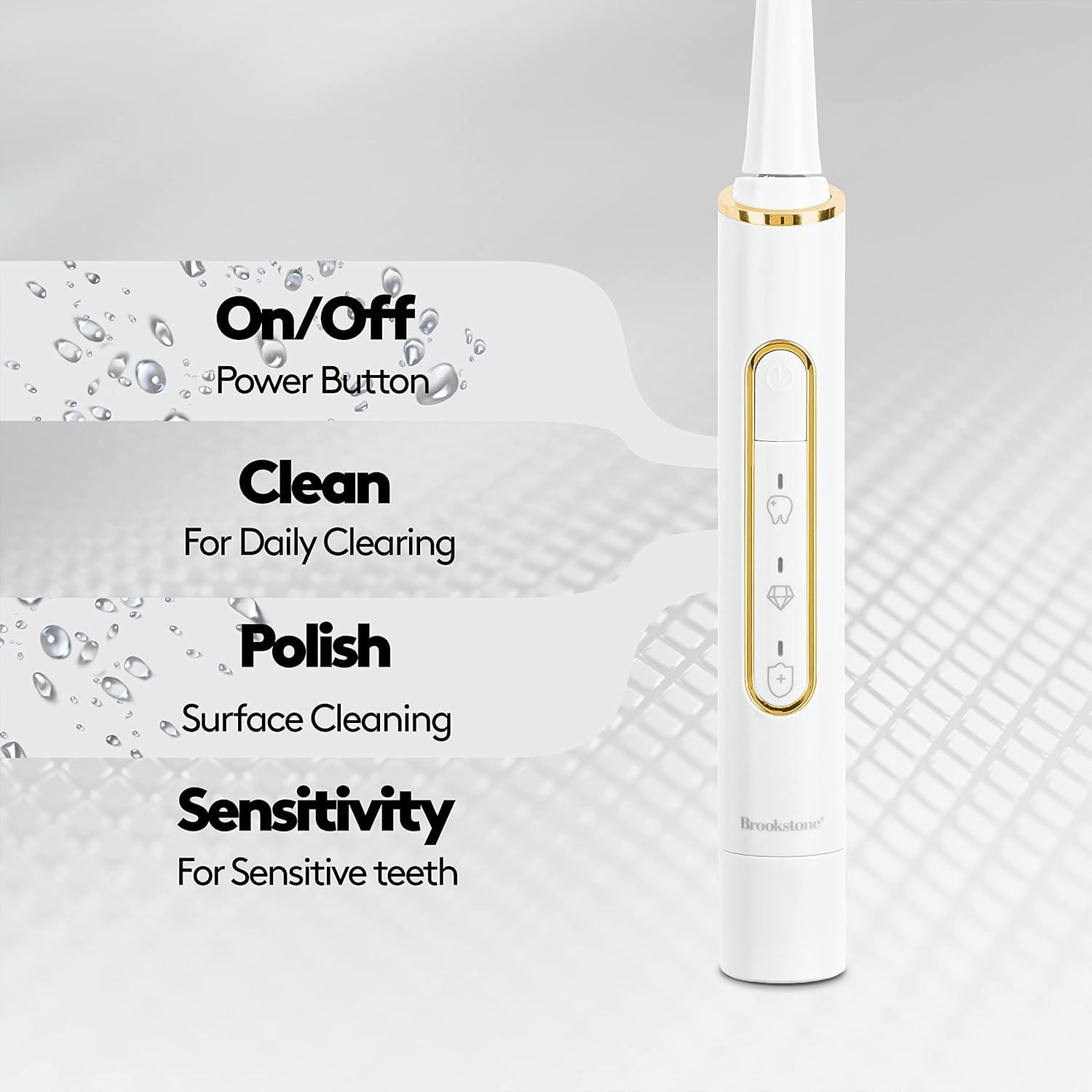
Resim: Ayrıntılı view of the toothbrush handle, highlighting the power button and indicators for Clean, Polish, and Sensitivity modes.
2. Fırçalama Tekniği ve Zamanlayıcı
The toothbrush incorporates a 2-minute timer and a 30-second interval reminder to assist with proper brushing habits.
- Fırça başlığına az miktarda diş macunu sürün.
- Fırça başlığını diş eti çizgisine doğru hafif bir açıyla dişlerinize yerleştirin.
- Turn on the toothbrush. Gently move the brush head across all surfaces of your teeth.
- The toothbrush will pause briefly every 30 seconds to indicate it's time to move to a different quadrant of your mouth.
- After 2 minutes, the toothbrush will automatically turn off, signaling the completion of the recommended brushing time.

Image: Visual representation of key features: 2-minute timer, sonic vibrations up to 16,500 per minute, and IPX7 waterproof rating.
3. Using the Tongue Scraper
For enhanced oral hygiene, attach the tongue scraper head.
- Replace the brush head with the tongue scraper attachment.
- Turn on the toothbrush and gently glide the scraper across your tongue from back to front.
- Rinse the scraper after each pass.
Bakım
1. Diş Fırçasının Temizlenmesi
- After each use, rinse the brush head and the top of the handle under running water.
- Wipe the handle with a soft, damp cloth. Do not immerse the entire handle in water for extended periods, despite its IPX7 rating.
- Ensure no toothpaste residue accumulates around the metal shaft.
2. Fırça Başlıklarının Değiştirilmesi
Dentists recommend replacing brush heads every 3 months, or sooner if the bristles become frayed.
- Fırça başlığını sıkıca kavrayın ve sapından düz bir şekilde çekerek çıkarın.
- Yeni fırça başlığını metal şaftla hizalayın ve yerine oturana kadar aşağı doğru itin.
3. Pil Bakımı
- To maintain battery life, avoid completely draining the battery before recharging.
- Store the toothbrush in a cool, dry place when not in use.
Sorun giderme
| Sorun | Olası Neden | Çözüm |
|---|---|---|
| Diş fırçası çalışmıyor. | Pil bitmiş. | Diş fırçasını en az 12 saat şarj edin. |
| Zayıf titreşimler. | Pil zayıf veya fırça başlığı düzgün takılmamış. | Recharge the toothbrush. Ensure the brush head is firmly clicked into place. |
| Şarj göstergesi yanmıyor. | USB connection issue or faulty power source. | Ensure the USB connector is fully inserted. Try a different USB port or power adapter. |
| Kullanım sırasında fırça başlığı düşüyor. | Fırça başlığı sağlam bir şekilde takılmamış. | Remove and re-attach the brush head, ensuring it clicks firmly into place. |
Özellikler
- Modeli: OC0006-WH8
- Güç Kaynağı: Pille Çalışır (1 adet Lityum İyon pil dahildir)
- Titreşimler: Dakikada 16,000'e kadar titreşim
- Su Geçirmezlik Derecesi: IPX7
- Şarj: USB Rechargeable (integrated USB connector)
- Pil Ömrü: 12 saatlik şarjla 30 güne kadar
- Boyutlar: 1 x 1 x 9.5 inç
- Ağırlık: 4.4 ons
- Kıl Sertliği: Yumuşak
- Özel Özellikler: 2-Minute Brushing Timer, 30-Second Interval Reminder, Multiple Cleaning Modes (Clean, Polish, Sensitivity), Built-in Tongue Scraper
Garanti ve Destek
For warranty information or technical support, please refer to the product packaging or contact Brookstone customer service directly. Keep your proof of purchase for any warranty claims.
Üretici: Argento SC
İlk Mevcut Tarih: 10 Eylül 2022


