1. Ürün Bittiview
The NexiGo PJ30 is a native 1080P LCD projector designed for both indoor and outdoor entertainment. It delivers crisp, clear images with 500 ANSI lumens brightness and supports Dolby Sound for an immersive audio experience. Equipped with 5G Wi-Fi and Bluetooth 5.1, it offers versatile connectivity options for various devices.
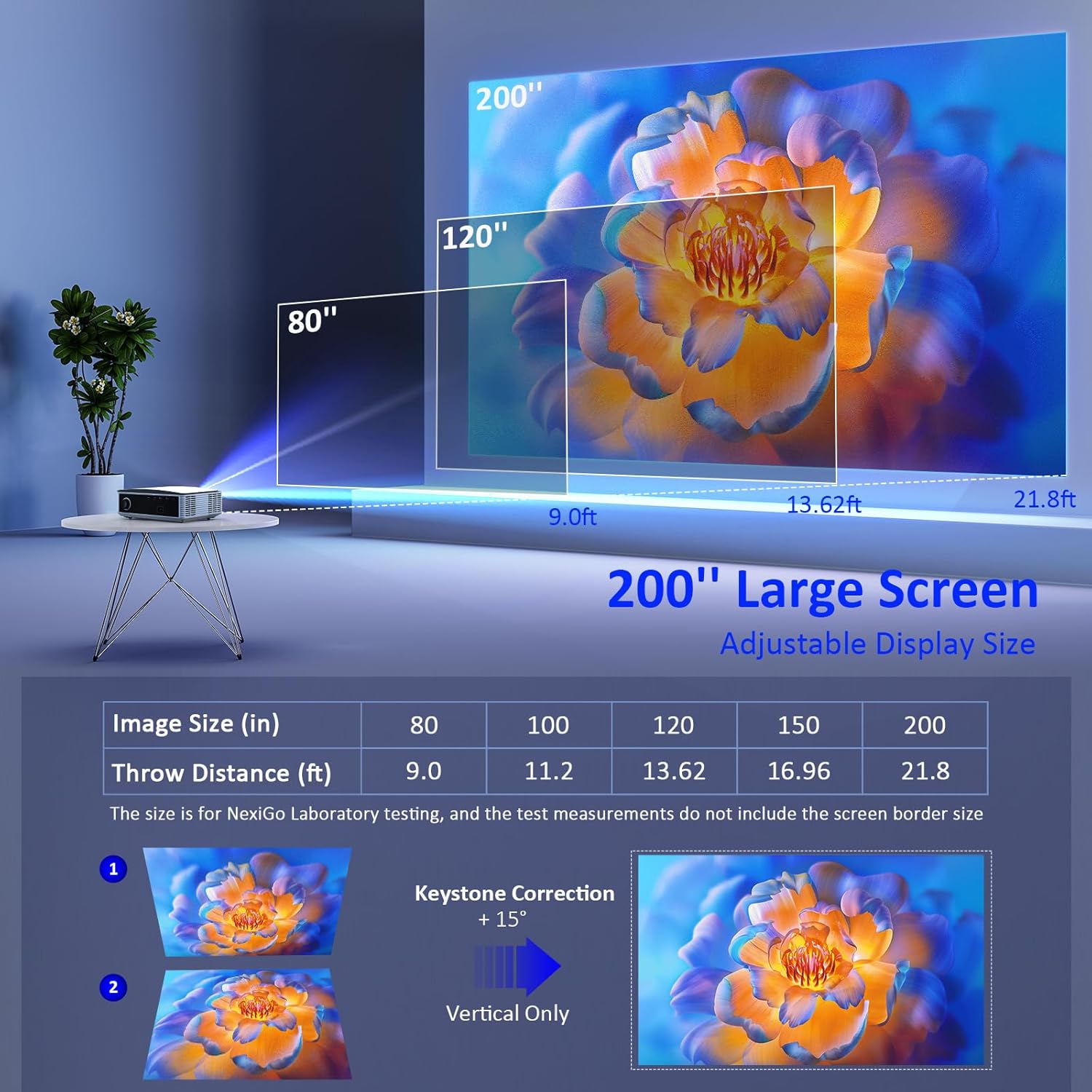
Image: The NexiGo PJ30 projector, a compact white device with a black lens, positioned to project an image.
Temel Özellikler:
- Native 1080P Resolution & 500 ANSI Lumens: Provides high-resolution, bright, and clear images.
- Kablosuz Ekran Yansıtma: Supports 5G Wi-Fi for seamless mirroring from iOS, Android, and Windows devices.
- Dolby Sound & Bluetooth 5.1: Built-in speaker with lifelike Dolby sound and Bluetooth 5.1 for external audio devices.
- Geniş Uyumluluk: Multiple ports including HDMI, USB, AV, and 3.5mm audio jack for various devices.
- Büyük Ekran Boyutu: Adjustable projection from 42" to 200" with a projection distance of 4.8ft to 21.8ft.
- Dijital Yakınlaştırma: Easily adjust screen size with the remote control (available for local video via USB).
2. Kutuda Neler Var?
Upon unboxing your NexiGo PJ30 projector, ensure all the following items are present:
- NexiGo PJ30 Projector
- Uzaktan Kumanda (2 adet AAA pil dahil değildir)
- Güç kablosu
- AV Kablosu
- Kullanıcı Kılavuzu
- Cleaning Kit (cloth and cotton swabs for lens/screen)
3. Kurulum
Yerleştirme ve Kurulum
The NexiGo PJ30 offers flexible installation options to suit your environment:
- Masaüstü Montajı: Projektörü düz bir yüzeye yerleştirin.
- Tavan montalama: Install the projector upside down on the ceiling (mounting hardware not included).
- Duvar montajı: Secure the projector to a wall shelf (shelf not included).

Image: Diagrams illustrating desktop, ceiling, and wall mounting options for the projector.
Güce Bağlanma
- Güç kablosunu projektörün güç giriş portuna bağlayın.
- Güç kablosunun diğer ucunu elektrik prizine takın.
Projeksiyon Mesafesi ve Ekran Boyutu
Adjust the distance between the projector and the screen to achieve your desired display size. The optimal projection distance ranges from 4.8ft to 21.8ft for screen sizes between 42" and 200".

Image: A diagram showing recommended throw distances for various screen sizes (80" at 9.0ft, 120" at 13.62ft, 200" at 21.8ft).
4. Kullanım Talimatları
Güç Açık/Kapalı
- Cihazı açmak veya kapatmak için projektördeki veya uzaktan kumandadaki güç düğmesine basın.
Odak ve Keystone Düzeltme
- Görüntü netleşene kadar projektör merceğindeki odak halkasını ayarlayın.
- Use the keystone dial on the rear of the projector to correct any trapezoidal distortion of the image.
Giriş Kaynağı Seçimi
Projektör birden fazla giriş kaynağını destekler:
- HDMI: Connect devices like TV boxes, gaming consoles (PS5), laptops, or TV sticks via HDMI 1 or HDMI 2 ports.
- USB BAĞLANTI: Connect USB flash drives for direct media playback.
- AV: Eski cihazları bağlamak için birlikte verilen AV kablosunu kullanın.
- Kablosuz Ekran Yansıtma: For iOS, Android, and Windows devices.

Image: The rear panel of the NexiGo PJ30 projector highlighting HDMI, USB, AV, and 3.5mm audio jack ports, with icons of compatible devices like iPhones, iPads, laptops, TV boxes, and USB drives.
Kablosuz Ekran Yansıtma
The PJ30 supports 5G Wi-Fi for wireless screen mirroring. Navigate to the 'MultiScreen' option in the input source menu.
- İOS Cihazları için: Connect your iOS device and the projector to the same Wi-Fi network. Open Control Center on your iOS device, tap 'Screen Mirroring', and select the projector's name (e.g., NexiGo-PJ30-XXXX).
- For Android/Windows Devices: Ensure your device supports Miracast or Wi-Fi Display. Connect the projector to Wi-Fi. On your device, open display settings or screen mirroring and select the projector's name.
- Note: Due to copyright protection, streaming services like Netflix, Amazon Prime Video, and Hulu do not support screen mirroring.

Image: The NexiGo PJ30 projector displaying a racing game on a large screen, with icons for 5G WiFi and Bluetooth 5.1, and logos for iOS, Android, and Windows devices, indicating wireless screen mirroring capability.
Bluetooth Ses Bağlantısı
Connect external Bluetooth speakers or headphones for an enhanced audio experience.
- Go to 'Settings' on the projector's main menu and select 'Bluetooth'.
- Bluetooth'u etkinleştirin ve mevcut cihazları arayın.
- Select your desired Bluetooth speaker or headphones from the list to pair.

Image: The NexiGo PJ30 projector on a coffee table, surrounded by sound waves, with headphones and a Bluetooth speaker, illustrating its immersive Dolby Audio capabilities.
Resim Ayarları
Access 'Settings' from the main menu to adjust various picture parameters:
- Projeksiyon Modu: Adjust based on projector orientation (Normal Front, Normal Back, Invert Front, Invert Back).
- Görüntü Ölçekleme: Scale the image up or down (e.g., 100% to 99%).
- En Boy Oranı: Choose between Auto, 4:3, or 16:9.
- Resim Modu: Select predefined modes (Standard, Soft, Dynamic) or customize your own.
Dijital Zoom
Use the remote control to digitally zoom in or out on the projected image.
- Note: Digital zoom functionality is only available when playing local video content via a USB connection.

Image: A person using a remote control to adjust the digital zoom on a projected image of a dolphin, showing 0.5X and 2X zoom levels.
5. Özellikler
The NexiGo PJ30 projector is engineered to provide a versatile and high-quality viewDeneyim:
- Yüksek Parlaklık: With 500 ANSI lumens, the projector delivers bright images suitable for various lighting conditions.
- Long-lasting LED Lamp: The energy-saving LED light bulb technology ensures a lifespan of up to 30,000 hours, equivalent to approximately 10 years with 8 hours of daily use.
- Çok Yönlü Eğlence: Ideal for home theater setups, gaming, outdoor movie nights, and presentations.

Image: A collage of four images depicting different uses for the NexiGo PJ30 projector: home theater, playing games, outdoor movie night, and as a holiday gift.
Resmi Ürün Videosu
Video: An official product video from NexiGo USA showcasing the features and capabilities of the PJ30 Native 1080P Movie Projector, including its brightness, sound, and connectivity options.
6. Bakım
Toz Filtresinin Temizlenmesi
To maintain optimal performance and prolong the projector's life, regularly clean the dust filter.
- Locate the dust filter cover on the bottom of the projector.
- Gently press and slide out the dust filter.
- Clean the filter with a soft, dry cloth or a small brush to remove accumulated dust.
- Temiz filtreyi yerine oturana kadar yuvasına geri yerleştirin.
- It is recommended to clean the dust filter monthly.

Resim: Yakın çekim view of the NexiGo PJ30 projector showing the removable dust cover at the bottom, with text indicating the importance of regular cleaning.
Lens Temizliği
Use a soft, lint-free cloth to gently wipe the projector lens. Avoid using abrasive cleaners or excessive force.
7. Sorun Giderme
- Hiçbir resmi: Ensure the power cable is securely connected and the projector is turned on. Check the input source selection matches your connected device. Verify HDMI/AV cables are properly connected.
- Bulanık Görüntü: Adjust the focus ring on the lens. Ensure the projector is within the recommended projection distance. Use keystone correction to fix distorted images.
- Ses Yok: Check the volume settings on both the projector and your connected device. If using Bluetooth, ensure it's properly paired and connected. If using external speakers via 3.5mm jack, ensure the cable is fully inserted.
- Ekran Yansıtma Sorunları: Ensure both the projector and your device are connected to the same 5G Wi-Fi network. Some streaming apps do not support mirroring due to copyright.
- Aşırı Isınma: Ensure the projector's vents are not blocked. Clean the dust filter regularly.
8. Özellikler
| Özellik | Detay |
|---|---|
| Model Numarası | PJ30 |
| Yerel Çözünürlük | 1920x1080 (1080P) |
| Parlaklık | 500 ANSI Lümenleri |
| Bağlantı Teknolojisi | 5G Wi-Fi, Bluetooth 5.1 |
| Ekran Boyutu | 42" ila 200" |
| Projeksiyon Mesafesi | 4.8 fit ila 21.8 fit |
| Ses Desteği | Dolby Sound, Built-in Speaker, 3.5mm Audio Jack |
| Giriş Portları | 2x HDMI, 2x USB, AV, 3.5mm Audio Jack |
| Ürün Ağırlığı | 5.51 pound |
| Ürün Boyutları | 12.2 x 8.66 x 3.14 inç |
9. Garanti ve Destek
For warranty information and technical support, please refer to the official NexiGo website or contact their customer service directly. The product was first available on September 1, 2022.
Üretici: Nextight INC


