1. Giriş
This manual provides essential information for setting up, operating, maintaining, and troubleshooting your Alienware X17 R2 Gaming Laptop. Please read this guide thoroughly to ensure optimal performance and longevity of your device.
The Alienware X17 R2 is designed for high-performance gaming and demanding tasks, featuring advanced cooling technologies, powerful processors, and dedicated graphics.
2. Ürün Bittiview
The Alienware X17 R2 is engineered to deliver an immersive gaming experience in a thin 17-inch form factor. Key features include:
- Powerful Intel CPUs: Experience high-performance action across all your favorite games with 12th Gen Intel Core processors.
- Next-Gen GPUs: Game unrestrained with NVIDIA GeForce RTX 3070Ti graphics, Dynamic Boost 2.0, and Deep Learning Super Sampteknoloji.
- Patented Quad Cooling: An industry-first design uses four intelligently controlled and programmable fans to dissipate heat.
- Uzatılmış Çalma Süresi: Improve battery life with Advanced Optimus technology from NVIDIA—now available on all display options.
- Legend 2.0 Industrial Design: A fresh evolution in design with a high-endurance finish and customizable AlienFX lighting.

Şekil 2.1: Ön view of the Alienware X17 R2 Gaming Laptop displaying a game.
3. Kurulum
3.1 Kutudan Çıkarma ve İlk İnceleme
- Dizüstü bilgisayarınızı ve tüm aksesuarlarını dikkatlice ambalajından çıkarın.
- "Kutunun İçindekiler" bölümünde listelenen tüm öğelerin mevcut olduğunu doğrulayın.
- Dizüstü bilgisayarı herhangi bir fiziksel hasar açısından inceleyin. Hasar tespit edilirse, derhal satıcınızla iletişime geçin.
3.2 Gücün Bağlanması
- Connect the power adapter to the charging port located at the rear of the laptop.
- Güç kablosunu duvardaki prize takın.
- The power indicator light will illuminate, indicating the laptop is receiving power.
3.3 İlk Önyükleme ve İşletim Sistemi Kurulumu
- Press the Alienware head power button to turn on the laptop.
- Windows 11 Home kurulum sürecini tamamlamak için ekrandaki talimatları izleyin. Bu işlem bölgenizi seçmeyi, bir Wi-Fi ağına bağlanmayı ve bir kullanıcı hesabı oluşturmayı içerir.
- Sistemin gerekli güncellemeleri indirmesine ve yüklemesine izin verin.
4. Dizüstü Bilgisayarınızı Çalıştırma
4.1 Klavye ve Dokunmatik Yüzey
The Alienware X17 R2 features a backlit keyboard and a responsive touchpad. The AlienFX lighting allows for customizable colors and effects across the keyboard and other zones.

Şekil 4.1: Ayrıntılı view Arkadan aydınlatmalı klavye ve dokunmatik yüzey.
4.2 Ekran ve Grafikler
Enjoy stunning visuals on the 17.3-inch FHD display with a 480Hz refresh rate and 3ms response time. The NVIDIA GeForce RTX 3070Ti graphics card ensures smooth gameplay and high-fidelity rendering. The laptop supports Dolby Vision for optimized color profiles.
4.3 Ses
Experience immersive 3D sound via Dolby Atmos, designed to deliver audio as studios intended.
4.4 Bağlantı Noktaları ve Bağlantı
The laptop offers a variety of ports for peripherals and external displays:

Şekil 4.2: Arka view illustrating the various connectivity ports.
- USB 3.0 Bağlantı Noktaları: 3 ports for connecting various USB devices.
- USB-C Bağlantı Noktaları: For versatile connectivity, including Thunderbolt 4.
- HDMI2.1: Supports up to 4K/120Hz output for external displays.
- Ethernet: Killer E3100 RJ45 Ethernet for stable wired network connections.
- Kablosuz: Killer Wi-Fi 6 (802.11ax) and Bluetooth for wireless connectivity.
5. Bakım
5.1 Temizlik
- Ekranı ve dış yüzeyleri temizlemek için yumuşak, tüy bırakmayan bir bez kullanın.
- Sert kimyasallar veya aşındırıcı malzemeler kullanmaktan kaçının.
- Regularly clean the cooling vents to prevent dust buildup, which can affect performance.
5.2 Yazılım Güncellemeleri
Ensure your operating system and drivers are kept up-to-date. Windows Update will handle OS updates, and Alienware Command Center can assist with driver and firmware updates.
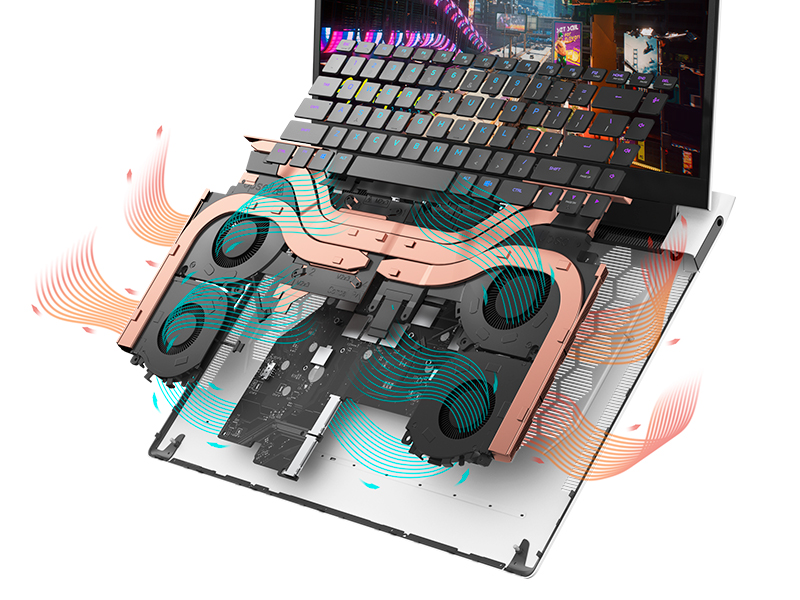
Figure 5.1: Alienware Command Center for system management.
6. Sorun Giderme
If you encounter issues with your Alienware X17 R2, consider the following basic troubleshooting steps:
- Güç Yok: Güç adaptörünün hem dizüstü bilgisayara hem de çalışan bir elektrik prizine güvenli bir şekilde bağlandığından emin olun. Güç gösterge ışığını kontrol edin.
- Görüntüleme Sorunları: If the screen is black, try connecting an external monitor to verify if the issue is with the laptop's display or the graphics card. Update graphics drivers.
- Aşırı Isınma: Ensure cooling vents are clear of obstructions. Use Alienware Command Center to monitor temperatures and adjust fan profiles.
- Performans Yavaşlaması: Gereksiz uygulamaları kapatın. Yüksek CPU veya RAM tüketimi yapan arka plan işlemlerini kontrol edin. SSD'de yeterli boş alan olduğundan emin olun.
- Yazılım Sorunları: Restart the laptop. If issues persist, consider performing a system restore or reinstalling the problematic software.
7. Özellikler
| Özellik | Şartname |
|---|---|
| Ekran Boyutu | 17.3 inç |
| Ekran Çözünürlüğü | 1920 x 1080 piksel (FHD) |
| İşlemci | Intel Core i9-12900H (3.8 GHz, 14 Çekirdek) |
| Veri deposu | 16 GB DDR5 (4800 MHz) |
| Sabit Sürücü | 1 TB SSD (Katı Hal Sürücüsü) |
| Grafik Eş İşlemcisi | NVIDIA GeForce RTX 3070 Ti (8 GB GDDR6) |
| İşletim Sistemi | Windows 11 Ev |
| Kablosuz Tip | 802.11ax (Killer Wi-Fi 6), Bluetooth |
| USB 3.0 Bağlantı Noktaları | 3 |
| Ürün Ağırlığı | 6.82 pound |
| Ürün Boyutları | 11.79 x 15.72 x 0.58 inç |
8. Kutuda Neler Var?
- Alienware X17 R2 Oyun Dizüstü Bilgisayarı
- Güç Adaptörü
- Güç Kablosu
- Belgeleme
9. Resmi Ürün Videoları
Alienware X17 R2 Gaming Laptop Overview
Video 9.1: Resmi bir açıklamaview of the Alienware X17 R2 Gaming Laptop, highlighting its design, cooling, and performance features.
About Alienware X17 R2 Gaming Laptop
Video 9.2: A detailed look at the Alienware X17 R2 Gaming Laptop, showcasing its features and design elements.
10. Garanti ve Destek
Your Alienware X17 R2 Gaming Laptop comes with a standard manufacturer's warranty. For detailed warranty information, please refer to the documentation included with your product or visit the official Alienware support webalan.
For technical support, driver downloads, and service requests, please visit the Alienware support portal. You can also find FAQs and community forums for additional assistance.


