giriiş
This manual provides detailed instructions for the Powerwave Switch Wireless Controller. Learn how to set up, operate, maintain, and troubleshoot your controller to enhance your gaming experience on Nintendo Switch, PC, Android, and iOS devices.

Ön view of the Powerwave Switch Wireless Controller, showcasing its Star White design with blue grips and red shoulder buttons. The controller features standard button layouts including A, B, X, Y buttons, a D-pad, and dual analog sticks.
Ürün Özellikleri
- Kablosuz Bluetooth Bağlantısı: Enjoy seamless gaming without cables.
- 3-Speed Dual-Motor Vibration: Experience immersive feedback with adjustable vibration intensity.
- Hareket Kontrolleri: Enhance gameplay with precise motion sensing capabilities.
- Çoklu Platform Uyumluluğu: Works wirelessly with Nintendo Switch, PC, Android, and iOS 13 and above.
- 4 Programlanabilir Makro Düğmesi: Customize complex inputs and activate them with a single button press.
- Turbo mod: Enable rapid-fire commands for quick actions in games.
- 8-Colour Rotating LED Lighting Effect: Adds a vibrant visual element to your gaming setup.

Visual representation of the controller's key features, including Wireless Bluetooth, 3-Speed Dual-Motor, PC/Android/iOS13 compatibility, 8-Colour Rotating LED, and Programmable Macro Buttons.
Kurulum Kılavuzu
1. İlk Şarj
Before first use, fully charge the controller using the provided USB-C cable. Connect the cable to the controller's USB-C port and the other end to a USB power source (e.g., Nintendo Switch dock, PC, or USB wall adapter). The LED indicators will show charging status.
2. Nintendo Switch ile eşleştirme
- Nintendo Switch ANA Menüsünden şunu seçin: Kontrolörler, Daha sonra Tutma Yerini/Sırayı Değiştir.
- On the Powerwave controller, press and hold the ANA SAYFA düğmesi (house icon) for 3-5 seconds until the LED indicators start flashing rapidly.
- Eşleştirme tamamlandığında, kumanda üzerindeki ilgili oyuncu LED'leri sürekli yanacaktır.
3. Pairing with PC, Android, or iOS (Bluetooth)
- Ensure Bluetooth is enabled on your device (PC, Android phone/tablet, iOS device).
- On the Powerwave controller, press and hold the ANA SAYFA düğmesi for 3-5 seconds until the LED indicators flash rapidly.
- On your device, search for new Bluetooth devices. Select "Powerwave Controller" (or similar) from the list to pair.
- Once connected, the LED indicators on the controller will stop flashing and remain solid.
Kullanım Talimatları
Temel Kontroller
The Powerwave Switch Wireless Controller features standard button layouts for intuitive gameplay. Refer to your game's specific control scheme for optimal use.
Programmable Macro Buttons (M1, M2, M3, M4)
The controller includes four programmable macro buttons on the back (M1, M2, M3, M4) for executing complex command sequences with a single press.
- Programlama Moduna Giriş: Basılı tutun Makro düğmesi (usually a small button near the M buttons) until the indicator light flashes.
- Recording Macro: Press the desired M button (M1-M4) you wish to program. Then, input the sequence of buttons you want to record (e.g., A, B, X, Y, L, R, ZL, ZR, D-pad directions, analog stick movements).
- Programlama Modundan Çıkış: Basın Makro düğmesi again to save the macro and exit programming mode. The indicator light will stop flashing.
- Using Macro: Simply press the programmed M button during gameplay to execute the recorded sequence.
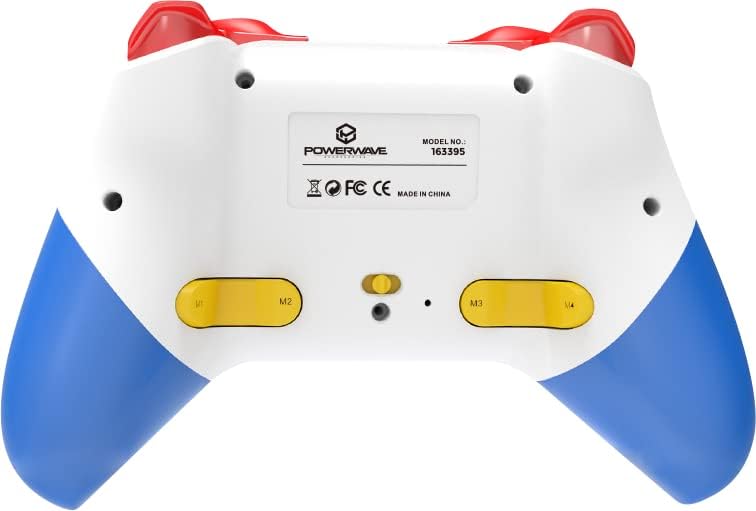
Arka view of the Powerwave Switch Wireless Controller, highlighting the M1, M2, M3, and M4 programmable macro buttons, along with the model number and regulatory markings.
Turbo Modu
Turbo mode allows a button to be pressed repeatedly as long as it is held down, providing a rapid-fire function.
- Turbo'yu Etkinleştirme: Basılı tutun Turbo düğmesi (usually marked 'T') and then press the desired action button (e.g., A, B, X, Y, L, R, ZL, ZR). The button will now be in Turbo mode.
- Turbo Hızının Ayarlanması: Tutarken Turbo düğmesi, move the Right Analog Stick Up or Down to cycle through different turbo speeds (slow, medium, fast).
- Turbo devre dışı bırakılıyor: To remove Turbo from a specific button, press and hold the Turbo düğmesi and then press the same action button again. To clear all Turbo settings, press and hold the Turbo düğmesi 5 saniye boyunca.
Titreşim Ayarı
The controller features 3-speed dual-motor vibration. To adjust vibration intensity, press and hold the Titreşim düğmesi (if available, or a combination like Turbo + D-pad Up/Down) to cycle through intensities (Off, Low, Medium, High).
LED Aydınlatma Efektleri
The 8-colour rotating LED lighting effect can be toggled or adjusted. Refer to the specific button combination for your controller model, often involving a dedicated LED button or a combination with the Turbo button.
Bakım
- Temizlik: Kumandayı silmek için yumuşak, kuru bir bez kullanın. İnatçı kirler için hafifçe kurulayın.ampBezi suyla yıkayın. Sert kimyasallar veya aşındırıcı temizleyiciler kullanmayın.
- Depolamak: Kontrol cihazını serin, kuru ve doğrudan güneş ışığından ve aşırı sıcaklıklardan uzak bir yerde saklayın.
- Pil Bakım: Pil ömrünü uzatmak için, kontrol cihazını sık sık tamamen boşaltmaktan kaçının. Uzun süre kullanılmasa bile düzenli olarak şarj edin.
- Damlalardan Kaçının: Kumanda cihazını, iç bileşenlerine zarar verebilecek fiziksel darbelere ve düşmelere karşı koruyun.
Sorun giderme
| Sorun | Olası Çözüm |
|---|---|
| Kumanda açılmıyor. | Ensure the controller is fully charged. Connect it to a power source and allow it to charge for at least 30 minutes before attempting to turn it on again. |
| Controller fails to pair with device. |
|
| Input lag or disconnection during gameplay. |
|
| Tuşlar veya analog çubuklar tepki vermiyor. |
|
Özellikler
- Model Numarası: 163395
- Ürün Ölçüleri: 15x6x10 cm
- Ağırlık: 212 Gram
- Bağlantı: Kablosuz Bluetooth
- Uyumluluk: Nintendo Switch, Nintendo Switch Lite, Nintendo Switch OLED, PC, Android, iOS 13+
- Özellikler: 3-Speed Dual-Motor Vibration, Motion Controls, 4 Programmable Macro Buttons, Turbo Mode, 8-Colour Rotating LED Lighting Effect
- Unsupported Functions (Nintendo Switch): HD Rumble, NFC, IR Camera
Garanti ve Destek
For warranty information and technical support, please refer to the official Powerwave webSiteyi ziyaret edin veya müşteri hizmetleriyle iletişime geçin. Satın alma belgenizi herhangi bir garanti talebi için saklayın.
Powerwave Official Webalan: www.powerwave.com.au