giriiş
This manual provides detailed instructions for the setup, operation, and maintenance of your Amazon Basics Projection Alarm Clock. Please read this manual thoroughly before using the product to ensure proper function and to prevent damage.

Image: The Amazon Basics Projection Alarm Clock, showing its digital display and projection lens.
Güvenlik Talimatları
- Üniteyi aşırı sıcaklıklara, doğrudan güneş ışığına, toza veya neme maruz bırakmayın.
- Güç adaptörünün yerel güç kaynağınızla uyumlu olduğundan emin olun.
- Cihazı sudan veya diğer sıvılardan uzak tutun.
- Cihazı sökmeye veya üzerinde değişiklik yapmaya çalışmayın. Bu, garantiyi geçersiz kılacaktır.
- Clean the unit only with a soft, dry cloth. Do not use liquid cleaners.
- Pilleri yerel düzenlemelere uygun şekilde atın.
Paket İçeriği
- Amazon Basics Projection Alarm Clock
- AC Güç Adaptörü
- Kullanıcı Kılavuzu
Ürün Özellikleri
- Projection of time onto a wall or ceiling.
- FM Radio with automatic/manual scan and up to 15 preset stations.
- USB port for charging mobile phones or tablets.
- 7-inch high-definition LED display with adjustable brightness.
- Dual alarms for separate wake-up times.
- Snooze function with adjustable duration (2 to 60 minutes).
- Sleep timer for automatic radio shut-off (5 to 90 minutes).
- DST button for Daylight Saving Time adjustment.
- Battery backup (requires 2 AAA batteries, not included) to maintain time settings during power outagee.

Resim: Üzeriview of key features including sleep timer, radio presets, and snooze function.
Kontroller ve Ekran
Familiarize yourself with the buttons and ports on your alarm clock for optimal use.

Resim: Yan view illustrating the location of controls, USB charging port, and projection lens.
- Zaman Ayarı Düğmesi: Geçerli saati ayarlamak için kullanılır.
- Alarm 1/2 Buttons: Used to set and activate Alarm 1 and Alarm 2.
- Snooze/Dimmer Button: Activates snooze during an alarm; adjusts display brightness when not alarming.
- Radio/Sleep Button: Turns FM radio on/off; sets sleep timer.
- Volume/Tune Dial: Adjusts radio volume and tunes FM frequencies.
- Projection On/Off/Flip Button: Controls the projection feature and flips the projected time.
- Projection Focus Wheel: Tahmini zamanın netliğini ayarlar.
- Projection Angle Adjuster: Changes the angle of the projected time.
- USB Şarj Noktası: Harici cihazları şarj etmek için.
- DST Düğmesi: Toggles Daylight Saving Time.
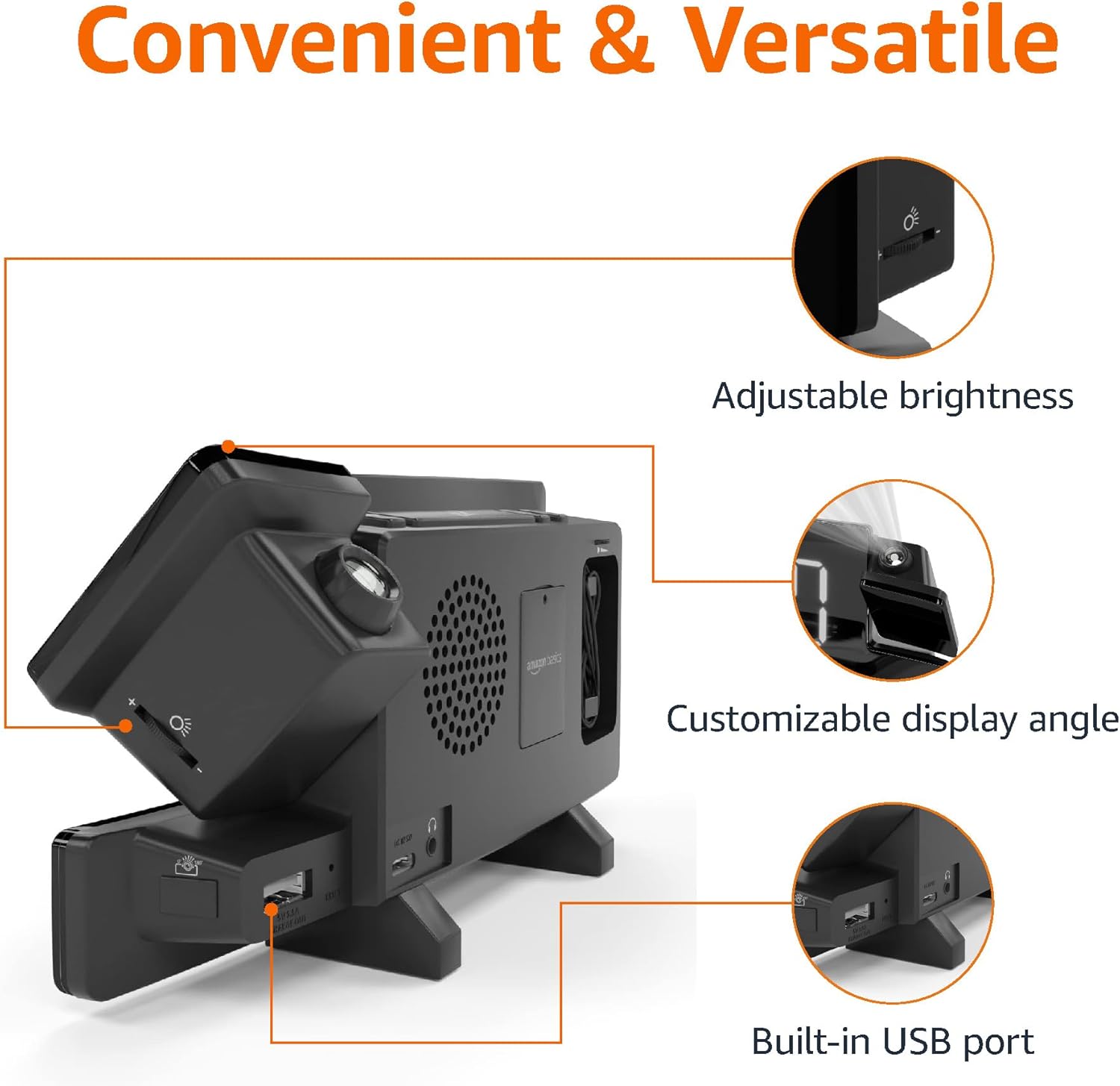
Image: Diagram highlighting the adjustable brightness, customizable projection angle, and USB charging port.
Kurmak
1. Güç Bağlantısı
Connect the AC power adapter to the DC IN port on the back of the alarm clock and plug it into a standard wall outlet. The display will light up.
2. Pil Yedekleme Kurulumu
For battery backup, open the battery compartment on the bottom of the unit. Insert 2 AAA batteries (not included), ensuring correct polarity (+/-). Close the compartment. The battery backup maintains time settings during power outages but does not power the display or alarm functions.
3. Başlangıç Zaman Ayarı
- Basılı tutun Zaman Ayarı düğme. Saat haneleri yanıp sönecektir.
- Kullanın Volume/Tune Dial saati ayarlamak için. Basın Zaman Ayarı Tekrar onaylamak için.
- Dakika rakamları yanıp sönecektir. Kullanın Volume/Tune Dial dakikayı ayarlamak için. Basın Zaman Ayarı Tekrar onaylamak için.
- The time format (12H/24H) will flash. Use the Volume/Tune Dial to select your preferred format. Press Zaman Ayarı Zaman ayarı modunu onaylamak ve çıkmak için.
4. Yaz Saati Uygulaması (DST)
Basın Yaz saati uygulaması button to toggle Daylight Saving Time on or off. The DST indicator will appear or disappear on the display.
Kullanım Talimatları
1. Alarmların Ayarlanması (Alarm 1 ve Alarm 2)
- Basılı tutun Alarm 1 or Alarm 2 Düğmeye basın. Alarm saati rakamları yanıp sönecektir.
- Kullanın Volume/Tune Dial to adjust the alarm hour. Press the respective Alarm Onaylamak için tekrar düğmeye basın.
- The alarm minute digits will flash. Use the Volume/Tune Dial to adjust the alarm minutes. Press the respective Alarm Onaylamak için tekrar düğmeye basın.
- The alarm source (FM radio or buzzer) will flash. Use the Volume/Tune Dial to select your preference. Press the respective Alarm Alarmı onaylamak ve etkinleştirmek için düğmeye basın. Ekranda bir alarm simgesi görünecektir.
- To deactivate an alarm, press the respective Alarm Düğmeye bir kez basın. Alarm simgesi kaybolacaktır.
2. Using Snooze
Alarm çaldığında, tuşuna basın. Erteleme/Dimmer button to temporarily silence the alarm. The alarm will sound again after the set snooze duration. The default snooze duration is 9 minutes. To adjust the snooze duration, press and hold the Erteleme/Dimmer düğmesini kullanın, ardından Volume/Tune Dial to select a duration between 2 and 60 minutes. Press Erteleme/Dimmer Tekrar onaylamak için.
3. FM Radyonun Çalıştırılması
- Açma/Kapatma: Basın Radio/Sleep FM radyoyu açıp kapatmak için kullanılan düğme.
- İstasyonları Ayarla: Kullanın Volume/Tune Dial to manually tune to a desired FM frequency.
- Otomatik tarama: Basılı tutun Radio/Sleep button to automatically scan and save available FM stations as presets.
- Ön Ayarları Seçin: Once stations are saved, short press the Radio/Sleep button to cycle through the preset stations.
- Sesi Ayarla: Döndür Volume/Tune Dial to adjust the radio volume.
4. Uyku Zamanlayıcısı
While the FM radio is playing, press the Radio/Sleep button repeatedly to set the sleep timer. Options typically range from 5 to 90 minutes. The radio will automatically turn off after the selected duration.
5. Projeksiyon Özelliği

Image: The alarm clock projecting the time onto a bedroom ceiling.
- Etkinleştir/Devre Dışı Bırak: Basın Projection On/Off/Flip button to turn the time projection on or off.
- Açıyı Ayarla: Manually adjust the projection arm to direct the time onto your desired surface (wall or ceiling).
- Odak: Döndür Projection Focus Wheel to achieve a clear image.
- Flip Display: Basın Projection On/Off/Flip button repeatedly to rotate the projected time 180 degrees, ensuring correct orientation.

Image: The alarm clock on a nightstand, projecting the time onto a wall, demonstrating its use in a bedroom setting.
6. USB Şarjı
Connect your mobile phone or tablet's USB charging cable to the USB Şarj Portu on the back of the alarm clock. The device will begin charging. This port is for charging only and does not support data transfer.
7. Ekran Parlaklığı Ayarı
Basın Erteleme/Dimmer button (when no alarm is sounding) to cycle through different brightness levels for the main LED display.
Bakım
1. Temizlik
Wipe the unit with a soft, dry, lint-free cloth. Do not use abrasive cleaners, waxes, or solvents as they may damage the surface.
2. Pil Değişimi
If the battery backup is not functioning correctly (e.g., time resets after a power outage), replace the 2 AAA batteries in the battery compartment, ensuring correct polarity.
Sorun giderme
| Sorun | Olası Neden | Çözüm |
|---|---|---|
| Ekran boş. | Güç bağlantısı yok. | AC adaptörünün cihaza ve çalışan bir duvar prizine güvenli bir şekilde takılı olduğundan emin olun. |
| Alarm çalmıyor. | Alarm etkinleştirilmemiş veya ses seviyesi çok düşük. | Check if the alarm icon is visible on the display. Re-set the alarm if necessary. Increase radio volume if FM is selected as alarm source. |
| Tahmin edilen zaman belirsizdir. | Projection focus is not adjusted. | Döndür Projection Focus Wheel görüntü netleşene kadar. |
| Projected time is not visible. | Projection is off or room is too bright. | Basın Projection On/Off/Flip button to activate. The projection is best viewed in a dark room. |
| Radyo alımı zayıf. | Anten konumu veya parazit. | Adjust the position of the FM antenna wire. Move the unit away from other electronic devices that may cause interference. |
| USB şarjı çalışmıyor. | Kablo sorunu veya cihaz uyumsuzluğu. | Ensure the USB cable is functional and properly connected. Try a different cable or device. |
Özellikler
- Modeli: MET8831-ABD
- Güç Girişi: AC Adaptörü (dahil)
- Pil Yedekleme: 2 x AAA pil (dahil değildir)
- Görüntülemek: 7 inç LED
- Radyo frekansı: FM
- USB Çıkışı: 5V, 1A (for charging)
- Boyutlar (U x G x Y): 7.1 x 1.6 x 3.7 inç (18.03 x 4.06 x 9.4 cm)
- Ağırlık: Yaklaşık 0.59 lbs (267.62 g)

Image: Product dimensions for the Amazon Basics Projection Alarm Clock.
Garanti Bilgileri
This product is covered by the Amazon Basics warranty. For detailed information regarding warranty terms and conditions, please refer to the official Amazon Basics website veya müşteri desteği ile iletişime geçin.
Müşteri Desteği
For further assistance, troubleshooting, or product inquiries, please contact Amazon Basics customer support through the Amazon website or your purchase platform. Have your product model number (MET8831-US) and purchase details ready.


