Ürün Bittiview
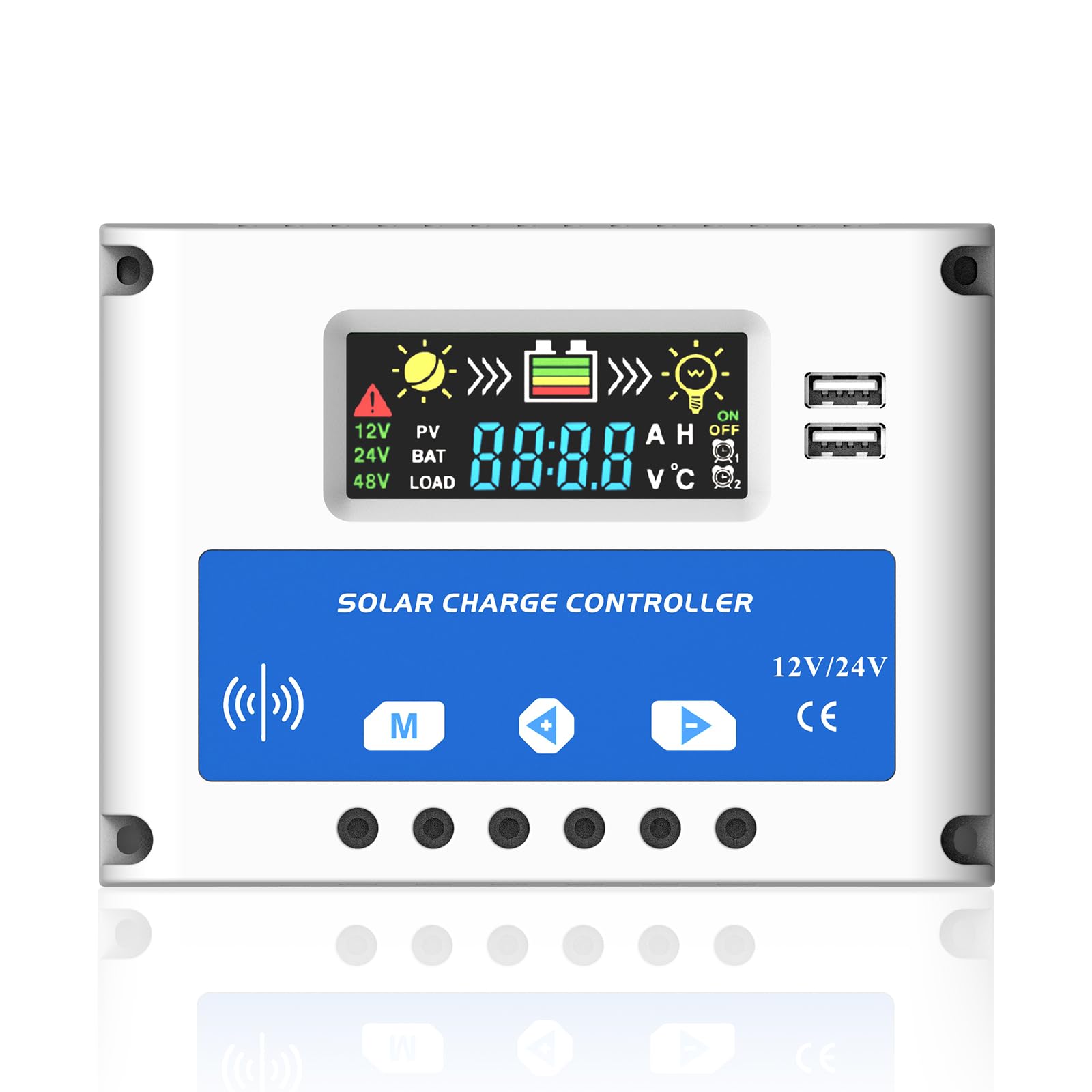
Şekil 0: Ön view of the Anern PSC 20A Solar Charge Controller, highlighting its LCD screen and control buttons.
The Anern PSC 20A Solar Charge Controller is designed to manage the power flow from your solar panels to your battery bank, ensuring efficient charging and protecting your battery from overcharge and over-discharge. This intelligent controller automatically detects 12V/24V system voltages and features a clear LCD display for monitoring system status and adjusting parameters. It includes dual USB ports for charging external devices.
Temel Özellikler
- Automatic management of solar panel and battery operation.
- İstikrarlı performans için dahili endüstriyel mikrodenetleyici.
- Large LCD display for real-time data and adjustable parameters.
- Tam 3-sntage PWM charge management (Bulk, ABS, Float).
- Multiple protection functions: short-circuit, open-circuit, reverse polarity, over-load, low voltage ve aşırı şarj koruması.
- Dual 5V/2A USB ports for device charging.
Güvenlik Talimatları
Please read and understand these safety instructions before installation and operation to prevent damage to the controller, battery, or other components.
- This controller is only suitable for lead-acid batteries: OPEN, AGM, and GEL types. It is not compatible with nickel-metal hydride, lithium-ion, or other battery types.
- The charge controller is designed exclusively for regulating solar modules. Do not connect any other charging sources to the charge regulator.
- The LCD display may have a voltage error of 0.2V - 0.3V, which is considered normal.
- Ensure battery cables are as short as possible to minimize power loss and maximize efficiency.
Özellikler
| Parametre | Değer |
| Pil Hacmitage | 12V/24V Otomatik Adaptasyon |
| Şarj Akımı | 20A |
| Deşarj Akımı | 10A |
| Şamandıra Hacmitage | 13.7V (ayarlanabilir) |
| USB Çıkışı | 5V/2A (Çift USB) |
| Çalışma Sıcaklığı | -35°C ile +60°C arası |
| Ürün Boyutları | 12x5x17 cm |
| Ürün Ağırlığı | 140 g (yaklaşık 4.94 oz) |
| Görüntü Türü | LCD |
| Malzeme | Plastik |
Kurulum ve Yükleme
Follow these steps for proper installation of the solar charge controller. Ensure all connections are secure and correct to prevent damage.
- Pili bağlayın: First, connect the battery to the charge controller. Ensure correct polarity (+ to + and - to -). The controller will automatically detect the battery voltage (12V veya 24V).
- Güneş panellerini bağlayın: Next, connect the solar panels (PV array) to the charge controller. Again, observe correct polarity.
- DC yükü bağlayın: Finally, connect your DC load (e.g., lights) to the charge controller.
Important Wiring Sequence:
Battery → Solar Panels → DC Load

Şekil 1: Wiring diagram illustrating the connection sequence for the solar charge controller, including solar panels, battery, and load. Ensure positive and negative terminals are correctly matched.
Koruma Fonksiyonları
The controller incorporates several protection features to safeguard your system:

Şekil 2: Üzerindeview of the controller's built-in protection mechanisms, including safeguards against reverse polarity, over-voltage, cilt altıtage, and over-current conditions.
Operasyon
LCD Ekran Arayüzü
The LCD provides real-time information about your solar system. The interface includes icons and numerical values for easy monitoring.

Şekil 3: Ayrıntılı view of the LCD display, explaining each icon and its corresponding meaning for system status monitoring.
Çalışma Modlarını Yükle
The controller offers three distinct load working modes, which can be configured via the LCD interface:
- 24H (24-hour operation): The load operates continuously for 24 hours.
- 0H (Light control mode): The load works only after dark.
- 1H-23H (Light and time control modes): The load works after dark for a set duration, configurable from 1 to 23 hours.

Şekil 4: Visual representation of the three selectable load operating modes and their respective icons.
Bakım
The Anern PSC 20A Solar Charge Controller is designed for low maintenance. However, regular checks can ensure optimal performance and longevity:
- Tüm kablo bağlantılarını periyodik olarak kontrol ederek sıkı olduklarından ve korozyondan arınmış olduklarından emin olun.
- Kontrol cihazını temiz ve toz ve kalıntılardan uzak tutun. Temizlik için kuru bir bez kullanın.
- Aşırı ısınmayı önlemek için kontrol ünitesinin çevresinde yeterli havalandırma olduğundan emin olun.
- Monitor the LCD display regularly for any error codes or unusual readings.
Sorun giderme
Bu bölümde, güneş enerjisi şarj kontrol cihazınızla karşılaşabileceğiniz yaygın sorunlar ele alınmaktadır.
Sık Sorulan Sorular ve Cevaplar
- Q: Why does the LCD screen become blank?
- A: The solar controller will stop outputting when the battery voltage drops below approximately 8V. In this state, the LCD screen will go blank. When the solar panels begin charging the battery again, the controller will resume output once the battery voltage 12.6V'a döner.
If you encounter other issues not listed here, please refer to the support section.
Garanti ve Destek
For warranty information or technical support, please contact Anern customer service through the retailer where you purchased the product or visit the official Anern website. Please have your model number (PSC-20A) and purchase details ready when contacting support.


