1. Ürün Bittiview
The AZZA CSAZ-280B Spectra Black is an ATX Mid Tower gaming case designed to house various computer components. It features a tempered glass side panel and a steel right panel. This manual provides instructions for the proper installation and maintenance of your computer components within this case.

Resim 1.1: Ön-sol view of the AZZA CSAZ-280B Spectra Black case, showcasing the tempered glass side panel and the front panel design with integrated RGB lighting.
Temel Özellikler:
- Left Panel: Tempered glass with rubber mounts for secure installation.
- Right Panel: Solid steel panel.
- Motherboard Compatibility: Supports ATX, Micro-ATX, and ITX motherboards.
- Drive Bays: Up to three 2.5" drive bays and up to two 3.5" drive bays.
- Maximum CPU Cooler Height: Up to 170 mm.
- Maximum Video Card Length: Up to 290 mm.
2. Kurulum ve Bileşen Montajı
Follow these steps for proper installation of your computer components into the AZZA CSAZ-280B case. Ensure the system is powered off and unplugged before beginning any installation.
2.1 Ön Giriş/Çıkış Paneli Bağlantıları
The top panel of the case features various input/output ports and controls for convenient access.

Resim 2.1: Yukarıdan aşağıya view of the case's front I/O panel, indicating the Power button, LED control button, Audio jacks (Mic and Headphone), two USB 2.0 ports, and one USB 3.0 port.
- Güç Düğmesi: Sistemi açmak veya kapatmak için basın.
- LED Düğmesi: Controls the RGB lighting effects of the case.
- Ses Jakları: Separate ports for microphone and headphones.
- USB 2.0 Bağlantı Noktaları: Two ports for connecting USB 2.0 devices.
- USB 3.0 Bağlantı Noktası: One port for connecting USB 3.0 devices, offering faster data transfer speeds.
2.2 Sürücü Kurulumu
The case supports both 3.5" HDDs and 2.5" SSDs. Refer to the images below for drive bay locations.

Resim 2.2: Dahili view showing the lower drive cage, capable of holding one 3.5" HDD or one 2.5" SSD, and an additional dedicated 3.5" HDD bay.

Resim 2.3: Dahili view showing two dedicated 2.5" SSD mounting brackets located behind the motherboard tray.
- For 3.5" HDDs: Install drives into the designated 3.5" drive cage located at the bottom front of the case. Secure with screws.
- For 2.5" SSDs: Install drives into the dedicated 2.5" mounting brackets behind the motherboard tray or in the lower drive cage. Secure with screws.
2.3 Grafik Kartı Kurulumu
Kasa 290 mm uzunluğa kadar ekran kartlarını destekliyor.

Resim 2.4: Dahili view illustrating the maximum supported length for a video card, which is 290mm.
- Kasanın arka tarafındaki gerekli PCI-E yuva kapaklarını çıkarın.
- Carefully insert the graphics card into the PCI-E slot on your motherboard.
- Ekran kartını vidalarla kasaya sabitleyin.
2.4 Fan Installation and Airflow
Proper fan placement ensures optimal cooling performance. The case supports various fan configurations:
- Ön: Supports 3 x 120mm fans or 2 x 140mm fans.
- Tepe: 2 adet 120 mm fanı destekler.
- Arka: 1 adet 120 mm fanı destekler.
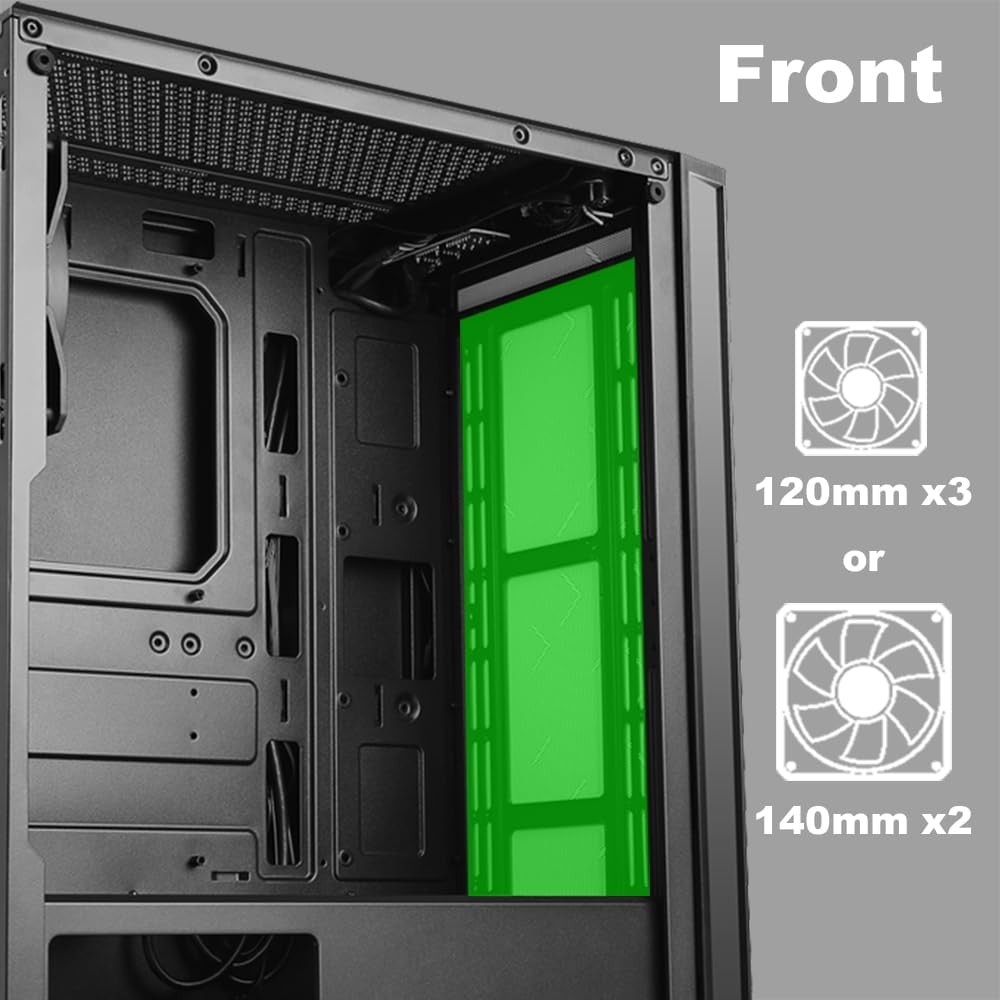
Resim 2.5: Dahili view of the front panel, highlighting the mounting locations for up to three 120mm fans or two 140mm fans.

Resim 2.6: Dahili view of the top panel, showing the mounting locations for up to two 120mm fans.

Resim 2.7: Dahili view of the rear panel, indicating the mounting location for one 120mm fan.
- Identify the desired fan mounting locations (front, top, rear).
- Secure fans to the case using appropriate fan screws.
- Connect fan power cables to the motherboard or a fan controller.
2.5 Güç Kaynağı Kurulumu
The power supply unit (PSU) mounts at the bottom of the case.
- Slide the PSU into the designated compartment at the bottom rear of the case.
- Güç kaynağını arkadaki vidaları kullanarak kasaya sabitleyin.
- Route power cables through the cable management cutouts to reach your components.
3. Kullanım Talimatları
3.1 Güç Açma/Kapatma
To power on your system, press the power button located on the top I/O panel. To power off, either shut down through your operating system or press and hold the power button for several seconds.
3.2 LED Kontrolü
Use the dedicated LED button on the top I/O panel to cycle through various lighting modes and colors for the integrated RGB elements of the case.
4. Bakım
Düzenli bakım, PC bileşenlerinizin optimum performans ve uzun ömürlü olmasını sağlamaya yardımcı olur.
- Toz Temizleme: Periyodik olarak toz filtrelerini ve iç bileşenleri basınçlı hava kullanarak temizleyin. Temizlemeden önce sistemin kapalı ve fişinin çekilmiş olduğundan emin olun.
- Kablo yönetimi: Ensure cables are neatly routed to prevent obstruction of airflow and to maintain a clean interior.
- Panel Bakımı: Clean the tempered glass panel with a soft, lint-free cloth and a mild glass cleaner. Avoid abrasive materials.
5. Sorun Giderme
Bu bölümde karşılaşabileceğiniz yaygın sorunlar ele alınmaktadır.
- Sistem Açılmıyor:
- Tüm güç kablolarının (24 pin ATX, 8 pin CPU, GPU güç kablosu) anakarta ve bileşenlere güvenli bir şekilde bağlı olduğundan emin olun.
- Güç kaynağı anahtarının 'AÇIK' konumunda olduğundan emin olun.
- Check that the front panel power button cable is correctly connected to the motherboard's front panel header.
- Fans Not Spinning / LEDs Not Lighting Up:
- Confirm fan power cables are properly connected to the motherboard or fan controller.
- Ensure LED cables are correctly connected to the motherboard's RGB header or the case's LED controller.
- Press the LED button on the top I/O panel to cycle through modes or turn on the lighting.
- USB bağlantı noktaları çalışmıyor:
- Check that the USB 2.0 and USB 3.0 headers from the front panel are correctly plugged into the corresponding ports on your motherboard.
- Audio Jacks Not Working:
- Ensure the HD Audio cable from the front panel is securely connected to the HD Audio header on your motherboard.
6. Özellikler
Detailed technical specifications for the AZZA CSAZ-280B Spectra Black case.
| Özellik | Şartname |
|---|---|
| Model Adı | CSAZ-280B SPECTRA BLACK |
| Dava Türü | Orta kule |
| Anakart Uyumluluğu | ATX, Mikro-ATX, ITX |
| Malzeme | Plastik, Temperli Cam |
| Renk | Siyah |
| Boyutlar (U x G x Y) | 19.69 x 17.32 x 9.84 inç |
| Ürün Ağırlığı | 11 pound |
| 2.5" Sürücü Yuvaları | 3'e kadar |
| 3.5" Sürücü Yuvaları | 2'e kadar |
| Maksimum CPU Soğutucu Yüksekliği | 170 mm |
| Maksimum Video Kartı Uzunluğu | 290 mm |
| Ön G / Ç Bağlantı Noktaları | 2 x USB 2.0, 1 x USB 3.0, Audio, Mic, Power, LED Control |
| Ön Fan Desteği | 3x120mm veya 2x140mm |
| En Üst Düzey Taraftar Desteği | 2x120mm |
| Arka Fan Desteği | 1x120mm |
| Güç Kaynağı Montajı | Alt Montaj |
7. Garanti ve Destek
7.1 İade Politikası
This product is subject to a 30-day return policy for refund or replacement, as per the retailer's terms.
7.2 Teknik Destek
For technical assistance or inquiries regarding your AZZA product, please visit the official AZZA website or contact their customer support channels. You can find more information and contact details by visiting the AZZA Store on Amazon.


