1. Giriş
This manual provides essential instructions for the setup, operation, maintenance, and troubleshooting of your Noise ColorFit Icon 2 Smartwatch. Please read this manual thoroughly before using your device to ensure proper function and longevity.
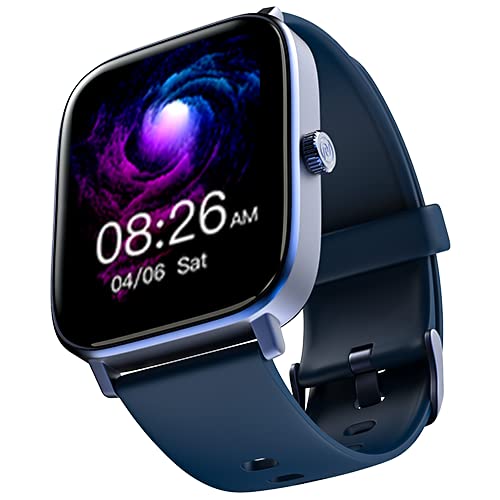
Resim: Ön view of the Noise ColorFit Icon 2 Smartwatch, displaying its rectangular screen and strap.
2. Kutuda Neler Var?
Verify that all the following items are present in your product packaging:
- Noise ColorFit Icon 2 Smartwatch
- Manyetik Şarj Aleti
- Kullanım Kılavuzu (bu belge)
- Garanti Kartı
3. Kurulum
3.1 Akıllı Saati Şarj Etme
Before initial use, fully charge your smartwatch. Connect the magnetic charger to the charging points on the back of the smartwatch and plug the USB end into a compatible power adapter (not included) or a computer's USB port. The watch display will indicate charging status.
3.2 Açma/Kapatma
- Açmak İçin: Noise logosu görünene kadar yan düğmeye basılı tutun.
- Kapatmak İçin: Navigate to the settings menu on the smartwatch, select "Power Off," and confirm. Alternatively, press and hold the side button and select "Power Off" from the options.
3.3 Akıllı Telefonunuzla Eşleştirme
- Download the official NoiseFit application from your smartphone's app store.
- Akıllı telefonunuzda Bluetooth'un etkinleştirildiğinden emin olun.
- NoiseFit uygulamasını açın ve hesap oluşturmak veya giriş yapmak için ekrandaki yönergeleri izleyin.
- Select "Add Device" or a similar option within the app and choose "ColorFit Icon 2" from the list of available devices.
- Eşleştirme isteğini hem akıllı telefonunuzdan hem de akıllı saatinizden onaylayın.
- Your smartwatch is compatible with devices running iOS 8 & + or Android 4.4 & +.
4. Kullanım Talimatları
4.1 Temel Gezinme
- Yukarı/Aşağı Kaydırma: Menüler ve bildirimler arasında gezinin.
- Sola/Sağa Kaydır: Access quick widgets or different screens.
- Musluk: Bir öğeyi seçin veya bir eylemi onaylayın.
- Yan Düğme: Ana ekrana dönmek veya cihazı uyandırmak için basın.
4.2 Temel Özellikler
The Noise ColorFit Icon 2 Smartwatch offers various features accessible through its interface and the connected NoiseFit app. These include:
- Activity Tracking (steps, distance, calories)
- Kalp Atış Hızı İzleme
- Uyku Takibi
- Notification Alerts (calls, messages, app notifications)
- Müzik Kontrolü
- Hava Durumu Bilgileri
For detailed instructions on specific features, refer to the NoiseFit application's help section.
5. Bakım
5.1 Temizlik
Cilt tahrişini önlemek ve cihaz performansını korumak için akıllı saatinizi ve kayışınızı düzenli olarak temizleyin. Yumuşak, tüy bırakmayan bir bez kullanın. Gerekirse, hafifçe silin.ampen the cloth with water. Avoid using harsh chemicals, abrasive materials, or strong detergents.
5.2 Şarj Etme En İyi Uygulamaları
- Yalnızca ürünle birlikte verilen manyetik şarj cihazını kullanın.
- Avoid exposing the charging contacts to water or sweat. Ensure they are dry before charging.
- Do not leave the smartwatch charging for extended periods after it is fully charged.
5.3 Depolama
When not in use for an extended period, store the smartwatch in a cool, dry place away from direct sunlight and extreme temperatures. Ensure it has a partial charge to prevent battery degradation.
6. Sorun Giderme
| Sorun | Olası Çözüm |
|---|---|
| Smartwatch does not power on. | Ensure the device is fully charged. Connect to the magnetic charger and wait a few minutes before attempting to power on again. |
| Akıllı telefonla eşleştirilemiyor. |
|
| Aktivite takibi hatalı. | Ensure the smartwatch is worn snugly on your wrist, about one finger's width above your wrist bone. Calibrate the device through the NoiseFit app if available. |
| Bildirimler alınmadı. |
|
If you encounter issues not listed here, please refer to the support section of the NoiseFit application or contact customer support.
7. Özellikler
| Özellik | Detay |
|---|---|
| Marka | Gürültü |
| Model Serisi | ColorFit Simgesi 2 |
| Ürün Model Numarası | wrb-sw-colorfiticon2-std-blu_blu |
| Ürün Boyutları | 4.7x3.9x1.2 cm |
| Ürün Ağırlığı | 45 gr |
| Bağlantı Türü | Bluetooth |
| Kablosuz Tip | Bluetooth |
| İşletim Sistemi Uyumluluğu | iOS 8 & + or Android 4.4 & + |
| Dahil Bileşenler | Smartwatch, Magnetic Charger, User Manual, Warranty Card |
| Küresel Konumlama Sistemi | GPS yok |
| Şekil | Dikdörtgen |
8. Garanti ve Destek
Your Noise ColorFit Icon 2 Smartwatch comes with a 1-year assured warranty from Noise, covering manufacturing defects from the date of purchase. Please retain your purchase receipt and warranty card for any warranty claims.
For technical support, warranty claims, or further assistance, please contact Noise customer service. Manufacturer and Importer details:
Nexxbase Marketing Pvt. Ltd.Khasra No-146/25/2/1, Jail Road Badshahpur,
Gurugram Haryana-122101, India
Telefon: 8882-132-132
You can also visit the official Noise webDaha fazla bilgi ve destek kaynakları için siteyi ziyaret edin.


