1. Giriş
Satın aldığınız için teşekkür ederizasing the WISCENT WTB-779 Micro Hi-Fi Stereo System. This manual provides essential information for the safe and efficient operation of your new audio system. Please read it thoroughly before use and retain it for future reference.
The WISCENT WTB-779 is a versatile audio system featuring a CD/DVD player, Bluetooth connectivity, FM radio, USB and SD card playback, AUX input, and a microphone port. It is designed to deliver clear audio in a compact form factor.
2. Güvenlik Bilgileri
Elektrik çarpması, yangın veya cihazda hasar oluşmasını önlemek için lütfen aşağıdaki güvenlik önlemlerine uyun:
- Bu cihazı yağmura veya neme maruz bırakmayın.
- Havalandırma açıklıklarını hiçbir şekilde kapatmayın. Uygun hava akışı için ünitenin etrafında yeterli boşluk olduğundan emin olun.
- Üniteyi radyatör, kalorifer ızgarası, soba veya diğer cihazlar (dahil) gibi ısı kaynaklarının yakınına yerleştirmeyin. amp(ısı üreten)
- Güç kablosunun, özellikle fişlerde, prizlerde ve cihazdan çıktığı noktalarda üzerine basılmasını veya sıkışmasını önleyin.
- Sadece üretici tarafından belirtilen aparatları/aksesuarları kullanın.
- Yıldırımlı havalarda veya uzun süre kullanılmayacaksa bu cihazın fişini çekin.
- Tüm servisleri kalifiye servis personeline yaptırın. Cihaz herhangi bir şekilde hasar gördüğünde, örneğin güç kaynağı kablosu veya fişi hasar gördüğünde, cihaza sıvı döküldüğünde veya içine nesneler düştüğünde, cihaz yağmura veya neme maruz kaldığında, normal şekilde çalışmadığında veya düşürüldüğünde servis gereklidir.
3. Paket İçeriği
Carefully unpack your WISCENT WTB-779 Micro Hi-Fi Stereo System and check that all items are present and in good condition. If any items are missing or damaged, please contact your retailer.
- 1 x WISCENT WTB-779 Compact Micro Hi-Fi System (Main Unit and Speakers)
- 1 x Uzaktan Kumanda (piller dahil değildir)
- 1 x 3.5mm AUX Kablosu
- 1 x RCA Kablosu
- 1 x Kullanım Kılavuzu (bu belge)

Figure 3.1: Package contents of the WISCENT WTB-779 Micro Hi-Fi Stereo System.
4. Ürün Bittiview
4.1 Ön Panel Kontrolleri ve Bağlantıları

Figure 4.1: Front panel layout and controls of the WISCENT WTB-779.
- Güç Düğmesi: Üniteyi açar veya kapatır.
- Mod Düğmesi: Cycles through input sources (CD/DVD, Bluetooth, FM, AUX, USB, SD).
- Ses Düğmesi: Ana ses seviyesini ayarlar.
- Durdurma düğmesi: Oynatmayı durdurur.
- Previous/Channel- Button: Skips to the previous track/chapter or tunes down FM radio frequency.
- Sessiz tuşu: Ses çıkışını sessize alır veya açar.
- Play/Pause/Search Button: Plays or pauses playback; initiates search function in some modes.
- Next/Channel+ Button: Skips to the next track/chapter or tunes up FM radio frequency.
- Açma/Kapatma Düğmesi: Disk tepsisini açar veya kapatır.
- Disk Tepsisi: For inserting CDs or DVDs.
- Mikrofon Girişi: Harici mikrofon bağlamak için 3.5 mm jak.
- Kulaklık girişi: Kulaklık bağlamak için 3.5 mm jak.
- USB Bağlantı Noktası: Medya oynatmak için USB flash sürücüleri bağlamak için.
- SD Kart Yuvası: For inserting SD cards for media playback (located on the side or rear, not visible in this image).
4.2 Arka Panel Bağlantıları
The rear panel typically includes connections for speakers, FM antenna, and RCA audio/video output for TV connection.
5. Kurulum
5.1 Hoparlörlerin Bağlanması
Connect the speaker wires from the main unit to the corresponding speaker terminals on each speaker. Ensure correct polarity (positive to positive, negative to negative) for optimal sound quality.
5.2 Güce Bağlama
Plug the power cord into a standard AC power outlet. The unit is designed for wired electrical power.
5.3 Televizyona Bağlantı (İsteğe Bağlı)
İle view DVDs, connect the RCA cable (included) from the 'Video Out' and 'Audio Out' ports on the rear of the main unit to the corresponding 'Video In' and 'Audio In' ports on your television.
5.4 FM Anten Bağlantısı
Extend the telescopic FM antenna for better radio reception. For improved signal, you may connect an external FM antenna to the designated port on the rear of the unit.

Figure 5.1: WISCENT WTB-779 main unit and speakers.
6. Kullanım Talimatları
6.1 Güç Açma/Kapatma
Basın GÜÇ Cihazı açmak veya kapatmak için ön paneldeki düğmeyi veya uzaktan kumandayı kullanın.
6.2 Mod Seçimi
Basın MOD button on the front panel or remote control to cycle through available input sources: CD/DVD, Bluetooth (BT), FM Radio, AUX, USB, and SD.
6.3 CD/DVD Oynatma
- Basın AÇIK/KAPALI Disk tepsisini açmak için düğmesine basın.
- Place a CD or DVD disc gently into the tray with the label side facing up.
- Basın AÇIK/KAPALI tepsiyi kapatmak için tekrar düğmesine basın.
- The unit will automatically detect the disc and begin playback. If not, press the OYNAT/DURDUR düğme.
- Kullanın PREVIOUS/CHANNEL- Ve NEXT/CHANNEL+ buttons to skip tracks/chapters.
- Supported disc formats include CD, CD-R, CD-RW, MP3-CD, WMA, DVD, SVCD, VCD, JPEG, and Kodak Picture CD. Blu-ray discs are not supported.
- The DVD player is region-free, compatible with zones 1, 2, 3, 4, 5, and 6.
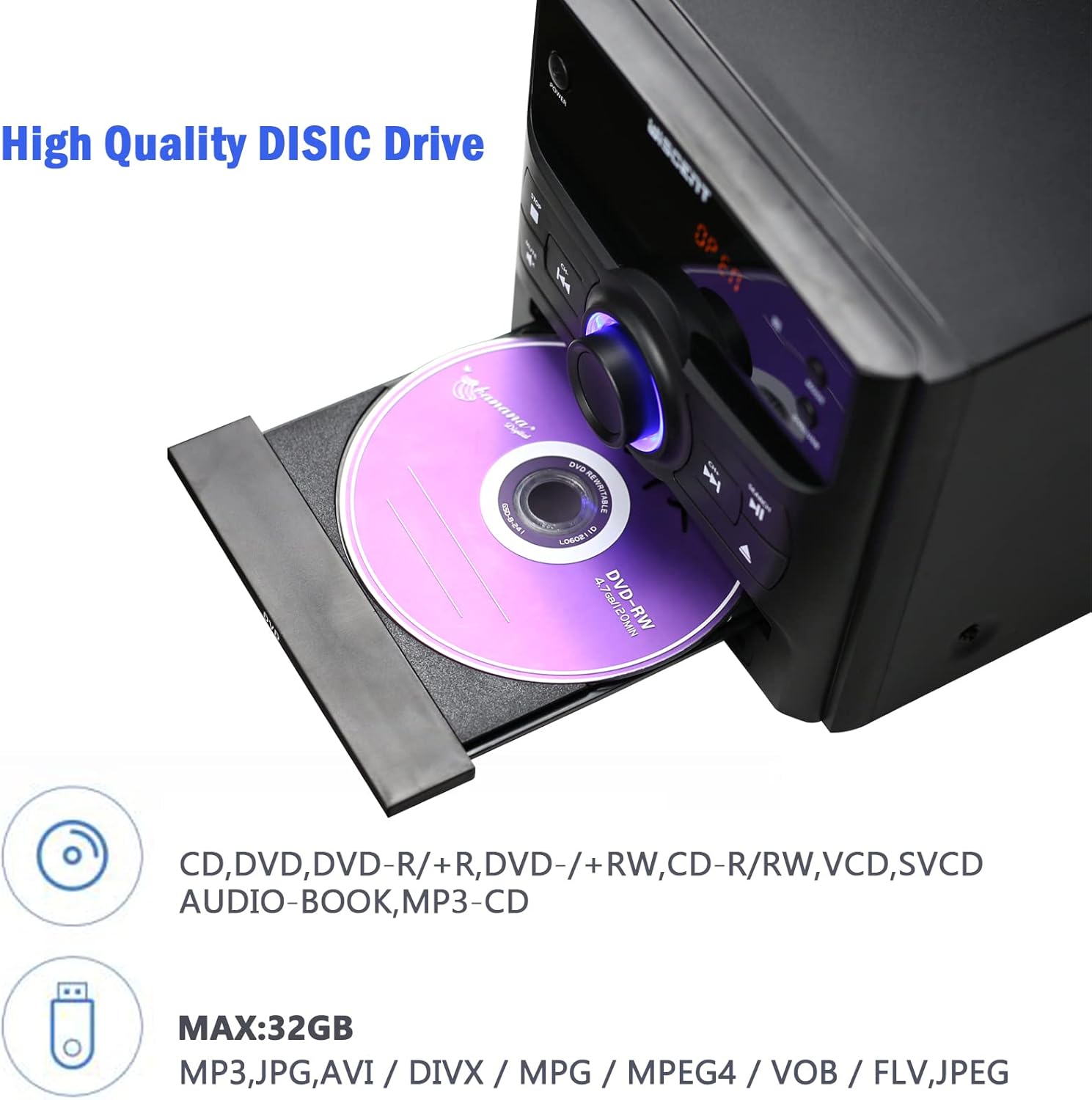
Figure 6.1: Inserting a disc into the WISCENT WTB-779.
6.4 Bluetooth Çalışması
- Basın MOD button until 'BT' or 'Bluetooth' appears on the display. The unit will enter pairing mode.
- Bluetooth özellikli cihazınızda (örneğin, akıllı telefon, tablet) Bluetooth'u etkinleştirin ve kullanılabilir cihazları arayın.
- Select 'WISCENT WTB-779' (or similar name) from the list to pair.
- Once paired, you can play audio from your device through the stereo system.
6.5 FM Radyo
- Basın MOD Ekranda 'FM' görünene kadar düğmeye basın.
- En iyi sinyal alımı için teleskopik anteni uzatın.
- Kullanın PREVIOUS/CHANNEL- Ve NEXT/CHANNEL+ Bir istasyonu manuel olarak ayarlamak için düğmeler.
- To auto-scan and save stations, refer to the specific instructions in the full manual (if available) or experiment with holding down the play/pause button. The unit supports 20 programmable preset stations.
6.6 USB/SD Oynatma
- USB flash sürücüyü USB bağlantı noktasına veya SD kartı SD kart yuvasına takın.
- Basın MOD button until 'USB' or 'SD' appears on the display.
- Cihaz, uyumlu ses dosyalarını otomatik olarak algılayacak ve çalmaya başlayacaktır. file(MP3, WMA).
- Desteklenen file systems are FAT16/32, with a maximum capacity of 32GB.
6.7 AUX Girişi
Connect an external audio device (e.g., smartphone, MP3 player) to the AUX IN jack using the provided 3.5mm AUX cable. Select 'AUX' mode to play audio from the connected device.
6.8 Mikrofon Girişi
Connect a microphone to the MIC input jack for karaoke or voice amplification. Adjust the microphone volume separately if available, or use the main volume control.
6.9 Kulaklık Çıkışı
Plug headphones into the earphone jack for private listening. The main speakers will be muted automatically.
6.10 Uzaktan Kumanda
The included remote control provides full functionality for operating the WISCENT WTB-779 from a distance. Insert two AAA batteries (not included) into the remote control before use. Point the remote control directly at the main unit's sensor.
7. Bakım
7.1 Ünitenin Temizlenmesi
Cihazı yumuşak, kuru bir bezle silin. Aşındırıcı temizleyiciler, cilalar veya çözücüler kullanmayın, çünkü bunlar yüzeye zarar verebilir. Temizlemeden önce cihazın fişinin çekili olduğundan emin olun.
7.2 Disk Bakımı
Handle discs by their edges. Keep discs clean and free of scratches. Store discs in their cases when not in use to prevent dust and damage.
8. Sorun Giderme
If you encounter issues with your WISCENT WTB-779, please refer to the following common problems and solutions:
| Sorun | Olası Neden | Çözüm |
|---|---|---|
| Güç yok | Güç kablosu bağlı değil; elektrik prizi arızalı. | Güç kablosunun prize sağlam bir şekilde takılı olduğundan emin olun. Farklı bir elektrik prizi deneyin. |
| Ses yok | Volume too low; Mute activated; incorrect input mode; speakers not connected. | Increase volume. Deactivate Mute. Select correct input mode. Check speaker connections. |
| Disk oynatılmıyor | Disc inserted incorrectly; disc dirty or scratched; unsupported disc format. | Re-insert disc correctly. Clean or replace disc. Ensure disc format is supported (not Blu-ray). |
| Bluetooth eşleştirme hatası | Unit not in pairing mode; device too far; Bluetooth disabled on device. | Ensure unit is in BT mode. Move device closer. Enable Bluetooth on your device. |
| Zayıf FM alımı | Anten uzatılmamış; sinyal zayıf. | Extend the telescopic antenna fully. Try repositioning the unit or connecting an external antenna. |
| Uzaktan kumanda çalışmıyor | Piller bitmiş veya yanlış takılmış; uzaktan kumanda ile cihaz arasında engel var. | Pilleri değiştirin. Doğru kutupluluğu sağlayın. Engelleri kaldırın. Uzaktan kumandayı doğrudan cihaza doğrultun. |
Bu çözümleri denedikten sonra sorun devam ederse lütfen müşteri desteğiyle iletişime geçin.
9. Özellikler
| Özellik | Şartname |
|---|---|
| Örnek | WTB-779 |
| Marka | WISCENT |
| Çıkış Watttage | 30 Watt |
| Ses Çıkışı Modu | Stereo |
| Bağlantı Teknolojisi | Bluetooth, USB |
| Desteklenen Disk Formatları | CD, CD-R, CD-RW, MP3, WMA, DVD, SVCD, VCD, JPEG, Kodak Picture CD (No Blu-ray) |
| DVD Region Compatibility | Region-free (1, 2, 3, 4, 5, 6 zones) |
| USB/SD Desteği | Up to 32GB, FAT16/32 file sistem |
| FM Radyo Ön Ayarları | 20 istasyon |
| Güç Kaynağı | Kablolu Elektrik |
| Ürün Ağırlığı | 4.73 Kilogram |
| Ürün Boyutları | 56x31.4x21.2 cm |
10. Garanti ve Destek
The WISCENT WTB-779 Micro Hi-Fi Stereo System comes with a 36 ay garanti from the date of purchase. This warranty covers manufacturing defects and ensures lifetime technical support.

Şekil 10.1: Garanti bilgileri.
For warranty claims, technical assistance, or any product-related inquiries, please contact WISCENT customer support through your purchase platform or the official WISCENT webalan.


