giriiş
This manual provides essential information for the proper installation, operation, and maintenance of your TELE System TS6105 DVB-T2 HEVC Digital Terrestrial Decoder. Please read these instructions carefully before using the device to ensure optimal performance and safety.
The TS6105 decoder is designed to receive DVB-T2 HEVC 10-bit digital terrestrial television broadcasts, offering Full HD resolution up to 1080p@60Hz. It includes features such as automatic channel scanning (AUTOSCAN), an Electronic Program Guide (EPG), and multimedia playback capabilities via USB.
Paket İçeriği
Paketin içerisinde tüm ürünlerin mevcut olduğundan emin olun:
- TELE System TS6105 DVB-T2 HEVC Digital Terrestrial Decoder
- Uzaktan kumanda
- Güç Adaptörü
- Kullanım Kılavuzu (bu belge)

This image shows the compact design of the TS6105 decoder, highlighting the TELE System logo, model number TS6105 DVB-T2 HEVC, Dolby Audio, and HDMI branding on the front, with ventilation on the side.
Kurmak
1. Connecting the Decoder
Before connecting, ensure your television and the decoder are turned off.

This image displays the rear panel of the TS6105 decoder, featuring the ANT IN, ANT OUT, COAXIAL, HD OUT (HDMI), SCART, and DC IN ports for power and signal connections.
- Anten Bağlantısı: Karasal anten kablonuzu şuraya bağlayın: KARINCA İÇİNDE port on the rear of the decoder. If you wish to loop the signal to another device, connect a coaxial cable from the Karınca Çıkışı port to the next device.
- TV Connection (HDMI): For the best picture quality, connect an HDMI cable from the HD Çıkışı port on the decoder to an available HDMI input on your television. Select the corresponding HDMI input on your TV.
- TV Connection (SCART): If your TV does not have an HDMI input, connect a SCART cable from the SCART port on the decoder to the SCART input on your television.
- Güç Bağlantısı: Güç adaptörünü prize takın. DC'DE port on the decoder, then plug the adapter into a wall outlet.
2. First-Time Installation and Channel Scan
After connecting the decoder and turning on your TV, switch on the decoder. The first time you use it, an installation wizard will guide you through the initial setup.
- Dil Seçimi: Choose your preferred language using the remote control's navigation buttons and press OK.
- Ülke Seçimi: Select your country. This helps the decoder apply the correct regional settings for channel scanning.
- OTOMATİK TARAMA: The decoder will automatically initiate the AUTOSCAN function. This process searches for all available digital terrestrial channels and organizes them logically using the LCN (Logical Channel Number) system. This may take several minutes.
- Tamamlama: Once the scan is complete, the decoder will save the channels and display the first available channel.
Operating the Decoder
Uzaktan Kumandaview
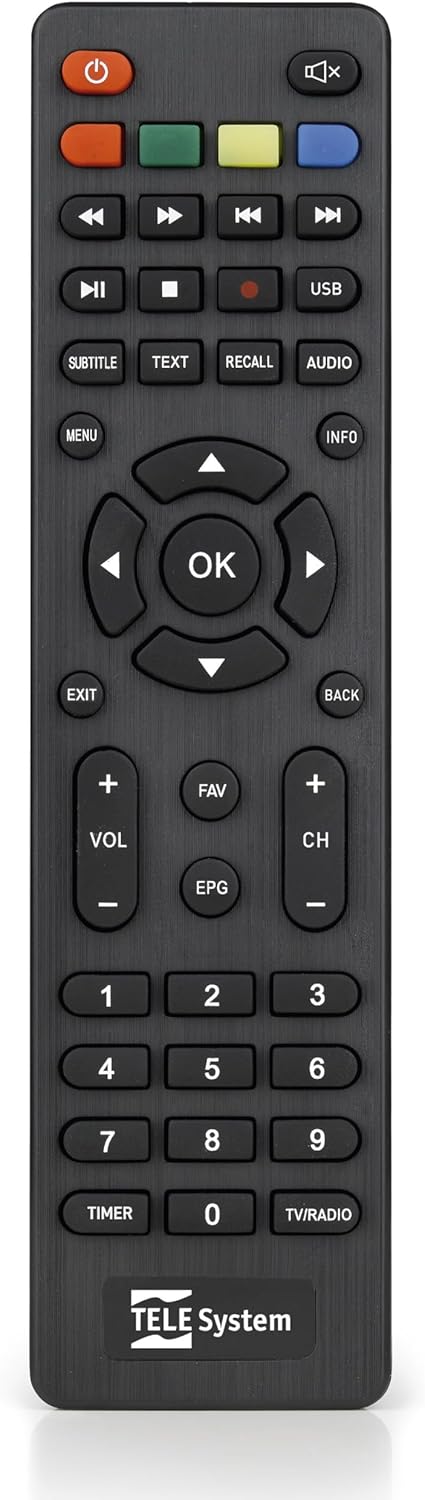
This image presents the remote control for the TS6105 decoder, featuring power, mute, channel, volume, navigation, EPG, media playback, and numeric buttons for comprehensive control.
- Güç düğmesi (U): Turns the decoder on or off (standby).
- CH +/-: Kanalları yukarı veya aşağı değiştirir.
- SES +/-: Ses seviyesini ayarlar.
- OK: Menülerdeki seçimleri onaylar veya kanal bilgilerini görüntüler.
- MENÜ: Ayarlar ve özellikler için ana menüye erişim sağlar.
- ÇIKIŞ/GERİ: Geçerli menüden çıkar veya önceki ekrana döner.
- Elektronik Posta Programı: Elektronik Program Kılavuzunu açar.
- METİN: Activates Teletext.
- ALT YAZI: Altyazıları açar/kapatır veya altyazı dilini seçer.
- USB BAĞLANTI: Accesses the multimedia player.
- Renkli Düğmeler (Kırmızı, Yeşil, Sarı, Mavi): Functionality varies depending on the current menu or EPG.
Elektronik Program Rehberi (EPG)
Basın EPG için uzaktan kumandadaki düğmeye view the Electronic Program Guide. The EPG provides information about current and upcoming programs for all channels. You can navigate through channels and time slots to see program details.
Multimedia Player (USB)
The TS6105 can play multimedia files bir USB depolama aygıtından.
- Insert a USB drive into the USB port on the decoder.
- Basın USB button on the remote control or navigate to the multimedia section via the MENÜ.
- Select the type of media you wish to play (Music, Photo, Video).
- Göz atın files ve basın OK oynamak.
Pause TV / Timeshift
The Pause TV / Timeshift function allows you to pause live television and resume viewing later. This feature requires a USB storage device connected to the decoder.
- Bir program izlerken, tuşuna basın. DURAKLAT button (usually represented by two vertical bars) on the remote control.
- Oynatmayı sürdürmek için, düğmesine basın. OYNAMAK button (usually represented by a right-pointing triangle).
- You can also fast-forward or rewind using the respective buttons.
Bakım
Temizlik
To clean the decoder, ensure it is unplugged from the power outlet.
- Dış yüzeyleri silmek için yumuşak ve kuru bir bez kullanın.
- Do not use liquid cleaners, aerosols, or abrasive materials, as these can damage the device.
- Havalandırma açıklıklarını toz ve engellerden temiz tutun.
Yazılım Güncellemeleri
Üreticinin periyodik olarak kontrol edin website for available software updates. Updates can improve performance, add new features, or resolve issues. Follow the instructions provided with the update file dikkatlice.
Sorun giderme
If you encounter problems with your decoder, refer to the following common issues and solutions:
- Görüntü/Ses Yok:
- Ensure all cables (antenna, HDMI/SCART, power) are securely connected.
- Televizyonunuzun doğru giriş kaynağına ayarlı olduğundan emin olun (örneğin, HDMI 1, AV).
- Check if the decoder is powered on and not in standby mode.
- Kanal bulunamadı:
- Perform an AUTOSCAN again from the menu.
- Check your antenna connection and ensure the antenna is properly positioned and functional.
- Verify that your region has DVB-T2 HEVC broadcasts.
- Uzaktan Kumanda Yanıt Vermiyor:
- Uzaktan kumandanın pillerini değiştirin.
- Ensure there are no obstructions between the remote control and the decoder's IR sensor.
- Görüntü Donması veya Pikselleşmesi:
- This often indicates a weak or unstable signal. Check your antenna connection and position.
- Try rescanning channels.
Özellikler
- Modeli: TS6105
- Marka: TELE Sistemi
- Renk: Siyah
- Ayarlayıcı Tipi: DVB-T2 HEVC 10-bit
- Video Çözünürlüğü: Up to 1080p@60Hz (Full HD)
- Bağlantı: HDMI, USB, SCART, Coaxial (ANT IN/OUT)
- Özellikler: AUTOSCAN, LCN, EPG, Pause TV/Timeshift, Multimedia Player (USB), Teletext, Subtitle Support
- Model Numarası: 21005353
Garanti ve Destek
Garanti Bilgileri
This product comes with a manufacturer's warranty of 2 years. Please retain your proof of purchase for warranty claims. The warranty covers defects in materials and workmanship under normal use. It does not cover damage caused by misuse, accidents, unauthorized modifications, or improper installation.
Müşteri Desteği
For technical assistance, troubleshooting beyond this manual, or warranty inquiries, please contact TELE System customer support. Refer to the official TELE System website or product packaging for the most up-to-date contact information.


