giriiş
This manual provides detailed instructions for the setup, operation, and maintenance of your PUSAT One Shot Pro Wireless Gaming Mouse. Please read this manual thoroughly before using the product to ensure optimal performance and longevity.
Paket İçeriği
Lütfen aşağıda listelenen tüm öğelerin paketinizde mevcut olduğundan emin olun:
- PUSAT One Shot Pro Kablosuz Oyun Faresi
- USB Kablosuz Alıcı
- USB-C - USB-A Şarj Kablosu
- Additional Side Buttons (interchangeable)
- Kullanım Kılavuzu (bu belge)

Şekil 1: PUSAT One Shot Pro mouse, charging cable, and interchangeable side buttons, displayed with its retail packaging.
Ürün Bittiview
Familiarize yourself with the various components and controls of your PUSAT One Shot Pro Wireless Gaming Mouse.
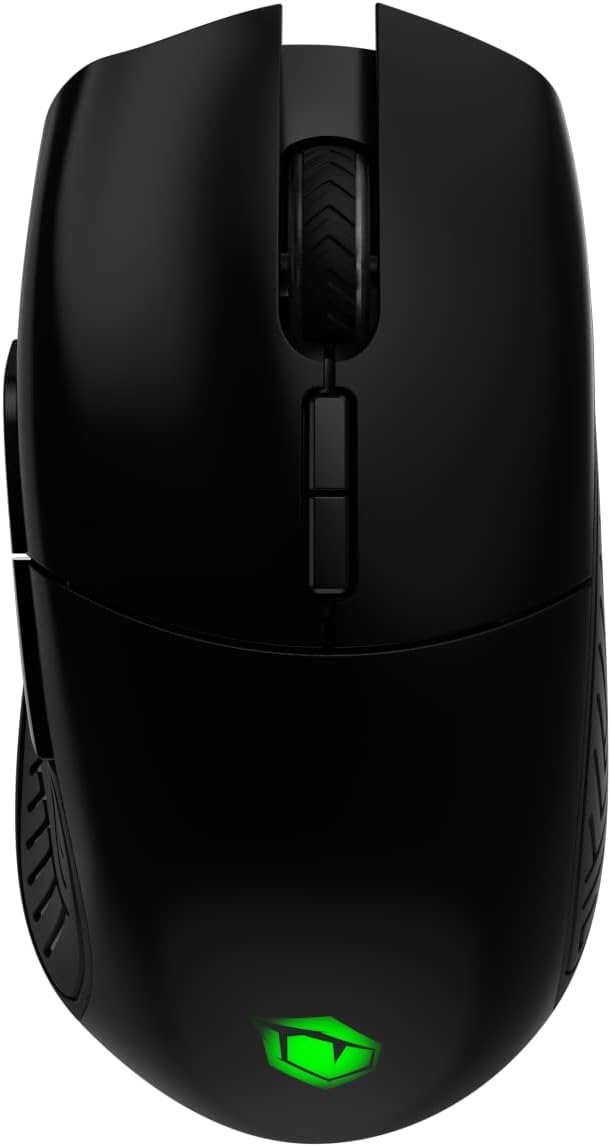
Şekil 2: Tepe view of the PUSAT One Shot Pro mouse, showing the left and right click buttons, scroll wheel, and DPI switch buttons.

Şekil 3: Sol taraf view of the PUSAT One Shot Pro mouse, highlighting the two programmable side buttons and textured grip.

Şekil 4: Alt view of the PUSAT One Shot Pro mouse, showing the optical sensor, ON/OFF switch, user profile switch, and the compartment for the USB receiver.
Düğme Fonksiyonları:
- Sol Tıklama Düğmesi: Standart birincil tıklama işlevi.
- Sağ Tıklama Butonu: Standart ikincil tıklama fonksiyonu.
- Kaydırma tekerleği: Scrolls content up/down, also functions as a middle click button.
- DPI Switch Buttons: Adjusts the mouse's sensitivity (DPI) on the fly.
- Programmable Side Buttons (8 total): Customizable buttons for various functions, often used for macros or in-game actions.
- Kullanıcı Profesyonelfile Switch (Bottom): Allows switching between different user-defined profiles.
- ON/OFF Switch (Bottom): Fareyi açar veya kapatır.
Kurmak
Fareyi Bağlama:
- Locate the USB wireless receiver. It is typically stored in a compartment on the underside of the mouse (refer to Figure 4).
- Remove the USB wireless receiver from its storage slot.
- Plug the USB wireless receiver into an available USB port on your computer (PC or Notebook).
- Flip the ON/OFF switch on the bottom of the mouse to the "ON" position.
- Bilgisayarınız gerekli sürücüleri otomatik olarak algılayıp yükleyecektir. Yükleme tamamlandıktan sonra fare kullanıma hazır olacaktır.
For optimal wireless performance, ensure the USB receiver is placed in a location with minimal interference and a clear line of sight to the mouse.
Kullanım Talimatları
Temel Kullanım:
- Ekrandaki imleci kontrol etmek için fareyi düz bir yüzey üzerinde hareket ettirin.
- Use the left and right click buttons for primary and secondary actions.
- Rotate the scroll wheel to navigate through documents or web sayfalar.
DPI Ayarı:
The PUSAT One Shot Pro mouse features adjustable DPI (Dots Per Inch) settings, allowing you to change cursor sensitivity. Use the dedicated DPI switch buttons, usually located near the scroll wheel, to cycle through preset DPI levels (1,000 to 16,000 DPI). Each change typically corresponds to a visual indicator, such as an RGB lighting color change, though specific indicators may vary.
Programlanabilir Düğmeler:
The mouse is equipped with 8 programmable buttons. To customize these buttons, you will typically need to download and install the official PUSAT software from the manufacturer's website. This software allows you to assign macros, keyboard functions, or other commands to each programmable button.
Şarj etme
The PUSAT One Shot Pro mouse is equipped with a rechargeable Lithium Ion battery (700 mAh) and supports both wired and wireless charging.
Kablolu Şarj:
- Connect the USB-C end of the charging cable to the port on the front of the mouse.
- Connect the USB-A end of the charging cable to an available USB port on your computer or a USB wall adapter.
- The mouse's RGB lighting or an indicator light will typically show the charging status.

Şekil 5: The PUSAT One Shot Pro mouse connected via its USB-C charging cable.
Kablosuz Şarj:
The PUSAT One Shot Pro supports wireless charging. To charge wirelessly, place the mouse on a compatible wireless charging pad. Ensure the mouse is correctly positioned on the charging pad for the charging process to initiate. The mouse's indicator lights will typically confirm that wireless charging is active.
Note: A wireless charging pad is sold separately and is not included with the mouse.
Bakım
Temizlik:
- Temizlemeden önce farenin kapalı olduğundan emin olun.
- Yumuşak, tiftiksiz bir bez kullanın ve hafifçe kurulayın.ampFarenin yüzeyini silmek için su veya hafif bir temizleme solüsyonu kullanın.
- Sert kimyasallar, aşındırıcı temizleyiciler veya çözücüler kullanmaktan kaçının.
- Use compressed air to remove dust and debris from crevices and around buttons.
- Doğru izleme sağlamak için farenin altındaki optik sensörü düzenli aralıklarla pamuklu çubukla temizleyin.
Pil Bakım:
- Pilin sık sık tamamen boşaltılmasından kaçının.
- Uzun süre kullanılmayacaksa fareyi serin ve kuru bir yerde saklayın.
- Uzun süre saklayacaksanız, pil ömrünü uzatmak için yaklaşık %50'ye kadar şarj edin.
Sorun giderme
| Sorun | Olası Neden | Çözüm |
|---|---|---|
| Fare yanıt vermiyor |
|
|
| Gecikmeli veya düzensiz imleç hareketi |
|
|
| Buttons not working or programmable features not active |
|
|
| Kablosuz şarj çalışmıyor |
|
|
Özellikler
| Özellik | Detay |
|---|---|
| Marka | MERKEZ |
| Örnek | One Shot Pro |
| Bağlantı | 2.4 GHz Kablosuz (USB Alıcı) |
| DPI Aralığı | 1,000 - 16,000 DPI |
| Düğme Sayısı | 8 (Programlanabilir) |
| Sensör Tipi | Optik |
| Pil Türü | 1 Lithium Ion Battery (Included) |
| Pil Kapasitesi | 700 mAh |
| Şarj etme | USB-C Wired, Wireless Charging Compatible |
| Boyutlar (U x G x Y) | 12.5x6.6x4.2 cm |
| Ağırlık | 110 gr |
| Renk | Siyah |
| Donanım Platformu | PC, Notebook |
Güvenlik Bilgileri
- Fareyi aşırı sıcaklıklara, neme veya doğrudan güneş ışığına maruz bırakmayın.
- Fareyi düşürmekten veya sert darbelere maruz bırakmaktan kaçının.
- Fareyi sökmeye veya üzerinde değişiklik yapmaya çalışmayın. Bu, garantiyi geçersiz kılabilir ve hasara neden olabilir.
- Keep the mouse away from liquids. If liquid enters the device, discontinue use immediately and contact support.
- Dispose of the battery according to local regulations. Do not dispose of batteries in general household waste.
Garanti ve Destek
For warranty information and technical support, please refer to the warranty card included with your product or visit the official PUSAT website. If you encounter any issues not covered in this manual, please contact PUSAT customer service for assistance.


