1. Giriş
This manual provides detailed instructions for the installation, operation, and maintenance of your YEEUU R250 Smart Door Lock. Please read this manual thoroughly before installation and use to ensure proper function and safety.

Image 1.1: YEEUU R250 Smart Door Lock, showing the lock lever, NFC tags, and the accompanying smartphone application interface for control and monitoring.
2. Kurulum ve Kurulum
2.1 Paket İçeriği
Kuruluma başlamadan önce tüm bileşenlerin mevcut olduğundan emin olun:
- YEEUU R250 Smart Door Lock Assembly
- Mounting Hardware (screws, spindle)
- NFC Access Cards (typically 3)
- Kullanım Kılavuzu
2.2 Kapı Uyumluluğu
The YEEUU R250 is designed for doors with a thickness range of 1-1/8 inches to 2-3/8 inches (30-60mm). It is suitable for both front and interior doors.
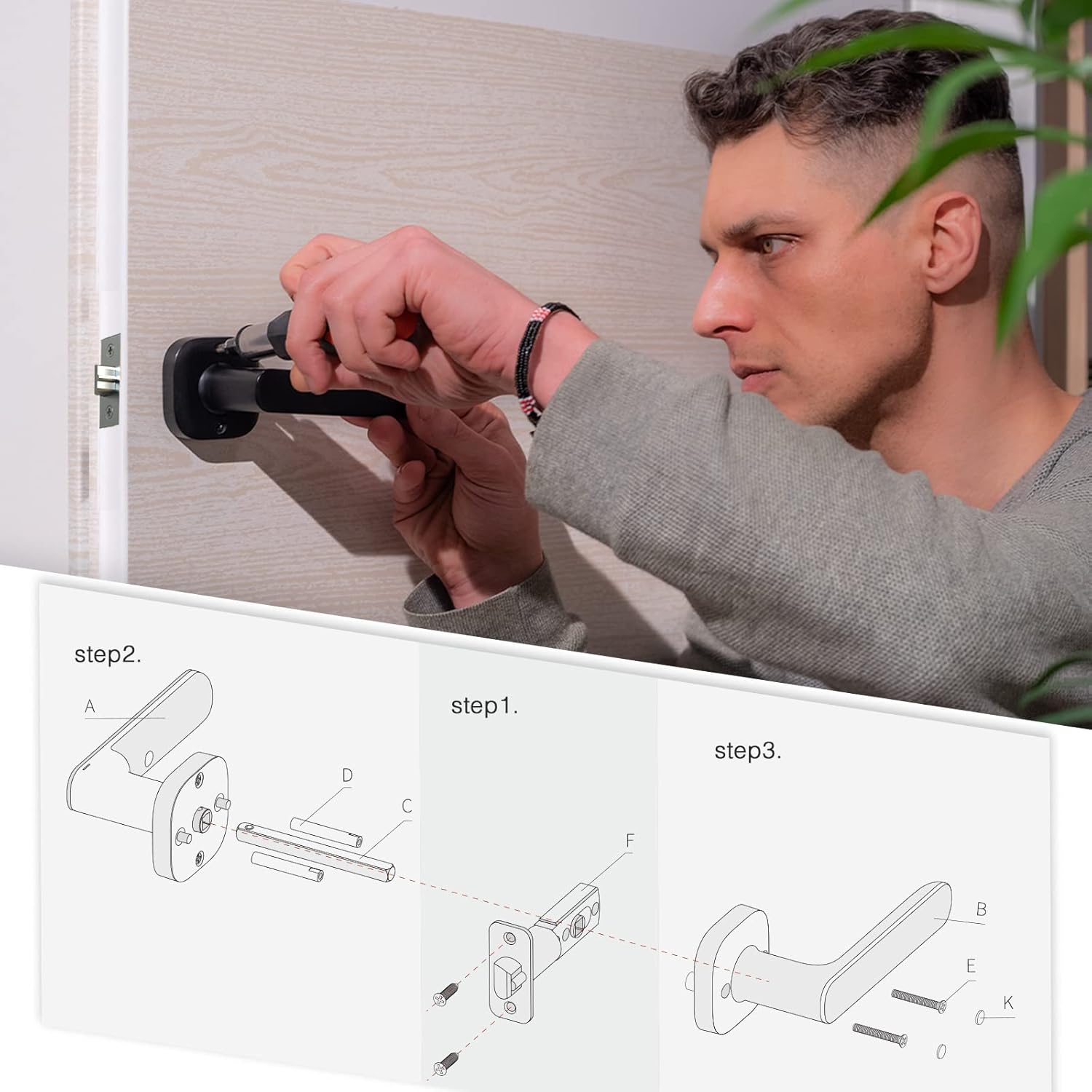
Image 2.1: Diagram illustrating the compatible door thickness range of 1-1/8 to 2-3/8 inches (30-60mm) for the YEEUU R250 Smart Door Lock.
2.3 Kurulum Adımları
Follow these general steps for installation. Refer to the detailed diagram for component identification.
- Kapıyı Hazırlayın: Ensure your door is properly prepped for a standard lever lock.
- Install the Latch Mechanism: Insert the latch (F) into the door edge and secure it with screws.
- Dış Kolu Takın: Position the exterior lever assembly (A) on the door, ensuring the spindle (C) passes through the latch.
- İç Kolu Takın: Attach the interior lever assembly (B) to the door, aligning it with the exterior assembly and securing it with the provided screws (E, K).
- Pilleri Takın: Open the battery compartment on the interior lever and insert 2*AAA alkaline batteries.
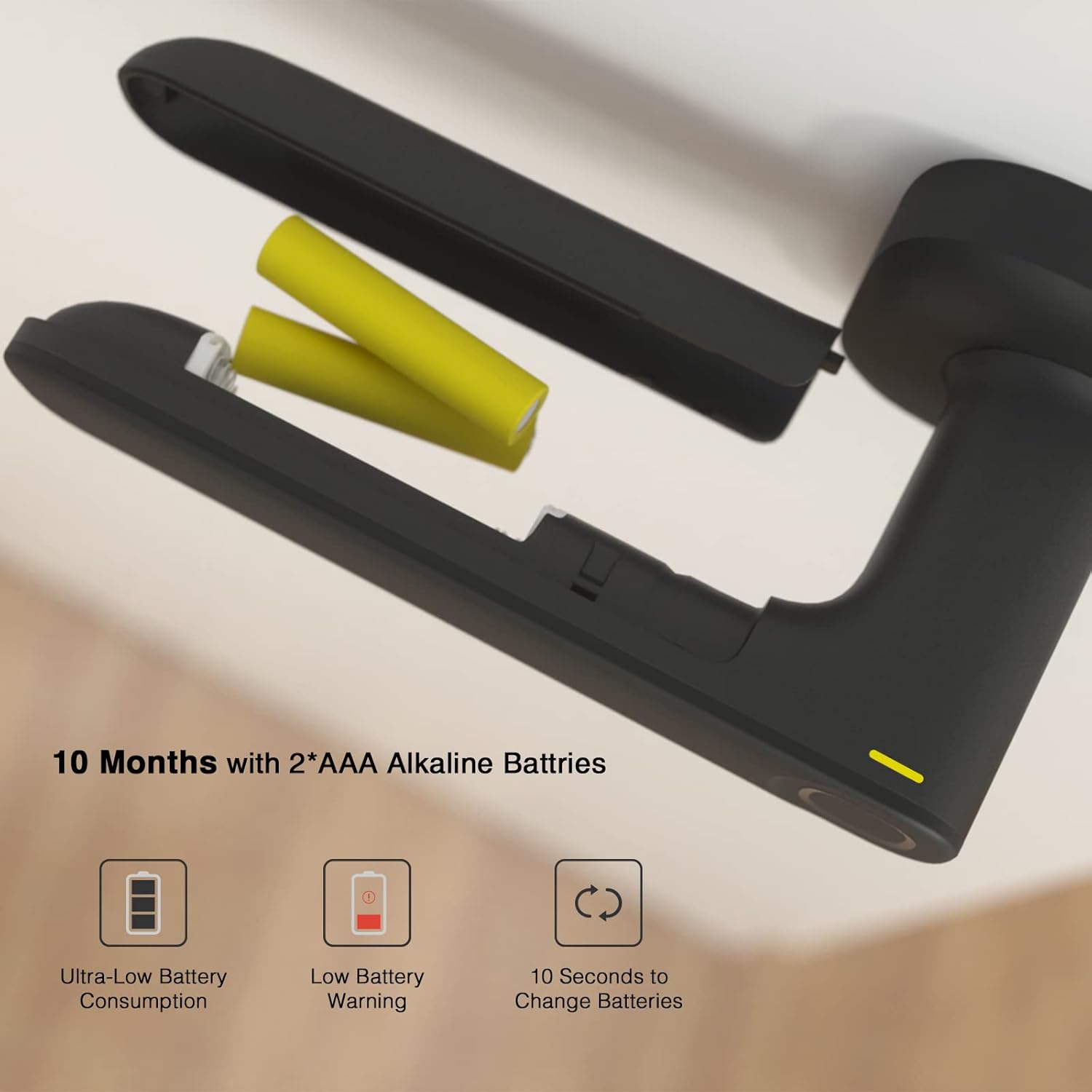
Image 2.2: Step-by-step installation diagram for the YEEUU R250 Smart Door Lock, detailing the placement of components and hardware.
2.4 Pil Kurulumu
The lock operates on 2*AAA alkaline batteries. To install or replace batteries:
- Locate the battery cover on the interior side of the lock lever.
- Slide or remove the cover to access the battery compartment.
- Insert two AAA alkaline batteries, ensuring correct polarity.
- Pil kapağını yerine takın.
Resim 2.3: View of the YEEUU R250 Smart Door Lock's battery compartment, showing the placement of two AAA alkaline batteries and indicators for low battery warning and quick battery change.
3. Kullanım Talimatları
3.1 Kilit Açma Yöntemleri
The YEEUU R250 Smart Door Lock offers multiple ways to unlock:
- Parmak izi: Place your registered fingerprint on the sensor. The lock will unlock in approximately 0.5 seconds with a recognition rate over 99.8%.
- NFC Access Card: Tap a registered NFC access card against the designated area on the lock.
- Smartphone App (Bluetooth): Use the YEEUU App on your smartphone to unlock the door via Bluetooth.

Image 3.1: Illustration of the various unlock methods available for the YEEUU R250 Smart Door Lock, including fingerprint, access card, NFC (Android devices only), and app via Bluetooth Low Energy (BLE).
3.2 Otomatik Kilitleme Özelliği
The R250 is equipped with an auto-lock feature. After unlocking, the door will automatically re-lock after 3 seconds to enhance security.
3.3 Stay Unlock Status
This feature allows the lock to remain unlocked for continuous access. To enable or disable this:
- Olanak vermek: Activate the 'Stay Unlock Status' via the YEEUU App.
- Disable Temporarily: Press the red button located on the battery cover once.

Image 3.2: The YEEUU R250 Smart Door Lock demonstrating the 'Stay Unlock Status' feature, allowing the door to remain open without re-locking, and showing how to temporarily disable it by pressing a button on the battery cover.
3.4 In-App Management
The YEEUU App provides comprehensive control over your smart lock:
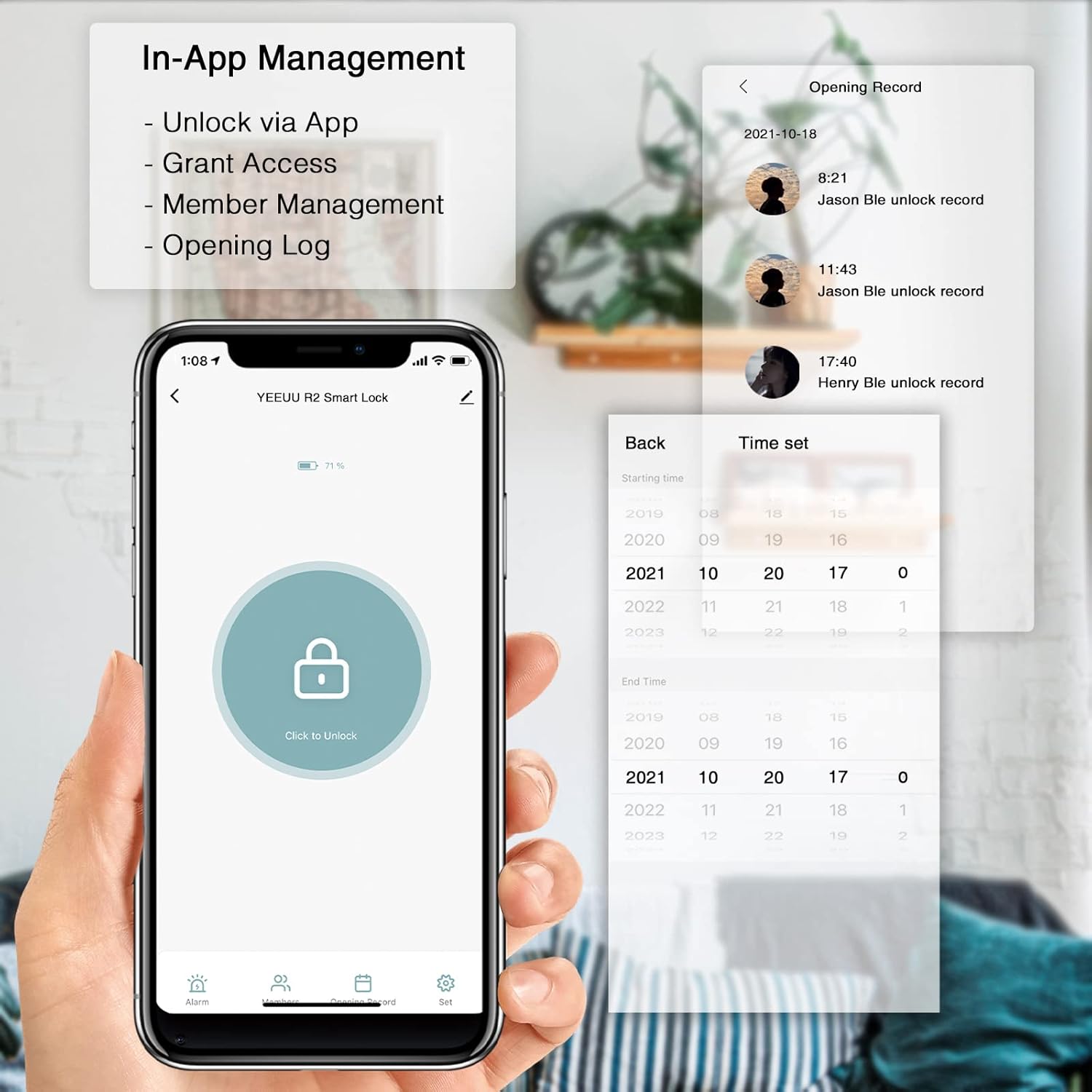
- Uygulama aracılığıyla kilidini aç: Remotely unlock your door.
- Grant Access: Share temporary or permanent access with family or guests.
- Üye Yönetimi: Add, modify, or remove user access.
- Opening Log: View a history of lock and unlock events and alarm alerts.

Image 3.3: Screenshot of the YEEUU App interface, highlighting features such as unlocking, granting access, member management, and viewing the opening record of the smart lock.
4. Bakım
4.1 Pil Değişimi
The lock will provide a low battery warning when power is critically low. Replace batteries promptly to avoid interruption of service. Refer to Section 2.4 for battery installation steps. The lock is designed for ultra-low battery consumption, offering approximately 10 months of use with 2*AAA alkaline batteries.
4.2 Temizlik
To maintain the appearance and functionality of your lock, clean it regularly with a soft, dry cloth. Avoid using abrasive cleaners, solvents, or harsh chemicals, as these can damage the finish and internal components.
5. Sorun Giderme
- Fingerprint Reader Not Recognizing: Ensure your finger is clean and dry. Try repositioning your finger on the sensor. If issues persist, re-register your fingerprint in the app. Dirt or debris on the sensor can affect recognition.
- Lock Not Unlocking (Green Light but No Action): Check if the installation screws are overtightened, which can impede the internal mechanism. Loosen screws slightly and test operation. Ensure the latch mechanism moves freely.
- NFC Cards Not Working: The YEEUU R250 is designed to work with proprietary YEEUU NFC tags. Generic NFC cards may not be compatible. Ensure the card is properly registered in the app.
- Uygulama Bağlantı Sorunları: Ensure Bluetooth is enabled on your smartphone and you are within range of the lock. Verify that the YEEUU App is updated to the latest version. If the app is outdated, it may not function correctly with newer operating systems.
- Düşük Pil Uyarısı: Replace the AAA batteries immediately. Refer to Section 2.4.
6. Özellikler
| Özellik | Detay |
|---|---|
| Marka | evet |
| Model Adı | R250 |
| Kilit Tipi | Biometric Smart Lock |
| Özel Özellikler | Fingerprint, NFC, App Control (Bluetooth) |
| Malzeme | Paslanmaz çelik |
| Renk | Siyah |
| Ürün Boyutları (U x G x Y) | 71.76 x 28.32 x 35.4 inç |
| Ürün Ağırlığı | 2.99 pound (1.36 Kilogram) |
| Güç Kaynağı | 2 * AAA Alkalin Piller |
| Pil Ömrü | Yaklaşık 10 ay |
| Bağlantı | Bluetooth |
| Kontrol Yöntemi | App, Touch (Fingerprint), NFC |
| Kapı Kalınlığı Uyumluluğu | 1-1/8" ~ 2-3/8" (30-60mm) |
7. Garanti Bilgileri
YEEUU products are manufactured to high-quality standards. For specific warranty terms and conditions, please refer to the warranty card included with your product or visit the official YEEUU webSite. Satın alma belgenizi garanti talepleriniz için saklayın.
8. Müşteri Desteği
If you encounter any issues or have questions not covered in this manual, please contact YEEUU customer support. You can typically find contact information on the product packaging, the official YEEUU websitenizden veya perakendeciniz aracılığıyla.


