1. Ürün Bittiview
The Loolinn Z3 Drone is designed for beginners, offering stable flight and ease of use. It features optical flow positioning technology for intelligent hovering and includes a 720p camera for capturing aerial photos and videos. With three included batteries, users can enjoy extended flight times.

Image 1.1: The Loolinn Z3 Drone, its remote control, and three rechargeable batteries.
2. Paket İçeriği
Lütfen aşağıda listelenen tüm öğelerin paketinizde mevcut olduğundan emin olun:
- 1 x Loolinn Z3 Drone
- 1 x Uzaktan Kumanda
- 1 x Kullanım Kılavuzu
- 1 x Akıllı Telefon Tutacağı
- 3 x Drone Bataryası
- 2 x USB Şarj Kabloları
- 4 x Rotor Blade Protectors
- 4 x Yedek Pervane
- 1 x Tornavida

Image 2.1: Contents of the Loolinn Z3 Drone package, including the drone, remote, batteries, and accessories.
3. Güvenlik Yönergeleri
Before operating the Loolinn Z3 Drone, please read and adhere to the following safety guidelines to ensure a safe and enjoyable experience:
- Always fly in open areas, away from people, animals, buildings, and obstacles.
- Şiddetli rüzgarlarda veya olumsuz hava koşullarında uçmaktan kaçının.
- Maintain a visual line of sight with the drone at all times.
- Ensure the drone batteries and remote control batteries are fully charged before each flight.
- Parmaklarınızı ve bol giysilerinizi dönen pervanelerden uzak tutun.
- Do not operate the drone near airports or restricted airspace.
- Bu ürün 14 yaş ve üzeri için uygundur. Daha küçük yaştaki kullanıcılar için yetişkin gözetimi önerilir.
4. Kurulum
4.1 Pil Şarjı ve Kurulumu
The drone comes with three 1500mAh Lithium Ion batteries. Each battery provides approximately 20 minutes of flight time. Use the provided USB charging cables to charge the drone batteries. A full charge typically takes about 35 minutes per battery.
- Connect the USB charging cable to a power source (e.g., computer USB port, USB wall adapter).
- Connect the battery to the charging cable. The indicator light on the cable will show charging status.
- Tamamen şarj olduktan sonra aküyü çıkarın.
- Insert a charged battery into the drone's battery compartment.
The remote control requires 4 AA batteries (not included). Open the battery compartment on the back of the remote and insert the batteries, observing correct polarity.

Image 4.1: The three 1500mAh Lithium Ion batteries included with the Loolinn Z3 Drone.
4.2 Pervane ve Koruma Montajı
Attach the propeller guards to the drone's arms by snapping them into place. Ensure they are securely fastened. If replacing propellers, match the propellers marked 'A' with motor 'A' and 'B' with motor 'B'.
4.3 Smartphone Holder Attachment
Attach the smartphone holder to the top of the remote control. This allows you to mount your smartphone to view the drone's camera feed.
4.4 Drone ve Uzaktan Kumandanın Eşleştirilmesi
- Uçağı düz, düz bir yüzeye yerleştirin.
- Güç düğmesine basarak drone'u çalıştırın. Drone'un gösterge ışıkları yanıp sönecektir.
- Uzaktan kumandayı açın.
- Sol kumanda kolunu (gaz kolunu) tamamen yukarı, ardından tamamen aşağı itin. Drone'un ışıkları yanıp sönmeyi bırakacak ve sabit kalacak, bu da eşleştirmenin başarılı olduğunu gösterir.
4.5 Jiroskop Kalibrasyonu
After pairing, calibrate the gyroscope for stable flight:
- Ensure the drone is on a flat, level surface.
- Push both joysticks on the remote control down and to the right simultaneously.
- Drone'un ışıkları hızlı bir şekilde yanıp sönecek ve ardından sabit hale gelerek kalibrasyonun başarılı olduğunu gösterecektir.
5. Kullanım Talimatları
5.1 Temel Uçuş Kontrolleri
- Tek Tuşla Kalkış/İniş: Press the one-key take-off/landing button (usually marked with an arrow) to automatically take off or land.
- Gaz Kelebeği (Sol Joystick): Yükselmek için yukarı itin, alçalmak için aşağı çekin.
- Yön Kontrolü (Sağ Joystick): Push forward to fly forward, pull back to fly backward, push left to fly left, push right to fly right.
- Yaw (Sol Joystick Sol/Sağ): Push left to rotate left, push right to rotate right.
5.2 Optik Akış Konumlandırması
The Loolinn Z3 Drone is equipped with an optical flow positioning sensor on its underside. This technology helps the drone maintain its position and hover stably, especially in indoor environments or areas with minimal wind. This feature contributes to easier control and clearer image capture.

Image 5.1: The Loolinn Z3 Drone utilizing its optical flow positioning technology for stable flight.
5.3 Kamera Çalışması
The drone features a 720p camera for capturing photos and videos. To access the camera feed and control, download the dedicated Loolinn drone app on your smartphone and connect via Wi-Fi.
- Download the Loolinn drone app from your smartphone's app store.
- Drone'yu açın.
- Connect your smartphone to the drone's Wi-Fi network (usually named 'Loolinn_XXXX').
- Uygulamayı şunun için açın: view Canlı kamera görüntüsü.
- Use the app interface to take photos or start/stop video recording.

Image 5.2: A smartphone displaying the 720p live video feed from the drone's camera.
5.4 Special Features: 3D Flip
The Loolinn Z3 Drone can perform 3D flips. To execute a flip:
- Fly the drone to a height of at least 2 meters (6.5 feet).
- Press the 3D flip button on the remote control (refer to your remote diagram for exact location).
- Immediately push the right joystick in the desired direction (forward, backward, left, or right) to perform the flip.

Image 5.3: The Loolinn Z3 Drone executing a 3D flip, demonstrating its acrobatic capabilities.
5.5 Uçuş Ortamı Hususları
The Loolinn Z3 Drone is lightweight (approximately 4.65 ounces) and can be sensitive to wind. For optimal performance and control, fly in calm conditions. The maximum control range is approximately 262 feet (80 meters).
6. Bakım
6.1 Pil Bakımı
- Always use the provided charging cables.
- Pilleri aşırı şarj etmeyin veya aşırı deşarj etmeyin.
- Pilleri serin ve kuru bir yerde, doğrudan güneş ışığından ve aşırı sıcaklıklardan uzakta saklayın.
- If not used for an extended period, charge batteries to about 50% capacity.
6.2 Pervane Değişimi
In case of propeller damage, use the included extra propellers and screwdriver for replacement. Ensure the correct 'A' and 'B' propellers are installed on their respective motors.
6.3 Temizlik
Use a soft, dry cloth to clean the drone and remote control. Avoid using water or chemical cleaners, which can damage electronic components.
7. Sorun Giderme
- Drone açılmıyor: Pilin tam şarjlı olduğundan ve doğru şekilde takıldığından emin olun.
- Eşleştirme zorluğu: Make sure the drone and remote are turned on and within range. Repeat the pairing steps (Section 4.4).
- Kararsız uçuş: Perform gyroscope calibration (Section 4.5). Avoid flying in windy conditions. Check for damaged propellers.
- Kamera kalitesi düşük: The camera records at 720p resolution. Ensure good lighting conditions for best results.
- Kısa uçuş süresi: Pillerin tamamen dolu olduğundan emin olun. Agresif uçuş veya şiddetli rüzgarlar uçuş süresini etkileyebilir.
- Propeller damage: Replace damaged propellers immediately using the spare parts provided.
- Bağlantı kaybı: If the drone loses connection with the remote, it will typically descend and land automatically. Ensure you are within the maximum range of 262 feet.
8. Özellikler
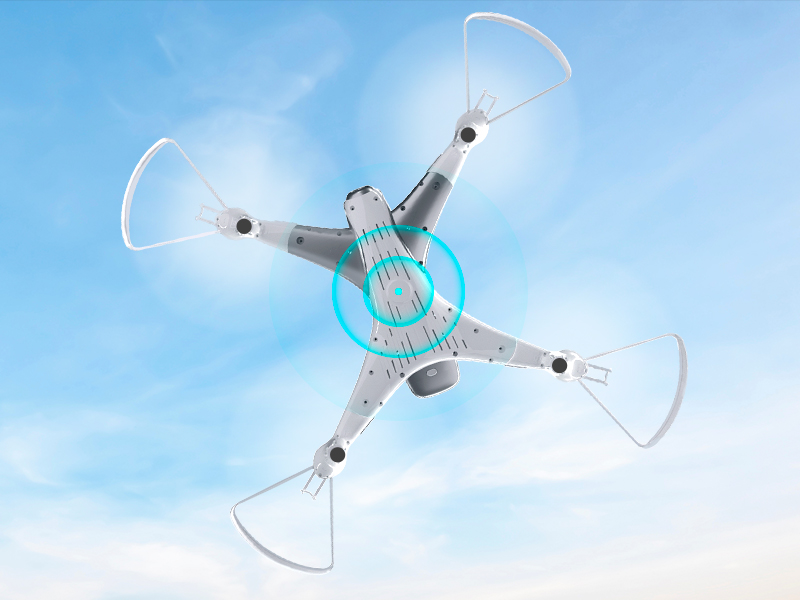
Image 8.1: The Loolinn Z3 Drone's weight measured on an electronic scale.
| Özellik | Şartname |
|---|---|
| Marka | saçmalamak |
| Model Adı | Z3 Drone |
| Özel Özellikler | 3 Batteries, 3D Flip, 60 Minutes Long Flight Time (total), Optical Flow Positioning Technology, Stable Flight |
| Yaş Aralığı (Açıklama) | Kids, Teenagers |
| Renk | Beyaz |
| Video Yakalama Çözünürlüğü | 720p |
| Bağlantı Teknolojisi | Wifi |
| Beceri Seviyesi | Acemi |
| Ürün Ağırlığı | 4.65 Ons (yaklaşık 131.7 gram) |
| Pil Kapasitesi | 1500 Miliamp Saat (pil başına) |
| Video Yakalama Formatı | MP4 |
| Uzaktan Kontrol Teknolojisi | Wifi |
| Maksimum Menzil | 262 Feet (yaklaşık 80 metre) |
| Malzeme | Metal, Plastik |
| Pil Hücresi Kompozisyonu | Lityum İyon |
| Desteklenen Görüntü Formatı | JPEG |
| Ürün Boyutları | 12.6"U x 12.6"G x 1.97"Y |
| UPC | 768492333128 |
9. Garanti ve Destek
Loolinn is committed to providing quality products and customer satisfaction. For any inquiries or support needs, please refer to the following:
- İade politikasi: A full refund is available within 30 days of purchase.
- Müşteri Hizmetleri: Loolinn offers responsive customer service, typically providing replies within 12 hours.
- Yedek Parçalar: For replacement parts such as propellers, please contact Loolinn customer support or visit their official webalan.
Daha fazla yardım için lütfen şu adresi ziyaret edin: Loolinn Store on Amazon.


