giriiş
This manual provides detailed instructions for the installation, operation, and maintenance of your YUNTX Android 10 Car Radio with Navigation, designed specifically for the Nissan Qashqai J10 models from 2008 to 2014. Please read this manual thoroughly before using the product to ensure proper functionality and safety.
Paket İçeriği
Aşağıda listelenen tüm öğelerin paketinizde bulunduğunu doğrulayın:
- 1 x YUNTX Android Car Radio Unit
- 1 x Güç Kablosu
- 1 x RCA Output Cable A
- 1 x RCA Output Cable B
- 1 x GPS Anteni
- 1 x USB Kablosu
- 1 x Kablosuz Anten
- 1 x Arka Kamera
- 1 x Kullanım Kılavuzu (bu belge)
Özellikler
| İşletim Sistemi | Android 10 |
| İşlemci | Quad-Core, Cortex 1.1 GHz |
| Veri deposu | 2 GB |
| ROM | 32 GB |
| Ekran Boyutu | 9 inç |
| Ekran Çözünürlüğü | 1024x600 |
| Ses Çıkışı | 4 x 50 W, Stereo |
| Bluetooth Sürümü | 5.0 |
| Bağlantı | Bluetooth, USB, Wi-Fi |
| USB/SD Kart Desteği | 500 GB'a kadar |
| Boyutlar (U x G x Y) | 1x1x1 cm |
| Ağırlık | 2.25 kilo |
Kurulum ve Yükleme
Bu bölüm bir genel bakış sağlarview of the installation process. Professional installation is recommended.
1. Uyumluluk Kontrolü
Ensure your vehicle is a Nissan Qashqai J10 manufactured between 2008 and 2014. The unit is designed for a direct fit in this model range.
2. Görsel Kurulum Kılavuzu

This image illustrates the seamless integration of the YUNTX Android 10 car radio into the dashboard of a Nissan Qashqai J10 (2008-2014). It displays the original car radio setup and the new 9-inch touchscreen unit after installation, highlighting the improved aesthetic and functionality.
The image above demonstrates the appearance of the dashboard before and after the installation of the YUNTX car radio. The unit is designed to replace the factory radio, providing a modern 9-inch touchscreen interface.
3. Kablo Bağlantıları

This image displays the customizable RGB button illumination feature, supporting up to 196 languages. It also provides a comprehensive wiring diagram with labeled connectors and a visual guide to included accessories like power sockets, RCA outputs, GPS antenna, USB cables, and the rear camera.
Refer to the detailed wiring diagram provided in the image above for connecting the power harness, RCA cables, GPS antenna, USB cables, and other accessories. Ensure all connections are secure and correctly matched to prevent damage to the unit or vehicle.
- Güç soketi: Ana güç kablosunu aracın elektrik tesisatına bağlayın.
- GPS Anteni: GPS antenini bağlayın ve açık bir görüş alanına yerleştirin. view En iyi sinyal alımı için gökyüzünün.
- USB Kabloları: Harici depolama veya akıllı telefon bağlantısı için birlikte verilen USB kablolarını bağlayın.
- RCA Output Sockets: Use RCA cables for connecting external amplifiers, subwoofers, or additional displays.
- Arka Kamera: Connect the included rear camera for parking assistance.
- Kablosuz Anten: Connect for improved Wi-Fi and Bluetooth signal.
Kullanım Talimatları
1. Açma/Kapama ve Temel Gezinme
Press the power button to turn the unit on or off. Navigate the interface using the 9-inch touchscreen. The main menu provides access to all primary functions.
2. CarPlay ve Android Auto

This image showcases the integrated Apple CarPlay and Android Auto features, allowing users to connect their smartphones for navigation, music, calls, and messages. The screen displays a typical CarPlay interface with app icons and a voice command prompt.
Connect your smartphone via USB to activate CarPlay (for Apple devices) or Android Auto (for Android devices). This allows you to access navigation, make calls, send messages, and play music directly from your phone's interface on the car radio screen. Use voice commands for hands-free operation.
3. Bluetooth 5.0

This image demonstrates several advanced features: Mirrorlink for mirroring smartphone content, Split Screen mode for running two apps simultaneously, Bluetooth 5.0 for hands-free calling and audio streaming, and the Headrest Function for connecting external displays for rear-seat entertainment.
Pair your phone via Bluetooth for hands-free calling and audio streaming. Access your phonebook, call history, and music library directly from the car radio. Bluetooth 5.0 ensures a stable and high-quality connection.
4. Wi-Fi and Internet Connectivity
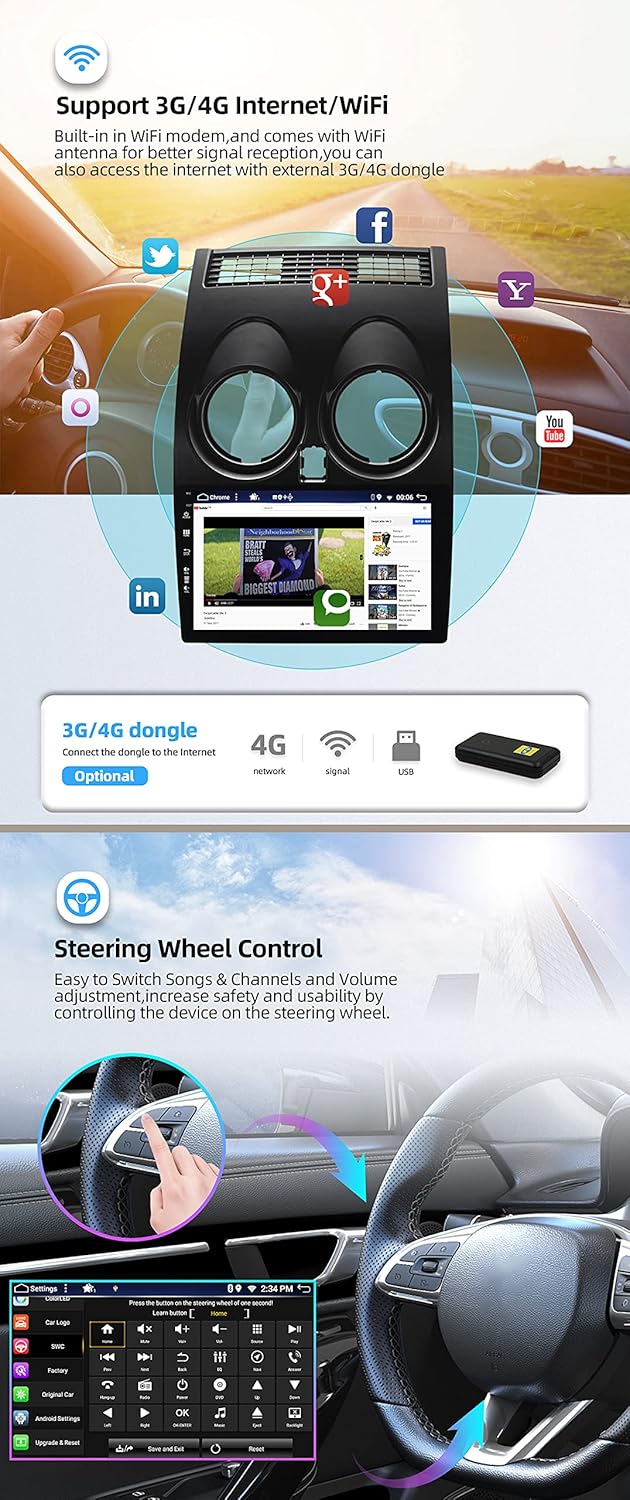
This image highlights the car radio's internet capabilities, including built-in WiFi and support for external 3G/4G dongles. It also illustrates the steering wheel control function, enabling safe and convenient operation of media and volume without taking hands off the wheel.
The unit features built-in Wi-Fi. Connect to a mobile hotspot or home Wi-Fi network to access online features, download apps, and browse the internet. External 3G/4G dongles (sold separately, e.g., B089KGJT61) are supported for mobile data access.
5. Direksiyon Kontrolü
The unit supports your vehicle's original steering wheel controls. After installation, you may need to configure the buttons in the system settings to match your preferences for volume, track skipping, and other functions.
6. MirrorLink
MirrorLink allows you to mirror your smartphone's screen onto the car radio display via USB or Wi-Fi. This feature supports both Android and iOS devices, enabling you to view and control your phone's content directly from the unit.
7. Bölünmüş Ekran Modu
Utilize the split-screen function to run two applications simultaneously. For exampÖrneğin, bir tarafta navigasyonu, diğer tarafta ise müzik çalmayı açık tutarak çoklu görev yeteneklerinizi artırabilirsiniz.
8. Headrest Function
The unit supports video output to external headrest monitors. Connect compatible displays to the RCA video output to provide entertainment for rear-seat passengers.
9. GPS Navigasyonu
The integrated GPS supports both online and offline navigation applications. Install your preferred navigation app and download offline maps for use without an internet connection. The system supports 3D maps and voice guidance.
10. Radio (AM/FM/DAB)
The unit includes an integrated AM/FM tuner with RDS (Radio Data System) for enhanced radio information. For digital radio (DAB+), an optional DAB box (e.g., B07NRD4T9D) is required, offering CD-like sound quality.
11. Multicolor Button Illumination
Customize the color of the physical buttons on the unit to match your vehicle's interior lighting or personal preference. The system supports a wide range of RGB colors and up to 196 languages for the interface.
Bakım
1. Ekranın Temizlenmesi
Dokunmatik ekranı nazikçe silmek için yumuşak, tiftiksiz bir bez kullanın. İnatçı lekeler için hafifçe silin.ampBezi suyla veya elektronik cihazlar için tasarlanmış bir ekran temizleme solüsyonuyla silin. Sert kimyasallardan veya aşındırıcı malzemelerden kaçının.
2. Yazılım Güncellemeleri
En iyi performansı sağlamak ve yeni özelliklere erişmek için düzenli olarak yazılım güncellemelerini kontrol edin. Güncellemeler genellikle Wi-Fi veya USB üzerinden yapılabilir. Güncelleme seçenekleri için sistem ayarlarına bakın.
3. Genel Bakım
Avoid exposing the unit to extreme temperatures, direct sunlight for prolonged periods, or excessive moisture. Ensure proper ventilation around the unit to prevent overheating.
Sorun giderme
- Güç Yok: Tüm güç bağlantılarını ve sigortaları kontrol edin. Aracın kontak anahtarının açık olduğundan emin olun.
- Ses Yok: Hoparlör bağlantılarını, ses seviyelerini ve ses kaynağı seçimini doğrulayın. ampeğer mümkünse daha canlı bağlantılar.
- GPS Sinyal Kaybı: GPS anteninin doğru şekilde bağlandığından ve engelsiz bir görüş alanına sahip olduğundan emin olun. view Gökyüzünden. Cihazı yeniden başlatmayı deneyin.
- Bluetooth Bağlantı Sorunları: Araç radyosunda ve akıllı telefonunuzda Bluetooth'un etkinleştirildiğinden emin olun. Önceki eşleştirmeleri silin ve yeniden bağlanmayı deneyin.
- Dokunmatik Ekran Tepki Vermiyor: Cihazı yeniden başlatmayı deneyin. Sorun devam ederse, fabrika ayarlarına sıfırlama gerekebilir (not: bu işlem tüm kullanıcı verilerini silecektir).
- CarPlay/Android Auto Bağlanmıyor: Ensure your phone's operating system is up to date. Try a different USB cable. Check the settings on both the car radio and your phone for CarPlay/Android Auto permissions.
Burada yer almayan konular için lütfen destek bölümüne bakın veya müşteri hizmetleriyle iletişime geçin.
Destek ve Garanti
For technical assistance, troubleshooting, or to request a PDF version of this manual in German, Italian, French, Spanish, or English, please contact YUNTX technical support:
E-posta: yuntx_techsupport@163.com
Information regarding specific warranty terms and conditions is available upon request from YUNTX customer service.


