1. Giriş
Satın aldığınız için teşekkür ederizasing the ZEBRONICS Zeb-PIXAPLAY 11 Portable LED Projector. This manual provides essential information for setting up, operating, and maintaining your projector. Please read it thoroughly before use to ensure proper functionality and to maximize your viewDeneyim.
The Zeb-PIXAPLAY 11 is designed for home entertainment, offering FHD 1080p support, multiple connectivity options, and a compact design for portability. Enjoy movies, TV shows, and gaming on a large screen up to 381cm (150 inches).
2. Güvenlik Bilgileri
- Projektör lensine doğrudan bakmayın.amp Açık.
- Aşırı ısınmayı önlemek için projektörün çevresinde uygun havalandırma olduğundan emin olun.
- Use only the provided power adapter or a compatible 5V DC, 3A USB power source.
- Projeksiyon cihazını sudan, nemden ve aşırı sıcaklıklardan uzak tutun.
- Projektörü kendiniz sökmeye veya onarmaya çalışmayın. Yetkili servis personeliyle iletişime geçin.
- Optimum performansı korumak için lensi ve havalandırma deliklerini düzenli olarak temizleyin.
3. Paket İçeriği
Aşağıda listelenen tüm öğelerin paketinizde bulunduğunu doğrulayın:
- Projeksiyon cihazı (1 adet)
- Uzaktan kumanda (1 adet)
- Güç Adaptörü (1 adet)
- AV Cable (1 unit)
- HDMI Kablosu (1 adet)
- Kullanıcı Kılavuzu

Şekil 3.1: Projector and Included Accessories
This image displays the ZEBRONICS Zeb-PIXAPLAY 11 projector along with its complete set of accessories: a remote control, a power adapter, an AV cable, an HDMI cable, and a QR code for the user manual. These items are typically found in the product packaging.
4. Ürün Bittiview
Projektörün bileşenlerini ve kontrollerini iyice öğrenin.

Şekil 4.1: Ön ve Üst View of the Projector with Remote
This image shows the ZEBRONICS Zeb-PIXAPLAY 11 portable LED projector from a front and slightly top-down angle, with its accompanying remote control placed beside it. The projector features a two-tone design, with the lens visible at the front.
4.1 Üst Panel Kontrolleri

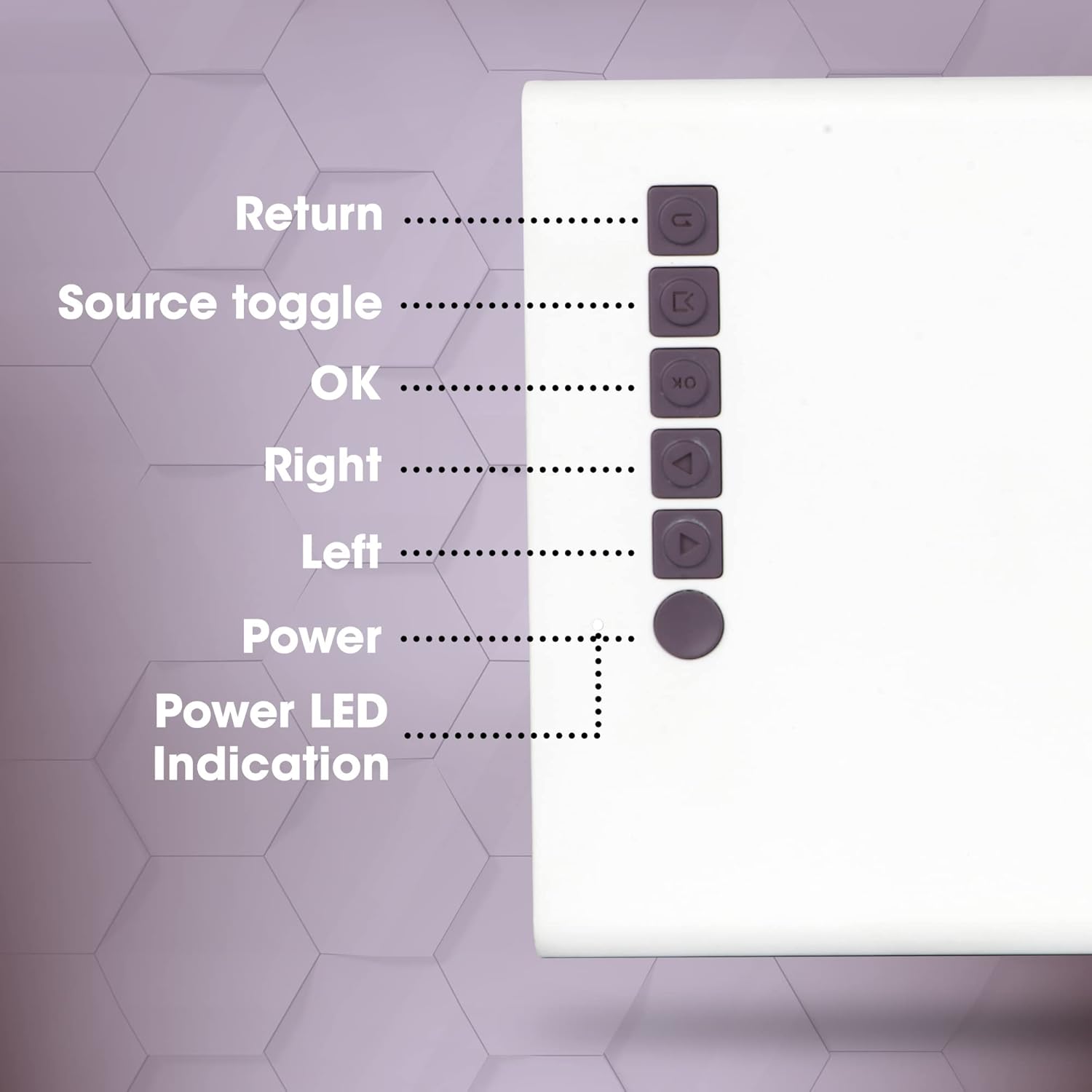
Şekil 4.2: Üst Panel Kontrolleri
This close-up image highlights the control buttons located on the top panel of the ZEBRONICS Zeb-PIXAPLAY 11 projector. The buttons are labeled for their functions: Return, Source toggle, OK, Right, Left, Power, and Power LED Indication.
- Geri dönmek: Menülerde geri dönmeyi sağlar.
- Source toggle: Switches between input sources (HDMI, USB, mSD, AV).
- OK: Seçimleri onaylar.
- Sağ sol: Navigates menu options.
- Güç: Projektörü açar/kapatır.
- Güç LED Göstergesi: Güç durumunu gösterir.
4.2 Rear and Side Ports
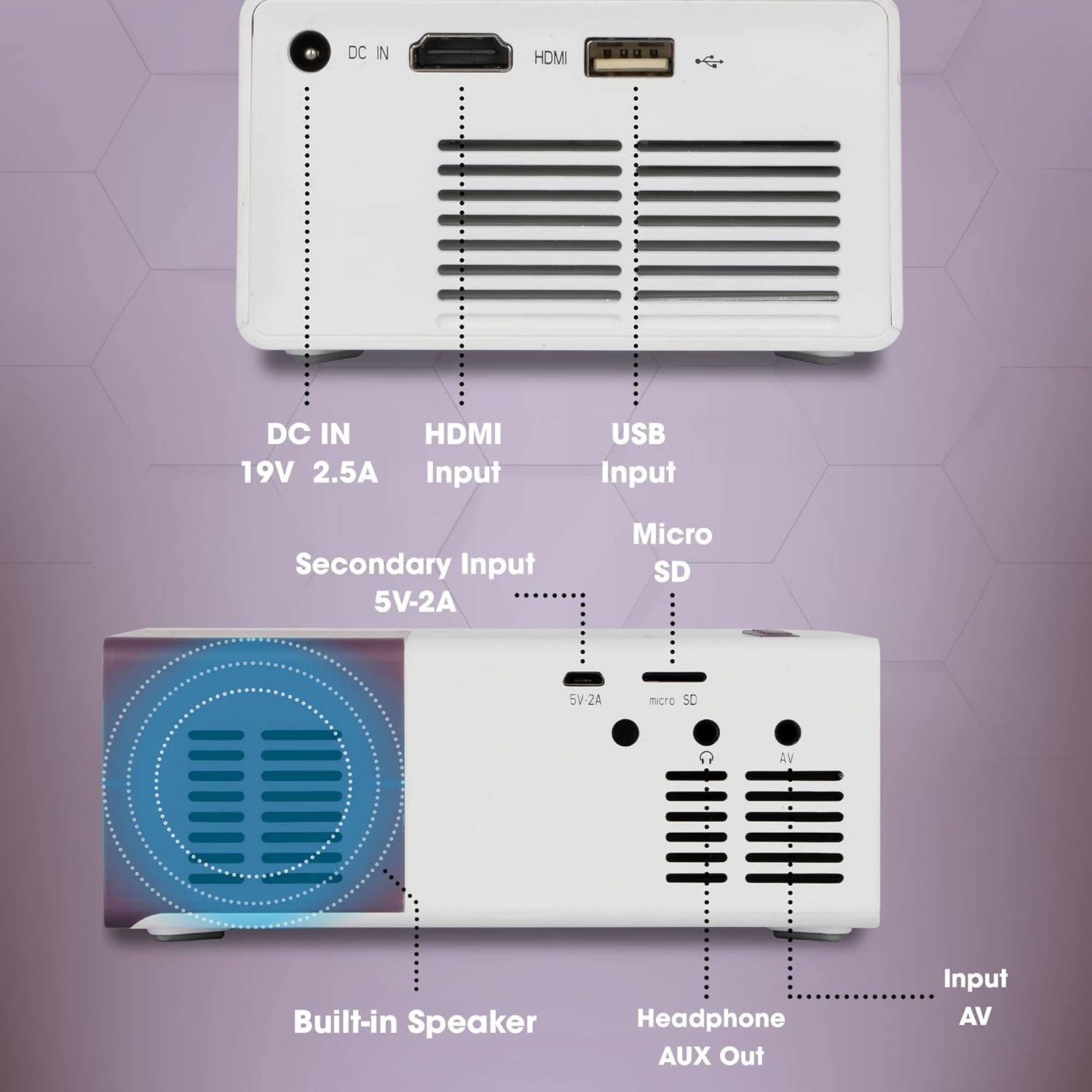
Şekil 4.3: Rear and Side Connectivity Ports
Bu görüntü ayrıntılı bir bilgi sağlar view of the connectivity ports located on the rear and side of the ZEBRONICS Zeb-PIXAPLAY 11 projector. Labels indicate the functions of each port: DC IN (19V 2.5A), HDMI Input, USB Input, Micro SD slot, Secondary Input (5V-2A), Built-in Speaker, Headphone AUX Out, and Input AV.
- DC Girişi (19V 2.5A): Ana güç girişi.
- Secondary Input (5V-2A): Alternative power input via USB (e.g., power bank).
- HDMI Girişi: Connects to devices like laptops, gaming consoles, TV boxes.
- USB Girişi: Connects to USB flash drives for media playback.
- Mikro SD: Slot for Micro SD cards for media playback.
- Input AV: Connects to devices using the included AV cable.
- Headphone AUX Out: Harici hoparlörlere veya kulaklıklara bağlanır.
- Dahili Hoparlör: Entegre ses çıkışı.
5. Kurulum
5.1 Güç Bağlantısı
- Verilen güç adaptörünü bağlayın. DC GİRİŞİ (19V 2.5A) port on the projector and then to a power outlet.
- Alternatively, for portable use, connect a 5V DC, 3A USB power source (e.g., a power bank) to the Secondary Input (5V-2A) liman.
Şekil 5.1: Dual Power Input Capability
This image illustrates the ZEBRONICS Zeb-PIXAPLAY 11 projector's compatibility with both a standard adapter and a 5V power bank, highlighting its portability for outdoor use. Children are shown enjoying a movie projected onto a screen in a garden setting.
5.2 Yerleşim ve Ekran Boyutu
- Projeksiyon cihazını sabit, düz bir yüzeye yerleştirin.
- Position the projector at an appropriate distance from the projection surface (wall or screen) to achieve the desired screen size. The projector supports a maximum screen size of 381cm (150 inches).
- Projeksiyon yolunun engellerden arındırılmış olduğundan emin olun.

Şekil 5.2: Large Screen Projection and Picture Clarity
This image demonstrates the ZEBRONICS Zeb-PIXAPLAY 11 projector's capability to project a large screen size of up to 381cm (150 inches) with FHD 1080p support, emphasizing the stunning picture clarity it delivers.
5.3 Odak Ayarı
Locate the focus ring near the projector lens. Rotate it until the projected image appears sharp and clear on the screen.
6. Kullanım Talimatları
6.1 Açma/Kapatma
- Basın Güç button on the projector or the remote control to turn the unit on. The Power LED will illuminate.
- Basın Güç üniteyi kapatmak için tekrar düğmesine basın.
6.2 Giriş Kaynağının Seçilmesi
Cihazı açtıktan sonra şunu kullanın: Source toggle button on the projector or the remote control to cycle through available input sources: HDMI, USB, mSD, and AV.
6.3 Cihazları Bağlama
- HDMI: Connect an HDMI cable from your laptop, gaming console, or TV box to the projector's HDMI input port. Select HDMI as the input source.
- USB BAĞLANTI: Insert a USB flash drive into the USB input port. Select USB as the input source and navigate through your media files using the remote or top panel controls.
- Mikro SD: Insert a Micro SD card into the Micro SD slot. Select mSD as the input source and browse your media.
- AV: Use the included AV cable to connect older devices (e.g., DVD players) to the AV input port. Select AV as the input source.
6.4 Ses Çıkışı
- The projector has a built-in speaker for audio playback.
- For enhanced audio, connect external speakers or headphones to the Headphone AUX Out 3.5 mm ses kablosu kullanarak bağlantı noktası.
6.5 Desteklenen Medya Formatları
The projector supports various video file formats including 3GP, AVI, DIVX, H264, MOV, MP4, MPEG1, MPEG2, MKV, and VOB.
7. Bakım
- Lens Temizliği: Gently wipe the projector lens with a soft, lint-free cloth. Avoid using abrasive cleaners.
- Havalandırma Temizliği: Periodically clean the ventilation openings to ensure proper airflow and prevent dust buildup. Use a soft brush or compressed air.
- Depolamak: Kullanılmadığı zamanlarda projektörü serin, kuru bir yerde, doğrudan güneş ışığından ve aşırı sıcaklıklardan uzakta saklayın.
- Lamp Ömür: LED lamp tahmini ömrü 30,000 saattir.

Şekil 7.1: Projector Brightness and Lamp Ömür
This image visually represents the ZEBRONICS Zeb-PIXAPLAY 11 projector's key specifications: 1500 lumens of brightness and a long-lasting LED lamp with a lifespan of 30,000 hours.
8. Sorun Giderme
Projeksiyon cihazınızla ilgili sorunlarla karşılaşırsanız, aşağıdaki yaygın sorunlar ve çözümlerine göz atın:
| Sorun | Olası Neden | Çözüm |
|---|---|---|
| Güç yok | Güç kablosu bağlı değil; Elektrik prizi arızalı. | Güç adaptörünün güvenli bir şekilde takılı olduğundan emin olun; farklı bir elektrik prizi deneyin. |
| Resim yok | Incorrect input source; Cable not connected; Device not outputting signal | Select correct input source; Check cable connections; Ensure source device is on and configured to output. |
| Bulanık görüntü | Odak ayarı yapılmamış; Projektör çok yakın/uzak. | Odak halkasını ayarlayın; Projektörü en uygun mesafeye yeniden konumlandırın. |
| Ses yok | Volume too low; External speakers not connected; Source device audio issue | Increase projector volume; Connect external speakers via AUX out; Check audio settings on source device. |
9. Özellikler
| Özellik | Şartname |
|---|---|
| Marka | ZEBRONİK |
| Model Numarası | GC-RB-2725 |
| Ekran Çözünürlüğü | 1280 x 720 (Native HD), 1080p FHD Support |
| Parlaklık | 1500 Lümen |
| Lamp Ömür | 30,000 Hours (LED) |
| Maksimum Ekran Boyutu | 381 cm (150 inç) |
| Bağlantı Teknolojisi | HDMI, USB, Micro SD, AV In, AUX Out |
| Hoparlör Tipi | Dahili |
| Güç Girişi | DC 19V 2.5A (Primary), 5V 3A USB (Secondary) |
| Ürün Ağırlığı | 1.85 pound |
| Ürün Boyutları | 5.79 x 4.02 x 0.98 inç |
10. Garanti ve Destek
This product is covered by a manufacturer's warranty. Please refer to the warranty card included in your package for specific terms and conditions. For technical support, service, or further inquiries, please visit the official ZEBRONICS websitesine gidin veya müşteri hizmetleriyle iletişime geçin.
You can also access the digital user manual and support resources by scanning the QR code provided in the package or by visiting: https://l.ead.me/zebpp11


