Önemli Güvenlik Bilgileri
Please read this manual carefully before assembly and use to ensure safe operation and to prevent damage to the product or injury to yourself.
- Maksimum yük taşıma kapasitesini aşmayın. 100 kiloAşırı yükleme, dengesizliğe ve hasara neden olabilir.
- Ensure all cables are properly managed and secured to prevent tripping hazards or damage during height adjustments.
- Çalışma sırasında çocukları ve evcil hayvanları masadan uzak tutun.
- Do not place hands or other body parts near moving parts of the desk frame during height adjustment.
- Masayı yalnızca amacına uygun olarak, yani çalışma masası olarak kullanın.
- Regularly check all screws and bolts to ensure they are tightened.
Ürün Bittiview
The FLEXISPOT E1B Electric Standing Desk is designed to provide a versatile and ergonomic workspace. It features a robust dual-motor system for smooth height adjustments and a durable tabletop.
Temel Özellikler:
- Çift Motorlu Sistem: Ensures stable and efficient height adjustment at 25 mm/s.
- Boy Aralığı: Adjustable from 70 cm to 119 cm to suit various user heights and work preferences.
- Yük Kapasitesi: Supports up to 100 kg, accommodating multiple monitors and office equipment.
- Bellek Ön Ayarları: Control panel with memory functions for saving preferred height settings.
- High-Quality Tabletop: 160x80cm black tabletop, made in the EU from FSC-certified MDF with scratch-resistant high-pressure laminate.
Paket İçeriği
Before starting assembly, verify that all components listed below are present and undamaged. If any parts are missing or damaged, please contact customer support.
- Desk Frame (E1B) components (legs, feet, crossbar, motor, control box)
- Tabletop (DT1608-BLACK-EU18)
- Control Panel with Memory Functions
- Güç Adaptörü ve Kablosu
- Montaj Donanımı (vidalar, cıvatalar, Allen anahtarları)
- Kablo Yönetim Aksesuarları
- Kullanıcı Kılavuzu
Kurulum ve Montaj Talimatları
Assembly is designed to be straightforward. It is recommended to assemble the desk on a soft, clean surface to prevent scratches. Two people are recommended for easier assembly.
Adım 1: Bileşenleri Paketinden Çıkarın
Tüm parçaları ambalajından dikkatlice çıkarın ve serin. Paket içeriği listesiyle karşılaştırın.
Adım 2: Masa Çerçevesini Birleştirin
- Attach the lifting columns to the crossbar using the provided screws.
- Masa ayaklarını kaldırma kolonlarının alt kısmına sabitleyin.
- Mount the control box to the designated area on the frame.
- Kaldırma kolonlarından gelen motor kablolarını kontrol kutusuna bağlayın.
- Kontrol paneli kablosunu kontrol kutusuna bağlayın.

Image: The FLEXISPOT E1B desk frame in black and white, illustrating the height adjustment range from 70cm to 119cm, highlighting the dual motor system, 25mm/s adjustment speed, and low noise operation (less than 50dB).
3. Adım: Masa tablasını takın
Carefully place the tabletop upside down on a soft surface. Position the assembled desk frame onto the tabletop, aligning the pre-drilled holes. Secure the tabletop to the frame using the provided screws.

Image: A FLEXISPOT desk with a black tabletop, featuring a laptop, books, and a pen holder, demonstrating a functional and organized workspace.
Step 4: Connect Power and Cable Management
Connect the power adapter to the control box and then to a power outlet. Use the included cable management accessories to organize and secure all cables, preventing them from interfering with the desk's movement.
Kullanım Talimatları
Kontrol Paneli Bittiview:
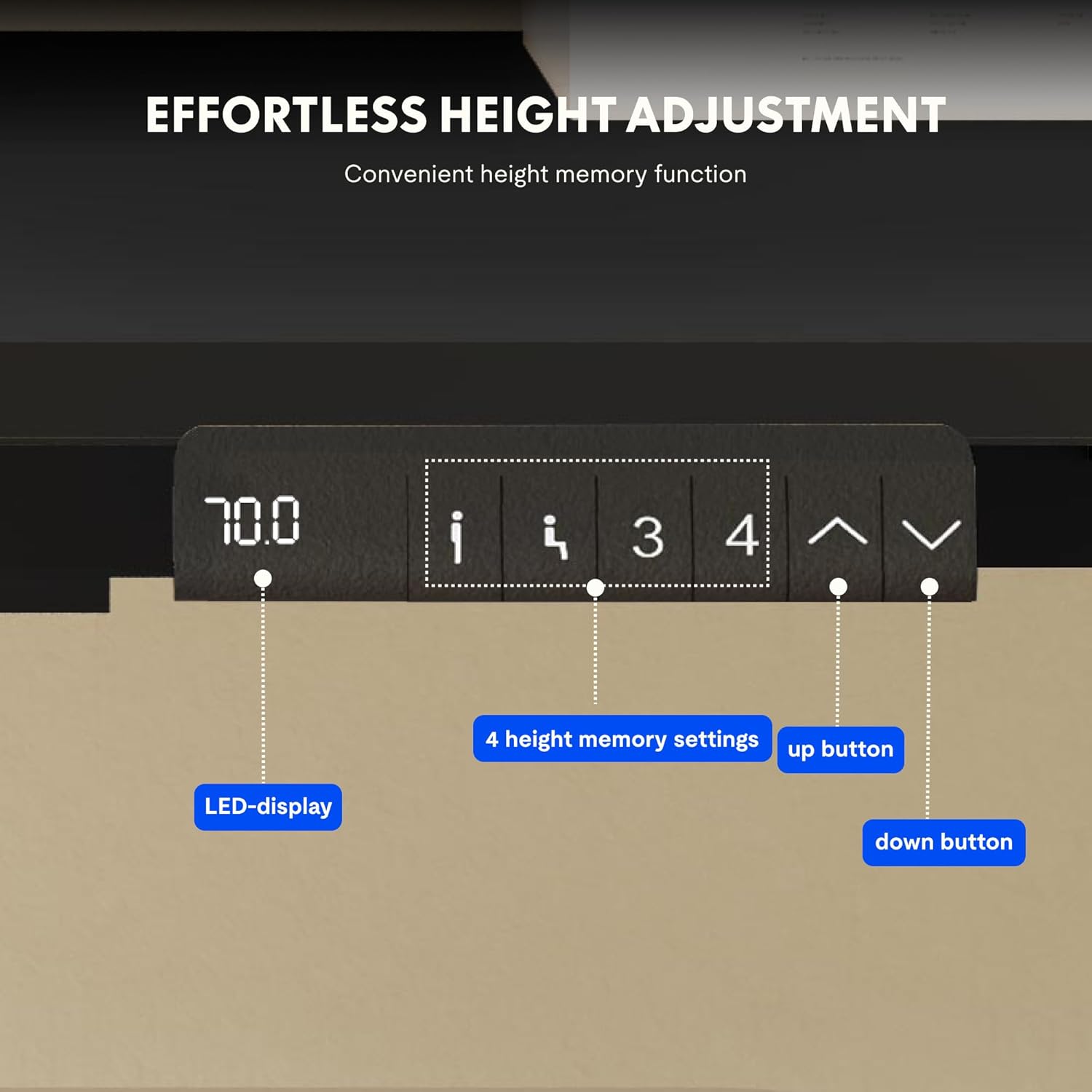
Image: Close-up of the FLEXISPOT desk control panel, showing the LED display for current height, up and down arrow buttons for manual adjustment, and four numbered buttons for saving and recalling height memory presets.
Manual Height Adjustment:
- Basılı tutun Up arrow (^) masayı kaldırmak için düğmeye basın.
- Basılı tutun Down arrow (v) masayı indirmek için düğmeye basın.
- İstediğiniz yüksekliğe ulaştığınızda düğmeyi bırakın. LED ekran mevcut yüksekliği gösterecektir.
Bellek Ön Ayarlarını Ayarlamak:
- Yukarı/Aşağı oklarını kullanarak masayı istediğiniz yüksekliğe ayarlayın.
- Basın "M" or "AYARLAMAK" button (if available, otherwise proceed to step 3).
- Numaralandırılmış hafıza düğmelerinden birine basın (1, 2, 3 veya 4) within 3 seconds. The display will show "S-" followed by the number, indicating the height is saved.
Bellek Ön Ayarlarını Geri Çağırma:
Simply press the desired numbered memory button (1, 2, 3 veya 4Masa, kaydedilen yüksekliğe otomatik olarak hareket edecektir.
Sıfırlama Fonksiyonu:
If the desk encounters an error or does not move smoothly, a reset may be required. Press and hold the "Aşağı" button until the desk reaches its lowest position, then release and press it again for 5-10 seconds until the display shows "RST" or "E-1" and then returns to the lowest height. The desk will then reset to its factory lowest position.
Bakım
- Temizlik: Masanın yüzeyini ve çerçevesini yumuşak bir bezle silin.amp Bez. Aşındırıcı temizleyicilerden veya sert kimyasallardan kaçının.
- Denetleme: Tüm vidaları ve bağlantıları düzenli olarak kontrol ederek sıkı olduklarından emin olun. Gerekirse tekrar sıkın.
- Kablo yönetimi: Ensure cables remain tidy and do not obstruct the desk's movement.
- Ağırlık dağılımı: Distribute weight evenly on the tabletop to prevent strain on the motors and frame.
Sorun giderme
| Sorun | Olası Neden | Çözüm |
|---|---|---|
| Masa hareket etmiyor. | Power cable disconnected; control box error; overloaded desk. | Check power connections. Perform a reset (see Operating Instructions). Reduce weight on the desk. |
| Masa düzensiz bir şekilde hareket ediyor veya alışılmadık sesler çıkarıyor. | Gevşek bağlantılar; tıkanıklık; dengesiz ağırlık dağılımı. | Check all screws and connections. Remove any obstructions. Redistribute weight evenly. Perform a reset. |
| Ekranda bir hata kodu (örneğin, E01, E02) görüntülenir. | Dahili sistem hatası. | Perform a reset. If the error persists, contact customer support. |
| Bellek ön ayarları çalışmıyor. | Ön ayarlar doğru şekilde kaydedilmedi. | Re-save the memory presets following the instructions. |
Özellikler
| Özellik | Detay |
|---|---|
| Marka | ESNEKLİK |
| Model Numarası | E1B+DT1608-BLACK-EU18 |
| Masa Üstü Ölçüleri (Uzunluk x Genişlik) | 160 cm x 80 cm |
| Yükseklik Ayar Aralığı | 70 cm - 119 cm |
| Yük Kapasitesi | 100 kilo |
| Ayar Hızı | 25 mm/s |
| Motor Tipi | Çift Motorlar |
| Masaüstü Malzemesi | FSC-certified MDF with high-pressure laminate |
| Çerçeve Malzemesi | Alaşımlı Çelik |
| Renk | Black Tabletop + Black Frame |
Garanti ve Destek
FLEXISPOT products are manufactured to high-quality standards. For warranty information and customer support, please refer to the official FLEXISPOT websitesine bakın veya satıcınızla iletişime geçin.
- Garanti: Specific warranty terms may vary by region and product. Please check your purchase documentation or the manufacturer's webayrıntılar için site.
- Müşteri Desteği: For technical assistance, missing parts, or operational questions, please visit the FLEXISPOT Marka Mağazası veya resmi destek kanallarıyla iletişime geçin.


