giriiş
Thank you for choosing the Baseus True Wireless Earphones Bowie E3. These earphones are designed to provide a high-quality audio experience with advanced features such as low latency, fast charging, and IP64 dust and water resistance. This manual will guide you through the setup, operation, maintenance, and troubleshooting of your new earphones.
Ürün Bittiview

The Baseus Bowie E3 True Wireless Earphones, shown here in their open charging case, highlighting their compact and sleek white design.

Illustration demonstrating the Baseus Dual Channel Connection and Low Latency feature, indicating a delayed time of less than 0.06 seconds for fast response.

Visual representation of the Baseus Flash Charge capability, showing that 10 minutes of charging provides 2 hours of music playback.

Kapatmak view of the 13mm Titanium Vibrating Diaphragms, designed for well-balanced triple frequency and clear sound quality.
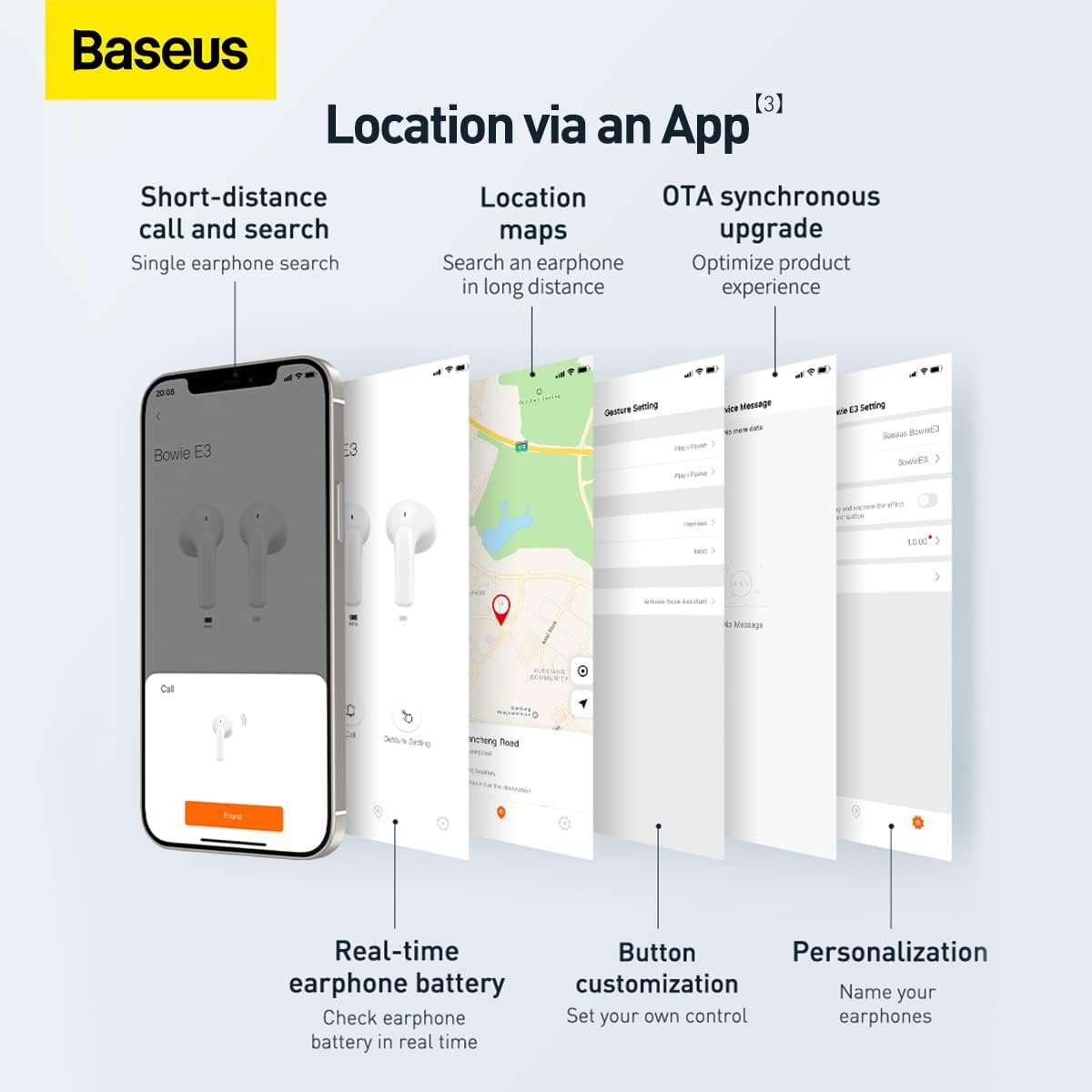
Screenshots illustrating the Baseus app features, including short-distance call and search, location maps, OTA synchronous upgrade, real-time earphone battery check, button customization, and personalization options.

Diagram showing the internal chip for Wireless 5.2 Stable Connection, indicating improved transmission rate and stability.

Summary of key features for Pure Music and Fast Response, including flash charge, 13mm PU+Titanium Moving Coils, 0.06 second delay, and location tracking via the app.

The retail packaging for the Baseus Bowie E3 True Wireless Earphones, displaying the product name and brand logo.
Kurmak
1. Kulaklık ve Kutunun Şarj Edilmesi
Before first use, fully charge the earphones and the charging case. Connect the charging case to a USB power source using a compatible USB-C cable. The indicator light on the case will show charging status.
- Flash Charge: 10 dakikalık şarjla yaklaşık 2 saat müzik dinleme imkânı sunuluyor.
- Ensure the earphones are properly seated in the charging case for them to charge.
2. Cihazınızla Eşleştirme
- Şarj kutusunu açın. Kulaklıklar otomatik olarak eşleştirme moduna geçecektir.
- Cihazınızda (akıllı telefon, tablet vb.) Bluetooth’u etkinleştirin.
- Arama "Baseus Bowie E3", mevcut Bluetooth cihazları listesinde yer alıyor.
- Select "Baseus Bowie E3" to connect. Once connected, a voice prompt will confirm successful pairing.
- Sonraki kullanımlarda, kulaklıklar kutusundan çıkarıldığında otomatik olarak en son eşleştirilen cihaza bağlanacaktır.
Kullanım Talimatları
Dokunmatik Kontroller
The Baseus Bowie E3 earphones feature touch-sensitive controls on each earbud. The following actions are typically supported:
- Oynat/Duraklat: Kulaklıklardan birine iki kez dokunun.
- Sonraki Parça: Sağ kulaklığa üç kez dokunun.
- Önceki parça: Sol kulaklığa üç kez dokunun.
- Çağrıyı Cevapla/Sonlandır: Kulaklıklardan birine iki kez dokunun.
- Çağrıyı Reddet: Kulaklıklardan birini 2 saniye basılı tutun.
- Voice Assistant'ı etkinleştirin: Kulaklıklardan birini 3 saniye basılı tutun.
Note: Specific touch controls may be customizable via the Baseus app.
Using the Baseus App
Download the official Baseus app from your device's app store to unlock additional features and customization options:
- Earphone Location: Use the app to locate your earphones if misplaced.
- Pil Durumu: Check the real-time battery level of each earbud.
- Düğme Özelleştirme: Personalize touch controls to your preference.
- OTA Synchronous Upgrade: Receive firmware updates to optimize product experience.
- Kişiselleştirme: Name your earphones within the app.
Bakım
- Temizlik: Kulaklıkları ve şarj kutusunu düzenli olarak yumuşak, kuru, tüy bırakmayan bir bezle temizleyin. Aşındırıcı temizleyiciler veya çözücüler kullanmayın.
- Suya Dayanıklılık: The earphones are IP64 dustproof and waterproof. This means they are protected from dust ingress and splashing water from any direction. Do not submerge them in water or expose them to strong jets of water.
- Depolamak: Kullanılmadığı zamanlarda kulaklıkları korumak ve şarjlarının dolu kalmasını sağlamak için şarj kutusunda saklayın. Serin, kuru ve doğrudan güneş ışığından ve aşırı sıcaklıklardan uzak bir yerde muhafaza edin.
- Pil Bakım: Pil ömrünü uzatmak için kulaklıkların pilini sık sık tamamen boşaltmaktan kaçının. Sürekli kullanılmasa bile düzenli olarak şarj edin.
Sorun giderme
| Sorun | Olası Neden | Çözüm |
|---|---|---|
| Kulaklıklar eşleşmiyor | Bluetooth is off; earphones not in pairing mode; interference. | Ensure Bluetooth is on. Place earphones back in case, close, then reopen. Try pairing again. Move away from other wireless devices. |
| Bir kulaklıktan ses gelmiyor | Low battery; earbud not connected; dirty contacts. | Charge both earphones. Re-pair the earphones. Clean the charging contacts on the earbud and in the case. |
| Düşük hacim | Device volume too low; earbud placement; dirty earbud mesh. | Increase volume on your device. Adjust earbud position. Gently clean the earbud mesh. |
| Şarj sorunları | Cable or adapter fault; dirty charging port/contacts. | Try a different USB-C cable and power adapter. Clean the charging port and earbud contacts. |
| App not connecting to earphones | Earphones not paired to phone; app permissions. | Ensure earphones are connected via Bluetooth. Check app permissions in phone settings. Restart app. |
Özellikler
- Modeli: NGTW080002
- Marka: Bazus
- Bağlantı: Bluetooth 5.2
- Kulak Yerleşimi: Kulakta
- Form Faktörü: Kulakta
- Empedans: 32 Ohm
- Gürültü kontrolü: Ses Yalıtımı
- Sürücüler: 13mm Titanium Vibrating Diaphragms
- Gecikme: 0.06 seconds (low latency)
- Şarj: Flash charge (10 min charge for 2h playback)
- Suya Dayanıklılık: IP64 Toza ve Suya Dayanıklı
- Pil: 1 Lithium Ion battery required (per earbud, case has its own)
- Ürün Ölçüleri: 3.8 x 9.2 x 9.2 cm (packaging/case); 100 g
- Üretici: Bazus
- Menşei ülke: Çin
- İlk Mevcut: 1 Mart 2022
Garanti ve Destek
Garanti Bilgileri
This product comes with a standard manufacturer's warranty. For specific warranty terms and conditions, please refer to the warranty card included in the product packaging or visit the official Baseus website. Extended warranty plans may also be available for purchase, such as 1-Year or 2-Year Extended Warranty Plans.
Müşteri Desteği
For technical assistance, troubleshooting beyond this manual, or warranty claims, please contact Baseus customer support through their official website or the contact information provided in your product documentation. Please have your product model number (NGTW080002) and purchase details ready when contacting support.
Çevrimiçi Kaynaklar:
- Official Baseus Webalan: www.baseus.com (Lütfen bölgesel kontrol edin web(belirli destek için siteler)
- Baseus App: Available on iOS App Store and Android Google Play Store.


