1. Giriş
This manual provides comprehensive instructions for the safe and efficient operation of your CLABEL 220B Thermal Bluetooth Label Printer. This portable, inkless label maker is designed for various applications in small businesses, offices, and homes, supporting label widths from 20mm to 50mm.
2. Paket İçeriği
Lütfen aşağıda listelenen tüm öğelerin paketinizde yer aldığından emin olun:
- CLABEL 220B Thermal Bluetooth Label Printer
- 1 Rulo Termal Etiket
- USB Şarj Kablosu
- Kullanım Kılavuzu (bu belge)
3. Ürün Bittiview
Familiarize yourself with the components of your CLABEL 220B printer.
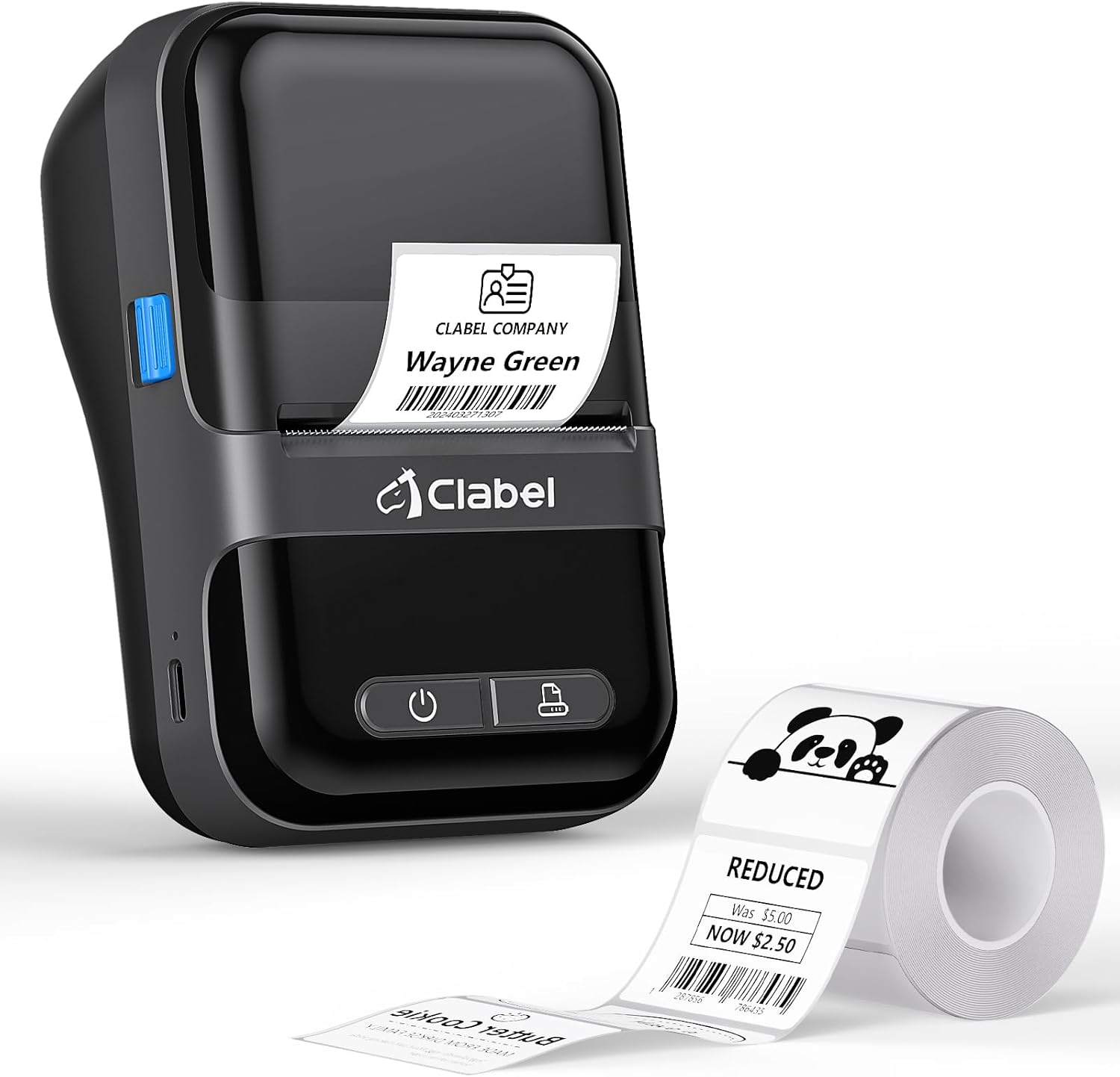
Image: The CLABEL 220B printer, showcasing its compact design, a printed label emerging from the output slot, and a roll of blank labels.
The printer features a power button, a feed button, and a label compartment. The charging port is typically located on the side or back.
4. Kurulum
4.1. Yazıcıyı Şarj Etme
Before initial use, fully charge the printer. Connect the provided USB cable to the printer's charging port and to a 5V-2A power adapter (not included) or a computer's USB port. The charging indicator light will show the charging status.
4.2. Etiketleri Yükleme
Follow these steps to correctly load the thermal labels:

Image: Step-by-step guide for label installation, showing opening the cover, setting jam protection, inserting labels, and closing the cover.
- Yazıcının kapağını açın.
- Set the jam protection to "OPEN" if applicable.
- Insert the label roll into the compartment, ensuring the printable side faces up and the labels are aligned on the left.
- Pull out a small length of labels and close the cover securely.
5. Bağlantı
5.1. Mobile Phone Connection (Bluetooth)
The CLABEL 220B supports connection with iOS and Android devices via Bluetooth.

Image: Mobile phone connection steps, illustrating downloading the 'Clabel trade' app, enabling Bluetooth, and connecting to the printer within the app.
- Download the "CLABEL trade" app from your device's app store (iOS App Store or Android Google Play Store).
- Cep telefonunuzda Bluetooth'un etkinleştirildiğinden emin olun.
- Open the "CLABEL trade" app and connect to your printer from the device list.
5.2. PC Connection (USB)
For Windows PCs, connect the printer using the provided USB cable.

Image: Computer connection steps, detailing turning on the printer, connecting via USB, downloading the driver/app, and printing.
- Yazıcıyı açın.
- Yazıcıyı USB kablosuyla bilgisayarınıza bağlayın.
- Download the necessary driver or application from the official CLABEL brand webalan.
- Open the application, create or select a label, and initiate printing.
6. Kullanım Talimatları
6.1. Using the CLABEL Trade App
The "CLABEL trade" app offers extensive features for label creation and management:
- Access over 30 business label templates.
- Utilize more than 450 common symbols for various applications.
- Create and customize your own label templates.
- Edit and typeset labels with text, barcodes, QR codes, images, and more.
6.2. Batch Printing
The printer supports batch printing, allowing you to import data from Excel tables to print multiple labels efficiently. This feature helps improve printing efficiency by setting the printing quantity without repetitive operations.
6.3. Recommended Label Sizes and Uses
The CLABEL 220B printer supports labels with a width of 20-50mm and a length of 15-100mm, accommodating various styles and applications.

Image: Recommended label sizes for business applications, including price tags, barcodes, logos, and product information (e.g., 40x40mm, 50x50mm).

Image: Recommended label sizes for food applications, such as bakery items, ingredient lists, and price & date labels (e.g., 40x30mm, 50x40mm).

Image: Recommended label sizes for office organization, including labels for letters, addresses, folders, and cables (e.g., 25x78mm, 50x30mm).
7. Bakım
To ensure optimal performance and longevity of your CLABEL 220B printer, follow these maintenance guidelines:
- Yazdırma Kafasını Temizleme: Termal baskı kafasını düzenli olarak alkollü pamukla temizleyerek toz veya yapışkan kalıntılarını giderin. Temizlemeden önce yazıcının kapalı ve soğumuş olduğundan emin olun.
- Dış Temizlik: Yazıcının dış yüzeyini yumuşak, kuru bir bezle silin. Sert kimyasallar veya aşındırıcı malzemeler kullanmaktan kaçının.
- Depolamak: Yazıcıyı serin, kuru bir yerde, doğrudan güneş ışığından ve aşırı sıcaklıklardan uzakta saklayın.
- Pil Bakım: For long-term storage, charge the battery to about 50% every three months to prevent deep discharge.
8. Sorun Giderme
If you encounter issues with your CLABEL 220B printer, refer to the following common problems and solutions:
| Sorun | Olası Neden | Çözüm |
|---|---|---|
| Yazıcı açılmıyor | Düşük pil veya güç sorunu | Yazıcıyı tamamen şarj edin. Güç düğmesine doğru basıldığından emin olun. |
| Poor print quality (light or spotty) | Dirty print head, incorrect label type, or low battery | Clean the print head. Ensure you are using thermal labels. Charge the printer. Adjust print density in the app if available. |
| Etiketler yanlış hizalanmış veya sıkışmış. | Labels not loaded correctly | Open the cover, re-align the label roll, and ensure it's properly seated. Refer to Section 4.2. |
| Bluetooth üzerinden bağlanılamıyor | Bluetooth off, app issue, or printer not discoverable | Ensure Bluetooth is enabled on your phone and the printer is on. Restart the app and printer. Try re-pairing the device. |
| PC connection issues | Driver not installed, incorrect cable, or software issue | Install the correct driver from the CLABEL website. Ensure the USB cable is functional. Restart PC and printer. |
If the problem persists, please contact CLABEL customer support for further assistance.
9. Özellikler
Key technical specifications for the CLABEL 220B Thermal Bluetooth Label Printer:
- Modeli: 220B
- Baskı Teknolojisi: Termal
- Bağlantı: Bluetooth, USB
- Yazıcı Çıktısı: Tek renkli
- Maksimum Baskı Çözünürlüğü: 203 DPI
- Maksimum Medya Boyutu: 25-50mm (width)
- Uyumlu Cihazlar: Smartphones (iOS, Android), Windows XP or above
- Pil Kapasitesi: 2200mAh
- Güç Tüketimi: 2.2 Watt (Açık mod)
- Ürün Ölçüleri: 4.65"D x 4.6"G x 2.88"Y
- Ürün Ağırlığı: 14.1 ons (400 Gram)
10. Garanti ve Destek
The CLABEL 220B Thermal Bluetooth Label Printer comes with a limited warranty. For specific warranty terms and conditions, please refer to the documentation included with your purchase or visit the official CLABEL webalan.
For additional support, including detailed user guides and installation manuals, please refer to the following resources:
- Official CLABEL Webalan: CLABEL Store
- Kullanıcı Kılavuzu (PDF): Kullanım Kılavuzunu İndirin
- Kurulum Kılavuzu (PDF): Kurulum Kılavuzunu İndirin
For technical assistance or customer service inquiries, please contact CLABEL support through their official channels.


