giriiş
Thank you for choosing the Xtorm XP300U Portable Power Station. This device is designed to provide reliable and portable power for various applications, from home use to outdoor camping. With a 300W output and multiple charging options, it ensures your devices stay powered wherever you are. This manual provides essential information on the safe operation, setup, maintenance, and troubleshooting of your power station.
Güvenlik Bilgileri
Güvenli kullanım ve hasarın önlenmesi için lütfen bu ürünü kullanmadan önce tüm güvenlik uyarılarını ve talimatlarını okuyun. Bu kılavuzu ileride başvurmak üzere saklayın.
- Cihazı sökmeyin, tamir etmeyin veya üzerinde değişiklik yapmayın. Yanlış montaj yangına veya yaralanmaya neden olabilir.
- Cihazı ateşe veya yüksek sıcaklıklara (60°C/140°F'nin üzerinde) maruz bırakmayın.
- Cihazı doğrudan güneş ışığı altında veya sıcak ortamlarda kullanmayın veya saklamayın.
- Üniteyi banyoda veya suya veya neme maruz kalan alanlarda kullanmayın veya saklamayın.
- Cihazı düşürmeyin, vurmayın veya şiddetli darbelere maruz bırakmayın.
- Çocukların erişemeyeceği yerde saklayınız.
- Use only the original or certified charging cables and adapters.
- Kullanım ve şarj sırasında yeterli havalandırma sağlayın. Cihazın üzerini örtmeyin.
- In case of leakage from the battery, do not allow the liquid to come into contact with skin or eyes. If contact occurs, wash with plenty of water and seek medical advice.

Image: Safety features of the Xtorm XP300U, highlighting Pure Sine Wave, Short Circuit Protection, Temperature Control, Overcharge Protection, APM Chip, A-Class Batteries, and High Efficiency.
Paket İçeriği
Lütfen paketi açarken içeriğini kontrol edin. Eksik veya hasarlı bir ürün varsa, satıcınızla iletişime geçin.
- Xtorm XP300U Portable Power Station
- AC Duvar Şarj Cihazı
- Araba Şarj Kablosu
- MC4 to DC Cable (for solar panel connection, solar panel not included)
- Kullanıcı Kılavuzu

Image: The Xtorm XP300U Portable Power Station displayed with its included accessories: AC wall charger, car charger cable, and MC4 to DC cable.
Ürün Bittiview
Familiarize yourself with the different parts of your Xtorm XP300U Power Station.
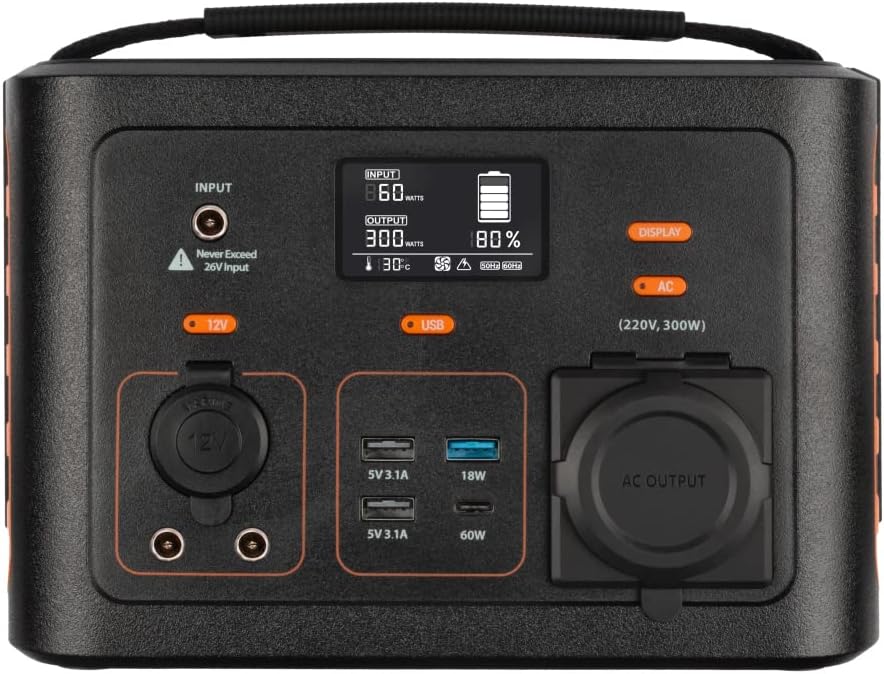
Resim: Yakın çekim view of the Xtorm XP300U's front panel, showing the digital display, input port, 12V DC output, USB-A and USB-C ports, and AC output socket.
Ön Panel Özellikleri:
- LCD Ekran: Pil seviyesini, giriş/çıkış gücünü ve durum göstergelerini gösterir.
- Giriş Portu: For charging the power station via AC adapter, car charger, or solar panel.
- 12VDC Çıkışı: 12V'luk cihazlara güç sağlamak için.
- USB-A Bağlantı Noktaları: Multiple USB-A outputs for charging various devices (e.g., 5V 3.1A, 18W Quick Charge).
- USB-CPD Bağlantı Noktası: High-speed USB-C Power Delivery output (up to 60W).
- AC Çıkış Soketi: Standard AC outlet for powering household appliances (220V, 300W).
- Kontrol Düğmeleri: Buttons for turning on/off specific outputs (e.g., AC, DC, USB).

Resim: Üst view of the Xtorm XP300U, highlighting its integrated carrying handle for portability.

Resim: Arka view of the Xtorm XP300U, featuring the Xtorm brand logo and "Portable Power Station 300" text.
Kurmak
Before first use, it is recommended to fully charge your Xtorm XP300U Power Station.
- Paketi aç: Güç istasyonunu ve tüm aksesuarlarını dikkatlice ambalajından çıkarın.
- Initial Charge (AC Wall Charger):
- Connect the AC wall charger to the input port on the power station.
- AC duvar şarj cihazını standart bir duvar prizine takın.
- LCD ekranda şarj durumu gösterilecektir. Pil göstergesi %100'ü gösterene kadar şarj edin.
- Atama: Place the power station on a stable, flat surface in a well-ventilated area, away from direct sunlight or heat sources.
Kullanım Talimatları
The Xtorm XP300U offers multiple ways to charge and power your devices.
Güç İstasyonunun Şarj Edilmesi:
The XP300U can be recharged using four different methods:
Image: Visual representation of the four charging methods for the Xtorm XP300U: via wall socket, USB-C PD, solar panel (not included), and 12V car charger.
- Via Wall Socket (AC Charger): Connect the included AC wall charger to the input port and a wall outlet.
- USB-C PD üzerinden: Use a compatible USB-C Power Delivery charger (not included) to charge the unit via its USB-C port.
- Güneş Paneli aracılığıyla: Connect a compatible solar panel (not included) to the input port using the provided MC4 to DC cable. Ensure the solar panel is placed in direct sunlight for optimal charging.
- Via 12V Car Charger: Connect the included car charger cable to the input port and your vehicle's 12V cigarette lighter socket.
LCD ekran giriş suyunu gösterecektir.tage and battery charge status during charging. You can use the outputs even while the power station is charging (pass-through charging).
Using the Outputs:
The XP300U provides various output ports to power different types of devices.

Image: The Xtorm XP300U demonstrating its universal compatibility with icons representing various devices and output types: 1x AC 300W/220V, 1x USB-C PD 60W, 2x DC 5.5mm 60W, 2x USB QC3.0 18W, 1x USB 18W, and 1x 12V Car 120W.
- AC Output (220V, 300W):
- Press the "AC" button to activate the AC output. The AC indicator on the display will light up.
- Cihazınızın güç kablosunu AC prizine takın.
- Cihazınızın güç tüketiminin 300W'ı aşmadığından emin olun.
- Press the "AC" button again to turn off the AC output when not in use.
- DC Çıkışı (12V):
- Press the "12V" button to activate the DC output. The DC indicator will light up.
- Connect your 12V device to the DC port.
- Press the "12V" button again to turn off the DC output.
- USB Outputs (USB-A, USB-C PD):
- The USB outputs are typically always active when the unit is on.
- Connect your USB-powered devices to the appropriate USB-A or USB-C PD ports.
- The display will show the output wattage for connected devices.
The power station can provide power for extended periods, depending on the connected devices' power consumption.

Resim: Eskiamples of device runtimes with the Xtorm XP300U: 17.5 hours for a 10W LED light, 5.5 hours for a 30W small TV, 4 hours for a 40W small coolbox, and 6 hours for a 40W small coolbox (via 12V carplug output).
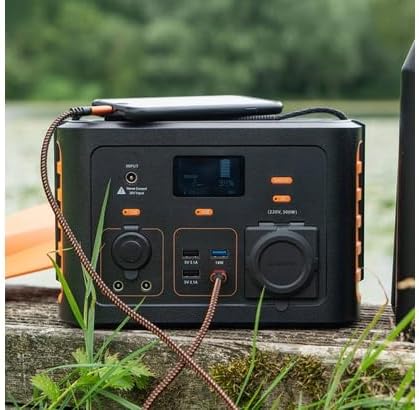
Image: The Xtorm XP300U Portable Power Station being used outdoors on a wooden surface, charging a smartphone, demonstrating its portability and utility in various environments.
Bakım
Doğru bakım, enerji santralinizin uzun ömürlü olmasını ve en iyi performansı göstermesini sağlar.
- Temizlik: Cihazın dış yüzeyini temizlemek için yumuşak, kuru bir bez kullanın. Aşındırıcı temizleyiciler veya çözücüler kullanmayın.
- Depolamak:
- Santralinizi serin, kuru, doğrudan güneş ışığından ve aşırı sıcaklıklardan uzak bir yerde saklayın.
- Uzun süreli saklama için, pilin ömrünü uzatmak amacıyla cihazı her 3-6 ayda bir yaklaşık %50-80 oranında şarj edin.
- Yüksek nem oranına sahip ortamlarda saklamaktan kaçının.
- Pil Bakım: Do not fully discharge the battery frequently, as this can reduce its lifespan. Recharge promptly when the battery level is low.
Sorun giderme
If you encounter issues with your Xtorm XP300U, refer to the following common problems and solutions.
| Sorun | Olası Neden | Çözüm |
|---|---|---|
| Ünite açılmıyor. | Pil tamamen boşalmış. | Connect the power station to an AC wall outlet and charge it for at least 30 minutes. |
| AC çıkışı çalışmıyor. | AC output not activated; device exceeds 300W; overheating. | Etkinleştirmek için "AC" düğmesine basın. Cihazın çalışıp çalışmadığını kontrol edin.tage. Aşırı ısınmışsa, cihazın soğumasını bekleyin. |
| USB portları şarj olmuyor. | Device not compatible; cable faulty. | Ensure device is compatible. Try a different USB cable. |
| Yavaş şarj. | Using a low-power charger; environmental factors (e.g., cloudy for solar). | Use the original AC charger or a higher wattage USB-C PD charger. Optimize solar panel placement. |
If the problem persists, please contact Xtorm customer support.
Özellikler
Detailed technical specifications for the Xtorm XP300U Portable Power Station.
| Özellik | Detay |
|---|---|
| Model Adı | XP300U |
| Marka | X fırtına |
| Çıkış Gücü | 300 Watt (AC) |
| Giriş Voltage | 12 Volt (DC) |
| Güç Kaynağı | AC Wall, USB-C PD, Solar, Car Charger |
| Önerilen Kullanımlar | Home, Campinmek |
| Ağırlık | 3300 Gram (3.3 kg) |
| Renk | Turuncu |
| Dahil Bileşenler | 1 package (Power Station, AC Charger, Car Charger, MC4 to DC Cable) |

Image: Dimensions of the Xtorm XP300U Portable Power Station (240mm x 154mm x 142mm) and its weight (3.3 kg), highlighting its convenient travel size.
Garanti ve Destek
Xtorm products come with a standard warranty. Please refer to the warranty card included in your package or visit the official Xtorm webAyrıntılı garanti şartları ve koşulları için siteyi ziyaret edin.
For technical support, troubleshooting assistance, or warranty claims, please contact Xtorm customer service:
- Webalan: www.xtorm.eu (Destek iletişim bilgilerini kontrol edin)
- E-posta: Refer to the Xtorm webBelirli destek e-posta adresleri için site.
- Telefon: Refer to the Xtorm webBölgesel destek telefon numaraları için site.
When contacting support, please have your product model (XP300U) and purchase details ready.