giriiş
This manual provides comprehensive instructions for the Angrox XRT140 Universal Remote Control, designed as a replacement for various VIZIO Smart TV models. It covers setup, operation, and troubleshooting to ensure optimal performance and ease of use.
Ürün Bittiview

Resim: Ön ve arka view of the Angrox XRT140 Universal Remote Control.
Temel Özellikler
- Tek Dokunuşla Erişim: Dedicated buttons for popular streaming services including Vudu, Netflix, Prime Video, Xumo, Hulu, and Redbox, plus a WatchFree button.
- Duyarlı Düğmeler: Engineered for quick response times (less than 0.5 seconds) and durability (over 11,000 clicks).
- Genişletilmiş Menzil: Offers a transmitting distance of over 42 feet for flexible use.
- Dayanıklı Yapı: Made from high-quality ABS material with a glossy finish for enhanced durability and soft, tactile buttons.
- Programlamaya Gerek Yok: Pil takıldıktan hemen sonra kullanıma hazırdır.
Uyumluluk
The Angrox XRT140 remote control is designed for broad compatibility with VIZIO Smart TV models and can replace several VIZIO remote models.
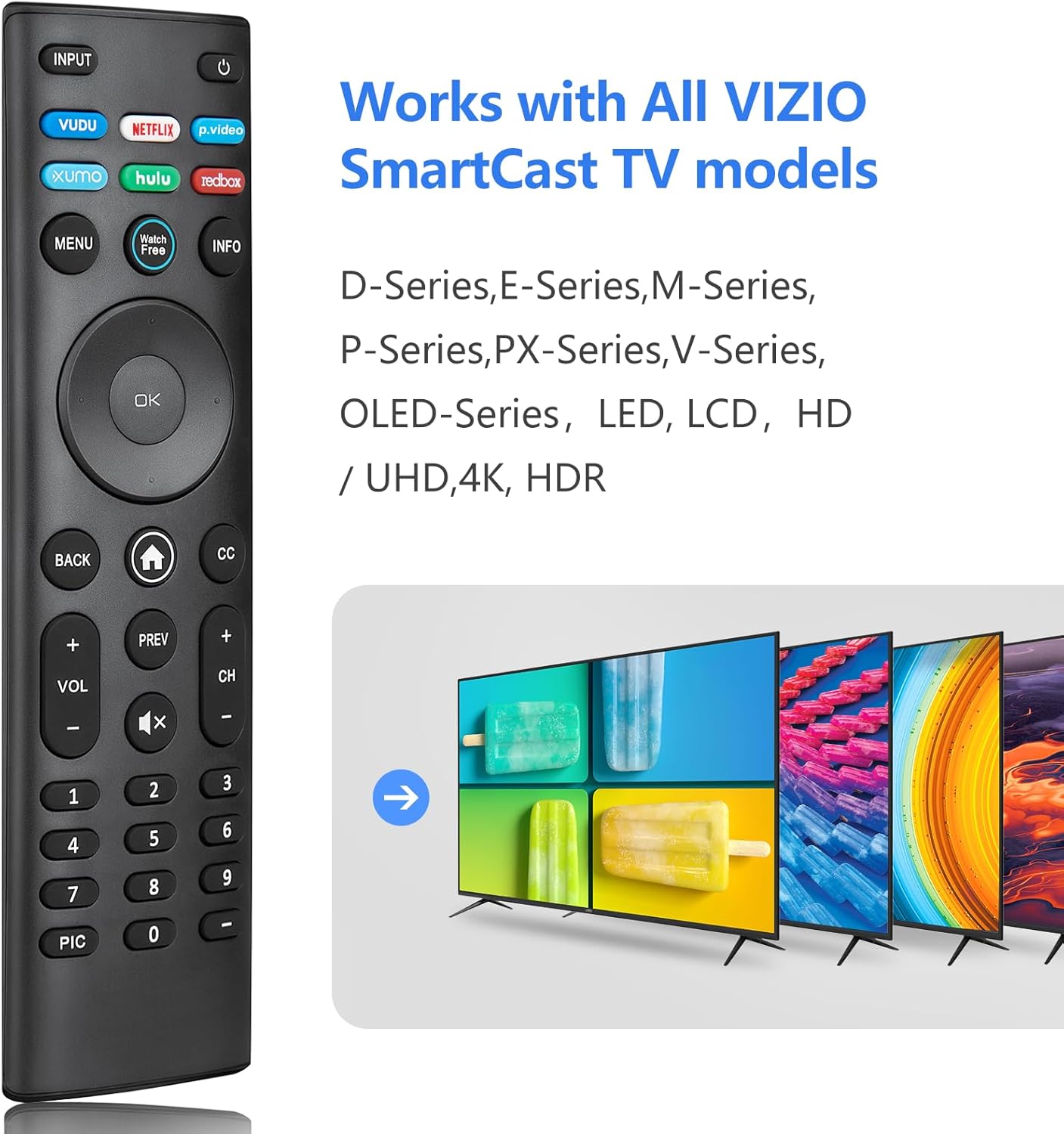
Image: The Angrox XRT140 remote control is compatible with various VIZIO SmartCast TV models, including D-Series, E-Series, M-Series, P-Series, PX-Series, V-Series, and OLED-Series.
- Compatible VIZIO TV Models: D-Series, E-Series, M-Series, P-Series, PX-Series, V-Series, OLED-Series, and other LED, LCD, HD, 4K UHD, HDR Smart TVs.
- VIZIO uzaktan kumanda modellerinin yerine geçer: XRT136, XRT135, XRT510, XRT500, XRT100, XRT112, XRT122, XRT302, VR1, VR2, VR10, VR15.
Kurulum Talimatları
Pil Kurulumu
- Uzaktan kumandanın arkasındaki pil bölmesini bulun.
- Pil kapağını açmak için aşağı doğru kaydırın.
- İki (2) adet 1.5V AAA pil takın ve pozitif (+) ve negatif (-) terminallerin bölmenin içindeki işaretlerle doğru şekilde hizalandığından emin olun.
- Pil kapağını güvenli bir şekilde yerine oturana kadar yerine kaydırın.
Not: Her zaman yeni pil kullanın ve her iki pili aynı anda değiştirin. Eski ve yeni pilleri veya farklı tipteki pilleri karıştırmayın.
İlk Kullanım
The Angrox XRT140 remote control requires no programming. Once batteries are installed, it is ready for immediate use with compatible VIZIO Smart TVs.
- Ensure your VIZIO Smart TV is powered on.
- Point the remote control directly towards the TV's infrared (IR) sensor.
- Press any button (e.g., Power, Volume Up) to test functionality.
If the remote does not respond, verify battery installation and ensure there are no obstructions between the remote and the TV sensor.
Kullanım Talimatları
Düğme Fonksiyonları
The following diagram and descriptions detail the functions of each button on the Angrox XRT140 remote control.

Image: Detailed diagram illustrating the function of each button on the Angrox XRT140 remote control.
| Düğme | İşlev |
|---|---|
| GİRİŞ | Şu anda görüntülenen giriş kaynağını değiştirir. |
| Güç (⏻) | Televizyonu açar veya kapatır. |
| VUDU | Accesses VUDU channels/application. |
| NETFLIX | Accesses NETFLIX channels/application. |
| p.video (Prime Video) | Accesses Prime Video channels/application. |
| XUMO | Accesses XUMO channels/application. |
| HULU | Accesses HULU channels/application. |
| REDBOX | Accesses REDBOX channels/application. |
| MENÜ | Ayarlar menüsünü görüntüler. |
| Ücretsiz İzle | Accesses WatchFree channels (availability may vary by region). |
| BİLGİ | Displays the information window. |
| Navigation Buttons (Up/Down/Left/Right) | Navigates on-screen menus. |
| Tamam / Oynat / Duraklat | Vurgulanan menü seçeneğini seçer ve içeriği oynatır veya duraklatır. |
| GERİ | Önceki ekran menüsüne döner. |
| Ana Sayfa Düğmesi (⌂) | Launches SmartCast Home or returns to the SmartCast Home Screen. |
| CC (Kapalı Altyazı) | Enables or disables closed captions. Long press to open the Accessibility menu. |
| VOL +/- (Volume Up/Down) | Sesin yüksekliğini artırır veya azaltır. |
| ÖNCEKİ | Kanala en son geri dönüyor viewed. |
| CH +/- (Channel Up/Down) | Kanalı değiştirir. |
| Sessize al (🔇) | Sesi açar veya kapatır. |
| Sayı Takımı (0-9) | Kanal numarasını manuel olarak girer. |
| RESİM | Farklı görüntü ayarı modları arasında geçiş yapar. Uzun basarak sesli yanıt özelliğini etkinleştirir/devre dışı bırakır. |
| Çizgi (-) | Sayısal tuş takımıyla birlikte kullanılarak dijital bir alt kanal (örneğin, 18-4 veya 18-5) manuel olarak girilir. |
Sorun giderme
If you encounter issues with your Angrox XRT140 remote control, please refer to the following common troubleshooting steps:
- Uzaktan Kumanda Yanıt Vermiyor:
- Ensure batteries are correctly installed with proper polarity (+/-).
- Replace old batteries with two new 1.5V AAA batteries.
- Confirm there are no obstructions between the remote's IR emitter and the TV's IR receiver.
- Kumandayı doğrudan televizyonun kızılötesi sensörüne doğrultun.
- Sınırlı Menzil:
- Ensure batteries are fresh. Low battery power can reduce signal strength.
- Remove any objects that might be blocking the signal path between the remote and the TV.
- The remote operates via infrared (IR) and requires a direct line of sight to the TV.

Image: The remote control offers an extended transmitting distance of over 42 feet, but requires a clear line of sight.
- Belirli Düğmeler Çalışmıyor:
- Clean the remote control buttons and surface with a soft, dry cloth to remove any dirt or residue that might be interfering with button presses.
- Yalnızca belirli düğmeler çalışmıyorsa, uzaktan kumanda hasar görmüş olabilir. Uzaktan kumandayı değiştirmeyi düşünün.
Özellikler
| Özellik | Detay |
|---|---|
| Model Numarası | XRT140 |
| Marka | angroks |
| Ürün Boyutları | 6.3 x 1.57 x 0.39 inç (16.0 x 4.0 x 1.0 cm) |
| Ürün Ağırlığı | 1.76 ons (50 gram) |
| Piller Gerekli | 2 x AAA pil (1.5V) |
| Özel Özellikler | Ergonomic design, No Programming Required, Universal compatibility with specified VIZIO TVs |
| Üretici | ENJOYLink Direct |

Image: Physical dimensions of the Angrox XRT140 remote control.
Bakım
- Temizlik: Uzaktan kumandayı temizlemek için yumuşak, kuru bir bez kullanın. Sıvı temizleyiciler veya aşındırıcı malzemeler kullanmayın.
- Pil Bakım: Remove batteries if the remote will not be used for an extended period to prevent leakage. Dispose of used batteries responsibly according to local regulations.
- Depolamak: Uzaktan kumandayı serin, kuru ve doğrudan güneş ışığından ve aşırı sıcaklıklardan uzak bir yerde saklayın.
Garanti ve Destek
Specific warranty details for the Angrox XRT140 remote control may vary. Please refer to the product packaging or contact the retailer where the product was purchased for detailed warranty information.
For technical support or further assistance, please contact Angrox customer service through their official channels or the retailer's support services.
