1. Giriş
The VOLTCRAFT DSO-2072H is a versatile 3-in-1 digital instrument, combining the functionalities of a digital oscilloscope, a multimeter, and a waveform generator. Designed for precision and ease of use, this device is ideal for various electrical measurement and testing applications.

Figure 1.1: VOLTCRAFT DSO-2072H Handheld Oscilloscope
2. Güvenlik Bilgileri
Lütfen bu cihazı kullanmadan önce tüm güvenlik uyarılarını ve kullanım talimatlarını okuyun ve anlayın. Aksi takdirde yaralanma veya cihazda hasar meydana gelebilir.
- This device is rated for CATII 1000 V measurements. Always adhere to safety standards for the measurement category.
- UYARI: To avoid electrical shock, do not open the case. There are no user-serviceable parts inside.
- To avoid personal injury or damage to the instrument, install quick-acting fuses with amp/hacimtage ratings shown on the device.
- Cihaz hasarlı görünüyorsa veya anormal çalışıyorsa cihazı kullanmayın.
- Çalışma sırasında uygun havalandırma sağlayın.
3. Paket İçeriği
Aşağıda listelenen tüm öğelerin paketinizde bulunduğunu doğrulayın:
- VOLTCRAFT DSO-2072H El Tipi Osiloskop
- Oscilloscope Probe and Adjustment Tool
- BNC to Alligator Clip Cable
- Multimeter Test Leads (one black, one red)
- USB kablosu
- Hızlı Başlangıç Kılavuzu
- Soft Protective Case
- CD with Software and English User Manual
4. Ürün Bittiview
4.1 Ön Panel ve Ekran
The device features a 3.5-inch (8.89 cm) LCD color display with a resolution of 320 x 240 pixels. The front panel includes various function buttons and input terminals for operation.
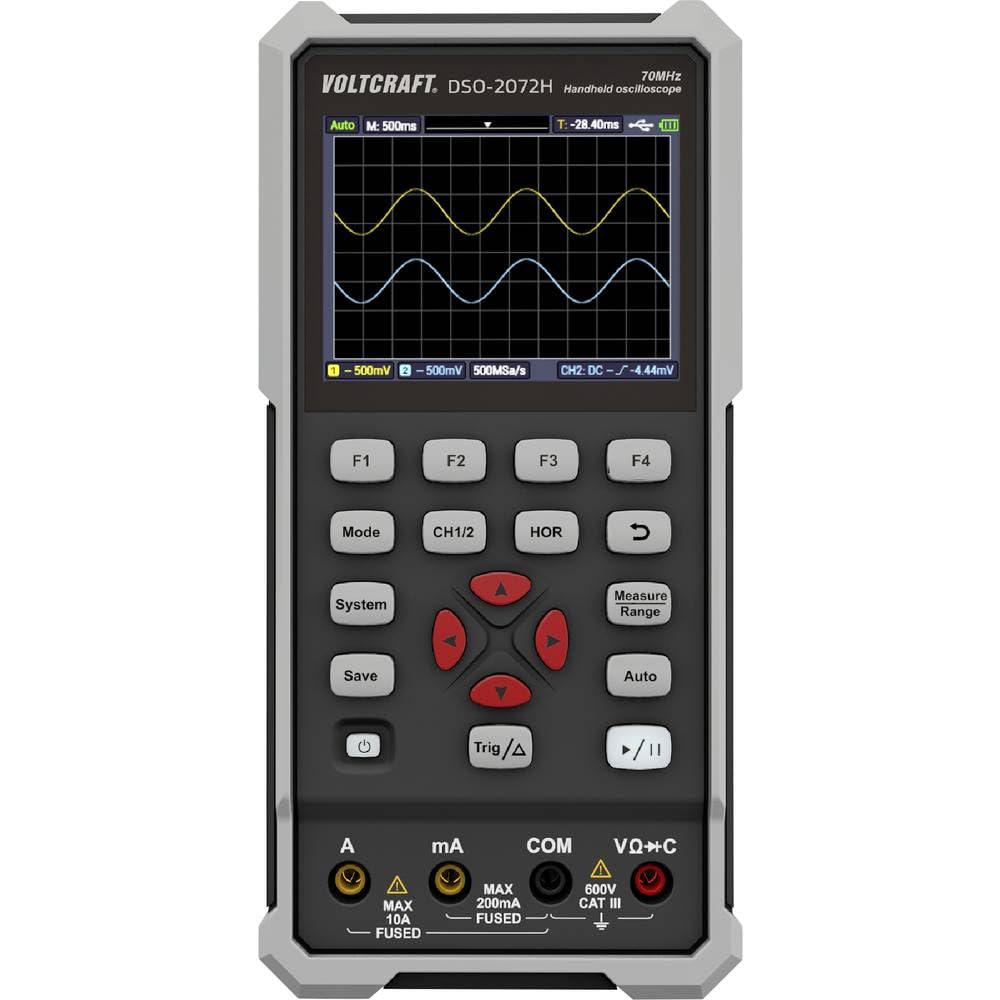
Şekil 4.1: Ön Panel Düzeni
- Görüntülemek: Shows waveform, measurement readings, and menu options.
- Fonksiyon Tuşları (F1-F4): Context-sensitive buttons for menu navigation.
- Mod: Switches between Oscilloscope, Multimeter, and Waveform Generator modes.
- BÖLÜM 1/2: Selects or controls oscilloscope channels.
- - Adjusts horizontal scale/time base.
- Kaydetmek: Saves waveform data or settings.
- Sistem: Sistem ayarlarına ve yapılandırmalarına erişim sağlar.
- Trig/Δ: Controls trigger settings or delta measurements.
- Otomatik: Auto-sets oscilloscope or multimeter parameters for quick measurements.
- Tedbir Aralığı: Adjusts measurement range in multimeter mode.
- Navigation Keys (Up/Down/Left/Right/Enter): For menu navigation and parameter adjustment.
- Güç Düğmesi: Cihazı açar veya kapatır.
- Oynat/Duraklat: Dalga formu alımını başlatır veya durdurur.
4.2 Giriş Terminali
- A (Amperler): Input for high current measurements (Max 10A, Fused).
- mA (Milliamperler): Input for low current measurements (Max 200mA, Fused).
- COM (Ortak): Common return terminal for all measurements.
- VΩ+C (Volts, Ohms, Capacitance): vol için giriştage, resistance, capacitance, continuity, and diode measurements (600V CAT III).
4.3 Arka Panel
The rear panel provides information about the device model, battery specifications, and important warnings.

Şekil 4.2: Arka Panel
- Model No.: DSO-2072H
- Li-ion cell: 3.7V, 2200 mAh, 8.14 Wh
- USB Tip-C Bağlantı Noktası: Şarj ve veri aktarımı için.
5. Kurulum
5.1 Açma/Kapatma
Cihazı açmak için, tuşuna basın ve basılı tutun Güç Ekran ışığı yanana kadar düğmeye basın. Kapatmak için düğmeye basılı tutun. Güç Ekran kapanana kadar tekrar düğmesine basın.
5.2 Pil Şarjı
Connect the device to a USB power source using the provided USB Type-C cable. The battery indicator on the display will show charging status. Ensure the device is fully charged before initial use for optimal battery life.
5.3 Connecting Probes/Leads
For oscilloscope measurements, connect the oscilloscope probe to the BNC input. For multimeter measurements, insert the red test lead into the VΩ+C terminal and the black test lead into the COM terminal. For current measurements, use the A or mA terminals as appropriate.
6. Kullanım Talimatları
6.1 Digital Oscilloscope Function
The DSO-2072H operates as a 2-channel digital oscilloscope with a maximum bandwidth of 70 MHz and a sampling rate of 250 MS/s. It features an 8K record length and 8-bit vertical resolution.
- Basmak Mod to select Oscilloscope mode.
- Kullanmak BÖLÜM 1/2 to select the active channel or adjust channel settings.
- Adjust the horizontal time base using the KOR button and navigation keys.
- Configure trigger settings with the Trig/Δ düğme.
- Basmak Otomatik for automatic waveform scaling and triggering.
6.2 Multimetre Fonksiyonu
The integrated multimeter supports measurements for voltage, current, resistance, capacitance, continuity, and diode testing, with a 20,000-count display and TRMS capability.
- Basmak Mod to select Multimeter mode.
- Kullanın Ölçüm Aralığı button or navigation keys to select the desired measurement type (V, A, Ω, F, continuity, diode).
- The Otomatik function can simplify the measurement process by automatically selecting the appropriate range.
6.3 Waveform Generator Function
The device includes a single-channel waveform generator with a maximum frequency output of 25 MHz, a sampling rate of 125 MS/s, 0.1 Hz frequency resolution, 14-bit vertical resolution, and 8K waveform length.
- Basmak Mod to select Waveform Generator mode.
- Use the function buttons and navigation keys to configure waveform type, frequency, ampBüyüklük ve uzaklık.
6.4 Saving Data and System Settings
- Basmak Kaydetmek to store current waveform data or measurement results.
- Basmak Sistem to access and adjust general device settings, display options, and calibration.
7. Bakım
Proper maintenance ensures the longevity and accuracy of your VOLTCRAFT DSO-2072H.
- Temizlik: Cihazı temizlemek için yumuşak ve kuru bir bez kullanın. Aşındırıcı temizleyiciler veya çözücüler kullanmayın.
- Depolamak: Cihazı serin, kuru ve doğrudan güneş ışığından ve aşırı sıcaklıklardan uzak bir yerde saklayın.
- Sigorta Değişimi: If a fuse blows, replace it only with a quick-acting fuse of the specified amp/hacimtage rating as indicated on the device's rear panel or in the full manual.
8. Sorun Giderme
Cihazınızda sorunlarla karşılaşırsanız aşağıdaki yaygın çözümlere başvurun:
- Cihaz açılmıyor: Ensure the battery is charged. Connect the USB cable to a power source and allow it to charge for some time.
- Dalga biçimi görüntülenmiyor: Check probe connections. Ensure the input signal is within the device's measurement range. Try using the Otomatik işlev.
- Yanlış multimetre ölçümleri: Verify that the test leads are correctly inserted into the appropriate terminals (VΩ+C, A, mA, COM) for the measurement type. Ensure the correct measurement range is selected.
- Cihaz donuyor veya yanıt vermez hale geliyor: Try restarting the device by holding the Güç button. If the issue persists, refer to the full user manual on the provided CD for advanced troubleshooting.
9. Özellikler
| Özellik | Şartname |
|---|---|
| Model Numarası | VK-11901280 |
| Boyutlar (U x G x Y) | 19.8 x 3.8 x 9.6 cm (7.8 x 1.5 x 3.8 inç) |
| Ağırlık | 600 Gram (1.32 lbs) |
| Görüntülemek | 3.5-inch (8.89 cm) LCD Color Display (320 x 240 pixels) |
| Güç Kaynağı | Electric Cable (USB Type-C), Li-ion Battery (3.7V, 2200 mAh) |
| Osiloskop Bant Genişliği | 70 MHz |
| Osiloskop Kanalları | 2 |
| Osiloskop Sampling Oranı | 250 MS/s |
| Oscilloscope Record Length | 8K |
| Oscilloscope Vertical Resolution | 8 bit |
| Multimeter Display Counts | 20,000 |
| Multimeter Measurement Category | CATII 1000 V |
| Waveform Generator Channels | 1 |
| Waveform Generator Max Frequency | 25 MHz |
| Waveform Generator Sampling Oranı | 125 MS/s |
| Waveform Generator Vertical Resolution | 14 bit |
| Uyumluluk | EN 61010-1 |
10. Garanti ve Destek
For detailed warranty information and technical support, please refer to the full user manual and software provided on the included CD. You can also visit the official VOLTCRAFT webDaha fazla yardım için siteyi ziyaret edin.
Üretici: VOLTCRAFT


