giriiş
This manual provides essential information for the safe and efficient operation, setup, and maintenance of your FLEXISPOT Electric Standing Desk Converter. Please read this manual thoroughly before use and retain it for future reference.

Figure 1: The FLEXISPOT 42-inch Electric Standing Desk Converter in a typical office setup, supporting two external monitors and a laptop.
Güvenlik Bilgileri
Always ensure the desk converter is placed on a stable, flat surface. Do not overload the desk beyond its specified weight capacity. Keep hands and objects clear of moving parts during height adjustment. Disconnect power before cleaning or maintenance. This product is intended for indoor use only.
Paket İçeriği
Paketi açtığınızda lütfen tüm bileşenlerin mevcut olduğundan emin olun:
- FLEXISPOT Electric Standing Desk Converter Unit
- Quick Release Keyboard Tray
- Güç Kablosu
- Kullanım Kılavuzu (bu belge)
Kurmak
The FLEXISPOT Electric Standing Desk Converter is designed for quick and easy assembly. Follow these two steps:
- Connect the keyboard tray: Align the keyboard tray with the designated slots on the desktop plate and slide it into place until it locks securely.
- Position the converter: Place the assembled desk converter on your existing desk. Connect the power cord to a suitable power outlet.

Figure 2: Simple two-step assembly process for the desk converter.
Kullanım Talimatları
The FLEXISPOT Electric Standing Desk Converter features a powerful and quiet electric motor for smooth height adjustments. The elegant control panel allows you to easily find your ideal height setting.
- Yükseklik Ayarı: Use the up and down arrow buttons on the control panel to raise or lower the desk converter to your desired ergonomic height. The height adjustment ranges from 5.7 inches to 19.7 inches.
- Desktop Capacity: The upper U-shaped desktop is designed to accommodate dual monitors or a laptop and monitor setup, with a weight capacity of 44 lbs.
- Klavye Tepsisi: The roomy lower tier has a depth of 12.1 inches and can hold a standard keyboard and mouse, or a 13-inch laptop, with a weight capacity of 11 lbs. The keyboard tray is quick-release and removable for flexibility.
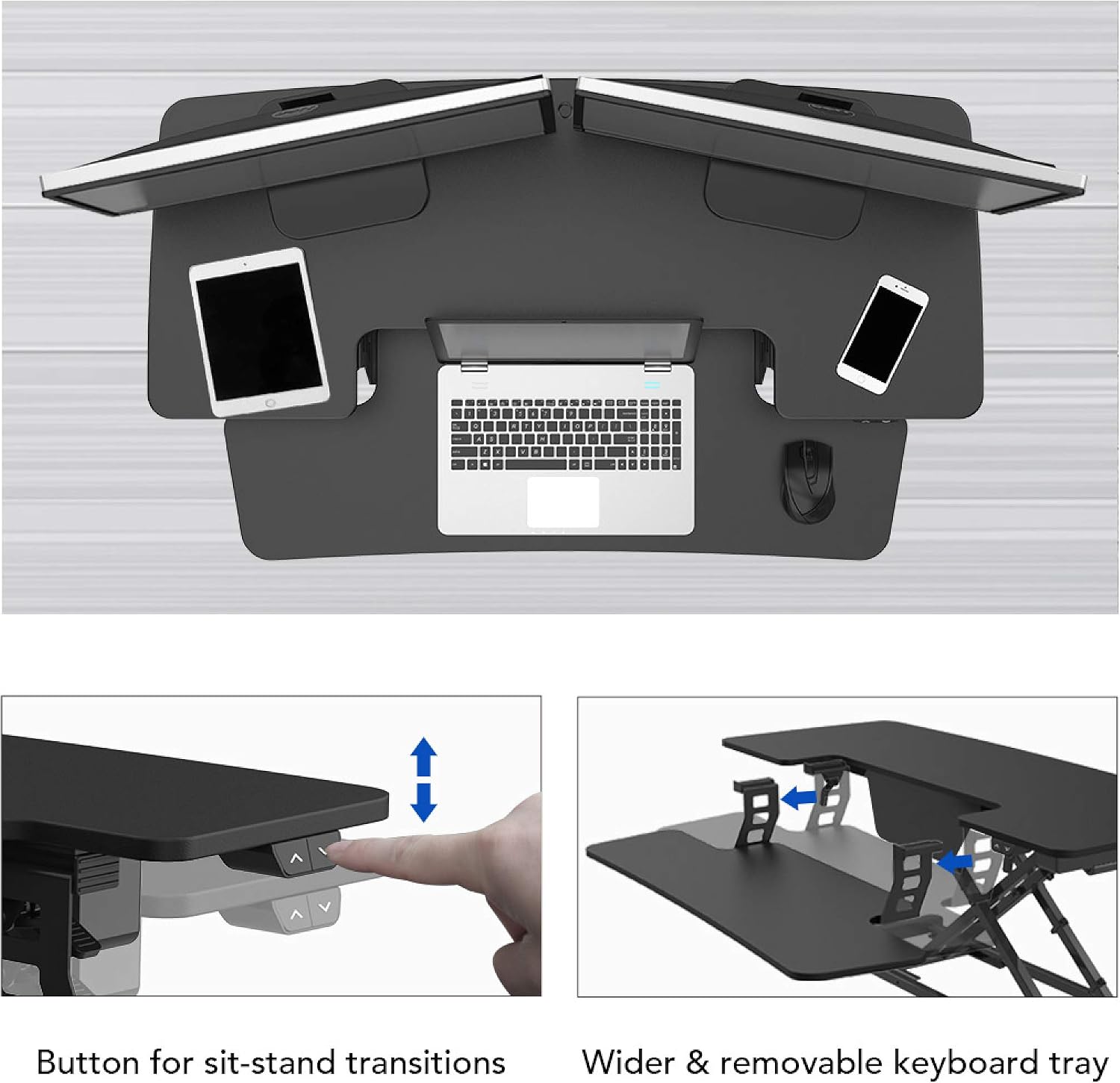
Figure 3: Control buttons for sit-stand transitions.

Figure 4: The spacious and removable keyboard tray provides ample room for a keyboard and mouse.

Figure 5: The electric motor ensures smooth and vertical lifting.
Bakım
To ensure the longevity and optimal performance of your FLEXISPOT Electric Standing Desk Converter, follow these maintenance guidelines:
- Temizlik: Yüzeyleri yumuşak bir bezle silin.amp Bez. Aşındırıcı temizleyicilerden veya sert kimyasallardan kaçının.
- Kablo yönetimi: Kabloların karışmasını ve hasar görmesini önlemek için düzenli olarak kontrol edin ve düzenleyin.
- Denetleme: Tüm vidaların ve bağlantıların sıkı ve güvenli olduğundan emin olmak için periyodik olarak kontrol edin.
- Aşırı Yük Önleme: Do not exceed the maximum weight capacities (44 lbs for desktop, 11 lbs for keyboard tray) to prevent motor strain and potential damage.
Sorun giderme
If you encounter any issues with your desk converter, refer to the following common troubleshooting steps:
| Sorun | Olası Neden | Çözüm |
|---|---|---|
| Desk not moving | Power cord disconnected; Overload; Motor error. | Check power connection; Reduce weight on desk; Unplug for 10 seconds and replug. |
| Çalışma sırasında olağandışı gürültü | Loose components; Obstruction in mechanism. | Check all screws and connections; Remove any obstructions. |
| Masa düzensiz hareket ediyor | Uneven weight distribution; Damaged leg. | Distribute weight evenly; Contact customer support if damage is suspected. |
Bu çözümleri denedikten sonra sorun devam ederse, daha fazla yardım için lütfen FLEXISPOT müşteri desteğiyle iletişime geçin.
Özellikler
| Özellik | Detay |
|---|---|
| Marka | ESNEKLİK |
| Örnek | 42" Electric Standing Desk Converter |
| Bitiş Türü | Odun |
| Şekil | Dikdörtgen |
| Taban Tipi | Bacak |
| Montaj Gerekli | Evet |
| Seviye Sayısı | 2 |
| Özel Özellik | Adjustable Height, Keyboard Tray Included |
| Ürün Ağırlığı | 45.4 pound |
| Ürün Boyutları (U x G x Y) | 16.3 x 16.3 x 5.7 inç |
| Malzeme Türü | Fiberboard & Steel |
| Masaüstü Yük Kapasitesi | 44 kilo |
| Klavye Tepsisi Yük Kapasitesi | 11 kilo |
| Yükseklik Ayar Aralığı | 5.7" ila 19.7" |
| Renk | Siyah |

Figure 6: Detailed dimensions and load capacities of the desk converter.
Garanti ve Destek
FLEXISPOT products are designed for durability and performance. For warranty information, technical support, or any inquiries not covered in this manual, please visit the official FLEXISPOT website or contact their customer service directly. Please have your product model number (42" Electric Standing Desk Converter) and purchase date available when contacting support.
Official FLEXISPOT Webalan: www.flexispot.com


